Here’s the short answer. To optimize Google Business Profile for AI search, keep the profile complete and accurate. There is no special AI switch on the listing, and no extra markup to add. Google Search Central lists an up-to-date Business Profile among the SEO basics that still matter for AI Overviews and AI Mode, and it says Google Business Profiles can help your products and services show in both AI responses and regular Search results. Put your real category, services, hours, description, photos, attributes and reviews on the profile, keep them in line with your website, and reply to customers. That is the same work that helps you in the Google Map Pack, and it is the work that gives AI features facts they can use.
I get asked this more and more by local owners. “How do I get Gemini or AI Overviews to recommend my shop?” Some posts online treat this like a new trick, with special files or “GEO” hacks. Google’s own guidance is plainer than that. In this guide I’ll show you what Google actually says, the profile fields I complete first, what happens when your details aren’t listed online, and how to use Gemini as a management tool without confusing it with a ranking boost.
What I mean by AI search
When I say AI search in this article, I mean the generative features people now use to choose a local business:
- AI Overviews in Google Search. These are AI-generated snapshots with links to dig deeper, shown when Google decides they add something useful beyond ordinary results. I explained how they differ from classic snippets in AI Overviews vs featured snippets.
- AI Mode in Google Search. This is a conversational view where someone can ask a longer question, follow up, and compare options. Google says it can split one question into related searches (query fan-out) and pull from more than one source at once. My overview of what Google AI Mode is covers how that works. AI Mode can also help people check local appointments, pricing or availability, and in some regions Google may call a business when that information isn’t already online.
- Gemini, including the Gemini web app. This is a separate product from Search, but owners can connect a Google Business Profile to Gemini to update hours, draft review replies, create posts and read insights. I’ll come back to that later. Connecting Gemini helps you manage the profile. It is not a shortcut to being recommended.
People also ask ChatGPT and other chatbots for local recommendations. Those tools are not Google, and Google does not publish a playbook for them. A complete Business Profile and a clear, consistent website still help, because many answers start with information that is already public. This article stays on the profile itself. For the website side, read how to get cited in Google AI Overviews.
What Google actually says about Business Profiles and AI search
In its guide to AI features and your website, Google Search Central says there are no additional technical requirements and no special optimizations needed to appear in AI Overviews or AI Mode. You don’t need a new machine-readable file, an AI text file, or special schema.org markup for these features. Among the ordinary SEO basics that still matter, Google includes this line: check that your Merchant Center and Business Profile information is up to date.
Google’s longer guide to optimizing for generative AI features says the same idea in more detail. Generative AI responses can include information about local businesses. Using Google Business Profiles, and Merchant Center where it applies, can help your products and services be visible in both AI responses and other Google Search results. Google also says these features are rooted in core Search ranking and quality systems. They retrieve current information and may use query fan-out, which means one customer question can trigger several related searches at once. From Google’s point of view, work labeled “AEO” or “GEO” is still SEO, and you can ignore hacks such as special AI text files.
What Google does not say is just as important. It does not say a complete profile guarantees that AI Overviews or AI Mode will name your business. It does not publish a separate AI ranking score for listings. And it does not say the three businesses in the Map Pack are automatically the businesses named in an AI answer. I treat them as related, not identical.
The local ranking help page is still the foundation. In Tips to improve your local ranking on Google, Google says businesses with complete and accurate information are more likely to show up in local results, and that local results are mainly based on relevance, distance, and popularity. In the same page, Google explains that third factor under the heading Prominence: how well-known a business is, including links and reviews. More reviews and positive ratings can help local ranking. There is no way to request or pay for a better local ranking. I keep that page in mind when I work on a profile for AI search, because the facts that help relevance and prominence are the facts an AI answer can quote.
A practical checklist to optimize Google Business Profile for AI search
This is the order I use when I optimize Google Business Profile for AI search with local service businesses. Menu names move around between Search, Maps and the Business Profile manager, but the fields stay the same.
1. Verify the profile and lock down the basics
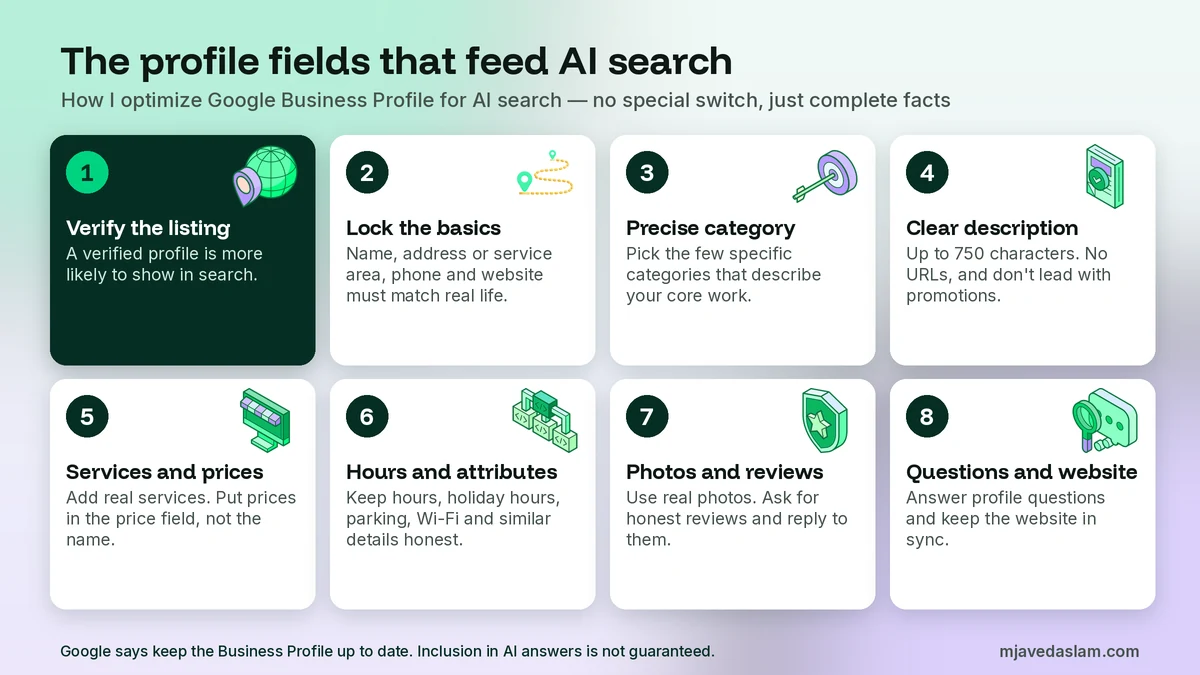
If the profile is not verified, start there. Google says verification tells it you’re authorized to represent the business, so it’s more likely to show up in search results. My guide on how to claim a Google Business Profile walks through that step.
Then make the public details match the real world and your website, character for character:
- The business name, following Google’s representation guidelines. Use the name as it appears on your signage. Don’t add keywords, city names, slogans or phone numbers to the title.
- The address, or a precise service area if customers don’t visit you. Service-area businesses should read my notes on service-area setup.
- A phone number people can actually reach. If you later need to change it, do it carefully so you don’t lose calls.
- The website URL that belongs to this location.
If your name, address or phone is wrong on the profile, AI answers can repeat the wrong facts. That’s why consistent citations still matter.
2. Choose a precise primary category
Relevance is how well the profile matches what someone is searching for. The primary category is one of the strongest signals you control. Google’s guidelines say to use as few categories as possible to describe your core business, and to choose categories that are specific but representative of the main work you do. Don’t add categories only as keywords, and don’t pick categories for nearby or related businesses you don’t actually run.
If someone asks AI Mode for an emergency plumber, a profile categorized as a hardware store with “plumbing” stuffed in the description is a weaker match than a profile whose primary category is plumber. I walk through the choice in how to choose a Google Business Profile primary category.
3. Write a clear description (and stay inside the rules)
Google lets you write a description of up to 750 characters. It should explain what you do, where you are, and what makes the business useful. Google says not to include URLs or HTML, and not to focus on special promotions, prices or sales. The text usually shows under “From the business.” Changes often appear in about 10 minutes, but Google says some edits can take up to 30 days. I wrote a full walkthrough of how to write a Google Business Profile description.
For AI search, I treat the description as a short, factual summary an answer can draw on: the services you actually offer, the areas you serve, the languages you speak, and how long you’ve been in business. I don’t keyword-stuff it. A stuffed description is both against the guidelines and less useful when a model is trying to state a plain fact.
4. Add the services you actually offer, with prices where you can
This is the field I see skipped most often, and it’s one of the most useful for AI questions like “Do they offer water heater installation?” or “How much is a basic haircut?”
Google’s services help page says businesses in certain categories can showcase offerings on the profile. When people search for an offering you provide, that service may be highlighted. On the Maps app, customers can view the full list under Services. You can pick suggested services for your category or add a custom service, group them, and add a description and a price.
Two policy details matter. Custom service names that violate policy are automatically rejected. Google says to avoid profanity, gibberish, personal information, prices, or phone numbers in custom service names. Put the price in the price field, not in the name. And only add services you really offer. A long list of services you don’t provide may look clever, but it sets you up for bad reviews and inaccurate AI answers.
If you are a retailer in an eligible country, you can also show in-store products. Google says those products might appear in local search results so customers can see what’s in stock. That’s a Merchant Center / in-store products job, not a services list job.
5. Keep hours, attributes and photos honest
Hours are one of the first facts people ask: “Are they open now?” “Are they open on Sunday?” Set regular hours, and add special hours before holidays or unusual closures. My guide to holiday hours on Google Business Profile is worth a look before a long weekend. Wrong hours don’t just annoy customers. They also give AI Mode or Gemini a stale fact to repeat.
Attributes fill in the extras Google lists on the ranking-tips page, such as parking or Wi-Fi. The options depend on your category: accessibility, payment methods, women-owned, outdoor seating, and so on. Only select attributes that are true.
Photos and videos show what you offer. Use real photos of your shop, team, work and services, not generic stock, and follow the Google Business Profile photo guidelines so images aren’t rejected.
6. Earn real reviews and reply to them
Google says prominence is based in part on reviews, and that more reviews and positive ratings can help local ranking. Replies show that you value feedback. For AI search, reviews also supply fresh details an answer can use, such as “they arrived the same day” or “the dentist explained the treatment in Urdu.”
Ask for reviews honestly. Don’t offer rewards for ratings, and don’t write reviews for yourself. When a review arrives, reply as the owner, in your own voice, and mention the actual issue or compliment. I keep a set of Google review response templates for the days when you’re busy and still need a careful reply.
7. Answer the questions customers ask
Google has been changing how questions work on Maps. In a December 2025 update on the official Google Business Profile Community, Google said customers can ask a question in Maps and get an instant answer based on your answers and relevant reviews, instead of scrolling a long list of old FAQs. Business Profile users can still answer existing questions in the Q&A section of the profile, and Google said those published questions and answers continue to help it understand the business and may be shown in Maps.
The practical takeaway is not “seed fifty keyword questions.” It is: answer the questions that appear on your profile, and put the underlying facts in services, hours, attributes, the description and your reviews, so instant answers have something accurate to use. If a question is wrong or outdated, correct it.
8. Add action links, and keep the website in sync
If you take bookings, orders or reservations, add the correct action link so a customer, or an AI feature helping that customer, can take the next step. I covered the booking-link setup in how to add a booking link to Google Business Profile.
Then look at the website the profile points to. The page should be indexed and written in clear text, and the name, address, phone, hours and services should match the profile. If you use structured data, it must match the visible text. I use LocalBusiness schema in WordPress for this, not as a magic AI tag. Short Google Business Profile posts can carry timely facts, such as a temporary closure, but they don’t replace the core fields.
What happens when your details aren’t listed online
This is the part that surprises owners, and it’s why a thin profile is a problem even if you already rank in the Map Pack.
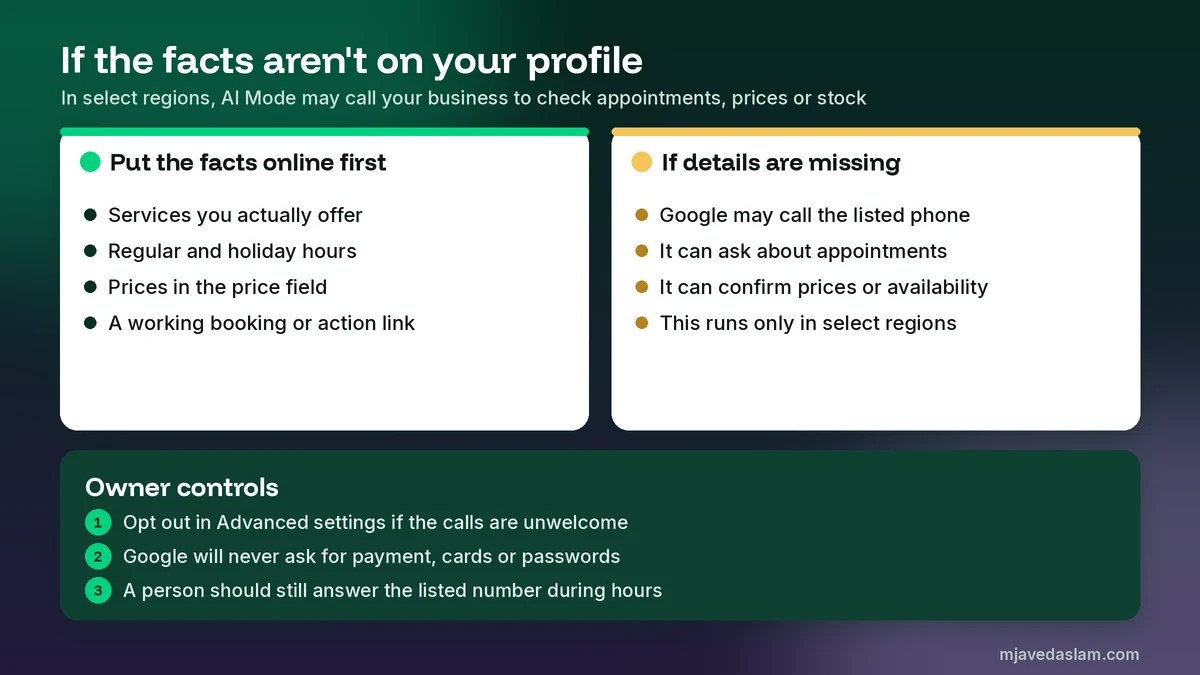
Google Search Help says people can use AI Mode to research service costs, find open appointment slots, or check whether something is in stock nearby. If a business does not have that information listed online, Google may call the business to get the details. Google Business Profile Help describes these as automated calls or texts to the phone number on your profile, either to confirm that your details are up to date or to assist a customer.
According to Google’s help page on automated calls and texts, customer requests can include booking an appointment, checking a restaurant wait time, or confirming the price and availability of products and services. If you already share in-store product details through Merchant Center, Google says it will use that information and will not call you to ask about inventory. These customer-assistance calls are available only in select regions and languages, and they may not be available for all users. In the United States, Google currently lists them as available in all states except Indiana, Louisiana, Minnesota, Montana and Nebraska. I would not assume the calling feature works the same way in every country, including Pakistan.
A few safety points I always mention:
- Google says it will never ask for payment, credit card information, or account passwords. If a caller asks for money to keep your business on Google, it is not Google.
- Calls made on behalf of customers are monitored and recorded for quality assurance.
- Updates that come from these calls can be marked pending and may take up to five business days to review. You can edit or remove updates later.
- You can opt out. In your Business Profile, open More, then Business Profile settings, then Advanced settings, and turn off automated calls and texts from Google. You can also say so during a call, and you can reply STOP to opt out of texts or WhatsApp messages.
My advice is simple. Put prices, services, hours and booking details on the profile and the website so a customer, or an AI feature, can get the answer without a phone tag. Keep the listed phone number one that a person actually answers during business hours. If the calls are disruptive, use the official opt-out. Don’t ignore a real Google confirmation call and then wonder why hours or services look wrong on Maps.
Using Gemini to manage your Google Business Profile
Gemini can help you manage a profile, which is useful, but it is a staff tool, not a ranking feature.
Google’s help page on managing a Business Profile with the Gemini web app says that once you connect the profile, Gemini can help you update hours, contact information and action links, draft review replies, create posts, summarize feedback themes, and read insights such as impressions, website clicks, direction requests, bookings and search keywords. You can also create a business notebook with suggested actions, such as filling missing hours.
The limits are strict, so check them before you spend time on a setup that won’t connect:
- You must be an owner or manager of only one verified Business Profile. If you manage more than one, this feature is not available.
- You must be 18 or over, signed in to the Gemini web app with a personal Google Account tied to that profile. Work or school accounts are not supported for now.
- Gemini History must be on.
- The feature is only available in the Gemini web app at gemini.google.com, in places where that app is supported. It is not a setting inside the Maps app.
To connect it, go to gemini.google.com while signed in to the same account you use for the profile, and ask about your Business Profile, or add @Google Business Profile to the prompt. If it isn’t connected yet, Gemini should offer to connect it. Always review drafts before they go live. I would never let a tool publish hours, a review reply or a post without a human check.
One more related product, so you don’t chase it by mistake: Business Agent. Google describes this as a conversational experience on Search that can answer product questions for a brand. It is aimed at US-based ecommerce stores with a verified Merchant Center account and at least 50 approved free listings. Most local service businesses I work with will not qualify, and you can skip it.
How to check whether AI search mentions your business
There is no official Google Business Profile report that says “you appeared in AI Overviews.” Keep your expectations honest.
- For your website, Search Console’s Performance report includes clicks and impressions from AI Overviews and AI Mode in the Web search type. That measures pages on your site that appear as supporting links, not the Maps listing itself. I covered eligibility and content for those citations in the AI Overviews citation guide.
- For the profile, use the usual Google Business Profile insights: search impressions, calls, direction requests, website clicks and the queries people use. A rise in branded or service searches can be a clue, but it is not proof that an AI feature named you.
- Manual checks. Once a month, ask realistic customer questions in regular Search, in AI Mode (google.com/ai), and, if you use it, in Gemini. Try service-plus-city questions, “open now” questions, and comparison questions, not only your business name. Note whether your name, hours, services or phone are stated correctly. Features don’t appear on every query. Google says AI Overviews are only shown when the system decides they add something, so a single search proves very little.
If an AI answer lists the wrong hours or a service you don’t offer, fix the source: the profile, the website, and any outdated directory. Then give Google time to recrawl and refresh.
Mistakes that weaken a profile for AI search
- Keyword-stuffing the business name. “Best Plumber Lahore Emergency 24/7” breaks Google’s name guidelines and can get the profile suspended or the name edited.
- Using categories as a keyword list. Extra categories that don’t describe the core business confuse relevance.
- Leaving services and hours blank or stale. That’s the first information AI features and customers look for, and it’s what may trigger a confirmation call in regions where Google calls businesses.
- Putting prices or phone numbers in custom service names. Google says those names can be rejected. Use the price field.
- Incentivized or fake reviews. They can be removed, and they teach models the wrong story about your business.
- Treating a Map Pack position as proof of AI inclusion. They can overlap, but Google does not say they are the same result.
- Buying “GEO” or “AEO” shortcuts that promise a special file or schema will get you into Gemini. Google says you don’t need those, and that third-party SEO advice should be checked against official guidance.
- Letting Gemini publish without review. A wrong holiday-hours update helps nobody, including an AI answer that repeats it.
A note for businesses in Pakistan
Google’s official availability lists for both AI Overviews and AI Mode include Pakistan, and English is a supported language. That does not mean every search shows an AI Overview, or that every local query in Urdu or English will name a Business Profile. It means the features can appear for users in this country.
The automated “call the business for a price or appointment” feature is separate, and Google limits it to select regions. I have not seen Pakistan listed in that help page, so I don’t count on it here. What I do count on is the profile itself. Complete, accurate information still helps you in Google Search and Maps, including the Map Pack, and it gives any AI feature that does appear a clean set of facts: your category, services, hours, phone and reviews.
If you try to connect the profile to Gemini, use a personal Google Account, and remember the one-profile limit. Many agencies and multi-branch owners in Pakistan manage more than one listing, so the connection simply won’t be offered. In that case, edit the profile in Search, Maps or Business Profile Manager as usual, and keep a monthly checklist.
FAQ: Optimize Google Business Profile for AI search
Is there a special way to optimize a Google Business Profile for AI search?
No. Google says no special optimization, AI file or extra markup is required for AI Overviews and AI Mode. Keep the Business Profile complete and up to date, and follow the same local SEO basics: accurate categories, services, hours, photos, reviews and a matching website.
Will a complete Google Business Profile get me into AI Overviews?
Not automatically. Google says a current Business Profile can help your products and services be visible in AI responses and in regular Search, but inclusion is not guaranteed. AI Overviews also don’t appear on every query.
Does connecting my profile to Gemini help me rank in AI search?
Google does not say that. Connecting Gemini lets eligible owners update hours, draft review replies, create posts and read insights in the Gemini web app. It is a management shortcut. The ranking and retrieval systems still depend on the quality and accuracy of the information, not on whether you chatted with Gemini.
Can Google AI Mode call my business?
In select regions and languages, yes. If appointment, pricing or availability details are not listed online, Google may place an automated call to the number on your Business Profile. The feature is not available everywhere. You can opt out in Advanced settings, and Google will never ask for payment or passwords.
Should I still answer questions on my Google Business Profile?
Yes, when questions appear. Google has been moving Maps toward instant answers based on your existing answers and reviews, and it says you can still answer questions in the profile’s Q&A section. Those answers, plus clear services, hours and reviews, give the system accurate material to use.
How do I see if Gemini or AI Overviews mentioned my business?
For website citations, use the Search Console Performance report (Web search type). For the listing itself, there is no dedicated AI report. Check Business Profile insights, and once a month test realistic customer questions in Search and AI Mode to see whether your name and facts appear correctly.
Next step
If you want a second pair of eyes on the listing, I can audit a Google Business Profile, tighten the category and services, and line it up with the website. Start with my Google Business Profile service page, or get in touch and tell me where the business is and what you want customers to find you for. The first hour of work is almost always the unglamorous part: making the facts complete, consistent and true.