Here is how to read Google Business Profile insights: open your profile on Google Search, select Performance, pick a date range, and read it in three layers. Views tell you how many people looked at your profile on Search and Maps. Searches show the actual search terms that triggered it. Interactions (calls, messages, bookings, directions and website clicks) show what people did next. Each number points to one fix: low views means a visibility problem, views without interactions means a persuasion problem, and the search terms tell you which words to build on.
I check these numbers for every Google Business Profile I manage, and the most common thing I hear from owners is, “I opened Insights, saw a graph, and had no idea if it was good or bad.” Google moved the old Insights metrics into Performance and changed how several are counted, but never explains what to do with them. This guide walks through every metric on the current screen, what Google actually counts, what it doesn’t, and the action I take when a number moves.
One quick requirement: Google only shows performance data for verified profiles, and you must be signed in to the Google Account that owns or manages the profile. If yours isn’t verified yet, start with my guide on how to claim a Google Business Profile.
Where to find your Google Business Profile insights in 2026
According to Google’s help page on Business Profile performance & insights, owners and managers can open the report in two places.
On a computer (Google Search):
- Go to your Business Profile (search your business name while signed in).
- Click Performance.
- At the top, select a time period for the report.
- Click Apply.
On a phone (Google Maps app):
- Open the Google Maps app and tap Business at the bottom right.
- Next to “Performance,” tap See more.
- Select a time period and tap Apply.
You may also see a separate Insights button on some profiles. That is not the metrics report. Google describes it as data-driven recommendations built from public information such as reviews, photos and local search trends, and says it may not be available for every profile.
If someone else, such as a marketer or office manager, needs to read the report, don’t share your password. Add them as a Manager; Google says both owners and managers can check performance. My guide on how to add a manager to Google Business Profile shows the steps.
Google Business Profile performance metrics explained
Google’s note at the top of the metric list matters: only metrics that apply to your business appear. A plumber won’t see menu clicks, and a profile without a booking provider won’t see bookings. Another detail most guides skip: Google says performance data includes views, searches and actions from both organic results and Google Ads. If you run ads with a linked profile, some of these numbers are paid activity.
| Metric | What Google counts | What it doesn’t tell you |
|---|---|---|
| Interactions | A summary of all your total interactions (calls, messages, bookings, directions, website clicks) | Which action drove a change, so always open the individual metrics |
| Views | How many people viewed your profile on Search and Maps, split by platform and device | How often you appeared without being opened |
| Searches | The search terms people used to find your business | Your ranking position for each term |
| Calls | Clicks on the call button on your profile | Whether the call connected, was answered, or became a job |
| Messages | The number of different conversations through messages | Message quality or replies |
| Bookings | Bookings people completed through a connected booking provider | Bookings made on your own site or by phone |
| Directions | How many people asked for directions, de-duplicated for multiple taps, cancellations and spam | Whether they actually arrived |
| Website clicks | Clicks on the website link on your profile | What visitors did on your site after the click |
Some business types see extra rows: Products (views of products sold at the location), Menus (menu clicks, counted per user per day), Offers (views and clicks on offers) and, for hotels only, Booking clicks.
Views: why the number is lower than you expect
Views confuse people more than anything else. Google explains that the views metric counts unique visitors: a person is counted only once a day, and someone who opens your profile on several devices (desktop and mobile) or platforms (Search and Maps) is counted only a limited number of times. It also counts views of your Business Profile only, not every appearance of your business on Google. That’s why this number can be lower than the view counts in Google’s email notifications. A low number is not a bug.
The platform and device breakdown is worth a glance. If most views come from Maps on mobile, people are likely searching while they’re out or ready to act, so your hours, photos and phone number carry the most weight. If Search on desktop dominates, people are often researching, and your description, reviews and website matter more.
Calls, website clicks and directions are taps, not outcomes
Google defines calls as the number of times someone clicked the call button, and website clicks as clicks on your website link. Neither proves a sale. Directions have been tidied up (Google changed the count to account for multiple taps, cancelled requests and spam), but a direction request still isn’t a store visit. Read all three as intent signals, then confirm the outcome in your own records.
Messages: check what your profile actually offers
Google’s original Business Profile chat ended on July 31, 2024, along with call history. Today, eligible profiles in some regions can add a WhatsApp or text message option instead. If your Messages line is empty, that’s usually why: the old chat button is gone and no current chat option is set up.
How to read the search terms report
The Searches section is the most useful part of your Google Business Profile insights, because it shows the real words local customers type. Three rules from Google help you read it correctly:
- It updates monthly. Google says the searches metric is updated at the start of each month and can take up to 5 days to show up. Don’t panic on the 2nd when last month looks empty.
- You can’t edit the list. Terms appear whenever your profile shows for a search. You influence them through relevance (categories, services, description, website), not through a setting.
- Small numbers are hidden. Google’s Business Profile Performance API documentation says each term carries either an actual value (the number of unique users who used that term in the month) or a threshold meaning the real number is below it. On the Performance screen, that shows up as a range such as “<15” instead of a count.
How I sort the list:
- Branded terms (your business name, misspellings, owner’s name). These show existing demand. If they’re most of your list, your profile is found by people who already know you, and discovery is weak.
- Category terms (“plumber,” “dentist near me,” “bakery”). These are discovery searches. If you see few of them, check your primary and secondary categories first; that’s where Google gets most of its relevance signal.
- Service + place terms (“emergency water heater repair Dallas,” “teeth whitening Brooklyn”). These are your best leads. Make sure each service appears in your Services list, description and a matching website page.
- Surprise terms. If people find you for a service you don’t offer, tighten your categories and description. If they find you for one you do offer but never mention, add it.
Don’t add up the “<15” rows as if each were 15. A threshold is a ceiling, not a count; use those rows to spot new wording.
Turn each metric into an action
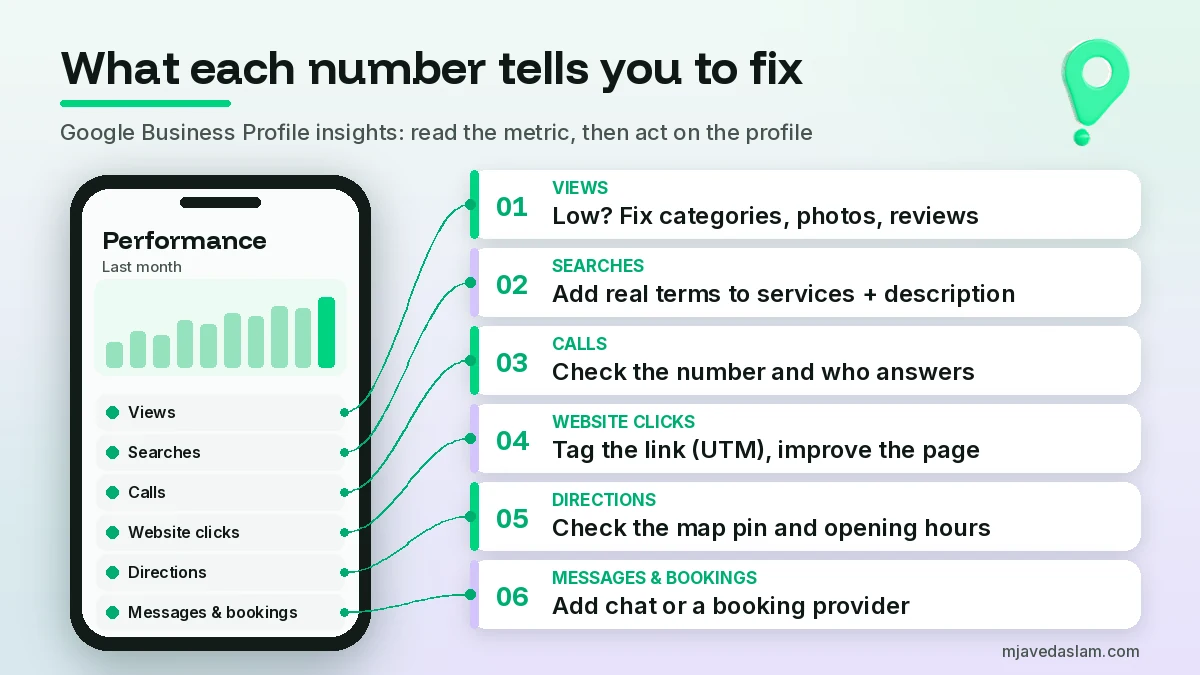
When a number is weak or moves, here’s the fix I start with.
Views are low
It’s a visibility problem. Check the primary category, fill every relevant field (hours, services, attributes, service area), add recent real photos, and keep reviews coming in steadily. Strong local SEO on your website (consistent name, address and phone, plus location pages that match your services) supports the profile too.
Views are healthy but interactions are low
People see you and choose someone else. Compare your profile with the top three competitors on the same search: rating and review count, photo quality, opening hours, and whether your description says clearly who you serve. Reply to reviews, especially negative ones.
Calls are low (or high but jobs aren’t)
Confirm the phone number is correct and answered during listed hours. Remember that a call in Performance is a tap on the button. If taps are high but bookings aren’t, the problem is usually missed calls or slow callbacks, not Google.
Website clicks are high but enquiries aren’t
The profile is doing its job and the landing page isn’t. Add UTM parameters to your profile’s website link (for example ?utm_source=google&utm_medium=organic&utm_campaign=gbp) so Google Analytics shows that traffic separately, then send it to a page with your phone number, service area and a short form above the fold, not a generic homepage.
Directions are falling
Check your map pin and address, and make sure your hours (including holiday hours) are right. A wrong pin quietly kills direction requests. If you’re a service-area business with a hidden address, low directions are normal; judge calls and website clicks instead.
Messages are zero
If chat options are available in your region and someone can reply the same day, add WhatsApp or text messaging under Contact. Otherwise leave it off.
Bookings are missing
Bookings only count through a supported booking provider. Bookings on your own site show up as website clicks instead.
My 15-minute monthly review routine
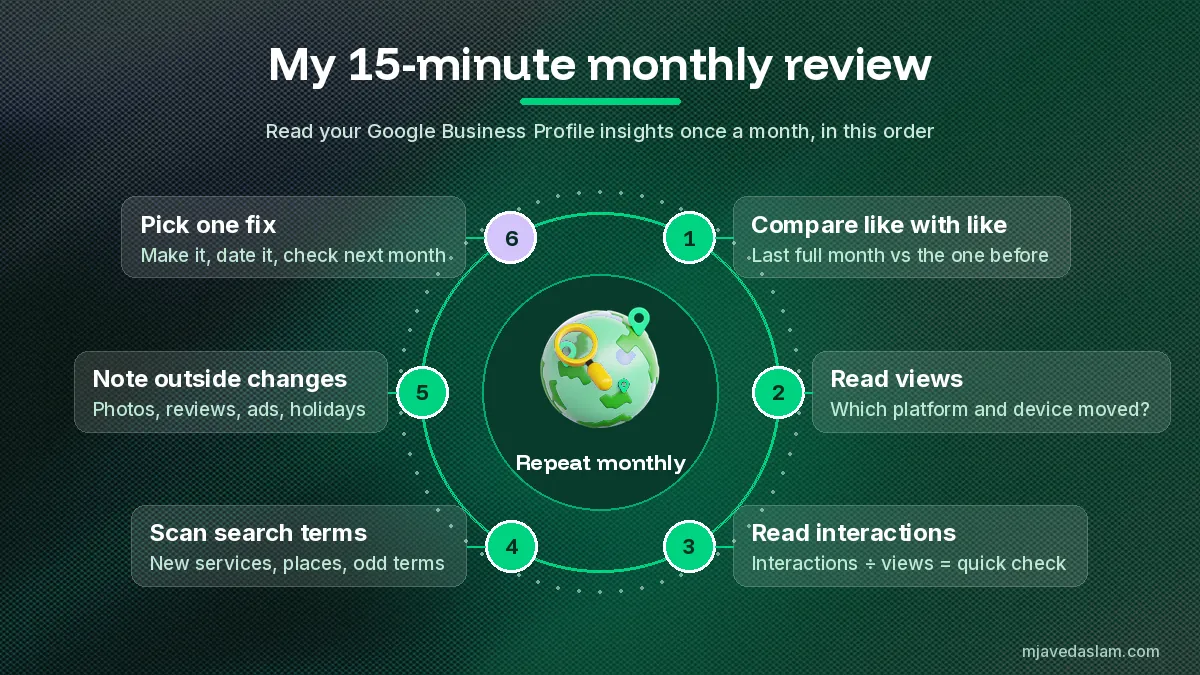
Once a month, after the searches data refreshes (give it the first week), I do this for each profile:
- Compare like with like. Compare the last full month with the previous month and, if you have it, the same month last year.
- Read views first. Up or down? Which platform and device moved?
- Read interactions next. Divide total interactions by views to get a rough interaction rate. (my own check, not a Google metric).
- Scan search terms. Note new service or place terms and anything irrelevant.
- Note outside changes. New photos, a category change, a burst of reviews, an ad campaign (remember, Ads activity is included), or a holiday closure.
- Pick one fix from the list above, make it, and write down the date. Next month, check whether the metric it targets moved.
If you want a record beyond what the screen shows, Google lets you download performance data to a spreadsheet from Business Profile Manager, including several locations at once. I cover that separately in a guide to exporting Google Business Profile insights, so here I’ll just say: keep a simple monthly spreadsheet so you can see trends past the dashboard’s date range.
Common mistakes when reading GBP insights
- Treating views like website traffic. Views are unique people per day on your profile, not sessions or impressions.
- Counting call taps as customers. Match them against your phone log before celebrating or panicking.
- Comparing across counting changes. Google changed how views and directions are counted, so very old reports aren’t a fair baseline.
- Forgetting ads. A jump after you switched on Google Ads may be paid, not organic. If you run local campaigns, also check your Google Ads location targeting so you aren’t paying for views from people outside your area.
- Reading the search list without acting. The report only pays off when a term ends up in your services, description, posts or website.
FAQ: How to read Google Business Profile insights
Where are Google Business Profile insights now?
They’re under Performance. On a computer, open your Business Profile on Google Search and click Performance. In the Google Maps app, tap Business, then See more next to Performance. A separate Insights button, where shown, gives recommendations rather than metrics.
Why are my Google Business Profile views lower than before?
Google counts unique visitors: one person is counted only once a day and only a limited number of times across devices and platforms. Only views of your Business Profile count, so the figure can be lower than view counts in Google’s emails.
Does a call in Google Business Profile insights mean someone actually called?
Not necessarily. Google defines calls as the number of times someone clicked the call button on your profile. It doesn’t show whether the call connected or was answered.
When does the search terms report update?
Google updates the searches metric at the start of each month, and it can take up to 5 days to appear. Read it in the first week of the new month for the previous month.
What does “<15” mean in the search terms report?
It means the term was used by fewer people than that threshold in the period, so Google hides the exact number. Treat it as a ceiling, not a count, and don’t add it to your totals.
Do Google Business Profile insights include Google Ads?
Yes. Google says performance data includes views, searches and actions from both organic search results and Google Ads, so consider any ad campaigns when a number jumps.
Next step
Open your profile today, click Performance, and set the range to last month. Write down three numbers (views, total interactions and your top five search terms), then pick one fix from this guide and make it this week. If you’d rather have someone read the report and act on it every month, see my Google Business Profile management service.