
Here’s the short answer. A Google Ads brand campaign is a small Search campaign that shows your ad only when people search for your business name. For a local business, it does three jobs. It puts your own ad at the top when a competitor bids on your name. It sends name searches to the right page with your phone number and a call button. And it keeps branded clicks out of your other campaigns, so your reports stay honest. Set it up with exact and phrase match keywords on your name, a tight location, a small budget and a bid cap. Then check the auction insights report every month to see who else is showing on your name.
I get the same message from local owners every few weeks. “I searched my own business name and a competitor’s ad came first. Is that even allowed?” In most cases it is. Google lets advertisers use other businesses’ names as keywords. What you can control is your own answer: a clean brand campaign that costs little and wins that top spot back. In this guide I’ll show you how I set one up for a local business, what Google’s trademark rules really say, and how to tell if the campaign is worth the money.
What is a Google Ads brand campaign?
A brand campaign targets searches that contain your business name. A non-brand campaign targets searches for your services, like “emergency plumber near me” or “dentist in Gulberg”. I always keep the two apart, because they behave very differently.
| Brand campaign | Non-brand campaign | |
|---|---|---|
| Example searches | ali plumbing, ali plumbing multan, ali plumbing phone number | plumber near me, blocked drain repair, water heater installation |
| Who is searching | People who already know you or were referred to you | People who don’t know you yet |
| Typical cost per click | Usually low in my accounts, because the ad is highly relevant | Higher, because many businesses compete |
| Main goal | Protect the top spot and route calls to you | Win new customers |
| Keywords | Exact and phrase match on your name | Service keywords with negative keywords and your name excluded |
Why are brand clicks usually cheap? Google’s Quality Score help page lists expected clickthrough rate, ad relevance and landing page experience as the three parts of Quality Score. An ad for your business on a search for your name scores well on all three. My guide to Google Ads Quality Score explains these parts in more detail.
Do local businesses need a Google Ads brand campaign?
Not always. I don’t add one to every account by default. Here’s how I decide.
Run a brand campaign when
- A competitor shows ads on your name. This is the main reason. If someone else sits above your own listing, some of your referrals will call them.
- Your name is a common word. Names like “City Dental” or “Pro Roofing” match other businesses. An ad with your exact name, your area and your call button helps people pick the right one.
- Aggregators and directories rank above you. Lead sites can appear on your name. Your own ad sends the click straight to you.
- You run Performance Max or broad match. These campaigns can pick up brand searches and make their numbers look better than they are. A brand campaign gives those searches a clear home.
- You have offers or hours that change. An ad can say “Open Sunday” or “Free inspection this month” on the day you need it.
You can skip it (for now) when
- Nobody else shows ads on your name, and your website and Google Business Profile name already fill the top of the page.
- Your budget is very small and every rupee or dollar must go to finding new customers. Check your name every month instead.
- Very few people search your name yet. A new business often has too little brand search for a campaign to matter.
Not sure what the total budget should look like? My breakdown of how much Google Ads cost for a small business shows where a small brand line fits.
Can competitors bid on your business name?
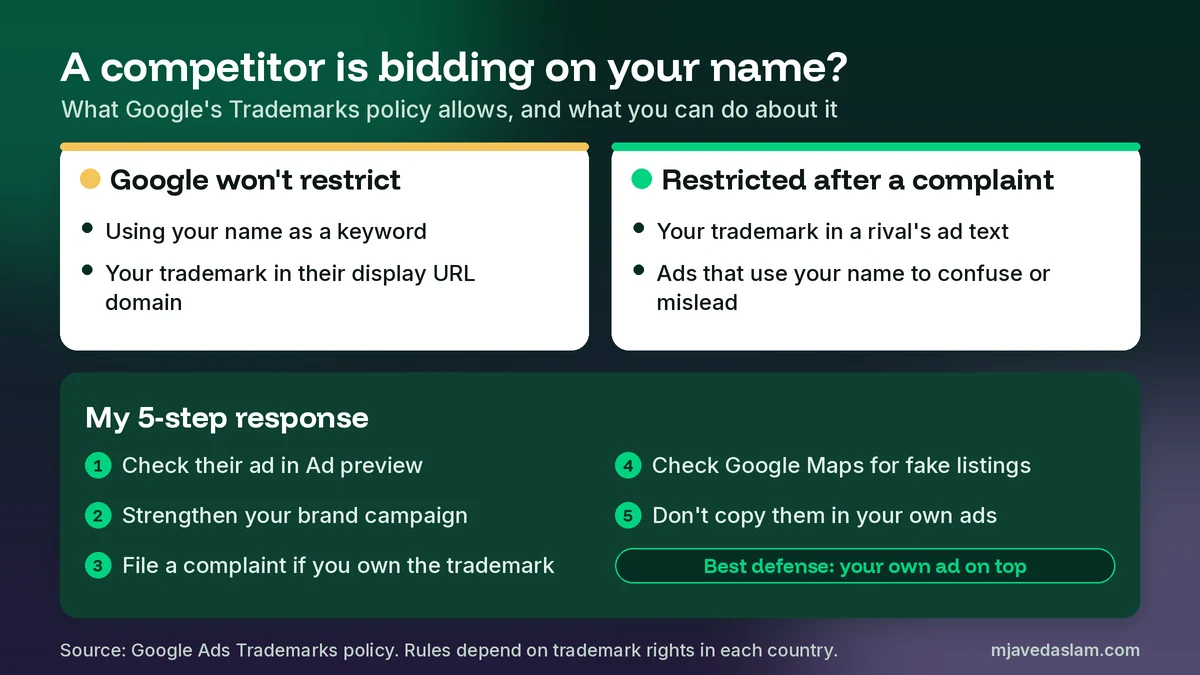
Yes, in most cases. This surprises a lot of owners, so let me quote the rule. Google’s Trademarks policy says Google Ads will not restrict using trademarks as keywords. It will also not restrict a trademark used in the second-level domain of the display URL. So a competitor can bid on your name, and Google won’t stop that.
What Google will restrict, after a trademark owner complains, is the use of a trademark in an ad from a direct competitor, and ads that use the trademark in a confusing, deceptive or misleading way. In plain words: a rival can show up when people search your name, but after a valid complaint they shouldn’t write your name in their headline or pretend to be you.
A few details from the same policy page matter for small businesses:
- Google reviews complaints from trademark owners. It only accepts complaints against specific advertisers, identified by their URLs, in the countries and industries where you have shown trademark rights.
- If Google restricts the trademark, the restriction is generally applied on an ongoing basis to ads that use the same second-level domain in their final URL.
- The trademark must be used in the ad itself, not only on the landing page.
I’m not a lawyer, and trademark law differs by country. If your name is not a registered trademark, a complaint may not be an option. That’s one more reason a brand campaign is the practical first step: you don’t need anyone’s permission to show your own ad on your own name.
How to set up a Google Ads brand campaign (step by step)
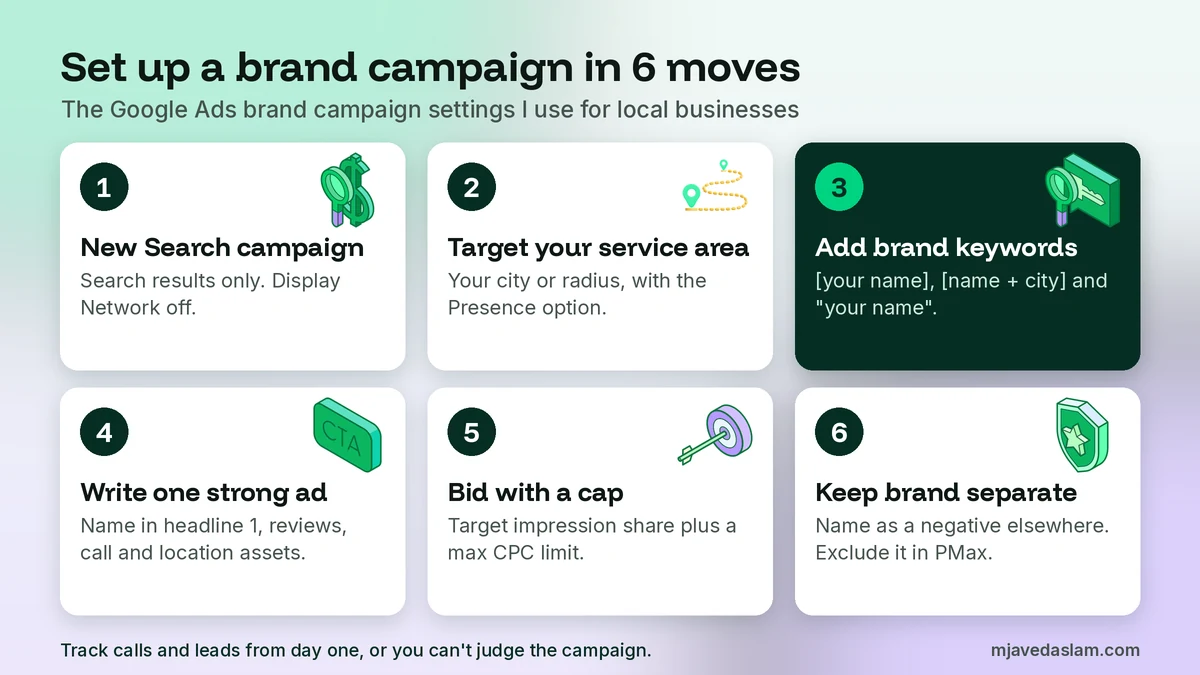
This is the setup I use for local service businesses. It takes about 30 minutes. Menu names move around in Google Ads, but the settings stay the same.
- Create a new Search campaign. Choose leads as the goal and Search as the type. Name it clearly, for example Brand | Ali Plumbing | Multan.
- Turn off the Display Network. Brand defense happens on the search results page. I usually leave search partners off at the start too, so the data is clean.
- Target your real service area. Add the city or radius you serve and choose the Presence option, so the ad shows to people in or regularly in that area. My guide to Google Ads location targeting walks through this setting.
- Add brand keywords. Use exact match for your core name and phrase match to catch longer searches (the next section has a full list).
- Write one responsive search ad. Put your business name in the first headline and pin it if you want it to show every time. Add proof that only you can claim: years in business, review rating, license number, the area you serve.
- Add assets. Add a call asset with your main number, sitelinks to your service and contact pages, and a location asset linked to your Google Business Profile.
- Pick a bid strategy with a cap. I explain the options below. Whatever you pick, set a maximum cost per click.
- Set a small daily budget. Brand search volume is limited, so a small budget is usually enough. If the campaign shows Limited by budget, raise it a little.
- Turn on conversion tracking. Count calls and form leads, or you can’t judge the campaign. See my guides to Google Ads conversion tracking in WordPress and Google Ads call reporting.
Exact match brand campaign keywords
Google’s keyword matching help page says exact match gives you the most control over who sees your ad, and that it reaches fewer searches than phrase and broad match. That’s exactly what you want here. Use square brackets for exact match and quotes for phrase match.
| Keyword | Match type | Why I add it |
|---|---|---|
| [ali plumbing] | Exact | Your core name. Most brand searches look like this. |
| [ali plumbing multan] | Exact | Name plus city, common when people compare branches or check they have the right business. |
| “ali plumbing” | Phrase | Catches longer searches like “ali plumbing phone number” or “ali plumbing reviews”. |
| [aliplumbing] | Exact | The name typed without a space. Add it only if your search terms show it. |
| [ali plumbers] | Exact | A plural or short form, only if customers really use it. Check your search terms report before adding more. |
There is a second reason to use exact match. The same help page explains that when a search is identical to an eligible exact match keyword in a Search campaign, that Search campaign is prioritized over Performance Max and over other broad or phrase keywords. So an exact match brand keyword gives you a clear say in which campaign answers brand searches.
Then add negative keywords for brand searches you don’t want to pay for. Common ones for local businesses are jobs, careers, salary, login and the names of other businesses that share part of your name. Read your search terms report after the first two weeks and add more.
Brand inclusions and brand lists (the newer option)
Google also has brand settings. According to Google’s brand settings help page, brand inclusions make a Search campaign serve only on queries associated with the brands you choose, and brand exclusions stop a Search or Performance Max campaign from serving on brands you want to avoid. You build these from a brand list under Tools, then Shared library, then Brand lists.
There are a few catches for small businesses:
- Brand inclusions work with the broad match keywords setting, and Google’s matching help says broad match should be used with Smart Bidding.
- Your business must be in Google’s brand library. If it isn’t, you can request it. Google says requests get a response within 3 to 6 weeks, and a brand under review can be used but its reach may be limited.
- Google’s definition of a brand includes a business name that may constitute a brand for small and medium-sized businesses, so a local business can qualify.
- Google says brand settings for Search campaigns began moving into AI Max from May 27, 2025. If you are new to brand settings, you turn on AI Max for the campaign to reach them.
My take: for most local businesses with small budgets, exact and phrase match brand keywords with a bid cap are simpler and easier to control. I use brand inclusions when the brand is already in the library and the account has enough conversions for Smart Bidding to work well.
Keep brand searches out of your other campaigns
A brand campaign only stays clean if your other campaigns stop chasing the same searches. Otherwise your non-brand campaign looks brilliant because it is quietly taking easy brand clicks. Do these three things:
- Add your name as a negative keyword in every non-brand Search campaign. Use phrase match negatives for the main spellings. My guide to keyword match types explains how negative match types differ.
- Apply brand exclusions to Performance Max. Google says brand exclusions for Performance Max apply to Search and Shopping inventory. My Performance Max guide for local businesses covers the other settings I check there.
- Compare like with like. Report brand and non-brand results separately. A cost per lead that mixes both is not useful.
Budget and bidding for a small Google Ads brand campaign
Brand campaigns don’t need big money. They need the right bid strategy and a ceiling. Here are the options I use:
| Bid strategy | When I use it | The setting that protects you |
|---|---|---|
| Target impression share (absolute top) | A competitor regularly shows above you and you want the first ad spot | Max CPC bid limit. Google warns that setting it too low can stop you reaching your goal. |
| Maximize clicks | New campaign with no conversion data yet | A maximum CPC bid limit so one click can’t get expensive |
| Manual CPC | Very small budgets and you want full control | Set the bid yourself and review it weekly |
| Maximize conversions | The campaign already records calls and leads reliably | A daily budget you are happy to spend in full |
Google’s Target impression share help page says this strategy sets bids to show your ad at the absolute top, at the top, or anywhere on the page, and that the Max CPC bid limit is a cap on the bids it sets. In my accounts I start with absolute top at a high target and a cap close to what a normal non-brand click costs in that city. Then I look at the actual cost per click after two weeks and adjust.
One warning. If a competitor is very aggressive on your name, prices can rise. That’s why the cap matters. You don’t have to win every single auction. You need to be visible and easy to call.
How to see who is bidding on your name
Don’t keep searching your own name on Google to check. Google’s help on the Ad preview and diagnosis tool says using the tool is better than searching yourself, because it avoids collecting ad impressions and affecting your statistics. You’ll find it in Google Ads under Tools, then Troubleshooting. Pick your city and device and type your business name.
Once your brand campaign has run for a few weeks, open the auction insights report. Google says it compares your performance with other advertisers in the same auctions, for Search, Shopping and Performance Max campaigns. These are the columns I read:
| Column | What it tells you about your brand name |
|---|---|
| Impression share | How often your ad showed out of the times it could. On your own name, this should be high. |
| Overlap rate | How often a competitor’s ad showed when yours did. A high number means they target your name regularly. |
| Position above rate | How often their ad showed above yours when both showed. |
| Outranking share | How often your ad ranked higher than theirs, or showed when theirs didn’t. |
| Absolute top of page rate | How often an ad was the very first ad above the organic results. |
Two things to know. Google says the report doesn’t show insights when impression share is less than 10%, and only campaigns, ad groups and keywords that meet a minimum activity level get the report. You may also see google.com listed. Google says that can appear if you use Google-hosted domains or Google Business Profile, or if a competitor’s landing page is a Google Site.
What to do when a competitor uses your name
When I find a rival on a client’s name, I follow this order. It keeps things calm and cheap.
- Check what the ad says. Use the Ad preview tool and take a screenshot. Does their ad only show on your name, or does it also write your name in the headline?
- Turn on or strengthen your brand campaign. Raise your target or cap a little and make sure your ad has your call asset, reviews and location.
- Read the trademark policy. If you own a trademark in that country and their ad text uses it, you can submit a complaint through Google’s trademark complaint process. Keep proof of your trademark rights and their ad URLs.
- Check Google Maps too. Some “competitors” go further and create listings that copy your name. Use my guide to report a fake Google Business Profile for those.
- Don’t copy them. Bidding on a rival’s name is allowed in many cases, but writing their name in your ads or pretending to be them can break the same policy. It also rarely brings good customers.
Is a Google Ads brand campaign worth it? How I measure it
The honest question is: would these customers have found you anyway through your organic listing and Google Business Profile? Some of them would. So I don’t judge a brand campaign by its own conversions alone. I watch four things each month:
- Cost per lead on brand. It should be well below non-brand. If it isn’t, check your search terms for non-brand queries slipping in.
- Competitor overlap. If auction insights shows no competitors for a few months, try lowering the budget or the target and watch total leads.
- Total branded clicks. Compare paid brand clicks in Google Ads with brand clicks in Search Console. If paid goes up and organic drops by the same amount, the ad is mostly taking clicks you’d get free.
- Calls by area. The Google Ads geographic report shows whether brand calls come from your real service area.
If you want to test it properly, pause the brand campaign for two to four weeks in a quiet season and compare total calls and form leads with the period before. Do not run this test while a competitor is actively bidding on your name.
Google Ads brand campaign mistakes I see in local accounts
- Brand and non-brand mixed in one campaign. The cheap brand clicks hide a weak non-brand campaign.
- No bid cap on Target impression share. One aggressive rival can push your cost per click far higher than it needs to be.
- Sending brand clicks to the homepage only. Use sitelinks for your main services, contact page and booking page.
- Wrong or old phone number in the call asset. It must match your website and Google Business Profile.
- Targeting the whole country. A local brand campaign should follow your service area, or people in other cities with a similar business name will click.
- Ignoring Local Services Ads. Where Local Services Ads are available, they can appear above search ads. My comparison of Local Services Ads vs Google Ads explains how they fit together.
- Never reading search terms. Phrase match on a common word can match searches that have nothing to do with you.
A note for businesses in Pakistan
The same Google Ads rules apply when you target customers in Pakistan or advertise from here to clients abroad. In my experience, brand clicks are usually cheap in Pakistani cities, because few local businesses bid on names yet. If you serve overseas clients, set your Google Ads brand campaign’s location to the countries you actually serve, not just your home city. And remember that Google accepts trademark complaints only within the countries where you can show trademark rights.
FAQ: Google Ads brand campaigns
What is a brand campaign in Google Ads?
A brand campaign is a Search campaign that only targets searches containing your business name, such as your name, your name plus city, or your name plus phone number. It keeps your own ad at the top for those searches and keeps brand clicks separate from campaigns that look for new customers.
Should a small local business bid on its own brand name?
Yes if competitors, directories or lead sites show ads on your name, or if you run Performance Max or broad match that could take brand searches. If nobody else advertises on your name and your website and Google Business Profile already fill the top of the page, you can wait and check again each month.
Is it legal for competitors to bid on my business name in Google Ads?
In most cases, yes. Google’s Trademarks policy says it will not restrict using trademarks as keywords. After a complaint from a trademark owner, Google may restrict a direct competitor from using the trademark in ad text, and it restricts ads that use a trademark in a confusing or misleading way. Trademark law differs by country, so get legal advice for serious cases.
How much should I spend on a Google Ads brand campaign?
Usually a small share of your total ad budget, because only a limited number of people search your name. Start with a modest daily budget and a maximum cost per click cap, then raise the budget only if the campaign shows Limited by budget and competitors keep appearing on your name.
Which match type is best for a brand campaign?
Use exact match for your core name and name plus city, and phrase match to catch longer searches like your name plus reviews or phone number. Google says exact match gives you the most control, and an identical exact match keyword in a Search campaign is prioritized over Performance Max.
How do I find out who is bidding on my brand name?
Use the Ad preview and diagnosis tool in Google Ads instead of searching your name repeatedly. After your brand campaign runs for a few weeks, open the auction insights report to see overlap rate, position above rate and outranking share for each competitor. The report doesn’t show data when your impression share is below 10%.
Next step
Open the Ad preview and diagnosis tool today and type your business name for your city. If a competitor shows above you, set up the brand campaign above this week, with exact match keywords, a tight location and a bid cap. Then add your name as a negative keyword everywhere else and check auction insights after a month. If you would rather have me build and manage it with your non-brand campaigns, see my Google Ads management service.