
Here’s the short answer. Google Ads Performance Max for local business works when you already have clean conversion tracking, a tight service area, and a clear offline goal such as calls, form leads, store visits or direction clicks. Use Performance Max for store goals when you have a real storefront and want Maps, Waze and local formats. Use a standard Performance Max campaign only after Search is profitable and your lead conversions are hard (answered calls, booked jobs), not soft phone-button clicks. If your trade is eligible for Local Services Ads, treat the pay-per-lead Performance Max migration as a separate product — it still charges per lead and only shows on Search and Maps, not like a regular Performance Max campaign across YouTube and Display.
Most Performance Max guides are written for ecommerce. Local plumbers, clinics, roofers and restaurants ask a different question: will this campaign fill the calendar, or burn the budget on out-of-area and junk clicks? Below is the local playbook I use — when to try it, which flavour to pick, how to set asset groups and goals, and the mistakes that produce “cheap leads” that never book.
The three Performance Max flavours local businesses confuse
According to Google’s About Performance Max campaigns page, Performance Max is a goal-based campaign type that can access YouTube, Display, Search, Discover, Gmail and Maps from one campaign. For local owners, that headline hides three different setups:
- Standard Performance Max (leads / sales / website traffic). Full inventory. You supply asset groups, conversion goals and location targeting. Google AI mixes assets and finds converting users across channels. This is the version that often floods service businesses with Display and YouTube junk if conversions are soft.
- Performance Max for store goals. Built for physical locations. Google’s Performance Max for store goals guide says you promote stores across Search, Maps, Waze, YouTube, Gmail and Display using your Business Profile or affiliate locations, with goals such as store visits, store sales and local actions (calls, directions). Radius can be set or auto-determined from density and vertical.
- Performance Max with pay-per-lead goals (Local Services Ads migration). Google’s transition pages say existing Local Services Ads move into Google Ads as Performance Max campaigns with pay-per-lead goals. You still pay for valid leads, ads stay on Search and Maps only, and targeting stays keywordless by category and area. New sign-ups still start at g.co/localservices for now. That is not the same as turning on a normal Performance Max lead campaign.
If you’re choosing between Local Services Ads and Search first, read my comparison of Local Services Ads vs Google Ads. For first-time LSA setup, use how to set up Local Services Ads. This article is about the Performance Max options around those choices — especially store goals and standard local lead campaigns.
When Performance Max helps a local business
I only recommend testing Performance Max for local when most of these are true:
- You already run a profitable Search campaign (or Local Services Ads) and want incremental reach, not a replacement for keyword control.
- Conversion tracking measures real business outcomes — answered calls with a minimum duration, form submissions that become jobs, booked appointments — not “click to call” alone. Soft goals teach the AI to buy cheap taps.
- You can feed audience signals: customer match from past callers or clients, remarketing lists, and in-market segments that match your trade.
- You have enough creative assets (photos of real work, team, vans, storefront) and a focused final URL (or storefront goal with a verified Google Business Profile).
- For storefronts: you want foot traffic, directions and calls near the location, and you’re willing to use store goals rather than hoping a lead-gen Performance Max stays local.
Google’s store-goals page is clear that the campaign is built to grow offline goals with location inputs, budget and assets. Their Local customer optimization feature (within store-goals campaigns) prioritises people close to or interested in your area who are ready to visit or contact — useful for restaurants, clinics and retailers who need nearby intent on Maps and Search.
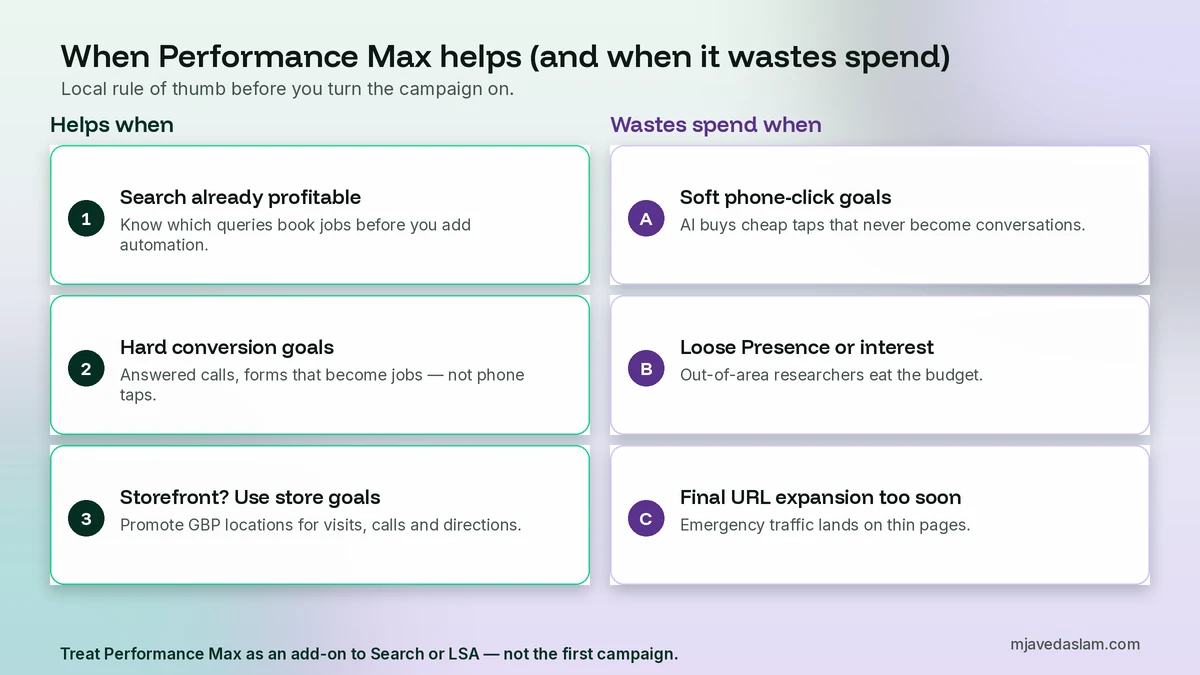
When it wastes spend (especially for service-area businesses)
Service-area businesses without a public storefront get hurt most by a naive Performance Max lead campaign. Common failure modes I see:
- Soft conversions. Phone-number clicks that never become calls. The campaign hits CPA targets with junk.
- Presence or interest left too broad. People researching your city from another province click ads you never intended to pay for. Fix targeting first — see my guide to Google Ads location targeting — then watch the Google Ads geographic report after launch.
- Final URL expansion on a thin site. Google’s Final URL expansion help says the setting is on by default and can replace your final URL with another page on the same domain. On a five-page local site, that can send emergency “burst pipe” traffic to an About page. Turn it off until every key page is conversion-ready, or exclude weak URLs.
- No video, auto-generated junk. If you don’t upload video, Google may auto-generate one. Upload a simple phone-shot of real work or opt out intentionally rather than hoping.
- Budget that starves learning. Tiny daily budgets across every Google surface rarely learn. Either fund a fair test or stay on Search.
Reddit and agency war stories about plumbing Performance Max producing attorney or car-dealer clicks usually trace back to soft phone-click goals plus Display inventory — not magic. Harden the goal, tighten geo, and treat Performance Max as an add-on, not the first campaign.
Another quiet budget leak: running Performance Max and broad Match Search without shared negatives or brand exclusions, so both fight over the same queries while Display invents new junk. Keep Search as the controlled layer for money keywords. Let Performance Max hunt incremental conversions only after that foundation is stable. If LSA already covers emergency jobs in your city, do not also ask Performance Max to “find more emergency leads” with soft goals — you will pay twice for the same intent class with worse quality.
Prerequisites before you create the campaign
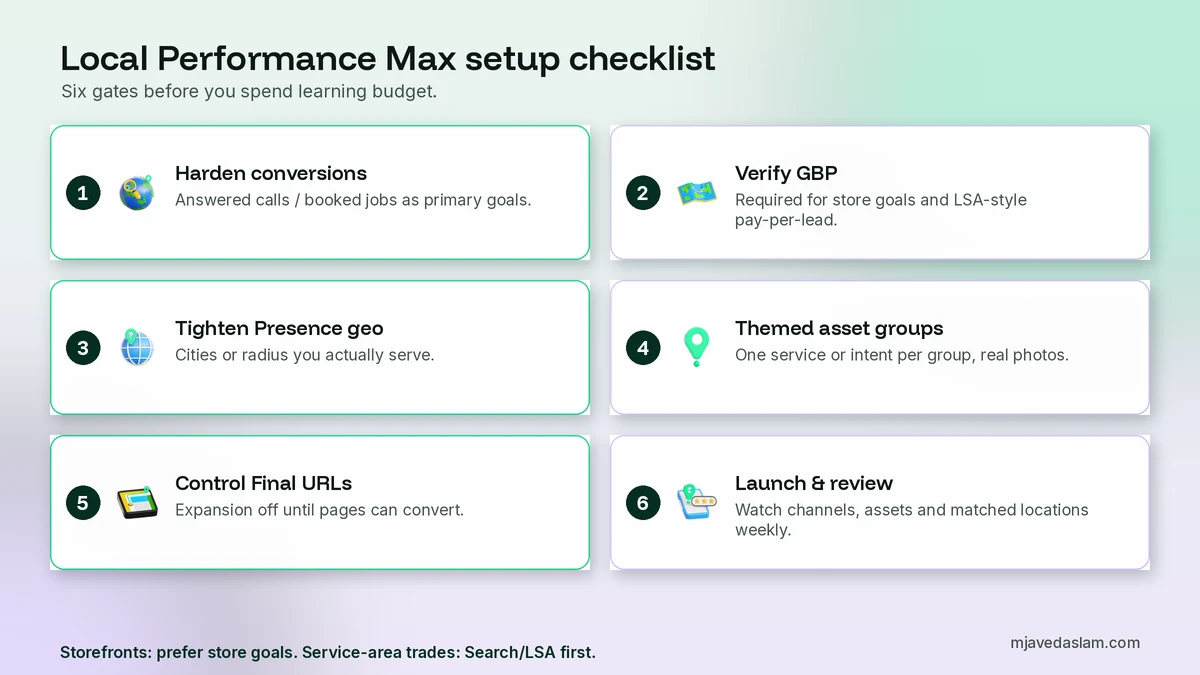
1. Conversion actions that match money. Set up call conversions with a meaningful duration, form thank-you events, and offline import of booked jobs when you can. My walkthrough of Google Ads conversion tracking for WordPress covers the site side. Mark only the actions you want Performance Max to optimise as primary/key goals for that campaign.
2. A verified Google Business Profile for store goals or pay-per-lead migration. Link locations from the Business Profile. Service-area businesses should fix profile setup first — see service-area business Google Business Profile.
3. Location targeting that matches where you actually work. Cities, postal codes or a realistic radius. Prefer Presence (people in or regularly in your locations) for most local trades; Presence or interest is for hotels, tourism and national brands courting interest from elsewhere.
4. Brand safety basics. Account-level negative keywords where available for Performance Max Search inventory, brand exclusions if needed, and content suitability settings so your van photos don’t sit next to junk.
How to set up Performance Max for a local storefront (store goals)
Google’s store-goals flow is the cleanest local option when customers should walk in or navigate to you:
- In Google Ads, create a campaign with the objective Local store visits and promotions and choose Performance Max.
- Confirm offline conversion goals: store visits, store sales, contacts (Google hosted) or directions (Google hosted), based on what you can measure.
- Optionally turn on Local customer optimization if you want to prioritise nearby, ready-to-act users on Maps, Waze and local Search formats. Google notes it is not compatible with online campaign goals or Merchant Center product campaigns.
- Select business locations from your Business Profile (or affiliate locations). Review the radius — auto radius depends on vertical, density and competitors; override if your catchment is smaller.
- Add text, images, logos and, if you have one, a short video. Highlight hours, parking, booking and what makes the visit worth it.
- Set a daily budget you can leave alone for at least a few weeks of learning, then review store visits, calls and directions — not CPC alone.
Promotion assets can highlight in-store offers. Google notes QR/barcode promotions serve on Maps, not on Search, Shorts or in-stream video.
How to set up standard Performance Max for local leads (carefully)
Use this path for lead gen only when Search is already working and conversions are hard:
- Objective: Leads (or Sales if you truly track revenue).
- Campaign type: Performance Max.
- Conversion goals: only the actions that equal a real inquiry. Remove page views, scroll depth and naked click-to-call if those fire as primary.
- Locations: your service cities/radius; Presence for most trades.
- Asset group: one theme per service or intent stage (for example emergency plumbing vs planned remodel), not one giant “everything we do” pile. Google describes asset groups as collections of creatives centred on a theme or audience that the AI mixes across inventory.
- Final URL: the best landing page for that service. Keep Final URL expansion off until the site can handle it, or exclude blog posts and thin pages.
- Audience signals: past converters, website visitors, customer match, and narrowly relevant in-market segments. Skip broad affinity fluff.
- Search themes: phrases that describe how locals search (“emergency plumber Multan”, “same-day HVAC repair”) as guidance, not as fake exact-match keywords.
- Launch with a budget you can afford to learn on, then review channel, asset and geographic performance weekly.
Asset groups, creative and landing pages that win locally
Local asset groups should look like your business, not stock AI wallpaper:
- Images: real vans, techs, before/after jobs, waiting room, storefront. Mix landscape, square and portrait where Google asks for ratios.
- Headlines: city + service, response time, license/insurance trust, booking clarity. Stay inside character limits Google lists in the asset-group setup help.
- Descriptions: what you fix, where you go, what happens after the click (call, book, get a quote).
- Business name: the same public name as your Google Business Profile.
- Call and location assets: make calling and navigating obvious. Automated location assets can show physical locations; keep NAP consistent.
Landing pages need a phone number that tracks, a short form, proof (reviews, licences) and a service-area statement. If you send Maps traffic to a homepage with no call button above the fold, Performance Max will still “optimise” — just not for booked jobs.
Budget, bidding and how long to wait
Google’s Performance Max overview recommends using the budget panel’s Low / Medium / High suggestions and forecasts during setup. For a single-location local business, I would rather fund one well-instrumented test than starve three experiments. Expect a learning period while Smart Bidding gathers conversion data. Judge success on cost per booked job and show rate of quality leads, not on “lots of conversions” that never answer the phone.
If Local Services Ads (or their pay-per-lead Performance Max form) cover your core jobs, keep keyword Search for the gaps and treat standard Performance Max as optional reach — not the foundation. My Google Ads management page outlines how I structure Search + LSA for local accounts.
Common local Performance Max mistakes
- Launching Performance Max before Search has clean conversion data.
- Optimising to phone clicks instead of answered calls or booked jobs.
- Leaving Presence or interest on for a radius-only trade.
- One asset group for ten unrelated services.
- Final URL expansion dumping traffic on the wrong page.
- Confusing pay-per-lead LSA-in-Performance-Max with a normal Performance Max lead campaign.
- Quitting after five days because Display CPCs looked “cheap.”
Keep waste down on Search with negative keywords for small businesses while you test Performance Max beside it.
Service-area businesses vs storefronts: different Performance Max rules
A bakery with a public address and a plumber who hides the address are not the same advertiser in Google’s eyes. Store goals Performance Max expects locations you can promote on Maps and Waze. Service-area businesses (SABs) often should not force a storefront campaign. Keep Search and, if eligible, Local Services Ads as the spine. If you still test standard Performance Max for leads, geo-fence hard, send traffic to service-area landing pages that state where you work, and never optimise to “directions” you cannot honour.
If your Google Business Profile is set up as a service-area business, fix that configuration before you pour Performance Max budget into location assets that imply a showroom you do not have. Customers who tap directions to a virtual office waste money and hurt trust.
How I read Performance Max reports for local accounts
After two to three weeks with spend, I look at:
- Channel performance: Is Search carrying the conversions while Display and YouTube eat budget? That is a signal to sharpen goals, creative and exclusions — or to pause Performance Max and return budget to Search.
- Asset group and asset grades: Replace low-rated images and headlines with real job photos and clearer offers.
- Geographic matched locations: Same habit as Search. Out-of-area spend means Presence settings or exclusions need work. Use the companion guide on the export matched locations from Insights & reports and cut waste the same way you would on Search
- Search categories / search terms insights: Watch for irrelevant themes Performance Max wandered into, then add negatives and refine search themes.
- Offline reality: Sit with the owner for 20 minutes and mark which leads became paying jobs. Feed that honesty back into what you count as a conversion.
Google lists assets-level metrics, asset group reporting, channel performance, placement reports and conversion tracking among Performance Max reporting options. Use them. Vanity dashboards that only show “conversions” without job value are how local budgets disappear quietly.
Frequently asked questions
What is Google Ads Performance Max for a local business?
Performance Max is a goal-based Google Ads campaign that can show across Search, Maps, YouTube, Display, Discover and Gmail from one set of assets. For local businesses there are important flavours: standard Performance Max for leads or sales, Performance Max for store goals (store visits, calls, directions with a Business Profile), and Performance Max with pay-per-lead goals when Local Services Ads migrate into Google Ads. Those pay-per-lead campaigns still charge per lead and stay on Search and Maps.
Should a local service business start with Performance Max or Search?
Start with Search (and Local Services Ads if you are eligible) so you control keywords and learn which queries book jobs. Add Performance Max only after conversion tracking measures real leads and Search is profitable. Soft goals like phone-button clicks make Performance Max buy cheap junk across Display and YouTube.
What is Performance Max for store goals?
It is a Performance Max setup for physical locations. You link Google Business Profile or affiliate locations, supply creative assets and a budget, and Google optimises toward offline goals such as store visits, store sales and local actions like calls or directions across Search, Maps, Waze, YouTube, Gmail and Display.
Is Local Services Ads the same as Performance Max?
No. Local Services Ads are pay-per-lead and keywordless. Google is migrating them into Google Ads as Performance Max campaigns with pay-per-lead goals, but they still charge per lead and show only on Search and Maps. A normal Performance Max lead campaign uses the broader Google inventory and usually charges per click or conversion under standard bidding.
Should I turn on Final URL expansion for a local site?
Be careful. Final URL expansion is on by default for many Performance Max campaigns and can send users to other pages on your domain. On a small local website that can mean emergency traffic landing on a weak page. Turn it off until every important page can convert, or exclude thin URLs.
How long before I judge a local Performance Max test?
Allow a real learning window with steady budget and enough conversion volume — typically a few weeks, not a few days. Judge cost per booked job and lead quality, not cheap clicks. If Display dominates spend with no quality leads after a fair test, pause and return budget to Search or Local Services Ads.
Next step
If you have a storefront and want visits and directions, start with Performance Max for store goals and a verified Business Profile. If you’re a service-area trade, lock Search (and Local Services Ads if eligible) first, harden call and form conversions, then test a tightly geo-fenced Performance Max lead campaign with honest asset groups. If you want me to audit goals, geo and creative before you spend, see Google Ads management — or start with Local Services Ads vs Google Ads if you’re still choosing the first channel.