Here’s the short answer. To set up Local Services Ads, confirm your trade and country are eligible, claim a public verified Google Business Profile (you must be an Owner or Manager on it), sign up at g.co/localservices, submit the screening documents Google asks for (license, insurance, business registration, ID and, in many trades, background checks), then set your budget, job types and ad hours. Google says screening takes 3 to 4 weeks on average after you submit documents in the US. New pay-per-lead campaigns still start at that signup link; you can’t create them from scratch inside Google Ads yet, even though Google is moving Local Services Ads into Google Ads as Performance Max campaigns with pay-per-lead goals.
I write this for owners who already decided Local Services Ads (LSA) is worth a try — plumbers, HVAC techs, electricians, cleaners, roofers, lawyers and the rest of Google’s eligible list — and now need the setup path without a sales call. If you’re still choosing between LSA and Search ads, read my comparison of Local Services Ads vs Google Ads first. Below is the setup playbook: eligibility, documents, signup, screening, budget, go-live and the mistakes that waste the first month.
What you need before you sign up
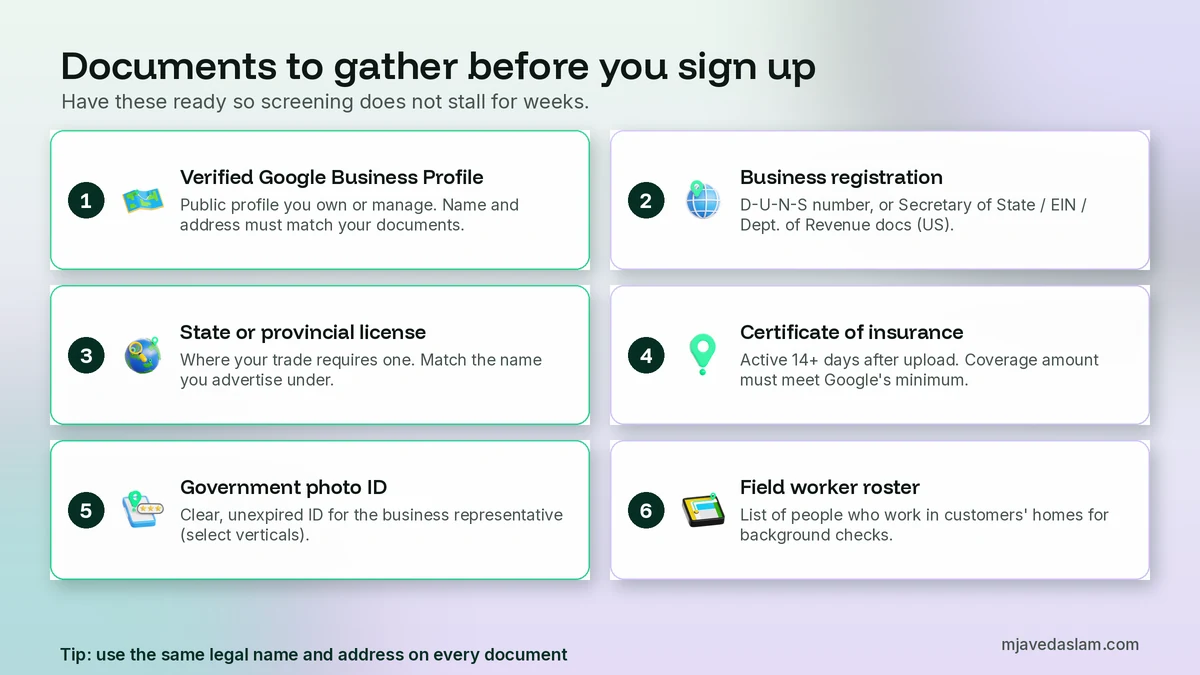
Don’t open the signup form empty-handed. Most delays I see are documents that don’t match each other, not “Google being slow.” Gather these first.
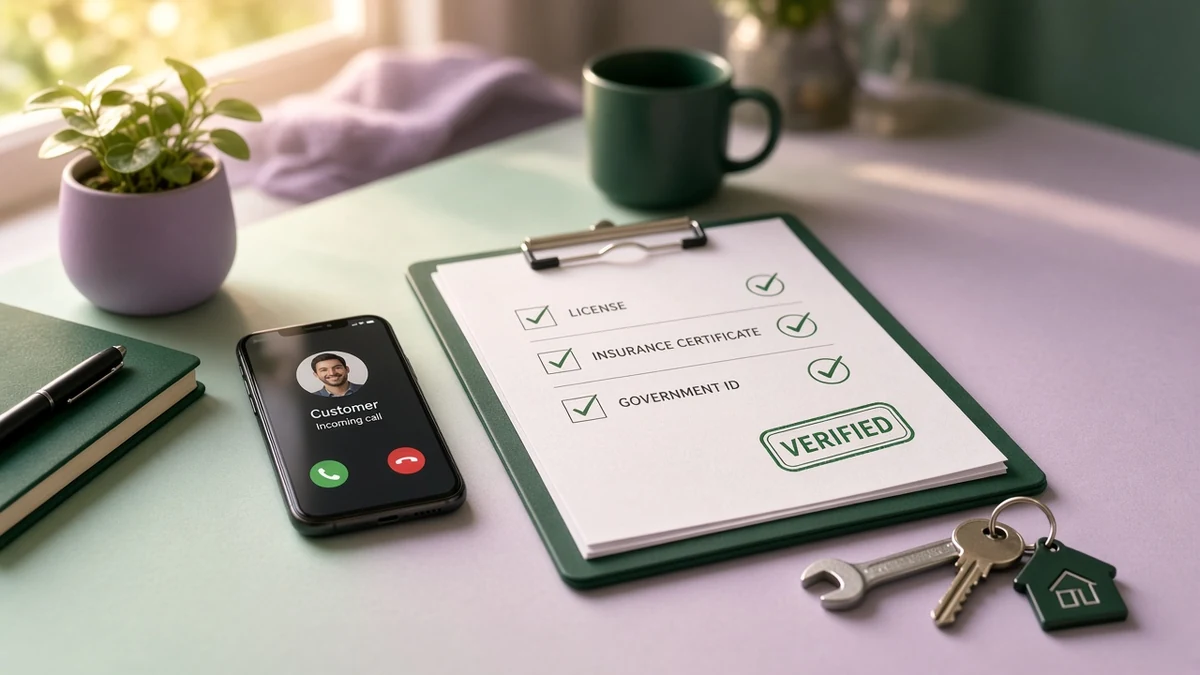
- A public, verified Google Business Profile. Google requires every Local Services advertiser to have an affiliated Business Profile. The person completing LSA verification must be an Owner or Manager on that profile, even if someone else already claimed it. If you don’t have one yet, start with my guide to claiming a Google Business Profile.
- Matching legal name and address. The name and address on your Business Profile, license, insurance and registration need to line up. If you advertise under a trade name, have a Doing Business As (DBA) document ready.
- State or provincial license (where your trade requires one). Google validates licenses against state or country databases when it can.
- Certificate of insurance (for categories that need it). Google’s North America guidelines say the policy must be active for at least 14 days after you upload it, show a policy number, match the name you advertise under, cover the service area you want, and meet the minimum coverage amount shown in your dashboard.
- Business registration proof. In the US, for select verticals, Google often uses a D-U-N-S number from Dun & Bradstreet. If you can’t get one, Google accepts Business Registration with the Secretary of State’s Office, an EIN letter from the IRS, or registration with the Department of Revenue. Applying for a new D-U-N-S number can take up to 30 days, so start early.
- Government photo ID for the business representative, when Google asks for a representative check (US, select verticals). Google’s partner Evident runs a private identity check on a clear, unexpired government-issued photo ID.
- A field worker roster for categories that require background checks on people who work in customers’ homes. Office staff who never visit customers don’t need the check.
Service-area businesses (no public storefront) can still run LSA in many categories, but your Business Profile setup has to be correct. If that describes you, check my guide to a service-area business Google Business Profile before you submit anything.
Step 1: Confirm you’re eligible
Local Services Ads are not open to every business. According to Google’s getting started guide for Local Services Ads, availability is limited to certain service categories, and you should use Google’s eligibility checker for your area. The same page lists these countries for the eligibility tool: Austria, Belgium, Canada, France, Germany, Ireland, Italy, Spain, Switzerland, the United Kingdom and the United States. Categories differ by country. The US list is long — plumbers, electricians, HVAC, roofers, house cleaning, lawn care, pest control, locksmiths, lawyers, dentists, pet care and many more — but if your trade or country isn’t on the list, LSA isn’t an option. In that case, use Google Ads Search instead; my Google Ads management page explains how I run Search for local businesses.
Urgent categories such as plumbing, HVAC, electrical, locksmiths and garage door get extra screening. Google says locksmiths and garage door providers also go through Advanced Verification, which can include a review of publicly available data and a video interview. Plan more time for those.
Step 2: Sign up at g.co/localservices
New advertisers still start outside the main Google Ads “create campaign” flow. Google’s Local Services Ads transition page says you can’t create a new pay-per-lead campaign directly inside Google Ads at this time, and that new sign-ups should continue at g.co/localservices. Use the same Google account that owns or manages your Business Profile.
During signup you’ll enter business details, pick your category and job types, set the areas you serve, and connect billing. Keep job types honest. If you turn on every job type Google offers for your category, you’ll pay for leads you don’t want and dilute the ones you do.
You can also call Google’s Local Services sales lines listed on the getting-started page (for example, 1-877-824-3983 for American English) if you want a human walkthrough. I usually prefer self-serve so you control which job types go on from day one.
Step 3: Complete screening and verification
This is the long part. Google’s screening and verification process page says every business must pass checks that vary by category and location, and may include background, business registration, insurance, license checks and minimum review requirements. Google’s US requirements page says that on average the process takes 3 to 4 weeks after you submit your documents, and recommends starting screening as soon as the account exists.
Business Profile affiliation
Google matches your Local Services ad to your Business Profile so only authorized people manage calls and messages. If the signed-in user isn’t an Owner or Manager on the matched profile, the dashboard lets you request access. You can finish other verification steps in the meantime, but this affiliation step must be done before your ad can appear. Google says it can take up to 24 hours for the step to show as complete on the verification dashboard.
Background checks (US and Canada, select categories)
Google says background checks cover the business entity, owners and field workers who perform core services at customer properties. Checks include identity and criminal history (for example, sex offender, terrorist and sanctions registries in the US) and, at company level, civil litigation history such as judgments and liens. Google states there is no credit check or credit pull, and businesses aren’t charged for the background check. Local partners run the checks; results stay between you and the partner.
If you fail: after resolving errors with the partner and a final disqualification, Google says you must wait an additional 30 days to reapply. After a second denial, you wait 180 days before further reapplications.
Licenses and insurance
Upload licenses and insurance from Business Verification in the Local Services menu. For insurance in North America, Google’s upload guidelines require a signed Certificate of Insurance when possible, a policy number, matching business name (or DBA proof), an address that covers your advertised service area, and coverage at or above the amount shown in your dashboard. Healthcare categories often upload general liability and professional liability separately.
Pre-badge ads while you finish
Google offers pre-badge ads so you can receive leads after preliminary checks while you finish the rest. Per the getting-started guide, pre-badge requirements typically include license or business registration (or acknowledging you hold the right licenses), reviews subject to category rules, and completed billing with a budget. Pre-badge listings appear below fully verified Google Verified providers. Pre-badge ads aren’t available for garage door services, health care verticals or locksmiths.
Google Verified badge
Once you complete required checks for your vertical, eligible profiles show the Google Verified badge. Google replaced the older Google Guaranteed, Google Screened and License Verified badges with this single badge in 2025, and discontinued the Money Back Guarantee. The badge isn’t available for auto, beauty and dining verticals.
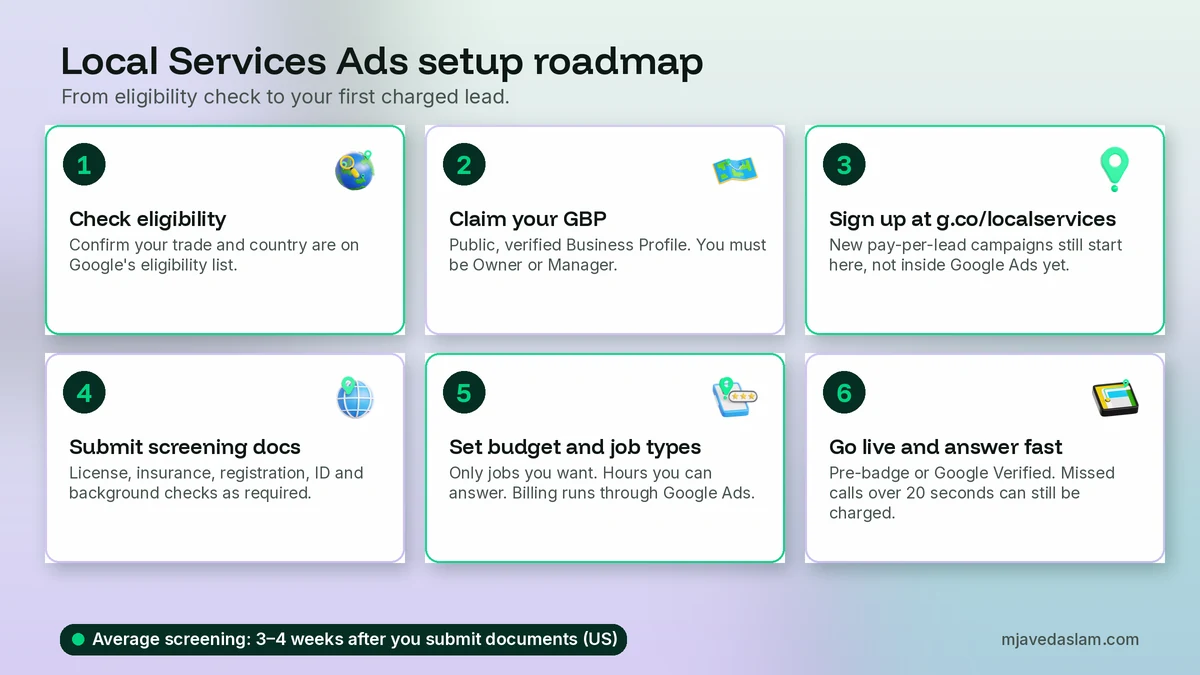
Step 4: Set budget, bidding, job types and hours
You’re charged per valid lead, not per click. Google’s How leads work page says you set an average weekly budget based on how many leads you want in a typical week, and you can spend more than that average in a busy week, but you won’t exceed your monthly max (roughly weekly budget times the average number of weeks in a month). After migration into Google Ads, weekly budgets become daily budgets (weekly ÷ 7), with a monthly cap of daily × 30.4.
Valid leads Google lists include:
- A phone call you answer, or a call you return and speak on.
- A missed call during your business hours where the caller stays on the line more than 20 seconds.
- A text, email or voicemail from the customer.
- A booking request (United States and Canada only; not for health care).
Spam and duplicates aren’t charged. Low-quality lead credits aren’t available for health care, tax specialists or advertisers in Europe, the Middle East and Africa. Message leads are usually priced lower than phone leads, though Google says not always.
Ad hours and answering. Business hours come from your Google Business Profile. If your ad schedule is tighter than those hours, unanswered calls are only charged when they fall inside both. The 20-second missed-call rule is why I tell every client: don’t turn LSA on until someone will actually pick up. A missed call can cost money and hurt ranking.
Job types and area. Turn on only the jobs you want at LSA prices. Narrow the service area to places you truly serve. You can refine later if lead quality is off.
Step 5: Go live, manage leads and stay responsive
Once billing is set and required checks clear (or you qualify for pre-badge), your ad can show in the Local Services unit on Google Search (and Maps placements as Google describes for this product). When a customer contacts you, you get an email. Reply to messages even when you decline the job — Google says regularly failing to answer calls or messages can hurt ad ranking.
Inside the account you can manage leads, adjust budget, pause when you’re booked solid, track bookings and lead credits where available (US and Canada), and ask for reviews (US and Canada). Billing for Local Services Ads is managed by Google Ads; a suspension on the Google Ads account also suspends LSA. Pause or edit the LSA campaign from the Local Services inbox (or the Google Ads Leads/campaign settings after migration), not by randomly pausing unrelated Search campaigns.
After Google migrates your account, leads live under Goals → Conversions → Leads in Google Ads. Past lead history moves over; old performance reports do not, so screenshot or download reports before your migration date. The account admin gets email 14 days before migration.
How long until you get leads?
Plan on document prep (a few days to a few weeks if you need a new D-U-N-S number), then Google’s 3–4 week average screening after submission, then a short ramp as the system learns. Urgent categories and Advanced Verification can run longer. Pre-badge can shorten time-to-first-lead for eligible trades, but you still sit below fully badged competitors until verification finishes.
I don’t quote “typical cost per lead” numbers. Google says lead prices vary by location, job type, lead type and bidding mode. Judge the channel after a fair sample by cost per booked job, not cost per lead.
Common setup mistakes (and how I avoid them)
- Signing up before the Business Profile is verified. Affiliation blocks go-live. Claim and verify first.
- Name mismatches across license, insurance and the profile. Fix NAP consistency before upload; DBA paperwork if needed.
- Turning on every job type. You pay for leads you refuse.
- Ad hours with nobody answering. Missed calls over 20 seconds during hours can still be charged.
- Ignoring the field worker roster. Missing workers delay background checks in home-service categories.
- Expecting Google Ads “new campaign” to create LSA. New pay-per-lead setup still starts at g.co/localservices.
- Skipping report backups before migration. Performance history doesn’t transfer.
For Search campaigns you run alongside LSA, keep waste down with Google Ads location targeting and negative keywords for small businesses so you’re not paying for out-of-area or wrong-intent clicks while LSA covers your core jobs.
Frequently asked questions
How do I set up Local Services Ads for the first time?
Check eligibility for your category and country, make sure you have a public verified Google Business Profile that you own or manage, sign up at g.co/localservices, submit the screening documents Google requests, complete billing, and set budget, job types and hours. Ads can go live after required checks (or as pre-badge ads if your category allows). Screening averages 3 to 4 weeks after you submit documents in the US.
How long does Local Services Ads verification take?
Google recommends starting screening as soon as the account is created and says the process takes 3 to 4 weeks on average after you submit documents (US). Background checks, license validation, insurance review and Business Profile affiliation all have to clear. Getting a new D-U-N-S number, if you need one, can take up to 30 days on its own before you even submit.
Do I need a Google Business Profile for Local Services Ads?
Yes. Google requires a public, verified Google Business Profile affiliated with your Local Services account. The person finishing LSA verification must be an Owner or Manager on that profile. Name, address and hours sync from the Business Profile into Google Ads after migration.
What documents do I need for Local Services Ads screening?
It depends on category and location. Common items include business registration (often a D-U-N-S number or EIN/Secretary of State docs in the US), state or provincial licenses, a certificate of insurance that meets Google’s minimums, government photo ID for the representative, and background checks for owners and field workers in applicable home-service categories. Your Local Services dashboard lists exactly what your business needs.
Can I run Local Services Ads without the Google Verified badge?
In some categories, yes, through pre-badge ads after preliminary checks and billing setup. Pre-badge ads show below fully verified providers. Pre-badge isn’t available for garage door, health care or locksmiths. Auto, beauty and dining don’t get the Google Verified badge at all.
Where do I create a new Local Services Ads campaign in 2026?
Still at g.co/localservices for new pay-per-lead campaigns. Google is migrating existing Local Services Ads into Google Ads as Performance Max campaigns with pay-per-lead goals (US home services from August 2026, broader groups later in 2026, non-US and remaining categories in 2027), but Google says you can’t create those new pay-per-lead campaigns directly in Google Ads yet.
Next step
If your category is eligible, fix the Business Profile, gather matching documents, and sign up at g.co/localservices this week so screening can run while you keep answering the phone for your regular work. If you want me to check eligibility, prep the document list for your trade, or run LSA next to Search without wasted spend, see my Google Ads management service — or start with the side-by-side in Local Services Ads vs Google Ads if you still need the strategy call.