Google Ads remarketing for small business means showing ads to people who already visited your site (or used your app) by building data segments from a properly installed Google tag, then adding those segments to campaigns with budgets small enough that you are not “spraying” the whole Display Network. Start with standard website-visitor segments, consent-aware tagging, frequency caps, and a narrow offer — not a six-figure dynamic catalog feed on day one.
This guide is remarketing setup and small-budget guardrails. It is not Search vs Display strategy overview, conversion-tracking install alone, Quality Score theory, or the call-only ads sunset playbook.
Campaign help: Google Ads services.
Google Ads remarketing for small business — quick answer
- In Google Ads: Tools → Shared library → Audience manager → Audience sources / Your data sources → set up the Google tag to collect standard website data (or use Tag Manager).
- Install the Google tag on every page (and the config for your Ads ID). Without the tag, segments stay empty.
- Create a data segment such as “All visitors — 30 days” and optionally “Key pages” (pricing, contact, service pages) with shorter windows.
- Add the segment to a Search campaign as an observation or targeting layer, or to a modest Display remarketing campaign with strict geo and frequency limits.
- Respect privacy/consent requirements for your region before firing advertising tags. Empty consent = empty ethical remarketing.
Google’s Help on audience sources and data segments describes collecting website visit data via the Google tag, building segments, and (separately) dynamic remarketing with parameters. “Remarketing” and “retargeting” are often used interchangeably in marketing speech; in Google Ads UI you will mostly see audiences / data segments.
Standard remarketing vs dynamic remarketing
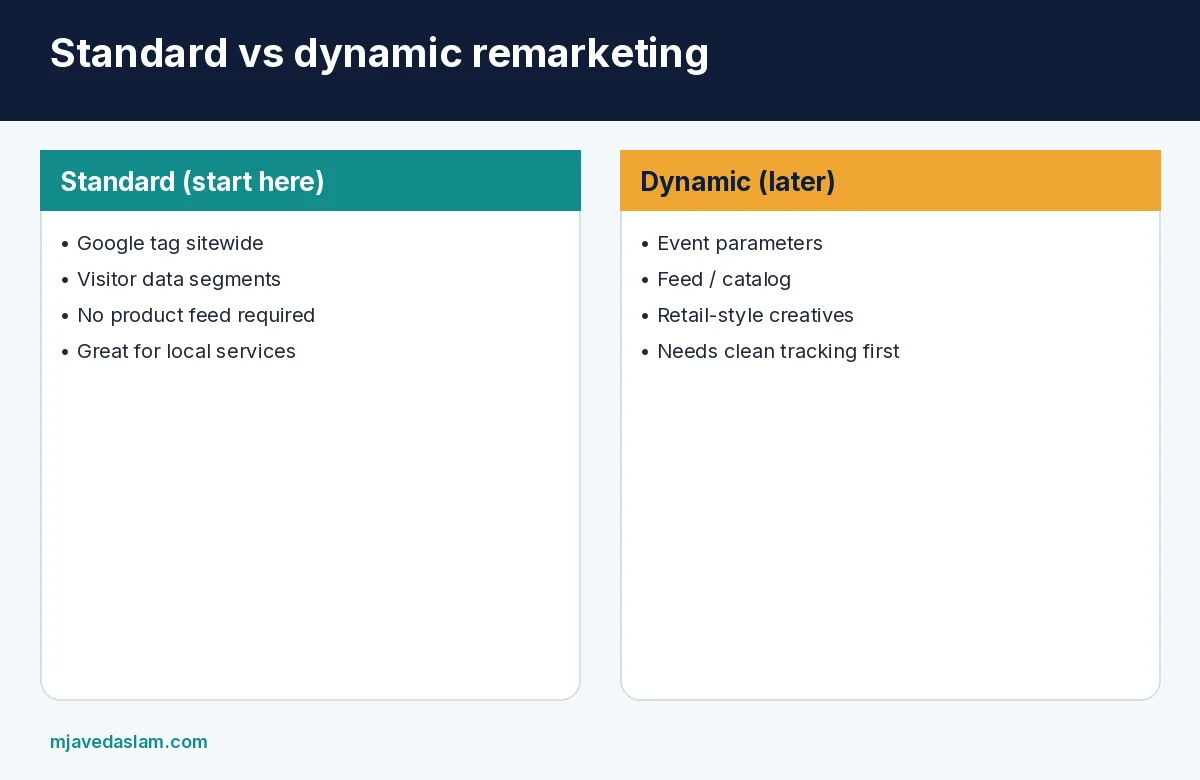
Standard: Tag collects general visit data; you show ads to people who hit your site. Ideal first step for service businesses without a product feed.
Dynamic: Tag plus event parameters (and usually a feed) to show ads related to specific products viewed. Powerful for retailers; overkill for a three-service plumber until standard segments and conversion tracking already work: conversion tracking on WordPress.
Google’s tagging Help walks through Audience manager → set up tag → collect standard data vs specific attributes for personalization. Tag Manager has a dedicated Google Ads remarketing tag path using your Conversion ID.
Small-budget setup that does not waste spend
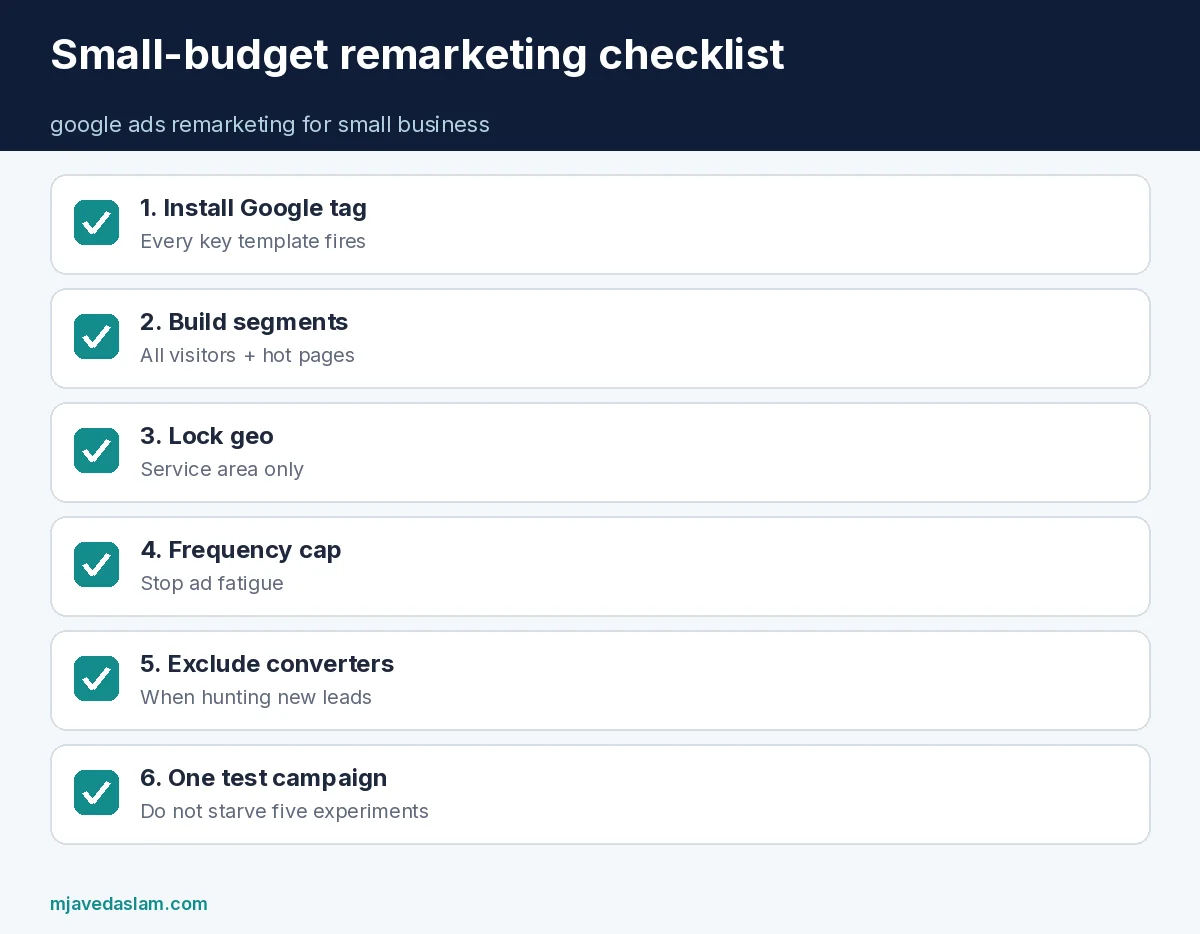
- Geo first: Restrict to your service area. Remarketing a worldwide bounce list is expensive noise.
- Segment quality: Exclude converters if your goal is new leads. Keep “visited contact page but did not convert” as a hotter list when volume allows.
- Frequency caps: Cap impressions per user so the same neighbor does not see you 40 times a day.
- Creative: Offer something specific (estimate, seasonal tune-up) — not a vague logo ad.
- Network choice: Many small service brands start by adding remarketing lists to Search (RLSA-style) before opening broad Display. Display can work with tight geos and exclusions.
- Budget: Treat early remarketing as a learning line item. If daily budgets are tiny, keep one campaign well-funded enough to exit learning rather than five starved experiments. Cost context: Google Ads cost for small business.
Tag install notes for WordPress
Prefer one clean Google tag path — either via Tag Manager or a single plugin that injects the official tag — not three plugins all firing duplicate gtag configs. Confirm the tag fires on key templates (service pages, contact thank-you). Thank-you pages should already be wired for conversions; remarketing and conversion tracking share tag infrastructure but are not the same goal.
If you already installed the Google tag for conversions, Google’s Help notes you may only need the additional config / remarketing enablement rather than a second full paste — follow the current Audience manager instructions in your account.
Creative and offers that fit local services
- Remind visitors of the exact service page they viewed.
- Use call assets and location assets so mobile users can tap to call: ads assets for local business.
- Seasonal hooks beat generic “We’re the best” copy.
- Keep landing pages fast — bouncing from a slow page into remarketing hell helps no one: Core Web Vitals.
Privacy, consent, and “why is my list tiny?”
Browsers limit third-party tracking; consent banners may block ads tags until accepted; short membership windows and low traffic produce small lists. Google documents membership duration controls on segments — do not invent a magic “always 540 days maximizes ROI” rule. If the list has almost no users, fix tagging and traffic before scaling Display bids.
Follow the laws and platform requirements that apply to your business and visitors. This article is not legal advice; it is a reminder that “just paste the tag” without consent controls can be both non-compliant and ineffective.
Common mistakes
- Launching dynamic remarketing with an empty or stale feed.
- No geo limits on Display remarketing.
- Remarketing to converters with the same “buy now” message forever.
- Duplicate tags inflating or breaking measurement.
- Expecting remarketing to fix a broken offer or a site with no trust signals.
- Confusing Search vs Display goals — overview: Search vs Display.
Ops checklist (first two weeks)
- Confirm Google tag fires sitewide (Tag Assistant / preview).
- Build All visitors + Pricing/Contact segments.
- Exclude converted customers where appropriate.
- Add lists to Search as observation; note search term overlap.
- If using Display, lock geo, add content exclusions, set frequency cap, start with one ad group.
- Review search/display placement reports weekly; cut waste.
Agencies should document which account owns the tag when multiple Ads accounts share a CRM site — crossed conversion IDs create ghost lists.
When traffic is under a few hundred visits a month, invest first in Search intent and GBP visibility; remarketing needs a pool of visitors to matter. Local presence: Google Business Profile services.
After segments fill, test one message change at a time. Creative chaos plus automated bidding makes learning impossible on small budgets.
FAQ: Google Ads remarketing for small business
Is remarketing the same as retargeting?
In practice marketers use both words for “ads to past visitors.” In Google Ads, configure audiences / data segments from your tag and other sources.
Do I need a big budget?
You need enough budget to serve the list without constant under-delivery — but you do not need enterprise spend. Tight geo and caps matter more than a huge daily number.
Can service businesses use remarketing without products?
Yes. Standard website-visitor segments work without a retail product feed. Save dynamic remarketing for when you have feed-worthy inventory.
Where do I set up the tag?
Google Ads → Tools → Shared library → Audience manager → audience / data sources → Google tag setup. Or deploy via Google Tag Manager with your Conversion ID.
Why is my remarketing list empty?
Tag not installed, consent blocking hits, brand-new tag with no traffic yet, or wrong account ID. Verify with tag diagnostics before raising bids.
Should remarketing replace Search campaigns?
No. Remarketing assists people who already found you. High-intent Search and a solid local profile still do the heavy lifting for new demand.
Google Ads remarketing for small business works when the tag is clean, the geo is honest, and the offer respects people who already met you once. Start standard, stay narrow, measure conversions — then expand.
Keep documentation in your ops folder: screenshot the live UI quarterly, store the Help URLs you relied on, and note the date you last verified settings. Interfaces move; your runbook should move with them.
When something conflicts between an old blog post and current Google Help, trust Help — then update your internal SOP the same day so the next teammate does not relearn a sunset feature.
When list sizes finally grow, split messaging for “visited pricing” versus “visited blog only” if volume supports it — blog readers often need a softer education ad than quote-page abandoners.
Exclude placements that never convert for your category once you have placement data; local services rarely need random mobile-game inventory even if the CPM looks cheap.
Document consent-mode or banner behavior with your developer so marketing does not “fix” empty lists by re-pasting tags that never fire for declined cookies.
Quarterly, export segment sizes and note membership windows. If google ads remarketing for small business lists shrink after a site redesign, check the tag on new templates first.