
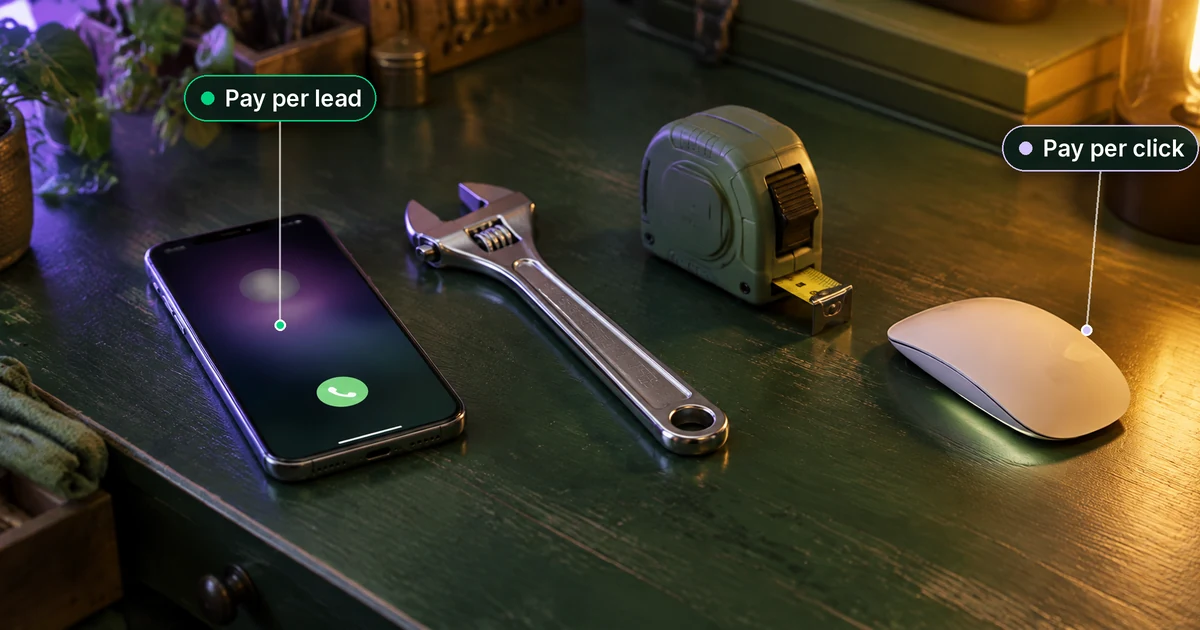
Here’s the short answer. Google Local Services Ads vs Google Ads comes down to how you pay and who can join. With Local Services Ads (LSA), you pay for a valid lead, such as a phone call, message or booking, not for a click. There are no keywords, and you need to pass Google’s screening. With Google Ads Search campaigns, you pay per click, choose your own keywords and send people to your website, and almost any business in almost any country can use them. If your trade is eligible for LSA in your area and someone reliably answers the phone, I usually start there. If it isn’t, or you need control over keywords and landing pages, start with Google Ads Search. Many busy local businesses end up running both.
Plumbers, roofers, cleaners and lawyers ask me this almost every week, usually after a sales call that left them more confused. One more thing has changed in 2026: Google is moving Local Services Ads into the Google Ads platform. Below I compare the two side by side, explain what each one really costs, cover the 2026 migration, and give you my rule for which one to start with.
What are Google Local Services Ads?
Local Services Ads are Google’s pay-per-lead ads for local service businesses. According to Google’s getting started guide for Local Services Ads, the Local Services unit shows prominently in Google Search results when people search for the services you offer in the areas you’ve chosen. A customer can call you, send you a message or, in some categories, book you directly from the ad.
What makes LSA different:
- You pay per lead, not per click. A lead is a customer contacting you through the ad.
- There are no keywords. You choose your service category, job types and service area, and Google matches you to searches.
- You must pass screening. Depending on your category and location, that can include license, insurance, business registration and background checks. You also need a public, verified Google Business Profile.
- Only some categories and countries qualify. Google’s list covers trades such as plumbers, electricians, HVAC, roofers and cleaners, plus categories like lawyers, dentists, pet care and more. Its eligibility checker covers Austria, Belgium, Canada, France, Germany, Ireland, Italy, Spain, Switzerland, the United Kingdom and the United States, and categories differ by country.
What happened to “Google Guaranteed”?
If you’re searching for “Google Guarantee ads vs search ads”, you’ll find a lot of old advice. In 2025 Google replaced its separate LSA badges (Google Guaranteed, Google Screened and License Verified by Google) with a single Google Verified badge, and it discontinued the Money Back Guarantee. Google’s page on the Google Verified badge explains that the badge shows on your LSA profile, that the relevant verifications are called out on the profile, and that eligible existing advertisers who had completed verification got it automatically. So when someone today says “Google Guarantee ads”, they mean Local Services Ads.
What are Google Ads (Search campaigns)?
When most owners say “Google Ads”, they mean Search campaigns: the text ads marked “Sponsored” that appear for searches you pick with keywords. You write the ads, choose the keywords, decide where people land on your website and set your bids. Google explains in its cost-per-click definition that with CPC bidding you pay for each click on your ad, and your maximum CPC is the most you’ll usually be charged, though often you pay less.
Google Ads also runs Display, YouTube, Shopping and Performance Max campaigns, but for a local service business comparing options with LSA, Search is the fair comparison. That’s what I mean by “Google Ads” in the rest of this guide.
The strengths of Search are control and reach. You can target any service you offer, not just the job types Google lists for your category. You can exclude searches you don’t want with negative keywords for small businesses, and tighten your area with Google Ads location targeting. The trade-off: you pay for clicks whether or not the person ever calls, so your website and tracking have to do real work.
Local Services Ads vs Google Ads: side-by-side comparison
This table is based on Google’s help pages as of November 2026. Details still vary by country and category, so treat it as a guide and check your own account.
| Question | Local Services Ads | Google Ads (Search) |
|---|---|---|
| What you pay for | Valid leads: calls, messages and bookings through your ad | Clicks on your ad (cost per click) |
| How you’re matched to searches | No keywords. Your category, job types and service area | Keywords, match types and negative keywords you choose |
| Where people go | Your LSA profile, then they call, message or book | Your website landing page (or a call, if you use call assets) |
| Who can use it | Eligible categories in supported countries only | Almost any business that follows Google Ads policies |
| Screening | License, insurance, registration or background checks, depending on category and location | Standard advertiser verification, no trade screening |
| Trust badge | Google Verified badge (most eligible categories) | None |
| What moves your position | Your bid, responsiveness, relevance and profile quality, including reviews | Your bid, ad quality, landing page experience and expected click-through rate |
| Control | Low: job types, area, hours, budget | High: keywords, ad copy, pages, schedule, devices, bids |
| Website needed? | No, but your Business Profile and reviews matter a lot | Yes, in practice. Your landing page decides whether clicks turn into calls |
| Time to go live | Weeks. Google says verification takes 3 to 4 weeks on average after you submit documents (US) | Usually days, once ads are reviewed and approved |
Two lines in that table cause the most confusion. First, “no keywords” doesn’t mean “no control”. You still choose job types and service areas, and Google’s LSA ad rankings page says ranking depends on your bid, how likely your ad is to bring a lead (including how responsive you are) and your profile quality, which includes your rating, number of reviews, average response time, photos and completed verification checks. Second, “no website needed” for LSA is true, but your Google Business Profile has to be verified and in good shape. If yours isn’t, start with my guide to claiming a Google Business Profile.
The big 2026 change: Local Services Ads are moving into Google Ads
If you read an LSA guide from last year, this part is missing. Google is moving Local Services Ads into the main Google Ads platform as a special campaign type called Performance Max with pay-per-lead goals. Here’s what Google’s LSA transition page says.
What isn’t changing:
- You still pay only for valid leads, not clicks.
- The ads still show only on Google Search and Google Maps, in the same positions as before.
- The campaign is still keywordless and based on your service categories and areas.
What is changing:
- The dashboard. You manage budgets, targeting and leads inside Google Ads. Leads appear under Goals, then Conversions, then Leads.
- Weekly budgets become daily budgets. Your average weekly budget is divided by 7. Google says monthly spend is capped at your daily average budget multiplied by 30.4.
- Manual bidding goes away. Setting a maximum cost per lead by hand is no longer supported. You get automated bidding (Maximize Conversions, or a target cost per lead).
- Business details sync from your Business Profile. Name, address and hours come from your Google Business Profile in one direction. Google says a significant change to your business name or physical address can trigger a verification review that typically takes 24 to 48 hours, and your campaign may pause during it.
- Old reports don’t move. Your past lead history transfers, but campaign performance reports don’t. Google recommends downloading or screenshotting them before you migrate.
The timeline: the first phase began in August 2026 for select US home service categories, including plumbing, HVAC, electrical, roofing, house cleaning, lawn care, pest control, appliance repair and moving. Broader groups, including service-area businesses without storefronts, follow in late 2026. Non-US accounts and the remaining categories follow in 2027. Google emails the account administrator 14 days before each account’s migration date.
For a new advertiser, the practical point is simple. Google says you can’t yet create a new pay-per-lead campaign directly inside Google Ads, so new sign-ups still start at g.co/localservices. I’ll walk through that process step by step in my guide to setting up Local Services Ads. Either way, LSA and Search ads will increasingly sit in the same account. That makes it easier to run both, and easier to compare them honestly.
Local Services Ads cost vs Google Ads cost
I won’t quote you a “typical” cost per lead or cost per click. Both vary too much by trade, city and season, and any single number would mislead you. What I can explain is how each one charges you, because that’s what decides which one fits your budget. For Search budgets in more depth, see my upcoming guide to Google Ads cost for small businesses.
How Local Services Ads charge you
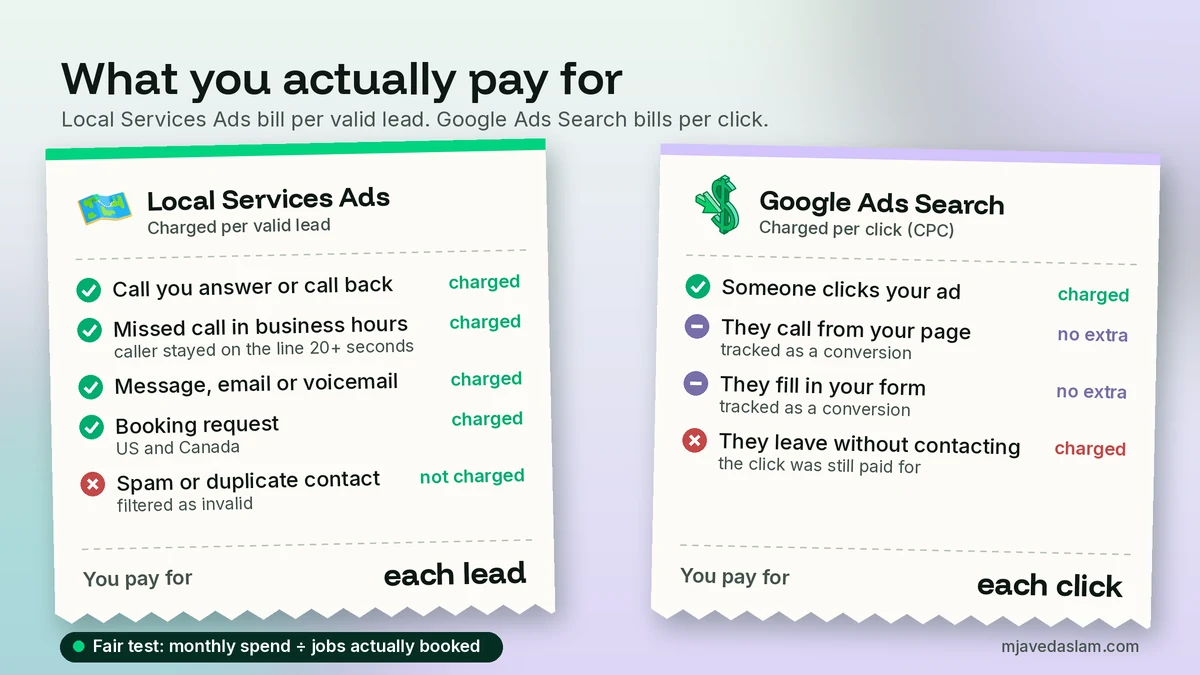
Google’s How leads work page says you’re charged for each valid lead, and that lead prices can vary by location, job type, lead type and bidding mode. A valid lead can include:
- A phone call you answer, or a call where you call the customer back and speak with them.
- A missed call during your business hours where the customer stays on the line for more than 20 seconds.
- A text message, email or voicemail from the customer.
- A booking request (in the US and Canada).
Google says it filters out invalid activity such as spam and duplicate contacts, and that charged leads can be credited automatically if they turn out to be low quality. Those credits aren’t available for health care categories, tax specialists or advertisers in Europe, the Middle East and Africa. Google also says message leads are usually priced lower than phone leads, though not always.
Look closely at the missed-call rule. If nobody answers your phone during business hours, you can still be charged for the lead. That’s why I tell owners that LSA rewards whoever answers.
How Google Ads Search charges you
Search ads charge per click. Your actual cost per click is usually below your maximum bid. Google’s average daily budget page explains the limits: on any one day, most campaigns can spend up to twice the average daily budget, but in a month you won’t pay more than 30.4 times your daily budget. Google’s own example: a monthly budget of $304 works out to $10 a day.
The catch is what a click buys you. A click is a visit, not a customer. Some visitors call, some fill in a form, and some leave. Your real cost per lead on Search is your spend divided by the calls and forms you actually got, so you can only know it if you track conversions properly. I’ll cover that setup in my guide to Google Ads conversion tracking for WordPress.
Compare cost per booked job, not cost per lead
Here’s how I compare them for clients. For each channel, take one month of spend and divide it by the jobs you actually booked from it. A cheap lead that never books is expensive. A more expensive lead that books more often can be the bargain. To do this, you need two simple habits: note where every call came from, and mark which ones became paid jobs. A spreadsheet is enough to start.
Pros and cons of each
Local Services Ads
- Pro: You don’t pay for clicks from people who never contact you.
- Pro: The Google Verified badge and your reviews do much of the persuading, so a weak website hurts less.
- Pro: Simple to run: there are no keywords, ad copy or landing pages to manage.
- Con: Only eligible categories and countries. If your service isn’t on the list, it isn’t an option.
- Con: Screening for new advertisers can take weeks before you get a single lead.
- Con: Less control. You can’t target a high-value job type Google doesn’t offer for your category, and manual bidding is going away.
- Con: Missed calls and slow replies cost you twice: you can be charged, and your ranking can drop.
Google Ads Search
- Pro: Works for almost any business, in almost any country.
- Pro: Full control over keywords, ads, landing pages, schedule and area. You can focus on your most profitable services.
- Pro: Can go live within days.
- Con: You pay for every click, including people who were only comparing prices.
- Con: It needs a good landing page, conversion tracking and regular search-term cleanup, or the budget leaks.
- Con: There’s no trust badge, so your ad copy, reviews and website have to earn the call.
Which should you start with? My rule of thumb
This is my practice with clients, not a Google rule. Answer these honestly.
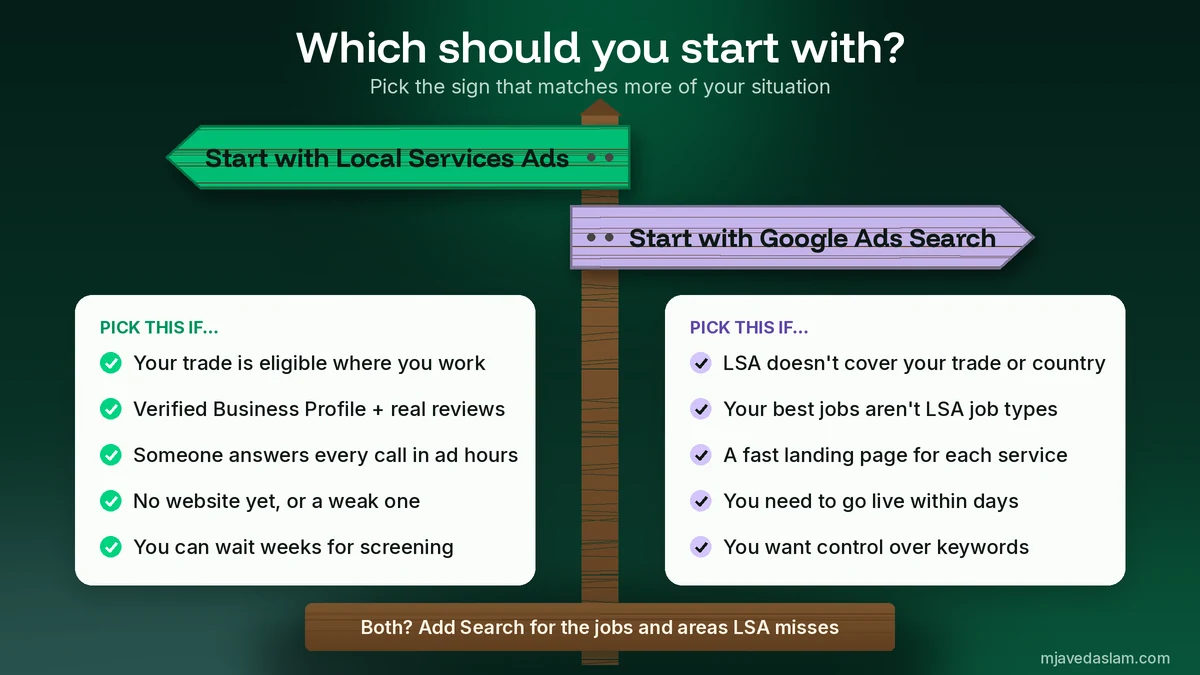
Start with Local Services Ads if:
- Your category is eligible in your area (check Google’s eligibility tool first).
- You have a verified Google Business Profile with genuine reviews.
- Someone answers the phone during your ad hours, and messages get a reply within the hour.
- You want leads without building or fixing a website first.
- You can wait a few weeks for screening.
Start with Google Ads Search if:
- Your category or country isn’t covered by LSA. If your business is in Pakistan, for example, it isn’t on Google’s current list.
- Your most profitable jobs aren’t in the LSA job types for your category.
- You have a fast, clear landing page for each main service.
- You need to go live quickly, or you want tight control over which searches you pay for.
Run both when: LSA is giving you good leads but runs out of budget or doesn’t cover all your services. Then add Search campaigns for the gaps: specific high-value jobs, nearby towns or brand searches. For a trade example, see my guide to local SEO for plumbers, which shows how ads and organic Maps rankings support each other.
How I run both without wasting money
Running LSA and Search together isn’t double spending if each one has a job. This is how I set it up:
- Fix the Business Profile first. Both rely on it now: LSA uses it for verification and syncing, and a strong profile helps people trust a Search ad too. Service-area businesses should check their setup with my guide to the service-area business Google Business Profile.
- Give LSA your core jobs. Turn on only the job types you want, and set ad hours you can actually answer.
- Give Search the gaps. Use Search for services LSA doesn’t cover, plus areas or times where LSA runs out of budget.
- Clean up search terms every week. Add negatives for jobs you don’t do, DIY searches and job seekers, and choose sensible Google Ads keyword match types so you don’t pay for loose matches.
- Track every lead to a booked job. Review LSA leads in the lead inbox (or the Leads page in Google Ads after migration) and record which Search calls and forms became customers.
- Judge after a fair period. Google says LSA bidding takes about two weeks to show accurate results as its model learns. I give both channels at least a full month before moving budget.
Mistakes I see with Local Services Ads and Google Ads
- Running LSA with nobody answering the phone. Missed calls can still be charged and can lower your ranking.
- Sending Search ads to the homepage. Someone searching for “blocked drain” wants a blocked-drain page with a phone number at the top, not your company history.
- Turning on every job type. If you don’t do a job, or don’t want it at LSA prices, switch it off.
- Not saving LSA reports before migration. Google says old performance reports won’t carry over. Screenshot or download them now.
- Judging Search on clicks. Clicks are a cost, not a result. Judge on calls and booked jobs.
- Believing old “Google Guaranteed” sales pitches. The badge is now Google Verified, and the Money Back Guarantee has ended.
Frequently asked questions
What is the difference between Local Services Ads and Google Ads?
Local Services Ads charge you per valid lead (a call, message or booking), use no keywords, and require your business to pass Google’s screening and verification. Google Ads Search campaigns charge per click, let you choose keywords and send people to your website, and are open to almost any business. Google is now moving Local Services Ads into the Google Ads platform as Performance Max campaigns with pay-per-lead goals, but they still charge per lead and show only on Search and Maps.
How much do Local Services Ads cost?
There’s no fixed price. Google says the cost of a lead varies by location, job type, lead type and bidding mode, and message leads are usually priced lower than phone calls, though not always. You set an average budget, and Google says leads it judges invalid, such as spam or duplicate contacts, aren’t charged. Credits for low-quality leads aren’t available in health care, for tax specialists or in Europe, the Middle East and Africa.
Are Local Services Ads cheaper than Google Ads?
Not automatically. A lead usually costs more than a click, but one lead can be worth several clicks that never call. The fair comparison is cost per booked job: take a month’s spend on each channel and divide it by the paying jobs it produced. Track where each call came from so you can compare honestly.
Is Google Guaranteed the same as Local Services Ads?
Google Guaranteed was the old badge on many Local Services Ads. In 2025 Google replaced the Google Guaranteed, Google Screened and License Verified badges with a single Google Verified badge and discontinued the Money Back Guarantee. Eligible advertisers who had already completed verification received the new badge automatically.
Can I run Local Services Ads and Google Ads at the same time?
Yes. Many local businesses do. Use Local Services Ads for your core eligible jobs and Google Ads Search for services, areas or times that LSA doesn’t cover. Add negative keywords for jobs you don’t want, and track every lead to a booked job so you know which channel is working.
Are Local Services Ads available in my country?
Only in some countries and categories. Google’s eligibility checker lists Austria, Belgium, Canada, France, Germany, Ireland, Italy, Spain, Switzerland, the United Kingdom and the United States, and the eligible categories differ by country. If your trade or country isn’t covered, Google Ads Search is the practical place to start.
Next step
If you’re deciding between Local Services Ads and Google Ads, start with three checks: is your category eligible in your area, is your Business Profile verified with real reviews, and who answers the phone? Those answers usually make the choice for you. If you’d like me to check your eligibility, set up LSA or build Search campaigns that don’t leak budget, see my Google Ads management service.