Here’s the short answer. To add social media links to Google Business Profile, open your profile on Google, select Edit profile, then Contact. Next to “Social profiles,” select Edit, pick the platform, paste your profile address and select Save. Google allows one link each for Facebook, Instagram, LinkedIn, Pinterest, TikTok, X and YouTube. If you can’t see the option, it’s probably not available in your region yet. If a link disappears, it’s usually the wrong URL format, a pending or rejected edit, or a change Google made.
I’m Javed Aslam, a local SEO consultant in Pakistan. I set up and fix Google Business Profiles for small businesses. Social links are a small field, but they cause a lot of confusion: a Facebook link that never shows up, or a link on the profile that the owner never added. This guide covers what Google’s help pages say today, the exact steps, the URL formats Google accepts, and what to check when a link won’t save or vanishes. If you’re still setting up your profile, start with my Google Business Profile service page and come back to this step later.
What Google says about social media links
Google’s help page Manage your social media links is the main source. I fetched it today, and these are the key lines, quoted as written:
- Availability: “Social media links are currently available in select regions and may not be available on your Business Profile at this time.”
- Limit: “You can add one link per social media platform. For example, you can add one Facebook and one YouTube link to your Business Profile, but you can’t add two YouTube links.”
- Rejected links: “If a social media link is rejected or fails to save, ensure the URL isn’t broken, duplicated, invalid, or pointing to an unsupported platform.”
- Automatic links: “Some Business Profiles may show social media links automatically if they meet certain requirements.”
- Tracking: “Google does not currently provide performance metrics or click tracking for social media links.”
- Google-added links: “If Google adds a social media link to your profile, you can check if you want to replace it with a different one. If you still want to remove it, contact us.”
Google’s broader Edit your Business Profile page repeats the same platform list and the same warning that the feature “may not be available for all users.” Its content guidelines also say plainly that “Merchants are permitted to post contact information (social media handles, email, phone number) for their own business on their own business profile.” So adding your own business accounts is allowed. Adding someone else’s page is not what this field is for.
Which social platforms you can add, and the URL formats Google accepts
Google lists seven platforms, with a required address format for each. Most failed links I see come from a wrong format, such as a share link, a link to a single post, or a short link. Here is Google’s list, with my notes in the last column:
| Platform | Format Google lists | My note |
|---|---|---|
| https://www.facebook.com/{username} | Use your Page’s username address, not a link to one post or a share link. | |
| https://www.instagram.com/{username} | Copy the profile address, not a post or Reel link. | |
| https://www.linkedin.com/in/{username} or https://www.linkedin.com/company/{username} | For a business, the company page format is usually the right choice. | |
| https://www.pinterest.com/{username} | Use the profile, not a single board or Pin. | |
| TikTok | https://www.tiktok.com/{username} | Copy your profile address exactly as TikTok shows it. |
| X (formerly Twitter) | https://www.twitter.com/{username} | Google’s format still uses twitter.com. |
| YouTube | https://www.youtube.com/channel/{username}, /user/{username} or /@{username} | The @handle address is the simplest one to copy. |
A few rules I follow, which aren’t Google rules: always start with https://, remove anything after a question mark (tracking codes, share IDs), and open the link in a private browser window before you save it. If the page doesn’t load for someone who isn’t logged in, it’s not a good link for customers either.
How to add social media links to Google Business Profile
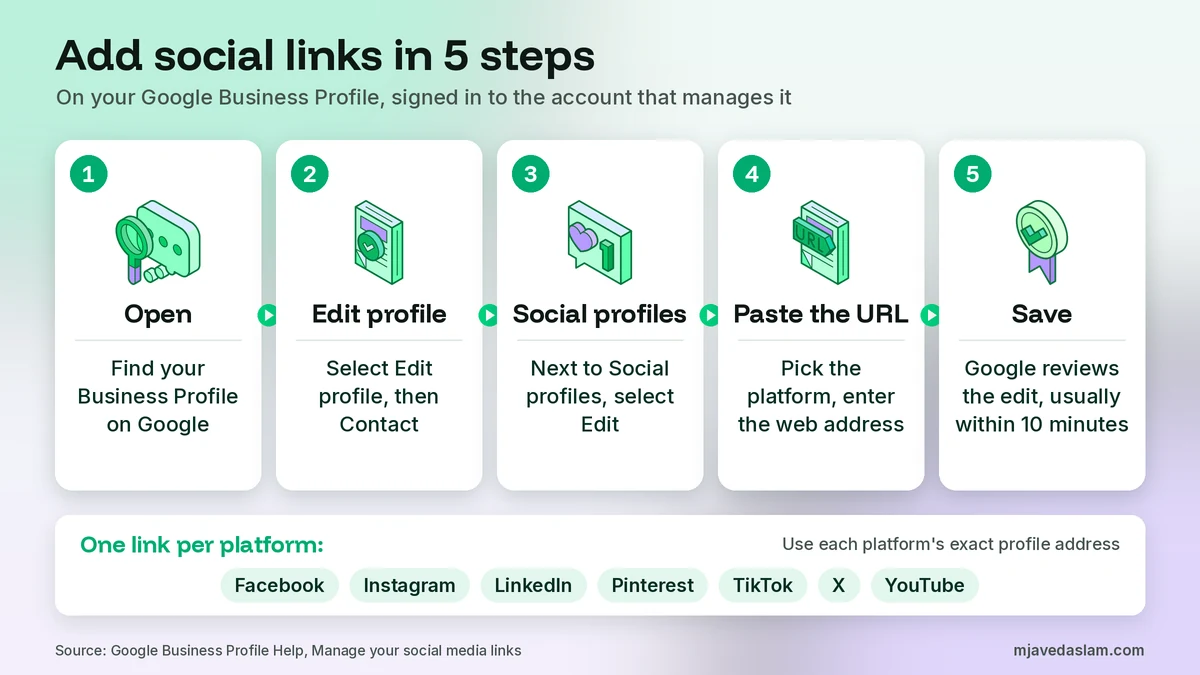
You need to be signed in to the Google Account that manages your profile. Google’s edit page says, “To edit your business info, you need to sign in to the Google Account that’s linked to your Business Profile.” Then follow Google’s steps:
- Go to your Business Profile. A simple way is to search for your business name on Google while signed in to the right account.
- Select Edit profile, then Contact.
- Next to “Social profiles,” select Edit.
- From the “Social profile” dropdown menu, select the platform you want to add.
- In the “Web address” field, enter the link.
- To add more platforms, select Add social profile and repeat.
- Select Save.
On a phone, you can also start in the Google Maps app. Google’s edit page says to tap Business at the bottom right, then Edit profile, make your changes and tap Save. I find it easier to do link work on a computer, because copying and checking long URLs on a small screen leads to mistakes. My guide to managing your Business Profile in the Google Maps app shows where the other tools are on mobile.
After you save, the edit goes into review. Google’s page on what happens to your edits says: “Edits usually take up to 10 minutes to review, but sometimes it can take up to 30 days.” The status shows as Accepted, Not approved or Pending. Don’t keep deleting and re-adding the same link while it’s pending. In my view that only makes it harder to see what happened.
How to edit, replace or remove a social link
To change a link, go back to Edit profile, then Contact, select Edit next to “Social profiles,” update the “Web address” field and select Save. Google’s steps for removing a link are just as short:
- Go to your Business Profile.
- Select Edit profile, then Contact.
- Next to “Social profiles,” select Edit.
- Next to the social profile you want to remove, select Delete, then Save.
There’s one special case. If Google added a link to your profile on its own, Google suggests you first check whether you’d rather replace it with a different link. If you still want it gone, Google says to contact them. My guide on how to contact Google Business Profile support explains the routes that actually work.
A common reason to replace a link is an old account. It’s easy for a business to end up with two Facebook pages, an old one someone made years ago and the one it uses now. Since Google allows only one link per platform, make sure it points to the page you actually post on and answer messages from.
Why you can’t see the “Social profiles” option
If there’s no Social profiles section under Contact, check these in order:
- Your region. Google says social media links are “currently available in select regions.” Google doesn’t publish a country list on that page, so I can’t tell you for sure whether your country has it. The only real test is your own Edit profile screen.
- Verification. Google’s edits page says that on an unverified profile “you can still edit some info like your business name, business category, address, hours, phone number, and website,” and that “To edit all your info, verify your profile.” Social links aren’t on that short list, so my reading is that you should verify first.
- The right account. If someone else set up the profile, make sure you’re in the Google Account that has access. If you don’t have access yet, see my guide on how to add a manager to Google Business Profile.
- Your interface. Google notes that some features “may differ between Search and Maps and your device’s operating system.” If you don’t see it on one, try the other.
Why social media links get rejected or disappear
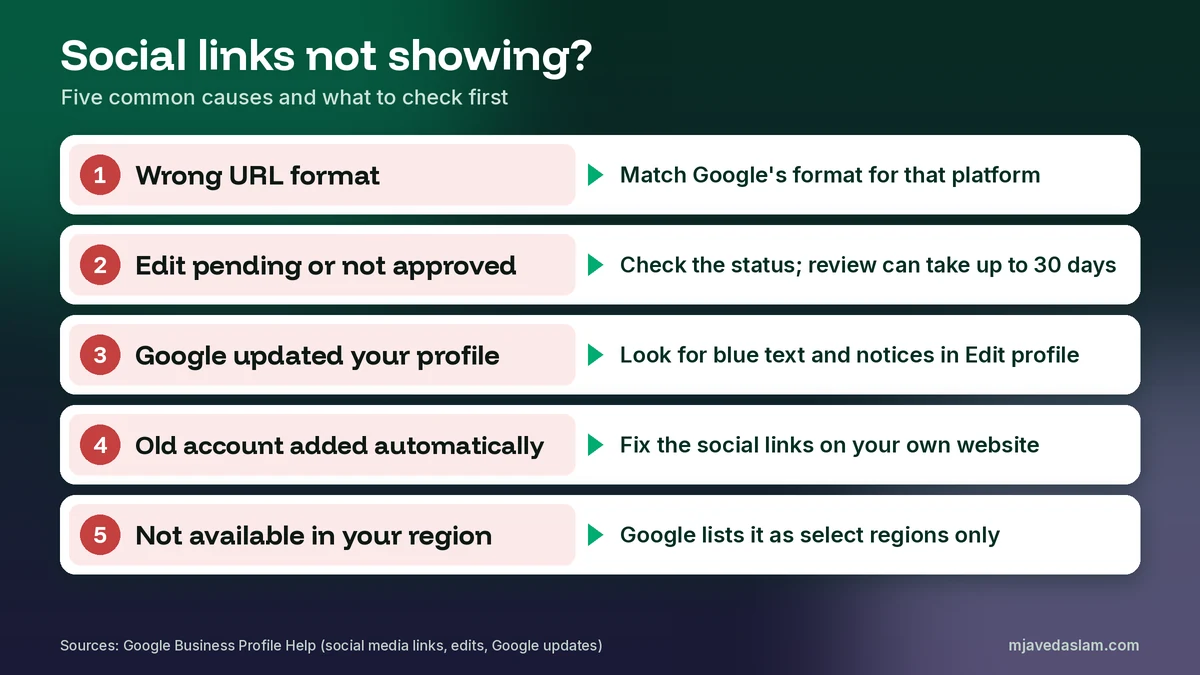
This is the part most guides skip. When a link doesn’t show, or shows and then goes away, it’s usually one of these:
1. The URL format is wrong
Google’s own fix list is: make sure the URL “isn’t broken, duplicated, invalid, or pointing to an unsupported platform.” A WhatsApp link, a Linktree page, a Threads profile or a Facebook group link isn’t on Google’s list of seven platforms, so I wouldn’t expect it to save. A share link with tracking codes after it can count as invalid. Go back to the format table above and match it exactly.
2. The edit is still pending or was not approved
Edits can take up to 30 days. If the edit shows as Not approved, Google says it “might not approve changes if it can’t confirm its accuracy.” I’d check that the social account clearly belongs to the same business, with the same name, the same phone number and ideally a link back to your website or profile. My guide on Google Business Profile edits not approved walks through the appeal options.
3. Google changed your profile
Google’s page on Google updates on your Business Profile says that “If sources report that your profile info is incorrect or outdated, Google may update your profile.” In the profile editor, blue text shows info changed by Google. Google also says that if you get a suggested-edit notice, “you have 4 days to accept or reject the suggestion,” and if you don’t respond, Google may publish it if other public info supports it. So if your Facebook link was swapped for an old page, look for blue text and notices in Edit profile.
4. A link was added automatically, not by you
Google says some profiles show social links automatically “if they meet certain requirements.” Its page on how Google sources info in Business Profiles explains that profile info comes from sources such as “crawled web content (e.g., information from a business’ official website),” licensed data and user contributions. My reading is that the social links on your own website matter. If your website footer still links to an old Instagram account, don’t be surprised if that’s the one Google picks up.
5. The feature isn’t fully available where you are
Because Google calls the feature limited to select regions, it may behave differently from one country, language or profile to the next. If you can’t add links at all and everything else checks out, there’s not much you can do except keep your website’s social links tidy and check again later.
Social links vs website, booking and messaging links
Owners often mix up the different link fields on a profile. Each one has its own job and its own rules:
| Field | What it’s for | Can it be a social media URL? | Where Google says so |
|---|---|---|---|
| Social profiles | Your own accounts on the 7 listed platforms, one per platform | Yes, that’s its purpose | Manage your social media links |
| Website | The site that represents your business location | I don’t recommend it. Use a site you own | Guidelines (Website & phone) |
| Booking, ordering and reservation links | Pages where customers complete an action | No: “Social media sites” are on the not-allowed list | Business links policies |
On the website field, Google’s guidelines say: “Provide a phone number that connects to your individual business location, or provide a website that represents your individual business location,” and “Do not provide phone numbers or URLs that redirect or ‘refer’ users to landing pages or phone numbers other than those of the actual business, including pages created on social media sites.” My advice is simple: put a website you own in the website field, and put Facebook and Instagram in Social profiles where they belong.
For booking and ordering, the business links policy is clear. It says local business links “must allow customers to complete the designated action” and lists what they can’t be: “Social media sites, Messaging links, App store links, Link shorteners.” So a Facebook page or a WhatsApp chat link won’t work as your Book button. My guide to the Google Business Profile booking link covers what does work, and if customers mostly reach you by chat, see my guide to Google Business Profile messaging.
Posts from your social accounts on your profile
Linking social accounts can also bring your social posts onto your profile, in some places. Google’s social links page says: “Posts about events, deals, or special offers from your linked social media profiles or Business Profile may also show. This feature is available only in select regions and languages, and may not be available for all users.”
Google’s posts help page is more specific about these “featured posts.” It says they can come “from your social media channels, like Facebook and Instagram,” and that “This feature is currently available in English for single-location food and drink businesses in the US, UK, Canada, Australia, and New Zealand.” It also notes that when featured posts are available, customers find them “in place of reviews” on your profile on mobile. So for most businesses outside those countries and that category, this won’t apply yet. You can still post directly on your profile, and my Google Business Profile posts guide shows what’s worth posting.
Social links for businesses with several locations
Google says: “If you manage multiple Business Profiles, you can use the same social media link across multiple Business Profiles. To update social links across all your profiles at once, you can use Business Profile APIs.” Google’s Business Profile APIs page explains that the APIs “are designed for developers who represent large, tech-savvy businesses and third parties.” For a business with two or three branches, editing each profile by hand is quicker. If each branch has its own Facebook page, link each profile to its own branch page. If you have one brand page, using it on every profile is fine. My multi-location Google Business Profile guide covers the rest of the setup.
Do social media links help your ranking?
Google’s page on improving your local ranking says: “Local results are mainly based on relevance, distance, and popularity,” and the section explaining the third factor is titled Prominence. It also says, “Businesses with complete and accurate info are more likely to show up in local search results.” Google doesn’t list social links as a factor anywhere I could find.
My reading: social links are part of a complete, trustworthy profile, and they give customers an easy way to see recent work, reviews and replies. That can help people choose you. But I won’t promise a ranking change from adding them. Reviews, the right primary category, your location and a strong website do far more. My guide on how to rank in the Google Map Pack covers those steps.
How to measure clicks on your social links
You can’t, at least not inside Google. Google’s help page says it “does not currently provide performance metrics or click tracking for social media links.” The performance report does show website clicks, calls and other actions, so those are still worth watching. My guide to Google Business Profile insights explains each metric.
I don’t add tracking codes to social links, because Google lists exact URL formats and extra parameters can make a link look invalid. If you want tracking, put UTM tags on your website link instead. My guide to UTM tracking for Google Business Profile shows how. Most social platforms also show profile visits in their own analytics, which gives you a rough idea of traffic from Google.
Make your profile, website and social accounts match
Social links work best when everything points the same way. Your business name, address and phone number should match across your profile, website and social pages. My guide on citation building for local SEO explains why that consistency matters, and my Google Business Profile name guidelines post covers how to write your name the same way everywhere.
On your website, link to your social accounts in the footer or contact page, and describe them in structured data. Google’s organization structured data documentation describes the sameAs property as “The URL of a page on another website with additional information about your organization, if applicable. For example, a URL to your organization’s profile page on a social media or review site.” My LocalBusiness schema guide for WordPress shows how to add it. If you’re preparing for AI search too, my guide to optimizing your Google Business Profile for AI search covers how consistent info helps there.
On each social account, add your website and your Google review or profile link in the bio or About section. That way the link works both ways, which makes it easier for customers, and in my view easier for Google, to see they’re the same business.
My checklist before you save
- The account belongs to this business, uses the same business name, and is active.
- The URL starts with https:// and matches Google’s format for that platform.
- No tracking codes, share IDs or short links.
- Only one link per platform, pointing to the account you actually use.
- The page opens in a private browser window without logging in.
- Your website footer links to the same accounts, so Google doesn’t find an old one.
- Booking, ordering and messaging go in their own fields, not in Social profiles.
A note for businesses in Pakistan
Here, many small businesses run mostly on Facebook, Instagram and WhatsApp, and some have no website at all. That makes social links feel extra important. But keep two things in mind. First, WhatsApp isn’t on Google’s list of seven platforms, so it won’t go into Social profiles, and Google’s business links policy rules out messaging links for booking and ordering too. Second, because Google says this feature is only in select regions, check your own Edit profile screen before you promise a client or your team that the links will show. If the option is there, use it. If it isn’t, keep your Facebook and Instagram accounts linked from your website and make sure your name, phone and address match everywhere.
If social media is your main marketing channel, my post on what social media marketing is is a good starting point, and a good business description helps tie it together. See my guide to writing a Google Business Profile description.
Frequently asked questions
How do I add social media links to my Google Business Profile?
Go to your Business Profile and select Edit profile, then Contact. Next to “Social profiles,” select Edit. Choose the platform from the “Social profile” dropdown, paste your profile address into the “Web address” field, select Add social profile for more platforms, and then select Save.
Which social media platforms can I add?
Google’s help page lists seven: Facebook, Instagram, LinkedIn, Pinterest, TikTok, X (formerly Twitter) and YouTube. You can add one link per platform, so one Facebook link and one YouTube link is fine, but two YouTube links is not.
Why can’t I see the Social profiles option?
Google says social media links are currently available in select regions and may not be available on your Business Profile. Also check that you’re signed in to the Google Account that manages the profile and that the profile is verified, because unverified profiles can edit only some basic info.
Why was my social media link rejected or removed?
Google says to make sure the URL isn’t broken, duplicated, invalid or pointing to an unsupported platform. Use the exact format Google lists for each platform. Edits can also stay pending for up to 30 days, and Google can update your profile from other sources, so check the Edit profile screen for notices.
Can I use my Facebook page as my website or booking link?
Not as a booking or ordering link. Google’s business links policy says those links can’t be social media sites, messaging links, app store links or link shorteners. For the website field, I always recommend a real website you own, and adding Facebook in the Social profiles section instead.
Do social media links help my Google Maps ranking?
Google doesn’t name social links as a ranking factor. It says local results are mainly based on relevance, distance and prominence, and that complete, accurate info helps. Social links make your profile more complete and help customers check you out, but I wouldn’t add them expecting a ranking jump.
Next step
When you add social media links to Google Business Profile with the right format and the right accounts, customers can check your latest work in one tap, and Google has less reason to show an old page you forgot about. If you want me to check your profile’s links, categories and photos, see my Google Business Profile service page, or get in touch with your business name and city, and I’ll tell you what I’d fix first.