Here’s the short answer. When your Google Business Profile edit is not approved, Google is telling you it couldn’t confirm the change is accurate, or the change broke one of its rules. The usual causes are a name with extra keywords, a big change to your name or category that looks like a different business, an address Google can’t match to the real world, an unverified or suspended profile, or details that don’t match your website and signs. Don’t keep re-saving the same edit. First make your real-world proof match the change: website, signage, documents. Then save the edit once and give it time, because Google says a review usually takes 10 minutes but can take up to 30 days. If it’s still rejected and you’re sure it’s correct, appeal. Businesses in the UK and EEA use the appeals tool. Everyone else, including businesses in Pakistan, uses Google’s Contact us form.
I manage Google Business Profiles for local businesses in Pakistan and abroad. “Your edit was not approved” and “my edit has been pending for two weeks” are two of the messages I see most. They feel random, but they usually aren’t. In this guide I’ll explain what each status means, why Google rejects edits, how I fix them, and how to handle changes Google makes on its own. If you haven’t taken control of your listing yet, start with how to claim your Google Business Profile.
What the edit statuses mean
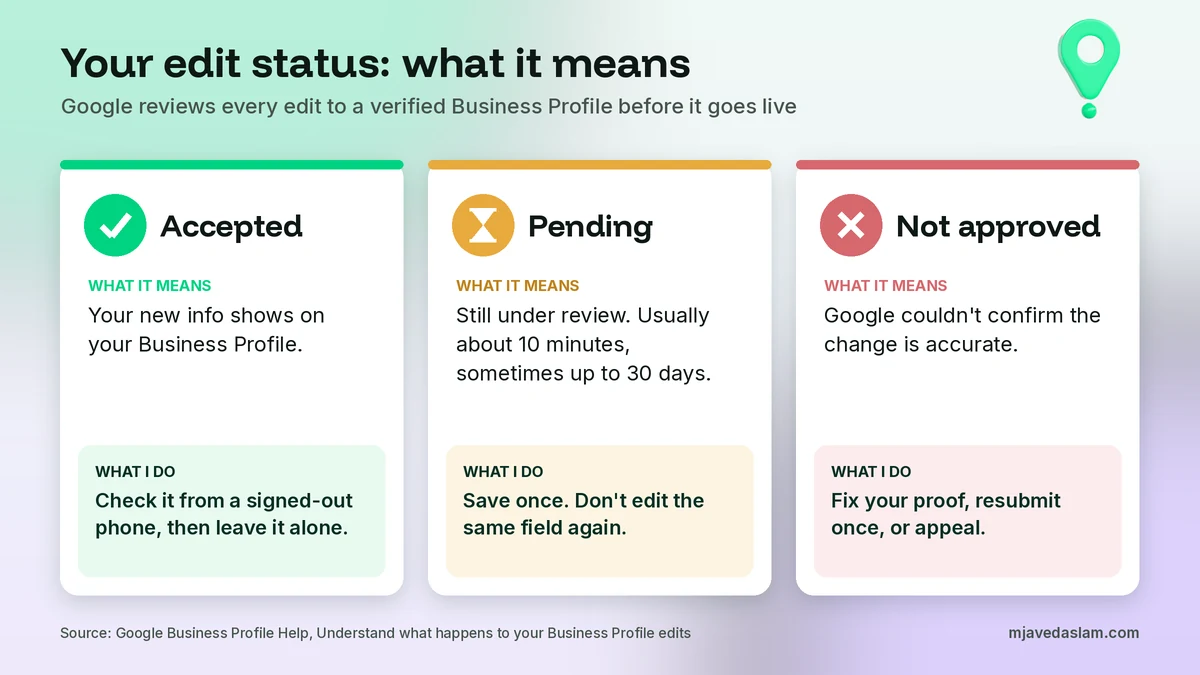
Google reviews every edit you make to a verified profile before it goes live. Its help page on what happens to your Business Profile edits lists three statuses:
| Status | What Google says it means | What I do |
|---|---|---|
| Accepted | Your updated info displays on your Business Profile | Check it from a signed-out phone, then leave it alone |
| Pending | Your edit is still under review. This usually takes 10 minutes, but sometimes up to 30 days | Wait. Don’t save the same field again |
| Not approved | Google might not approve changes if it can’t confirm their accuracy | Fix the proof, resubmit once, or appeal |
The key phrase is “can’t confirm its accuracy.” Google isn’t saying your edit is wrong. It’s saying it couldn’t find enough evidence that it’s right. So the fix is to give Google more evidence outside the editor.
How to check your edit status
Sign in to the Google account that manages the profile. Search for your business name on Google, or open the Business tab in the Google Maps app, and select Edit profile. That’s the same path Google gives on its Edit your Business Profile page. Look at the field you changed. Google’s edit status page shows how a pending change is displayed in the editor, so you can see which fields are still under review.
Then check your profile from a phone or browser that isn’t signed in. As the owner, you can see your own pending changes, which can trick you into thinking a change is live when customers still see the old version.
If you manage your profile mostly from your phone, my guide to the Google Business Profile app in Google Maps shows where each of these options lives on mobile.
Why Google Business Profile edits are not approved
When a Google Business Profile edit is not approved, it’s almost always one of these eight reasons. They’re roughly in order of how often I see them.
1. Google can’t confirm the change
This is the reason Google itself gives, and it covers most cases. In my experience, it checks your edit against what it can find elsewhere: your website, your signs, other directories and user reports. If you change your hours on the profile but your website still shows the old hours, Google sees two different answers. If your new phone number appears nowhere else online, there’s nothing to confirm it against.
2. The business name has extra words
Google’s guidelines for representing your business say your name should reflect your real-world name as used on your storefront, website and stationery. Adding a service, a city, “best,” a phone number or opening hours to the name is the classic reason a name edit is rejected. “Ali Electronics” can pass. “Ali Electronics Best UPS Repair Multan 24/7” usually won’t. My full guide to Google Business Profile name guidelines covers the grey areas.
3. The change looks like a different business
Google’s overview of Business Profile policies says edits that try to significantly change the nature of a business are often fraudulent, so Google may reject some edits, such as significant changes to the business name or category. If a different business now operates at your location, Google says the old one should be marked permanently closed, not renamed. So if you bought a shop and changed what it sells, don’t just rename the old profile and swap the category. Close it and create a new one.
4. The address change doesn’t fit the rules
The same policy page says location edits will be rejected for businesses whose physical identity is tied to the customer experience, such as restaurants, hotels and entertainment venues. If a business like that moves, Google says to mark the old profile permanently closed and create a new one at the new location. If you haven’t moved and only need to fix a wrong address, Google says to contact them. For other businesses, Google’s edit help says a move after verification means you must verify again. If the address is right but the pin is wrong, that’s a different fix, covered in my guide to fixing a wrong Google Maps pin.
5. The profile isn’t verified
On an unverified profile, Google says you can still edit some info, like your business name, category, address, hours, phone number and website. To edit everything else, you need to verify. The policy overview also says Google may reject content added to unverified profiles. If you’re stuck on verification, see my guides on video verification and postcard verification.
6. The profile is suspended, disabled or restricted
Google says content may be rejected when the profile is suspended or disabled before Google reviews it, and that the profile must be reinstated before new content can go live. If your Google account itself is restricted, content added from that account will be rejected, and all profiles on that account are suspended. In this case, no edit will stick until the suspension is fixed. Fix that first, then come back to your edits.
7. The info is already live or was changed again
Google’s policy page also lists non-policy reasons. If you try to add the same photo or phone number more than once, Google may not add it because it already accepted it. And if you edit the same field again while the first edit is under review, you’re creating a mess of overlapping changes. This is why I tell clients to save once and wait.
8. The content breaks a content rule
Some fields have their own rules. Google’s guidelines say the business description must not focus on promotions, prices or sales, and must not contain links. Categories shouldn’t be used only as keywords. Personal information in the wrong place gets content rejected too. If only one field keeps failing, read the rules for that field before you try again. Services have their own rejection rules too, which I cover in my guide on why Google Business Profile services are not showing.
Google Business Profile edit not approved: quick diagnosis
Here’s the table I use when a client sends me a “your edit was not approved” screenshot. Find the field, then use the fix in the last column.
| Edit that failed | Most likely reason | What to do |
|---|---|---|
| Business name | Keywords, city or extras in the name, or a big name change | Use your real signboard name. Update signs and website first if you rebranded |
| Primary category | Category doesn’t match the business, or a big category change | Pick the most specific true category. Don’t change it to chase rankings |
| Address | New location, or the address doesn’t match real-world data | Moved? Follow Google’s move rules. Wrong address but not moved? Contact Google |
| Phone number | Number not found anywhere else, or doesn’t connect to this business | Put the number on your website and signs, then resubmit |
| Hours | Website or other listings show different hours | Make every listing match, then resubmit |
| Website | Site is down, redirects, or represents a different business | Link to a working page for this exact location |
For phone numbers specifically, I wrote a separate guide on how to change your Google Business Profile phone number without losing calls. It includes what to do when that one edit is pending or not approved.
What to do while an edit is pending
Pending is normal. My rule is simple: save once, write down the date, and leave that field alone.
When owners see Pending, they often save the same field again, delete and re-add it, or change three other things to “push” it through. Each change is another edit for Google to review. Re-saving never speeds it up. What does help is making sure Google can confirm the change from other sources while it waits.
- Update your website first. Your contact page and footer should show the same name, address, phone and hours as the edit.
- Update your signs. For a name change, Google’s guidelines tie your name to how you’re known in the real world, including your storefront.
- Update other listings. Facebook, Apple Business Connect, Bing Places and local directories should match too.
- Do big edits one at a time. When I do a full clean-up, I change the name or category first, wait until it’s accepted, then do the smaller fields.
If the edit is still pending after 30 days, I treat it like a rejection and go to the steps below.
How to fix an edit that was not approved
This is my step-by-step process. It works for most rejected name, category, address, phone, hours and website edits.
- Confirm the profile is healthy. Make sure it’s verified and not suspended. If it is suspended, nothing else matters until it’s reinstated.
- Read the field’s rules. Check Google’s guidelines for the exact field. Remove keywords from names, prices and links from descriptions, and P.O. boxes from addresses.
- Make the real world match. Update your website, signage and other listings so they show exactly what you’re trying to save.
- Wait a few days. Give Google time to see the updated website and listings.
- Resubmit once. Save the corrected edit one time. Don’t make other edits to the same field while it’s under review.
- Appeal if you’re sure it’s right. If it’s rejected again and the change is accurate, use the appeal route for your country.
How to appeal a rejected edit
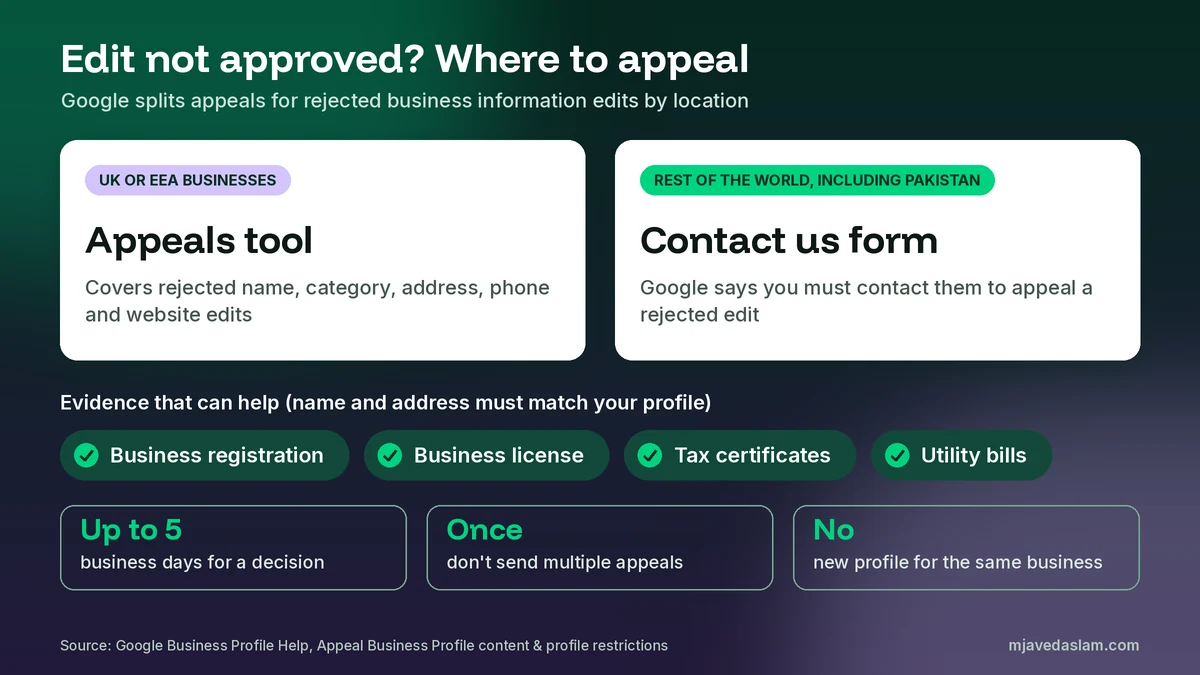
Google’s page on how to appeal Business Profile content and profile restrictions splits appeals by location. For businesses located or operating in the UK or the European Economic Area, the appeals tool covers rejected business information edits: name, category, address, phone and website. For the rest of the world, Google says you must contact them to appeal a rejected business information edit. That means a business in Pakistan, the US or the Gulf uses the Contact us form, not the appeals tool.
Whichever route you use, prepare your evidence before you start. Google gives these examples of evidence that can strengthen an appeal:
- Official business registration
- A business license
- Tax certificates
- Utility bills for the business, such as electricity, phone, cable or internet
Google’s tip is that the business name and address on each document should match your Business Profile. In Pakistan, I usually use the FBR NTN certificate, a trade license or registration with the local chamber, and a recent electricity or PTCL bill in the business name. If those documents show a different name or address from the one you’re trying to save, fix that gap first.
A few rules from Google that people break all the time. Appeal reviews and decisions can take up to 5 business days. Don’t submit multiple appeals for the same issue before you get a decision. And don’t create a new Business Profile for the same business. A second profile won’t solve a rejected edit, and it creates a duplicate problem. If you already have one, see how to fix a duplicate Google Business Profile.
Google updates to your Business Profile
Sometimes the problem isn’t your edit. It’s that Google changed your profile, or a user suggested a change. Google’s page on Google updates on your Business Profile explains how this works. Google gathers info from sources like user reports and licensed content, and if those sources say your info is wrong or outdated, Google may update your profile.
Here’s how to spot it. In the profile editor, info changed by Google shows in blue. If your profile has Google updates, you’ll find a notification at the top of the page. Google’s edit status page also says you’ll get a notification and an alert in the Edit profile section.
For suggested edits from users, Google may notify you by email or in the product. Once notified, you have 4 days to accept or reject the suggestion. If you don’t respond within 4 days, Google may publish the update automatically if it’s supported by other public information, such as your website. Google also says it may apply some user edits without your review when they’re needed to meet policy guidelines.
Three things I do for every client:
- Turn on email notifications for the profile, so a 4-day window doesn’t pass while you’re busy.
- Keep your website accurate. Google uses it to judge whether a suggested change is supported. If your website has old hours, it can work against you.
- Correct wrong updates directly. Google says you can always update your profile directly. Edit the field back to the correct value and keep your proof ready.
If you bulk-upload a spreadsheet for many locations, Google says a blank field may get an automatic update, so don’t leave fields blank. My guide to managing a Google Business Profile with multiple locations covers bulk work.
Field-by-field tips that get edits approved
Business name
Use the exact name on your sign. If you rebranded, change the sign, website and documents first.
Category
Change the primary category only when it’s clearly wrong. Pick the most specific category that’s true. My guide to the Google Business Profile primary category explains how I choose one. Remember that editing categories may lead Google to ask you to verify again.
Address
Use a precise street address. Google’s guidelines say P.O. boxes or mailboxes at remote locations aren’t acceptable, and a virtual office isn’t eligible. If you don’t receive customers at your address, hide it and set a service area.
Phone, hours and website
These are the easiest to get approved, as long as they match your website. For holidays, don’t change your main hours. Set special hours, as I explain in my guide to Google Business Profile holiday hours.
A note for businesses in Pakistan
Most of my rejected-edit cases here come down to mismatched details. The signboard says one name, the Facebook page another, and the NTN certificate a third. Or the address is written three different ways across listings. So before I touch the profile, I pick one version of the name, address and phone number and make every place match it. After that, most edits go through on the first try.
FAQ
Why was my Google Business Profile edit not approved?
Usually because Google couldn’t confirm the change is accurate, or the edit broke a rule. Common causes are keywords in the business name, a big name or category change, an address that doesn’t fit Google’s rules, an unverified or suspended profile, and details that don’t match your website.
How long do pending edits take on Google Business Profile?
Google says edits usually take up to 10 minutes to review, but sometimes up to 30 days. Save the edit once and don’t change the same field again while it’s pending.
How do I check my edit status?
Sign in to the account that manages the profile, open your Business Profile on Google Search or in the Maps app, and select Edit profile. Look at the field you changed. Then check the profile from a signed-out phone to see what customers see.
Can I appeal a rejected Business Profile edit?
Yes. Businesses in the UK and EEA can use the appeals tool for rejected name, category, address, phone and website edits. Businesses in the rest of the world, including Pakistan, must use Google’s Contact us form. Decisions can take up to 5 business days.
Why did Google change my Business Profile without asking?
Google updates profiles based on user reports and licensed content. Changes by Google show in blue in the editor. For some suggested edits you get 4 days to accept or reject them, after which Google may publish them if public info like your website supports them.
Should I create a new profile if my edits keep getting rejected?
No. Google says not to create a new Business Profile for the same business. Fix your real-world proof, resubmit once, and appeal if needed. The only time a new profile is right is when the business has truly moved or changed, and Google’s rules say to close the old one.
Next step
If your edit is still stuck, or you’d like someone to clean up your profile so changes go through the first time, I can audit it and handle the fixes and appeals. See my Google Business Profile service page, or get in touch with your business name and city. Once you know why a Google Business Profile edit is not approved, most fixes come down to one thing: make the real world and your profile say the same thing.