Here’s the short version of the Google Business Profile name guidelines: your profile name must be your business’s real-world name, exactly as it appears on your storefront sign, website and stationery and as customers know it. Nothing else goes in the name field. No keywords, city names, taglines, opening hours, phone numbers, store codes or ALL CAPS. Special characters and legal terms such as “Ltd” or “LLC” are only allowed if your real-world branding consistently uses them and you can prove it. Google says adding unnecessary information to your name isn’t permitted and could get your profile suspended.
I check the name field first on every profile I audit, because it’s the cheapest rule to follow and one of the easiest to break. Owners see a competitor called “Best Dentist Near Me Downtown” in the map pack and copy it. This guide is about prevention: what the rules say, a do and don’t table with realistic examples, the special cases, how Google reviews a name edit, and how to change your name safely. If your profile is already suspended, that’s a recovery job with its own process, which I cover in my guide to fixing a suspended Google Business Profile.
What Google’s name guidelines actually say
The rule sits in Google’s guidelines for representing your business on Google. Your name should reflect your business’s real-world name, as used consistently on your storefront, website and stationery, and as known to customers. Everything else (address, service area, hours, category) belongs in its own field.
Google’s own example is a 24-hour coffee shop in downtown San Francisco called Shelly’s Coffee. The business name is just Shelly’s Coffee. “24 hours” goes in the hours, “downtown San Francisco” goes in the address, and “coffee shop” goes in the category. Google already uses those fields to match you to searches.
Google is also direct about the consequence. Including unnecessary information in your business name isn’t permitted and could result in the suspension of your Business Profile. So the name isn’t a style preference. It’s a condition for keeping the profile.
Google Business Profile name guidelines: what’s allowed and what isn’t
Google publishes a table of business name examples, mostly using big brands. Here’s the same set of rules in the format I use with small business clients, with the kind of names I actually see. The “Allowed” column assumes that version is the real name on the sign and website.
| Rule | Not allowed | Allowed |
|---|---|---|
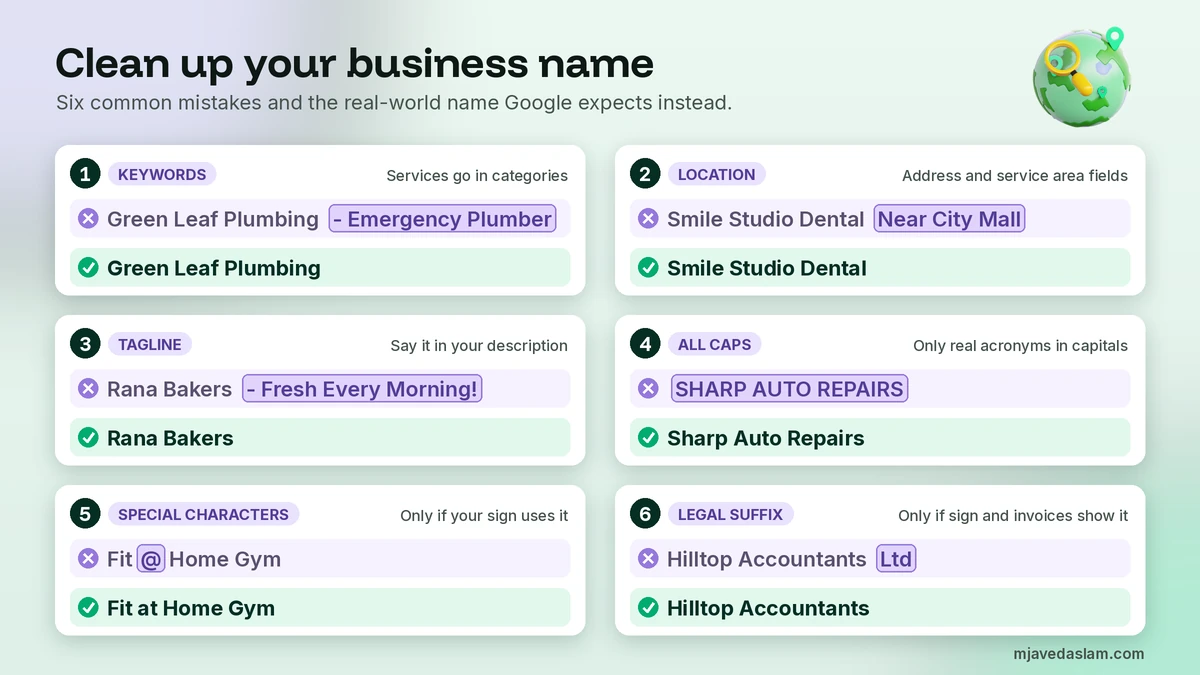
| No service or product keywords that aren’t part of the real name | Green Leaf Plumbing – Emergency Plumber & Drain Cleaning | Green Leaf Plumbing |
| No location information | Smile Studio Dental Clinic Near City Mall | Smile Studio Dental Clinic |
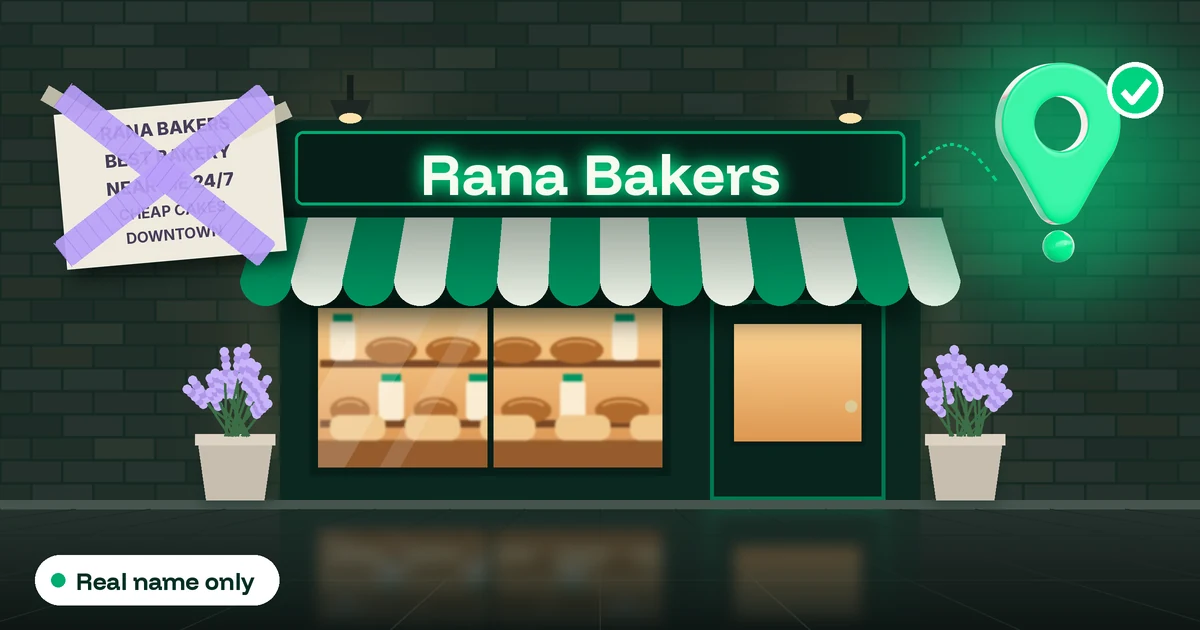
| No marketing taglines | Rana Bakers – Fresh Every Morning! | Rana Bakers |
| No hours or status | Pizza Point Open 24 Hours | Pizza Point |
| No phone numbers or website URLs (unless they are the brand) | City Movers 0300-1234567 | City Movers |
| No fully capitalized words (unless it’s an acronym the business really uses) | SHARP AUTO REPAIRS | Sharp Auto Repairs (or an acronym like KFC) |
| Special characters only with real-world proof | Fit@Home Gym ★ (when the sign says Fit at Home Gym) | Fit at Home Gym, or H&M style names when the sign shows the “&” |
| Legal suffixes only with real-world proof | Hilltop Accountants Ltd (when the sign and website just say Hilltop Accountants) | Hilltop Accountants |
| No trademark symbols or store codes | QuickPrint® Store #214 | QuickPrint |
| No “inside” or “part of” information | Glow Nail Bar (inside Westside Mall) | Glow Nail Bar |
| Don’t combine two brands at one location | Burger Hub / Shake Shack Corner | Burger Hub (and a separate profile for the other brand if it operates independently) |
| Don’t repeat the name in two scripts or languages | Al Noor Pharmacy / النور Ùارمیسی | Al Noor Pharmacy |
Two of these trip up honest businesses more than any other. The first is legal suffixes. Your registration certificate might say “Hilltop Accountants Ltd”, but if your sign, website and invoices say “Hilltop Accountants”, that’s your real-world name. Google says that to include special characters or legal terms you must be able to show real-world proof, such as signage, business cards or invoices, that consistently displays them as part of your name. The second is capital letters. Writing your name in capitals on the sign doesn’t make “SHARP AUTO REPAIRS” acceptable. Google’s example is SUBWAY being written as Subway, while genuine acronyms such as KFC and IHOP stay in capitals.
Can I put keywords in my Google Business Profile name?
Only if the keyword is genuinely part of your real-world name. Google’s examples make the line clear. “Verizon Wireless” is acceptable because that’s the brand, but “Verizon Wireless 4G LTE” isn’t. “Midas” is acceptable, “Midas Auto Service Experts” isn’t. A service word that’s always been part of your name, such as “Green Leaf Plumbing”, is fine. A service word bolted on for the map results, such as “Green Leaf Plumbing Emergency Plumber”, isn’t.
What about renaming the business itself to include the keyword? If it’s a genuine rebrand you’ll use everywhere for years, the real-world name rule is on your side. But I don’t recommend renaming just to chase a keyword. A sudden keyword-heavy name invites closer review and public edits, and it can count as a new business under the rebranding rules below. Your category, services, reviews and website do the keyword work far more safely.
Special cases: practitioners, departments, co-located businesses and chains
Most naming mistakes I see in clinics, law firms and shared premises come from these situations:
- Individual practitioners. Doctors, dentists, lawyers, financial planners and insurance or real estate agents can have their own profile if they’re public-facing and can be contacted directly at the verified location during stated hours. The name may include a title or degree such as Dr., MD, JD, Esq. or CFA. Support staff shouldn’t have their own profiles.
- Several practitioners at one location. The organisation gets its own profile, and each practitioner’s profile uses only the practitioner’s name, not the organisation’s. So “Dr. Sara Khan”, not “Dr. Sara Khan – Smile Studio Dental Clinic”.
- A solo practitioner in a branded organisation. Google recommends one shared profile named in the format [brand]: [practitioner name]. Its example is “Allstate: Joe Miller”.
- Departments. Public-facing departments that operate as distinct entities (a hospital’s dermatology department, a dealership’s service centre) may have their own profile, but the department name must be different from the main business and from other departments, and its main category must be different too. A section of a shop, such as the hot food bar inside a supermarket, doesn’t qualify.
- Two or more brands at one location. Don’t combine them as “Brand A / Brand B”. Pick one brand’s name, or create a separate profile for each brand if they operate independently.
- Co-located businesses. Google lists cases that should each have their own profile, such as a restaurant inside a hotel or a pharmacy inside a supermarket. The second profile must use a different name, and neither name should say it’s inside the other.
- Chains and multiple locations. All locations in the same country should use the same name, so “The Home Depot”, not “The Home Depot at Springfield”. The exceptions are genuine sub-brands or operation types used consistently (Google’s examples include “Walmart Supercenter” and “Walmart Express”) and locations that consistently use a different name in the real world.
Service-area businesses follow the same name rule. A plumber or cleaner who travels to customers and runs a service-area Business Profile uses the name on their van, website and invoices, and puts the towns they cover in the service area field, never in the name.
What gets a business name flagged
Google doesn’t publish a list of triggers, but names come to its attention in three ways. First, every edit you make to a verified profile is reviewed against the guidelines. Second, the public can suggest edits. Google says that if it receives reports that your business information isn’t accurate, it might update your profile and notify you in the Edit profile section. A competitor who suggests your real name, with a photo of your sign, has the guidelines on their side. Third, Google reserves the right to suspend profiles that break the guidelines.
In my audits, the profiles in trouble over their name usually share a story: the owner added a service or city, it worked for a while, then an edit or a competitor report led to a review. If you’ve spotted a competitor using a stuffed name, the fix is to suggest their real name, not to copy them. I walk through that in my guide on how to report a fake Google Business Profile.
How Google reviews and re-verifies a name edit
Here’s what happens after you change your name and select Save, based on Google’s help on what happens to your Business Profile edits:
- The edit is reviewed. Edits usually take up to 10 minutes to review, but it can take up to 30 days.
- You’ll see one of three statuses. Pending means it’s still under review. Accepted means the new name is live. Not approved means Google couldn’t confirm it was accurate, and you might be able to appeal the rejected edit.
- You may be asked to verify again. Google’s page on verifying your business says that if you change some information about your business you may need to re-verify, and Google might ask for more details. If the “Get verified” button appears again, follow the steps on your profile. Verification reviews take up to 5 business days, and occasionally longer.
- Don’t touch the name while a postcard is pending. If you’re waiting for a verification code by post, Google says not to edit your business name, address or category, because the code you were sent won’t work.
Re-verification after a real change is normal, so don’t panic. Have your proof ready, and if you’re offered a video option, film your new sign, branded equipment and documents. I explain what to show in my guide on how to verify a Google Business Profile with video.
How to change your Google Business Profile name safely
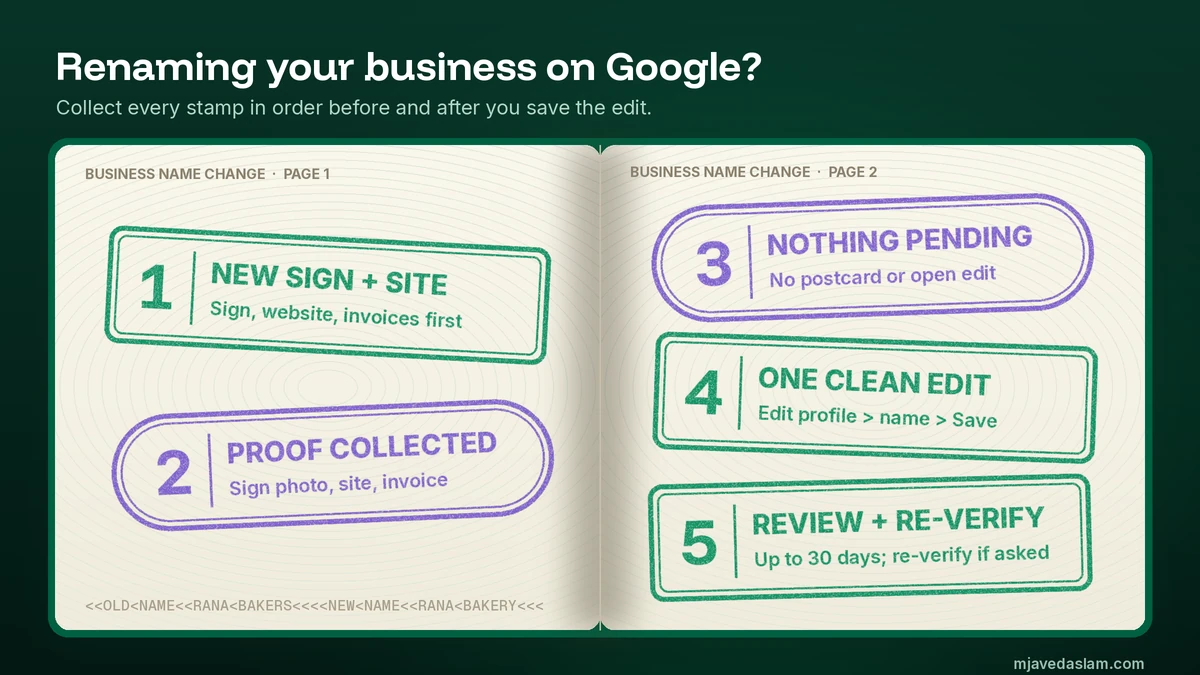
First decide whether your change counts as a rebrand. Under Google’s rules, a profile may be eligible for rebranding (a name change without a new profile) if it’s a minor change where the proper nouns and the services described in the name stay the same and the category doesn’t change. Businesses with multiple locations whose name changes may also be eligible. “Rana Bakers” becoming “Rana Bakery” keeps the same proper noun and the same service, so it looks like a minor change. “Rana Bakers” becoming “Sunrise Café”, or a change of what the business does, isn’t. Google treats that as a new business: you mark the old profile as closed and create a new one with the new name.
For an eligible change, this is the order I follow:
- Change the real world first. Put up the new sign and update your website, invoices and business cards. The profile should follow reality, not lead it.
- Collect proof. Take a clear photo of the new sign and screenshot your website header. Keep an invoice or registration document showing the new name.
- Check for anything pending. Make sure there’s no postcard verification or other edit still under review. If someone else is taking over the business, sort out ownership before you rename it. Here’s how to transfer Google Business Profile ownership.
- Make the edit. Sign in to the Google Account that manages the profile, go to your Business Profile, select Edit profile, change the business name and select Save. Enter the name exactly as it appears on the sign. Nothing extra.
- Change one thing at a time. Don’t change the category, address and name on the same day. If something gets rejected, you won’t know why. Change the name, wait for Accepted, then move on.
- Watch the status and respond. Check the edit status over the next few days. If Google asks you to re-verify or give more details, do it promptly with the proof from step 2. If the edit isn’t approved, check it against the table above before you appeal.
- Update the name everywhere else. Change it on your website footer, social profiles and directory listings so your name, address and phone number match across the web. My NAP consistency checklist covers which listings matter most.
Tell any managers or agency on the profile before you rename, so nobody “corrects” it back. Here’s how to add or remove a manager on Google Business Profile.
My 5-minute name audit
If the answer to any of these is yes, fix it before Google or a competitor does:
- Does the profile name contain any word that isn’t on your sign or website header?
- Is there a city, area, street or landmark in the name?
- Is there a tagline, an offer, opening hours, a phone number or a URL in it?
- Is any word in ALL CAPS that isn’t a genuine acronym?
- Are there symbols, emojis, ® or â„¢, or a legal suffix you don’t use on your sign and invoices?
- Does the name mention another business you’re inside or next to, or combine two brands?
- If you have several locations, do they all use the same name?
If the profile isn’t yours yet, claim it before you try to fix anything. Here’s how to claim a Google Business Profile. And once the name is clean, keep an eye on your Google Business Profile insights for a few weeks. A small dip after removing keywords is possible, so put your effort into your primary category, reviews and photos instead.
FAQ: Google Business Profile name guidelines
What are the Google Business Profile name guidelines?
Your Business Profile name must be your business’s real-world name, as used consistently on your storefront, website and stationery and as known to customers. Google doesn’t allow unnecessary information in the name, such as keywords, location details, taglines, hours, phone numbers, URLs, store codes or fully capitalized words. Address, service area, hours and category go in their own fields.
Can I put keywords in my Google Business Profile name?
Only if the keyword is genuinely part of your real-world name. Google accepts Verizon Wireless but not Verizon Wireless 4G LTE, and Midas but not Midas Auto Service Experts. A service word that has always been in your name and on your sign is fine. A service or city added just for Google Maps breaks the guidelines.
Can a keyword-stuffed business name get my profile suspended?
Yes. Google says including unnecessary information in your business name isn’t permitted and could result in the suspension of your Business Profile, and it reserves the right to suspend profiles that break its guidelines. Members of the public can also suggest your real name as an edit. The safest fix is to remove the extra words yourself before anyone else flags them.
Can I add Ltd, LLC or special characters to my business name?
Only if they’re consistently part of your real-world name. Google says that to include special characters or legal terms such as LLC, Ltd or Inc, you must be able to provide real-world proof, such as signage, business cards or invoices, that consistently shows them as part of the name. If your sign just says Hilltop Accountants, leave the Ltd off.
How long does a Google Business Profile name change take?
Google says edits usually take up to 10 minutes to review but can take up to 30 days. The edit shows as Pending, Accepted or Not approved. Google may also ask you to verify the business again after a change, and verification reviews take up to 5 business days. Don’t edit your name while a postcard verification code is on its way.
When does a name change need a new Business Profile?
Google allows a name change on the same profile (a rebrand) when it’s a minor change where the proper nouns and the services described in the name stay the same and the category doesn’t change. It may also allow it when a business with multiple locations changes its name. Otherwise the change counts as a new business: you mark the old profile as closed and create a new profile with the new name.
Next step
Open your Business Profile now and compare the name, word for word, with the sign above your door and the header on your website. If they don’t match, decide which one is the real name, fix the real world first if needed, and then make a single clean edit. If you’d like me to audit your name, categories and the rest of your profile against Google’s guidelines before you change anything, see my Google Business Profile management service.