
Here is how to transfer Google Business Profile ownership: the current primary owner adds the new person as an Owner or Manager, waits until Google’s 7-day limit for new users has passed, then opens More → Business Profile settings → People and access, selects that person, chooses Edit next to Access, picks Primary owner, and saves. Only the primary owner can do this, and the person receiving it must already be a user on the profile.
I manage Google Business Profiles for small businesses, and ownership is the setting that causes the most stress — usually at the worst moment: a shop is being sold, an agency relationship ends badly, or the person who verified the listing years ago has left and nobody can log in. Transferring the existing profile (instead of making a new one) is what keeps your reviews, photos, and history in place. Google’s own help says that if you are handing over the business, transferring primary ownership is how “all of your business info, like reviews, are maintained.”
This guide covers the primary-owner handoff itself, the 7-day rules, three real-world scenarios (business sale, agency offboarding, staff leaving), and what to do when the old owner can’t be reached. If you only need to give someone day-to-day access, read my guide on how to add a manager to Google Business Profile instead — it covers invites and removing users in detail.
Owner vs primary owner vs manager: what actually changes hands
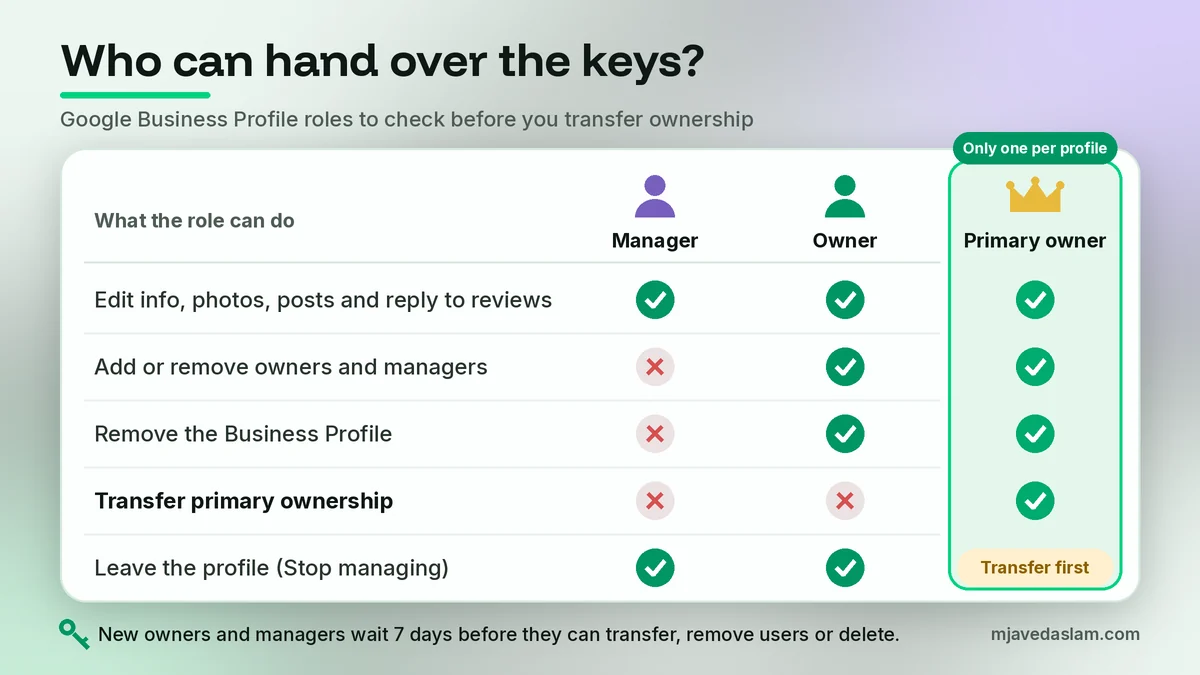
Google’s owners & managers help page describes two roles — owners and managers — and one special status on top: a profile “can have multiple owners but only one primary owner.”
| Role | What it can do | What it can’t do |
|---|---|---|
| Primary owner (one per profile) | Everything an owner can do, plus transfer primary ownership to another user | Remove itself while still primary — it must transfer primary ownership first |
| Owner | Add and remove users, change roles, edit info, remove the profile | Transfer primary ownership (only the primary owner can) |
| Manager | Edit info, hours, photos, posts; reply to reviews; download insights | Add or remove users, or remove the profile |
So “change owner on Google Business Profile” really means one of two things: adding a second owner (shared control) or moving the primary owner status to someone else (handing over the keys). For a sale or an agency exit, you want the second — and then you decide whether the old owner stays as a Manager or leaves completely.
Before you transfer: a quick pre-flight check
I run this checklist with every client before touching roles. It takes ten minutes and prevents the “we transferred it to the wrong Gmail” emergency.
- Confirm who is primary owner today. Open People and access and check each user’s access level. If you are only a Manager, you can’t start a transfer — you need the primary owner to act.
- Choose a long-term Google Account for the new primary owner. Use a business-controlled account the company will keep for years, not a staff member’s personal Gmail or a freelancer’s work account.
- Check the receiving account can sign in and has 2-Step Verification turned on. Losing access to the primary owner account is how most lockouts start.
- Write down everyone on the profile (owners, managers, pending invites) so you can clean up after the handoff.
- Don’t create a new profile. A second listing for the same business is a duplicate. Transfer the verified one so reviews and history stay attached.
How to transfer primary ownership of a Google Business Profile (step-by-step)
These steps follow Google’s help page on transferring primary ownership of a Business Profile. Labels can shift slightly between Search, Maps, and desktop, but the path is the same.
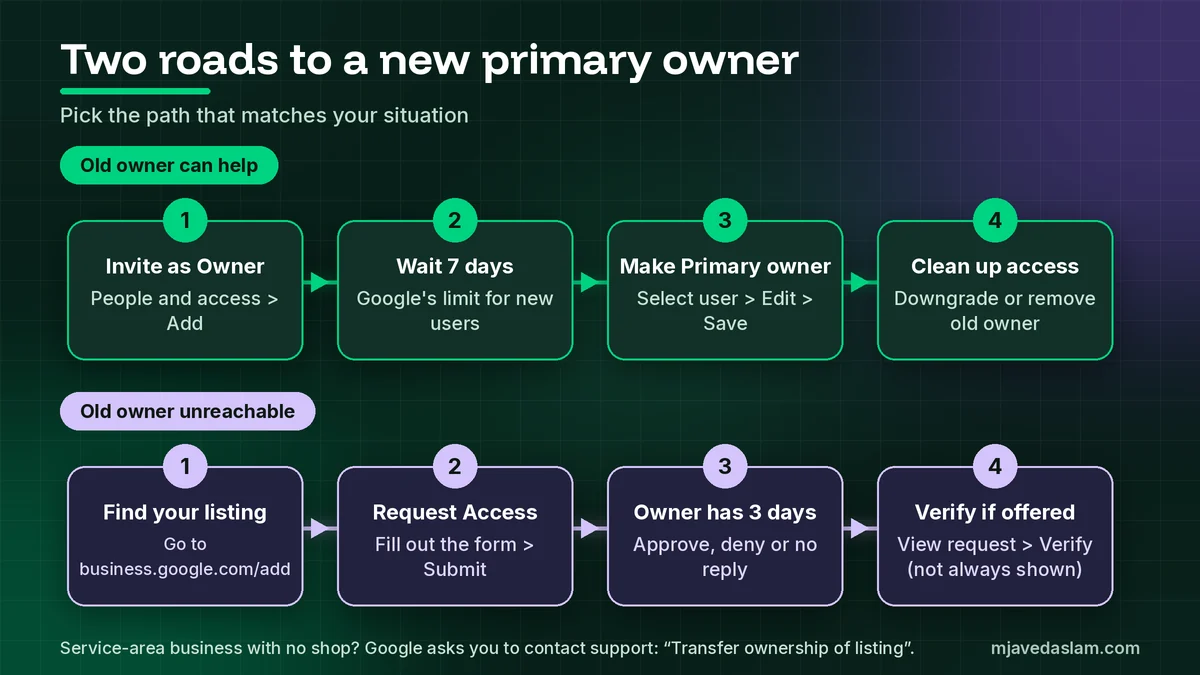
Step 1: Add the new owner to the profile
Primary ownership can only go to someone already on the profile — Google says a profile “must have at least one other owner or manager to transfer primary owner access to.” If the new owner isn’t listed yet, invite them from People and access → Add, choose Owner, and send the invite. I won’t repeat the full invite walkthrough here; it’s in my add a manager to Google Business Profile guide. Ask them to accept from the same Google Account the invite was sent to.
Step 2: Wait out the 7-day limit
Google states that when someone becomes an owner or manager, they must wait 7 days before they can manage some features, and that trying to transfer primary ownership during that window returns an error. Put a calendar reminder for day 8 rather than testing it every morning.
Step 3: Make them the primary owner
- Sign in as the current primary owner and open your Business Profile.
- Select More → Business Profile settings → People and access.
- Select the user you want to make primary owner.
- Next to Access, select Edit.
- Choose Primary owner → Save.
Step 4: Decide what happens to the old owner
After the transfer, the previous primary owner normally stays on the profile with owner access — confirm the role shown in People and access. They can either stay (useful when a founder hands daily control to a manager but wants a backup) or leave. To leave, open People and access, select yourself, then Stop managing → Confirm. Google notes that past review replies and posts stay on the profile after you remove yourself. The new primary owner can also remove the old owner — but only after their own 7-day window has passed.
The 7-day rules that trip up ownership transfers
Every Google help page on ownership repeats the same limits. For the first 7 days after someone becomes an owner or manager, they can get an error if they try to:
- Transfer primary ownership (to themselves or anyone else)
- Remove other owners or managers
- Delete or undelete the profile
Google adds that if a new user deletes their Google Account within those first 7 days, they are removed from the profile and must be added again.
The help pages word one detail differently: one says the error appears when an existing owner tries to transfer primary ownership “in their first 7 days,” another describes transferring to a user who is still in their first 7 days. In practice, my rule is simple: make sure both people have been on the profile for at least 7 full days before you attempt the switch. That covers both readings and avoids a confusing error in front of a client.
Plan a sale or agency exit as a two-week job, not a same-day task: week one for the invite and waiting period, week two for the primary-owner switch and cleanup.
Three common ownership-transfer scenarios
Selling the business
The seller (current primary owner) invites the buyer’s business Google Account as an Owner, waits 7 days, transfers primary ownership, and then removes themselves on handover day. Put this in the sale checklist next to the domain and phone number. Because the profile is transferred rather than recreated, reviews stay attached. If the business name, phone, or address changes after the sale, update them carefully and keep them consistent across your site — a clean local SEO setup depends on that consistency.
Agency offboarding: taking primary ownership back
This is the scenario I clean up most often. An agency created or claimed the listing on its own account years ago and still holds primary ownership. To fix it without drama:
- Ask the agency, in writing, to invite your business Google Account as an Owner.
- After 7 days, ask them to make your account Primary owner.
- Once you can see “Primary owner” next to your account, downgrade the agency to Manager or remove them.
- Check People and access for leftover freelancers and old staff.
Never accept “just give us your password” as the offboarding method. Google’s help is clear that each person should use their own Google Account so nobody needs to share a password.
A staff member who held ownership is leaving
If the departing employee is primary owner, get the transfer done before their last day — once their work account is deleted, you may be stuck with the recovery path below. If they are only an Owner or Manager, the primary owner can simply remove them from People and access; they get an email when removed.
What to do when the old owner is unreachable
When the primary owner has vanished — an ex-employee, a closed agency, a previous business owner who won’t reply — you can’t transfer anything yourself. You use Google’s request ownership process instead. For a storefront or hybrid business:
- Go to business.google.com/add.
- Enter your business name and address, then choose your business from the list.
- You’ll see a message that someone else may manage this Business Profile. Select Request Access.
- Fill out the form and select Submit.
You get a confirmation email, and the current owner is notified and has 3 days to respond. If they approve, you can manage the profile. If they deny, you can still suggest an edit and try to appeal the decision. If there’s no response after 3 days, Google says you may get the option to claim the profile: open the confirmation email, select View request → Verify, and follow the verification steps. Google also warns that the option to claim isn’t always available.
For a service-area business without a shop or office, Google’s instructions are different: contact Google Business Profile support and choose Transfer ownership of listing as the issue. If you’re unsure whether you count as a service-area business, see my guide to service-area business profiles.
Before you submit, I have clients gather proof that they run the business — a registration, license, utility bill, or tax document showing the same name and address as the listing — in case Google support asks for it. The broader claim and verification flow is in my guide on how to claim a Google Business Profile.
Common ownership-transfer mistakes
- Making a new profile instead of transferring. You lose reviews and create a duplicate that can confuse Google and customers.
- Transferring to a personal or freelancer account. The next handoff becomes another rescue mission.
- Trying the switch on day one. The 7-day error looks like a bug, so people retry or give up. Wait.
- Leaving the old primary owner on forever. After a sale or agency exit, remove or downgrade them once the new owner is confirmed.
- Letting the only owner account die. If one person holds the only owner role and their account is deleted, you’re back to request-access. Keep a second Owner on a business account.
- Sharing passwords “to save time.” It skips Google’s user roles and leaves you with no clean way to revoke access later.
FAQ: How to transfer Google Business Profile ownership
Who can transfer primary ownership of a Google Business Profile?
Only the current primary owner. Other owners can add and remove users, but Google states that only the primary owner can transfer primary ownership.
Can I transfer ownership to someone who isn’t on the profile yet?
No. The new owner must first be added as an Owner or Manager and accept the invite. Google says a profile needs at least one other owner or manager to transfer primary ownership to.
Why do I get an error when I try to transfer primary ownership?
Usually the 7-day limit. Google says new owners and managers must wait 7 days before they can transfer primary ownership, remove other users, or delete the profile. Make sure both accounts have been on the profile for at least 7 days, then try again.
Do reviews stay when Google Business Profile ownership changes?
Yes, if you transfer the existing profile. Google recommends transferring primary ownership to the new owner precisely so business info such as reviews is maintained. Creating a new profile does not carry reviews over.
What if the current owner won’t respond to my ownership request?
After you select Request Access, the owner has 3 days to respond. If they don’t, you may be offered an option to claim and verify the profile from your confirmation email, though Google notes this isn’t always available. Service-area businesses contact Google support and choose “Transfer ownership of listing.”
Can the primary owner remove themselves from the profile?
Not while they are primary owner. Google says the primary owner must transfer primary ownership to someone else first, then select Stop managing in People and access.
Next step
Open your profile today and check People and access. If the primary owner isn’t a long-term business account you control, start the handoff now: invite the right account as Owner, set a reminder for day 8, and transfer primary ownership then. If an agency or ex-employee is holding your listing and you want help getting it back cleanly, see my Google Business Profile management service.