
Here’s the short answer. To change the Google Business Profile phone number, sign in to the Google Account that manages your profile, search for your business name (or my business) on Google, and select Edit profile. Open the Contact section, replace the primary phone number, and select Save. Google reviews the edit first. Most edits clear in about 10 minutes, but some stay pending for up to 30 days. Before you switch, make sure the new number is a local number your business controls, and keep the old number working until the change is live everywhere.
That is the whole job on paper. In real life, a phone change is where I see small businesses lose calls for weeks. The website shows one number, Google shows another, and an old directory listing shows a third. Customers call a dead line and go to the next result. In this guide I’ll show you how to change phone number on Google Business Profile the safe way: the clicks, the rules Google checks, what to do if the edit is not approved, and the order I follow so no calls fall through the cracks.
Before you change your Google Business Profile phone number
Google’s guidelines for representing your business have a short section on phone numbers. An edit that breaks these rules is likely to be rejected, so check them first:
- It must connect to this location. Google asks for a phone number that connects to your individual business location as directly as possible.
- Local beats call center. Use a local phone number instead of a central call center helpline whenever you can.
- You must control it. The number must be under the direct control of the business. A number owned by a lead-selling agency doesn’t qualify.
- No redirects. Don’t use a number that sends callers to another business or a referral service.
- No premium numbers. Premium-rate numbers are not allowed, whatever the price per minute.
- Mobile is fine, fax is not. Google’s edit help page says your extra numbers can be mobile or landline, but not fax.
One more practical check. Google may verify your profile with a call or a text to the phone number on the profile, and its verification guide says automated menus (IVR systems) won’t get the code. So pick a number a real person answers, or one that can receive text messages. Also make sure it is a number you plan to keep for years. Every change resets a little trust you built with customers who saved your old number.
How to change phone number on Google Business Profile (desktop)
Google moved most profile editing to Google Search and Maps. If you manage many locations, you can also edit them in Business Profile Manager, but the steps below work for everyone.
- Sign in to the Google Account that is an owner or manager of the profile. If you don’t have access yet, first claim your Google Business Profile or ask the owner to add you as a manager.
- Search Google for my business or your business name and city. Your profile tools appear at the top.
- Select Edit profile, then open the Contact tab.
- Under Phone number, replace the primary number. Pick the right country code and type the full local number.
- Add or remove additional numbers if you need to. You can have up to 2 more.
- Select Save. You should see the new number marked as under review.
Write down the date and time you saved. If the edit stays pending for days, you will want that date when you talk to support.
How to change it in the Google Maps app
On a phone, the steps are just as short. Open the Google Maps app and tap Business at the bottom right. Tap Edit profile, find the contact or phone section, change the number, and tap Save. If you manage more than one profile, make sure the right one is selected before you edit. My guide to the Google Business Profile tools in the Maps app shows where everything else lives.
Primary vs additional phone numbers
Google lets you add a primary number plus up to 2 more. Here is how I use each slot for a small business:
| Slot | What I put there | Why |
|---|---|---|
| Primary phone | Your main local number, the one on your signs and website | This is the number most customers see and tap. It should match your website and citations exactly |
| Additional phone 1 | A second line, such as a direct mobile for after-hours | Useful if the main line is a landline that nobody answers at night |
| Additional phone 2 | Leave empty unless you have a real reason | Extra numbers add confusion. More is not better here |
| Hide phone | Only if you truly don’t take calls | Some businesses work by booking or chat only. Hiding is in Advanced settings |
If you don’t want calls at all, you can hide the number instead of deleting it. On your Business Profile, open the menu for more Business Profile settings, select Advanced settings, and under Phone number turn on Don’t show. Think hard before you do this. For most local businesses, the call button is the main reason the profile exists. If you want an extra channel, turn on messaging instead.
What happens after you save
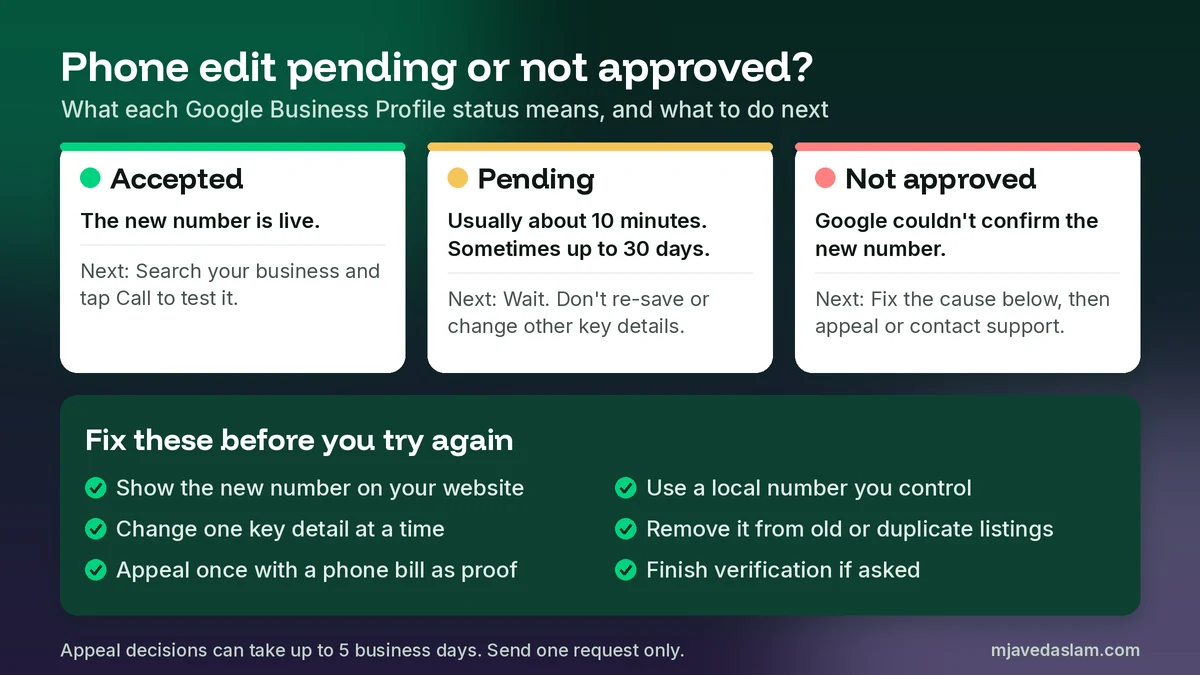
Google reviews every edit to a verified profile before it goes live, and a new Google Business Profile phone number is no exception. Its help page on what happens to your Business Profile edits lists three possible results:
| Status | What it means | What to do |
|---|---|---|
| Accepted | The new number shows on your profile | Search your business on Google and Maps and tap call to test it |
| Pending | Still under review. Usually about 10 minutes, sometimes up to 30 days | Wait. Don’t keep re-saving the same edit or change other key details |
| Not approved | Google couldn’t confirm the change was accurate | Fix what doesn’t match, then follow the appeal route below |
One thing worth knowing: while an edit is pending, the old number often still shows to customers. That is exactly why I never shut down the old line on the same day.
Does a new phone number mean you have to verify again?
Google doesn’t say that a phone change always needs a new verification. Its edit guide says a move to a new address does. Google also says it decides verification methods automatically. In my experience, some profiles do get a fresh verification request after edits to key details, and the risk goes up when several core details change at once. So here is my rule: change one key field at a time. If you are also moving, renaming or switching category, do the phone first, wait until it is accepted, then do the next change.
If Google does ask you to verify again, the new phone number matters. Phone or text verification sends the code to the number on the profile, and Google’s verification page warns that IVR systems won’t get it. Video verification is common now too, and my video verification guide shows how to film it so it passes the first time.
My safe switchover plan (so no calls get lost)
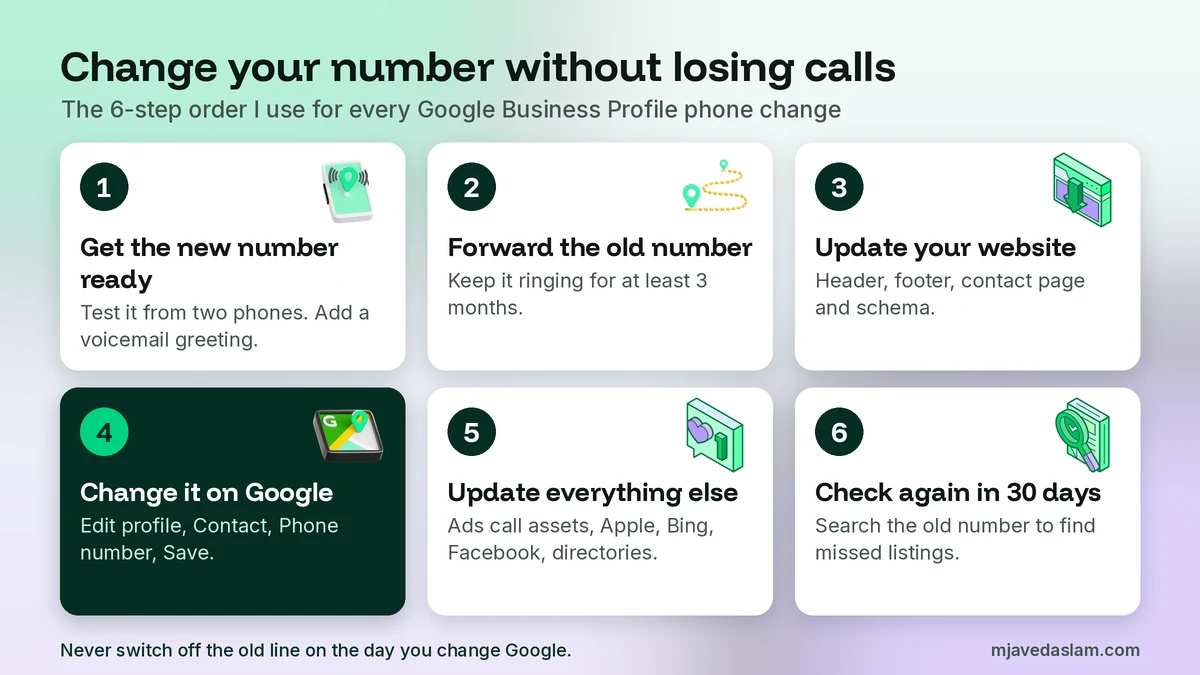
When a client changes numbers, I follow the same order every time. The goal is simple: at no point should a customer find a number that doesn’t ring.
- Get the new number working first. Test it from two different phones. Set up voicemail with your business name in the greeting.
- Keep the old number alive. Forward it to the new one for at least 3 months. Old citations and saved contacts take time to catch up.
- Update your website. Header, footer, contact page, click-to-call buttons and your LocalBusiness schema. Google compares your profile to your site.
- Change the Google Business Profile phone number. Use the steps above, then wait until the status says accepted.
- Update everything else. Google Ads call assets, Apple Business Connect, Bing Places, Facebook, Yelp, directories and your email signature.
- Check again after 30 days. Search your business name plus the old number to find listings you missed.
Step 5 is the one people skip. Consistent name, address and phone details across the web help Google trust your listing. My guide to citation building for beginners explains which directories matter and how to fix old entries.
If your phone edit is pending or not approved
A rejected phone edit almost always comes down to one thing: Google couldn’t confirm the new number belongs to your business. Here is what I check, in this order:
- Does your website show the new number? If not, update it and wait a few days before you try again.
- Does the number look like a call center or tracking line? A local number that matches your area code is easier to confirm.
- Is the number already on another profile? A number shared with an old or duplicate listing can confuse the review. My guide to fixing duplicate profiles helps here.
- Did you change other details at the same time? Undo the extra changes and submit the phone on its own.
- Is the profile verified? If it shows a Get verified button, finish verification first.
If the edit is still not approved, you can ask Google to look again. According to Google’s appeals help page, businesses in the UK and the EEA can appeal a rejected business information edit, including the phone, in the Google Business Profile appeals tool. Elsewhere, contact Google Business Profile support. Evidence that helps includes a phone bill in the business name, a business license or registration, and a screenshot of the website contact page. Google says appeal decisions can take up to 5 business days. Send one request and wait. Duplicate appeals only slow things down.
When Google shows the wrong phone number
Sometimes you didn’t change anything, but Google shows a different Google Business Profile phone number. This usually has one of three causes.
Google updated your profile
Google collects info from many sources, like user reports and licensed data. Its page on Google updates to your Business Profile says changed info shows in blue in the profile editor, with a notification at the top. If a customer suggests an edit that needs your review, you get an email or an in-product alert and have 4 days to accept or reject it. If you don’t respond, Google may publish the change when other public info, like your website, supports it. So check your email and fix wrong suggestions quickly.
Automated calls collected new details
Google may call, text or WhatsApp the verified phone number on your profile to confirm details like hours. Anything your staff confirms can be added to the profile. Updates from these calls are marked as pending, and that review can take up to 5 business days. In some regions you can review this in Edit profile under Collected info. Tell whoever answers your phone to give accurate answers or politely decline.
Someone else edited it
If a stranger keeps changing your number, check who has access under People and access and remove anyone you don’t know. If a fake listing is using your name with its own phone number, report the fake Google Business Profile. And if the pin is wrong as well as the phone, my guide to fixing a wrong Google Maps pin covers that part.
Should you use a call tracking number?
Business owners often ask me if they can put a tracking number on their profile to count calls. Google’s rules don’t ban it outright, but they do require a number that connects to your location, that you control, and that doesn’t redirect to someone else. In practice, I keep the real local number as the primary Google Business Profile phone number. It matches the signs, the website and every citation, which keeps your details consistent.
You can still measure results without a tracking number. Your profile’s Performance insights show calls made from the profile. For website visits, add UTM tags to your Google Business Profile link so Analytics shows that traffic separately. Save tracking numbers for ads and campaign landing pages, where they belong.
Don’t forget Google Ads
If you run ads, there are two places a phone number can show. Location assets pull data straight from your Business Profile. Google’s location assets help page says to fix wrong addresses or phone numbers in Google Business Profile, not in Ads. So once your profile edit is accepted, location assets follow. Call assets are different. You type that number into Google Ads yourself, so update it by hand. If you count calls from ads as conversions, check your setup again after the switch. My Google Ads call reporting guide walks through it.
A quick note for businesses in Pakistan and other countries
I work with clients in Pakistan and abroad, and the steps are the same everywhere. Choose the right country code in the phone field, then enter the local number in full. A mobile number is fine, and many small shops in Pakistan use one. Just keep the same format on your website and listings, so customers and Google see one clear number. If your business uses WhatsApp for customers, keep that number on your website. Don’t add it to the business name or description to get around the phone field.
Watch out for phone scams after a change
A new number on your profile can start getting “Google” calls. Some are real. Google does use automated calls to confirm hours and other details. But Google says it will never ask for payment, card details or passwords. If a caller says you must pay to keep your listing, or to “verify” your new number, hang up. Never share a verification code with anyone, not even a person who helps manage your profile.
FAQ: Google Business Profile phone number
How do I change the phone number on my Google Business Profile?
Sign in to the Google Account that manages the profile and search Google for my business. Select Edit profile, open Contact, replace the primary phone number and select Save. In the Google Maps app, tap Business, then Edit profile. Google reviews the edit before it goes live.
How long does it take for a new phone number to show on Google?
Google says edits usually take up to 10 minutes to review, but some take up to 30 days. While the edit is pending, customers may still see the old number, so keep the old line working and forwarded until the new number is live.
Why was my phone number change not approved?
Google rejects an edit when it can’t confirm the change is accurate. Common causes are a website that still shows the old number, a call center or redirect number, a number used on another listing, or several key details changed at once. Fix the mismatch, then appeal or contact support with proof such as a phone bill.
Can I use a mobile number on my Google Business Profile?
Yes. Google says your phone numbers can be mobile or landline, but not fax. The number must connect to your business location, be under your direct control and not be a premium-rate number. A local number is better than a central call center line.
Will changing my phone number hurt my Google ranking?
Google hasn’t said that a phone change lowers rankings. What causes trouble is mismatched details across the web and calls going to a dead line. Update your website, profile and main listings with the same number, and keep the old number forwarded for a few months.
Can I hide the phone number on my Google Business Profile?
Yes. On your Business Profile, open more Business Profile settings, select Advanced settings, and under Phone number turn on Don’t show. Only do this if you really don’t take calls, because for most local businesses the call button is the main way customers reach you.
Next step
Open your profile today and tap the call button yourself. Does it ring the right phone? Does the same number appear on your website and your top listings? If not, fix the website first, then change the Google Business Profile phone number and follow the switchover plan above. If you run several branches, my guide to Google Business Profile multiple locations shows how to update numbers in bulk. And if you would rather have me audit and fix your profile, see my Google Business Profile management service.