Here’s the short answer. Google Ads call reporting is an account setting that swaps the phone number in your ads for a Google forwarding number. That number rings straight through to your business, but now Google Ads can see each call: when it started, how long it lasted and which campaign it came from. To set it up, turn on call reporting in your account settings, add a call asset to your Search campaign, and then set a call conversion action with a sensible minimum call length. If people also call the number on your website after clicking an ad, add website call tracking too. The whole job takes about 30 minutes.
I manage Google Ads for small local businesses, and phone calls are often their best leads. Yet in most accounts I audit, calls are not tracked at all, or a 9-second wrong number counts the same as a booked job. Below is the setup I use for clients. If you have not set up website conversions yet, my guide to Google Ads conversion tracking in WordPress covers forms and thank-you pages. This article is only about calls.
What Google Ads call reporting does
When call reporting is on, Google assigns a Google forwarding number to your ad. A customer taps the call button, the call goes through that number, and it rings at your business as normal. According to Google Ads Help on call reporting, you can then see details like call duration, call start time, the caller’s area code and whether the call was connected. For calls longer than 15 seconds, you usually see the caller’s phone number too (except in India).
Call reporting works with three things:
- Call assets, the phone number or call button shown under your Search ads.
- Location assets, which can show your Business Profile address and phone number with your ads.
- Call ads, the ads built mainly around a call button.
Most importantly, call reporting lets Google Ads count a call as a conversion, so Smart Bidding can learn which keywords bring phone leads.
What is a Google forwarding number?
A Google forwarding number is a phone number that belongs to Google. It sits between the caller and your real number. Whenever possible, it uses the same area code as your business. If no local number is available, Google uses a regional number or a toll-free number instead.
The number belongs to Google and can change or be reassigned, so never copy it onto your website, Business Profile or listings. Caller ID still works in most countries, so your staff still see who is calling.
Does call reporting cost extra?
No. Google says a tap on the call button costs the same as a normal click on your ad, and you are not charged when someone dials the forwarding number by hand. So call reporting doesn’t raise your costs. It only gives you better data.
Countries where call reporting works
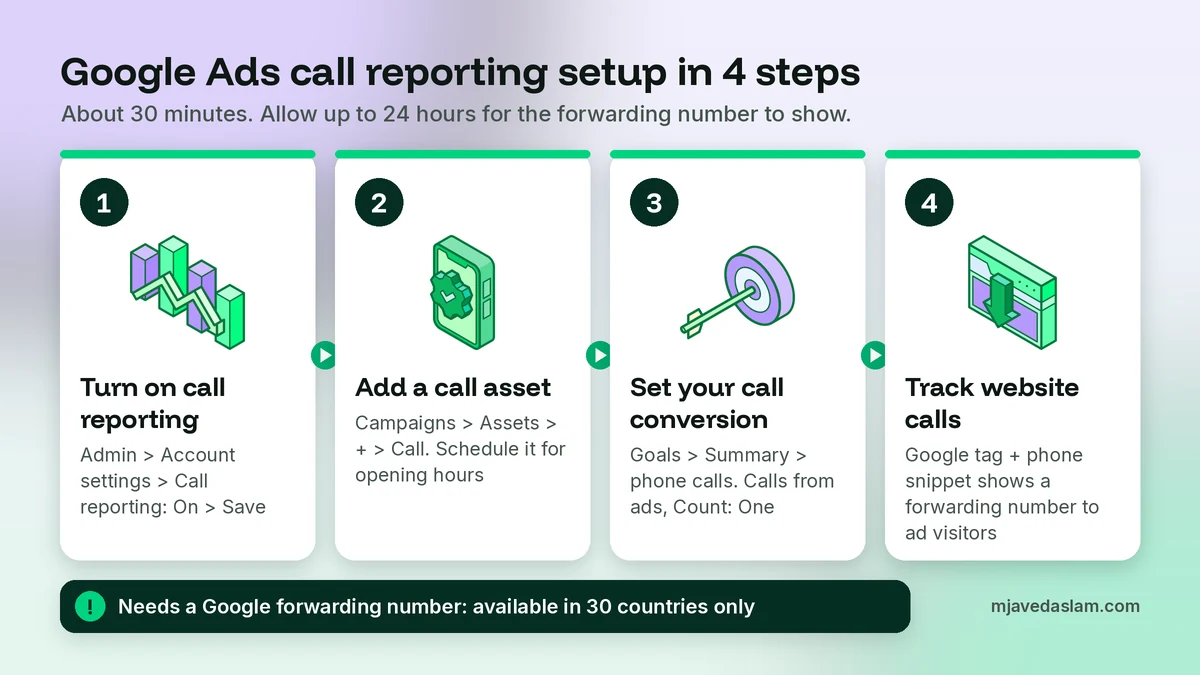
This is the part most guides skip. Call reporting needs a Google forwarding number, and those numbers only exist in some countries. At the time of writing, Google lists 30 countries:
Argentina, Australia, Belgium, Brazil, Canada, Chile, Colombia, Czech Republic, Denmark, France, Germany, Hungary, India, Indonesia, Ireland, Israel, Italy, Japan, Mexico, Poland, Portugal, Romania, Russia, Slovakia, South Africa, Spain, Sweden, Switzerland, the United Kingdom and the United States.
The country code of the phone number in your call asset must be on that list. So a plumber in Texas or Manchester can use call reporting, but a business with a Pakistani or UAE number can’t. The option may simply not show in your account settings. I cover what to do instead further down.
Before you start: a quick checklist
Check these four things first. They prevent most of the problems I see.
- You run a Search campaign. Call reporting runs on the Search Network. Call assets on the Display Network don’t get forwarding numbers.
- Your phone number is in the right format. Google asks for the international E.164 format, such as +12345678900, with no spaces. The same number should appear in your website’s source code. If it doesn’t, Google may disapprove the asset as an “Unverified phone number”.
- Your number is allowed. Google does not accept vanity, premium or fax numbers in call assets.
- Your phone system has no “early media”. Some phone menus play a message before the call is properly answered. Google says this is not compatible with call tracking and can cause calls to show as missed.
Google Ads call reporting setup in 4 steps
Google’s menus move now and then. If a label looks different in your account, use the search bar at the top of Google Ads.
Step 1: Turn on call reporting
- Sign in to Google Ads and open the Admin menu.
- Go to Account settings.
- Find Call reporting and select On.
- Select Save.
This account-level setting covers all call assets, location assets and call ads. Google says it can take up to 24 hours before your live ads show the forwarding number, so don’t panic if your own number still shows that afternoon.
Step 2: Add a call asset (if you don’t have one)
For most local businesses, call reporting needs a call asset on the Search campaign:
- Go to Campaigns, then Assets.
- Select the plus button and choose Call.
- Choose the level: account, campaign or ad group. The most specific level wins.
- Enter your business number in the right format and save.
- Under advanced options, set a schedule so the number only shows when someone can answer.
With location assets, Google may show that location’s number instead. That is normal, and those calls are reported too.
Step 3: Set up your call conversion action
Once call reporting is on, Google Ads counts new calls with a default conversion action called “Calls from ads”, as Google’s guide to measuring calls from ads explains. I always open it and check the settings, because the defaults don’t fit every business.
To create your own call conversion action instead:
- Open the Goals menu and go to Summary.
- Select + Create conversion action.
- Choose Conversions from phone calls, then Save and continue.
- Pick Phone call lead as the category.
- Add a conversion action and select Calls from ads.
- Edit the settings (see below), then save.
Now look at these four settings. They decide whether your numbers mean anything.
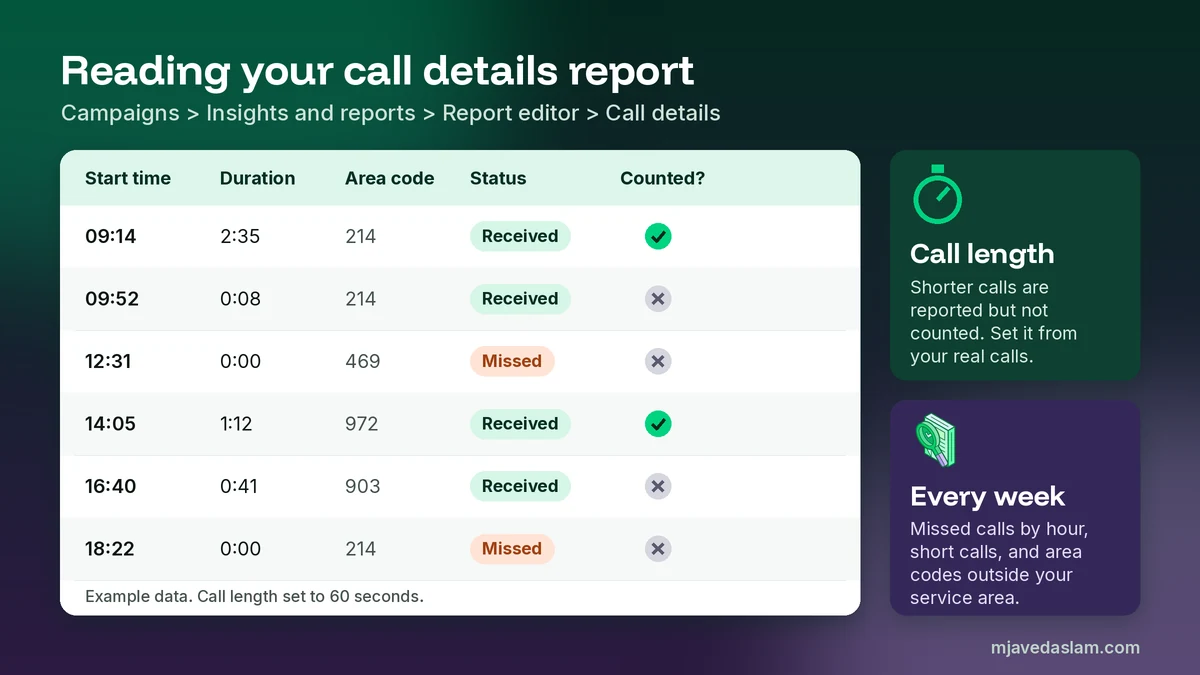
- Call length. Only calls longer than this count as conversions. Shorter calls still appear in your call reports. More on choosing the length below.
- Count. For leads, I choose “One”. If the same person calls three times about the same job, that is one lead, not three.
- Value. Add one if you know roughly what a new customer is worth.
- Primary or secondary. Make your main call action primary, so bidding learns from it. Make weaker signals secondary, so they are reported but don’t steer your bids.
Step 4: Track calls from your website too
Many people click your ad, read your page, and then call the number on your site. To catch those calls, follow Google’s guide to tracking calls to a number on your website. You install the Google tag plus a small phone snippet. For visitors who came from an ad, it swaps your number for a Google forwarding number at no cost. Everyone else still sees your normal number.
In the same conversion setup, choose Calls from website visits, then Someone calls a number shown on my website. Then install the tag yourself, email it to your developer, or use Google Tag Manager’s “Google Ads Calls from Website Conversion” tag.
Three details from Google’s instructions save time:
- The number you enter must match the digits on your page exactly.
- With the default JavaScript tag, only one number can be tracked on a page.
- It can take up to an hour before your ads are enabled for this conversion.
To test, Google suggests clicking your own ad once and checking that the number on your site changes. You pay for that click, so don’t repeat it often, and delete the “gwcc” cookie before each new test. My WordPress conversion tracking guide covers the Google tag setup in detail.
The 5 types of call conversions, compared
Google offers five ways to track calls. They are listed in Google’s overview of phone call conversion tracking. Here is how they compare in plain English:
| Type | What counts | Needs a forwarding number? | My view |
|---|---|---|---|
| Calls from ads | Calls from call assets, location assets and call ads that last longer than your call length | Yes | Start here. Make it primary. |
| Calls to a number on your website | Calls to the forwarding number shown on your site after an ad click, above your call length | Yes | Add it if your site shows a phone number. |
| Clicks on a number on your mobile website | Taps on a phone link on your site. Google can’t see if a call happened | No | Secondary only. A tap is not a call. |
| Clicks on call ads and assets | Taps on the call button, judged by Google’s estimate of a meaningful call | No | Useful where forwarding numbers don’t exist. |
| Import call conversions | Calls you mark as sales in your CRM, then upload to Google Ads | Yes | Best quality, once you have a CRM. |
The big trap here is double counting. If “Calls to a number on your website” and “Clicks on a number on your mobile website” are both primary, one caller from your site can count twice. So pick one primary action for each real-world event.
How to choose the minimum call length
Call length is the setting I change most often. In the accounts I work in, the field starts at 60 seconds, and you can set anything from 0 seconds upwards. Google’s own example on its call reporting page is a travel agent who noticed that calls over 2 minutes tended to lead to sales, so they counted only those.
There is no perfect number, so here is how I pick one:
- Quick-booking trades (locksmiths, plumbers, drain cleaning): a real job can be booked in 30 to 45 seconds. A 60-second rule may hide real leads.
- Consultation businesses (lawyers, clinics, home renovation): real enquiries usually run longer, so 90 to 120 seconds may fit better.
- Not sure? Keep 60 seconds for two weeks. Ask whoever answers to note what each call was about, then compare those notes with the durations in your report.
Google can now also use AI on call recordings to judge lead quality. However, call recording only works when both caller and business are in the U.S. or Canada. Everywhere else, your call length decides what counts.
How to read the call details report
Once calls start coming in, look at each one. Google keeps a call details report for this:
- Open the Campaigns menu.
- Go to Insights and reports, then Report editor.
- Under “Ads and assets”, open Call details.
You will see the start time, duration, caller country and area code, status (missed or received), call source, call type, campaign, ad group and search keyword. If you run Performance Max, remove the “Ad group” column, or those calls won’t show.
Here is what I look for every week:
- Missed calls by hour. If calls are missed at lunch or after 6 pm, fix the call schedule or the staff rota before you raise the budget.
- Very short calls. Lots of calls under 10 seconds often mean wrong numbers or the wrong search terms. Check your keywords and add negatives.
- Area codes and keywords. Calls from outside your area point to a targeting problem. Keywords that bring long calls deserve more budget.
For the area code problem, my guides to Google Ads location targeting and the geographic report show how to tighten things up. For junk searches, start with my negative keyword list for small businesses.
Import calls that became real jobs (optional)
Call length is only a rough sign of a good lead. A long call can still be a supplier or a job seeker. So bigger accounts record which calls became sales in a CRM, with the caller’s number and call start time, and upload that file to Google Ads. Google then matches each sale to the ad and keyword behind it.
This needs forwarding numbers, and calls made directly from your ads can only be matched from mobile. I usually start it once a client gets a few calls a day. Below that, a good call length and a weekly look at the reports is enough.
After a month of clean data, you will know your true cost per phone lead. My guide to Google Ads costs for small businesses shows how to turn that into a sensible budget. And if you later try Performance Max for local businesses, clean call conversions are a must before you start.
Common call tracking mistakes I fix in audits
- Putting the forwarding number everywhere. It belongs to Google and can change. Keep your real number on your website, your Google Business Profile and your listings. My guide to local citation building explains why one consistent number matters.
- Turning call reporting off by accident. Someone wants their own number back in the ads and switches it off. That also stops “Calls from ads” from counting as conversions, and Smart Bidding loses its data.
- Double counting. Two primary call actions for the same lead, or a 0-second call length, make your cost per lead look far better than it is.
- Third-party tracking fighting with Google. If you use a call tracking tool that swaps numbers, Google can’t verify the number from your source code. Link Google Search Console to Google Ads, or put the Google tag directly in your site’s HTML (not through Tag Manager), and resubmit the asset. If you prefer a paid tool, Google says you can turn call reporting off so your own number shows instead.
- Mixing up ad calls and profile calls. The calls number in your Business Profile Performance is a count of taps on the call button. It is a different report from Google Ads call reporting.
On that last point, my guide to reading Google Business Profile insights explains what those profile numbers really count.
If your country isn’t on the list (Pakistan, UAE and others)
I work from Multan, so I get this question a lot. Pakistan is not on the forwarding number list, so true call reporting is not available for Pakistani numbers. You can still run call assets with your normal number. Note that Google treats UAN numbers (such as 042 111) as non-standard cost numbers, so a small “extra charges may apply” note can appear.
Here is what I set up instead:
- Clicks on call ads and assets. This conversion type doesn’t need a forwarding number. Google counts a tap as a conversion when it estimates that a meaningful call took place.
- Phone clicks on your website. Track taps on your phone link as a secondary action, so you can see which pages drive them.
- A simple call log. Ask every new caller, “How did you find us?” and write it down. It is old-fashioned, but it works.
- A separate number for ads only, if you can. Some businesses use a second SIM or line only in their call assets. Then every call to that line is clearly from ads. Because that number won’t be in your website’s code, link Google Search Console to Google Ads so Google can verify your domain. Keep your main number on your website and listings.
The same thinking applies to choosing between ad types. If calls are your main goal in the U.S. or Canada, compare this with Local Services Ads vs Google Ads, where you pay per lead instead of per click.
FAQ: Google Ads call reporting
What is call reporting in Google Ads?
Call reporting is an account setting that shows a Google forwarding number in your call assets, location assets and call ads. Calls still ring at your business, but Google Ads records details such as start time, duration, area code and whether the call was answered, and it can count calls as conversions.
Does Google Ads call reporting cost extra?
No. A tap on the call button costs the same as a normal click on your ad, and Google does not charge you when someone dials the forwarding number by hand. Call reporting itself is free.
What minimum call length should I use for call conversions?
There is no single right answer. Many accounts start at 60 seconds. Quick-booking trades such as locksmiths may need a shorter length, while lawyers or clinics may need 90 to 120 seconds. Track for two weeks, compare call durations with real bookings, and then adjust.
Why is a different phone number showing in my Google ads?
That is the Google forwarding number used by call reporting. Calls to it are routed to your real business number. If you want your own number in the ads, you can turn call reporting off in Account settings, but then calls from ads will no longer be counted as conversions.
Is Google Ads call reporting available in Pakistan?
No. Google forwarding numbers are currently available in 30 countries, and Pakistan is not one of them. You can still show your number in call assets and track taps with the Clicks on call ads and assets conversion type, plus phone clicks on your website and a simple call log.
Should phone-link clicks on my website count as conversions?
Track them, but usually as a secondary action. A tap on a phone link does not prove a call happened, and if you also track website calls with a forwarding number, the same caller can be counted twice. Keep Calls from ads and website call conversions as your primary call actions.
Next step
Open your Google Ads account now and check one thing: is call reporting on in Account settings? If it is, open the “Calls from ads” conversion action and look at the call length. Those two checks take five minutes and fix most call tracking problems I see. If you would rather have me set up and audit your call tracking, see my Google Ads management service.