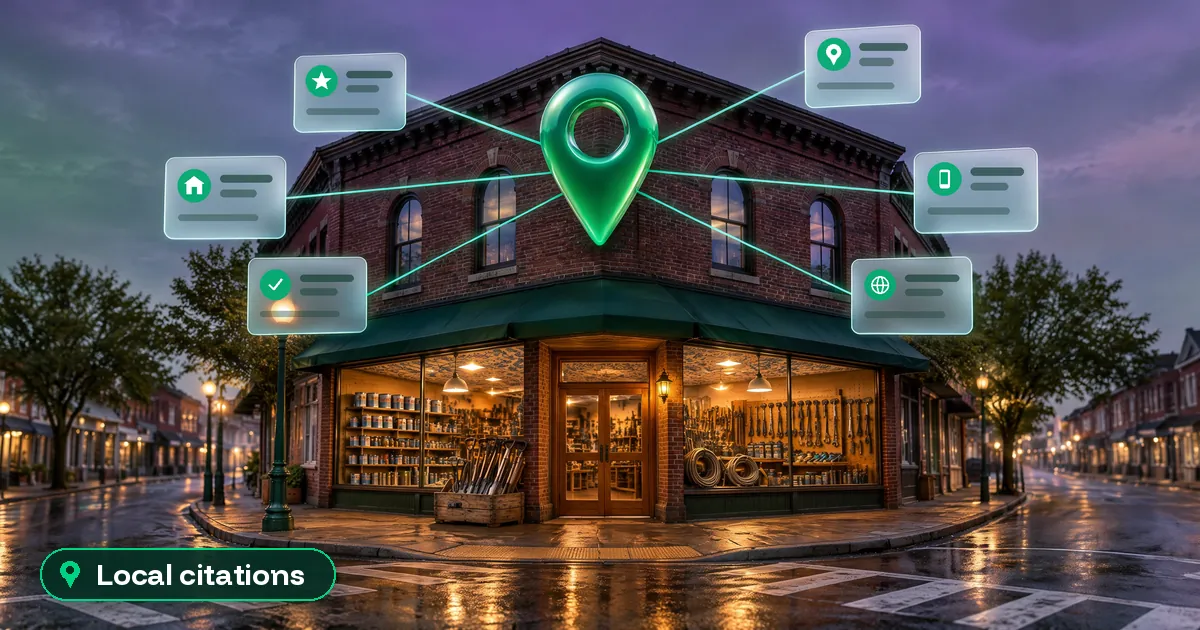
Here’s the short answer. Local citation building means listing your business name, address, phone number and website on other trusted sites, like Apple Maps, Bing, Yelp, Facebook and the directories in your trade. For a beginner, the right way is simple. First, write down one exact version of your business details. Then build your listings in order of value: Google first, then the other map apps, then the big review sites, then sites from your industry and your town. Track every listing in one spreadsheet. Skip the cheap “500 directory” packages. A few dozen accurate, relevant listings beat hundreds of junk ones.
I do local SEO and Google Business Profile work for small businesses. When a new client comes to me, citations are one of the first things I check, because messy listings cause wrong calls, wrong pins and lost trust. This guide is the same beginner plan I follow. You will learn what a citation is and whether it still matters in 2026. Then you will see which sites to start with, how to submit a listing the right way, and how to keep track of it all. If you do not have a Google profile yet, start there and claim your Google Business Profile first.
What is a local citation?
A local citation is any place online that mentions your business details. The core details are often called NAP: name, address and phone number. Most citations also show your website, hours and category.
There are two kinds:
- Structured citations. Business listings with fixed fields, like your profile on Apple Maps, Bing Places, Yelp, Facebook or a trade directory. You fill in a form, and the site shows your details in a set layout.
- Unstructured citations. Mentions inside normal content, like a local news story, a blog post about your town, a supplier’s “where to buy” page, or a charity’s sponsor list. You cannot fill these in yourself. You earn them.
Citation building is the work of creating, claiming and cleaning up those listings. For a beginner, most of the early work is structured citations. Unstructured ones come later, as your business gets known.
Do citations still matter for local SEO in 2026?
Yes, but not in the way old SEO blogs promised. Google says local results are mainly based on relevance, distance and prominence. In its local ranking help page, Google explains that prominence means how well-known a business is. It says this is based on info like how many websites link to your business and how many reviews you have. Google also says businesses with complete and accurate info are more likely to show up in local results.
The best industry data we have is the Whitespark Local Search Ranking Factors survey. The 2026 edition, published in November 2025, asked 47 local search experts to score 187 factors. For the map pack, the top citation factor was the consistency of your listings on the main map platforms (Google Maps, Bing Maps and Apple Maps). It ranked 28th. The plain number of directory listings ranked 110th. In other words, accuracy on the big platforms matters far more than volume.
The same report found something new. Whitespark says three of the top five factors for visibility in AI search are citation factors. AI tools pull business facts from many sites, so wrong or missing listings can show up in AI answers too.
My honest view: local citation building will not push a weak profile into the top three on their own. Your Google profile, reviews and website do the heavy lifting. But clean citations are the foundation. They help Google and AI tools trust that your business is real, and they help customers who find you on Apple Maps, Bing or Yelp reach the right phone number.
Before you build: write your NAP card
This is the step most beginners skip, and it is why their listings end up in five different formats. Before you submit anything, open a note and write the one version of your details you will use everywhere:
- Business name: your real-world name, exactly as it appears on your sign. Google’s guidelines for representing your business say your name should match the name you use consistently on your storefront, website and stationery. Do not add keywords or city names. My guide to Google Business Profile name rules covers this in detail.
- Address: one format, every time. Pick “Suite 4” or “#4”, “Street” or “St”, and stick to it. Google does not accept P.O. boxes or remote mailboxes as a business address.
- Service-area businesses: if you work from home and visit customers, follow Google’s rules for service-area businesses and hide your home address where the site lets you.
- Phone: one main local number. Google asks for a local phone number instead of a central call center number whenever possible. Keep call-tracking numbers for ads, not for citations.
- Website: one version of your URL (https, with or without www), pointing to your homepage or the right location page.
- Extras to copy-paste: your main category, opening hours, a short and a long description, your logo and five to ten good photos.
Make your website match the card too: the footer, the contact page and your LocalBusiness schema. Your website is the source of truth that all other listings should match.
Local citation building in five steps, in the right order
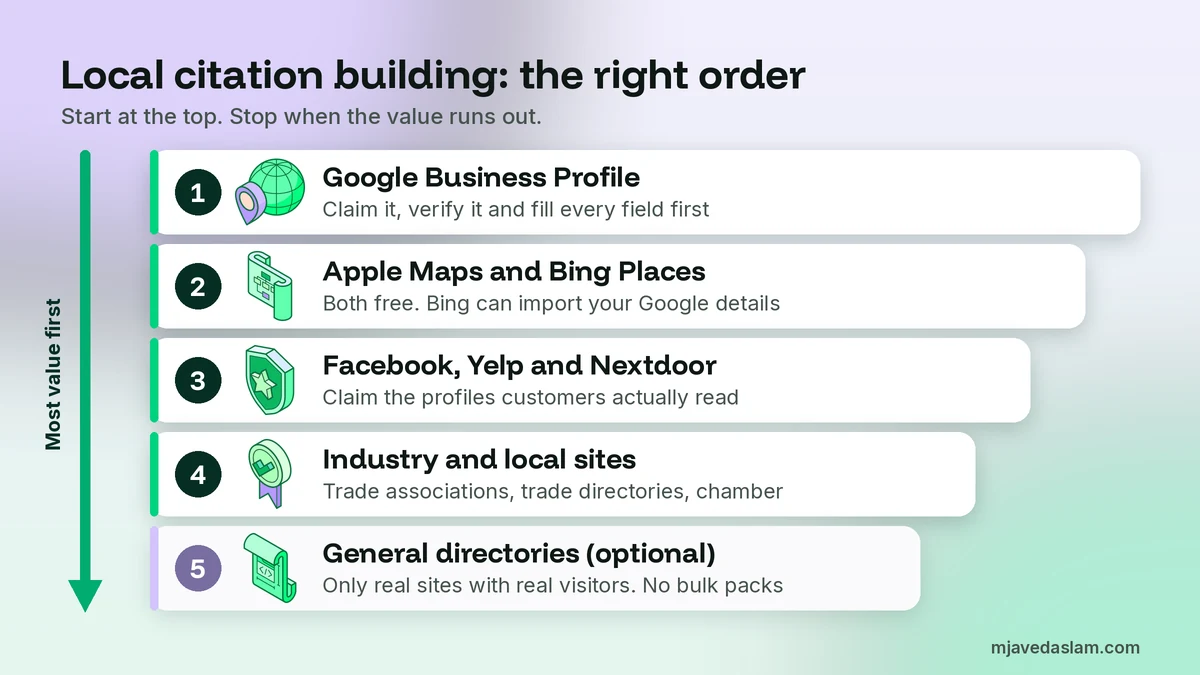
Order matters. The first sites on this list are used by real customers and are trusted data sources. The last ones bring much less value. Do them in this order and stop when the value runs out.
Step 1: Google Business Profile
Your Google profile is the most important listing you will ever have. Claim it, verify it and fill every field: the right primary category, a helpful business description, hours, services and real photos. Every other listing should copy these details.
Step 2: The other map platforms (Apple Maps and Bing)
These are the two other map platforms in Whitespark’s top citation factor, and both are free. On Apple, the old Apple Business Connect is now called Apple Business. Apple asks for the address that is officially listed on your website. My guide to Apple Business Connect vs Google Business Profile walks through the setup. For Bing, the old bingplaces.com address now redirects to bing.com/forbusiness. Bing Places lets you import your details from your Google Business Profile, which saves time. Check every field after the import, and add photos and anything else that is missing.
Step 3: The big review and social sites
Next, claim the profiles customers actually read: Facebook, Yelp and, for home services, Nextdoor. Yelp’s own business page FAQ says creating and claiming a page is free, and most new pages are approved within 24 hours. One detail beginners miss: Yelp says a claimed page may show as unclaimed again if the owner has not logged in for 90 days. So log in now and then. You do not need to buy ads on Facebook or Yelp to have a free listing, so politely say no to sales calls you do not want.
Step 4: Industry and local sites
This is where real value hides, and where your competitors are often lazy. Look for sites that are about your trade or your town:
- Your trade or professional association’s member directory.
- Industry directories your customers use. For example, lawyers have legal directories, clinics have health directories, restaurants have food and travel sites, and home services have sites like Angi or Houzz. Pick the ones that fit your work.
- Your local chamber of commerce or business association.
- Suppliers and brands you are a certified dealer or installer for (their “find a pro” pages).
- Local sponsorships, events and charities that list their supporters.
Some of these cost money, like chamber membership. Pay only when the site sends real customers or is a real part of your local business life. If you are a trade business, my niche guides, such as local SEO for plumbers, list a few industry options.
Step 5: General directories and data aggregators (optional)
Last come the general business directories. In the US, data aggregators also feed business data to many smaller sites. Whitespark’s survey names Infogroup (now Data Axle), Localeze and Foursquare. These can help spread the right data, but they come after steps 1 to 4. For most single-location businesses, a handful of the bigger general directories is enough. Never submit to sites that look spammy, have no real visitors, or ask you to link back to them first.
How to find citation sites for your business
You do not need a paid tool to start. These free checks find most good opportunities:
- Search your competitors’ phone numbers. Put a top competitor’s phone number in quotes in Google. The results show where they are listed. If a site lists three of your competitors, it probably belongs on your list too.
- Search your trade and town. Try searches like “[your trade] directory”, “[your city] business directory” and “best [your trade] in [your city]”. Note the directories and “best of” lists that appear on page one. Those are the ones people really see.
- Search your own details. Search your business name, your phone number and any old address in quotes. You will often find listings you never created, some with wrong details. Claim and fix them before you build new ones.
- Ask your network. Your suppliers, your association and local groups often have member pages you can join.
If you find an old listing at an address you left, update it rather than creating a new one. On Google, an old location should be handled properly, not left to confuse people. My guide on how to close or mark a Google Business Profile as moved explains the options. And if you find two Google profiles for one business, see how to fix a duplicate Google Business Profile.
How to submit a citation the right way
Most of local citation building is careful, repeatable data entry. Every listing takes ten to twenty minutes if you are prepared. Follow the same routine each time:
- Search before you create. Most sites already have a listing for your business, made from public data. Claim it instead of adding a new one. Duplicates are the biggest cleanup headache I see.
- Copy-paste from your NAP card. Never type your details from memory. One typo in the phone number makes the listing useless.
- Use a business email. Sign up with an email on your own domain or a shared business inbox, not a staff member’s personal account. When that person leaves, you keep access.
- Save every login. Store the site, email and password in a password manager. Lost logins are the reason so many old listings never get fixed.
- Pick the closest category. Category names differ from site to site. Choose the one closest to your Google primary category.
- Finish the profile. Add hours, a description, your logo and real photos. A half-empty profile looks abandoned to customers.
- Tag the website link on big sites. For listings that may send traffic, like Bing, Apple and Yelp, you can add UTM tags to the website link so you can see those visits in GA4. I explain the method in my guide to UTM tags for Google Business Profile.
- Complete verification. Many sites confirm ownership by phone call, text, email or postcard. Do it straight away, or the listing may sit unclaimed.
Listings can take days or weeks to appear or update. Do not submit the same site twice because you are impatient. That is how duplicates start.
Track your citations in one spreadsheet
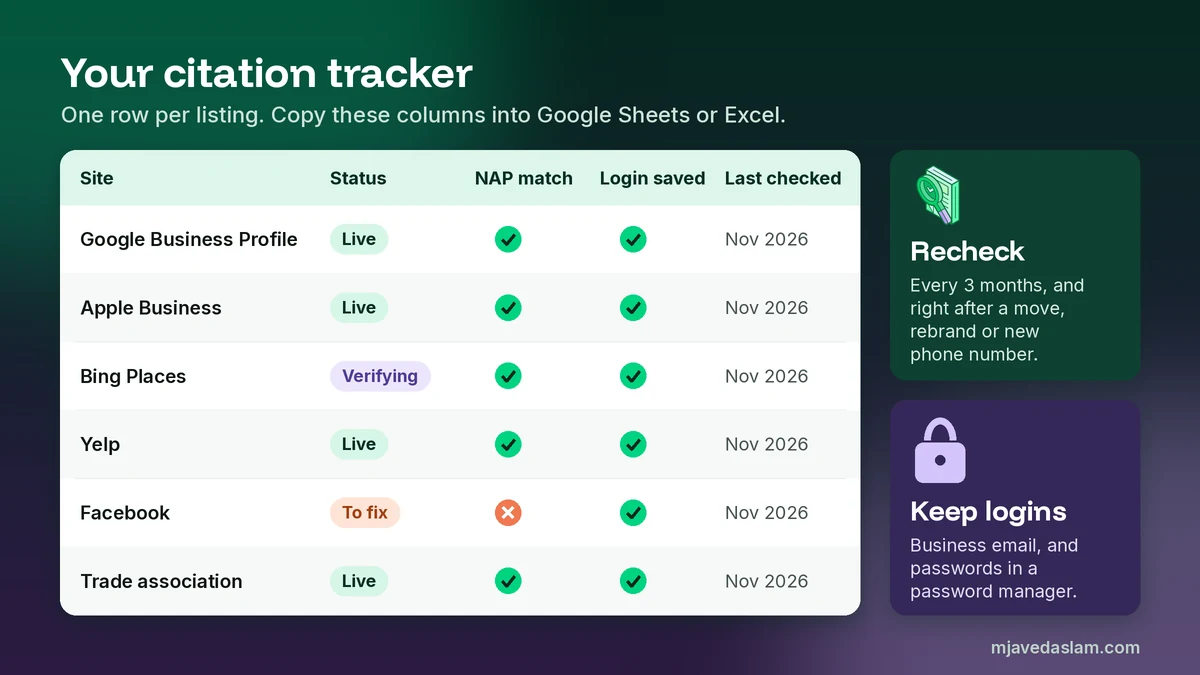
A simple sheet keeps the whole job under control, and it is gold when you move or change your phone number later. These are the columns I use:
| Column | What to write |
|---|---|
| Site | Name of the directory or platform |
| Listing URL | The link to your live listing |
| Status | Live, pending, needs verification, or to fix |
| NAP match | Yes or no (name, address, phone, website all exact) |
| Login | Which email you used (password stays in the password manager) |
| Date added | When you created or claimed it |
| Last checked | The last time you confirmed the details are right |
| Notes | Paid or free, renewal date, verification method |
Check the important rows every three months, and all of them right after you move, rebrand or change your phone number.
Common local citation building mistakes
- Buying bulk packages. “500 citations for $20” usually means low-quality sites that nobody visits. Remember, Whitespark’s experts ranked citation volume 110th for the map pack. Some of these sites also copy your details badly, which creates more cleanup work.
- Different names on different sites. The legal name on one site, a nickname on another, a keyword-stuffed name on a third. Use the sign name everywhere.
- Tracking numbers on listings. Each campaign number becomes another “main” number online. Keep one public number for citations.
- Creating instead of claiming. Adding a new listing when one already exists leaves two listings with different details.
- Forgetting old addresses. After a move, old listings keep sending people to the wrong place until you update them.
- Losing access. Listings set up by an old agency or ex-employee with no saved login. Always keep ownership in your own business account.
- Ignoring reviews on other sites. A listing is also a place for reviews. Reply to them, just like on Google.
If you need help with that last one, my Google review response templates work well on Yelp and Facebook too.
How many citations does a small business need?
There is no magic number in local citation building, and nobody outside Google knows an exact one. Here is my rule of thumb for a single-location business: get the core platforms right (Google, Apple, Bing, Facebook and Yelp), then add the industry and local sites that really fit you. For most of my clients that ends up at around 15 to 30 good listings. A business in a crowded trade and a big city may need more industry sites. A new business in a small town may need fewer.
The better question is: are you listed on the sites your customers and your top competitors use, with exactly the right details? If the answer is yes, more listings will not add much. Your time is better spent on reviews, photos and your website.
A simple 30-day citation plan for beginners
- Week 1: Write your NAP card. Fix your website footer and contact page. Make sure your Google Business Profile is complete and verified.
- Week 2: Set up Apple Business and Bing Places. Claim Facebook, Yelp and, if you serve homes, Nextdoor. Verify each one.
- Week 3: Search your own name, phone and old addresses. Claim and fix any wrong listings you find. Then search competitor phone numbers and list the industry sites they use.
- Week 4: Add five to ten industry and local listings. Fill in your spreadsheet. Set a calendar reminder to check everything again in three months.
That is it. One focused hour a few times a week is enough for a single location.
A note if your business is in Pakistan
I work from Multan, and many Pakistani business owners ask me about citations. The same plan works here. Google Business Profile comes first, and Apple’s own help pages list Pakistan among the countries where Apple Business location management is available. Facebook and Bing are worth setting up too. Local directories in Pakistan vary a lot in quality, so check that a site has real visitors and real listings before you join. Keep your address in the same format everywhere, including the area, block and city, because that is where I see most mismatches in Pakistani listings.
FAQ: Local citation building
What is local citation building?
Local citation building is the work of listing, claiming and cleaning up your business name, address, phone number and website on other sites, such as Apple Maps, Bing Places, Yelp, Facebook and directories in your trade or town. The goal is accurate, matching details on the sites your customers and search engines use.
Are citations still important for local SEO?
Yes, but accuracy matters far more than volume. In Whitespark’s 2026 Local Search Ranking Factors survey, consistency on Google Maps, Bing Maps and Apple Maps was the top citation factor for the map pack, while the number of directory listings ranked much lower. The same survey found citations matter more for AI search visibility.
Which citation sites should a beginner start with?
Start with your Google Business Profile, then Apple Business (Apple Maps) and Bing Places, then Facebook and Yelp. After that, add your trade association, the industry directories your customers use, and your local chamber or business groups. General directories come last.
Should I pay for a citation building service?
Avoid cheap bulk packages that promise hundreds of listings, because most of those sites have no real visitors and can spread wrong details. A single-location business can build its core citations by hand in a few weeks. Pay for help only if you have many locations or lack the time, and make sure every listing is created under your own business account.
How long does it take for citations to show up?
It depends on the site. Yelp says most new business pages are approved within 24 hours, while other directories can take days or weeks, especially if they verify by postcard. Do not submit the same listing twice while you wait, because that creates duplicates.
Can I use a call-tracking number on my citations?
It is better not to. Use one main local phone number on your Google Business Profile, website and citations, and keep tracking numbers for ads and campaign landing pages. Google’s guidelines ask for a local number instead of a central call center number whenever possible.
Next step
Open a note right now and write your NAP card: name, address, phone and website, exactly as they should appear everywhere. Then search your own phone number in quotes and see what comes up. If you would rather have me find, fix and build your listings for you, see my local SEO service or my Google Business Profile management.