Here’s the short answer. To close a Google Business Profile permanently, open your profile, select Edit profile, go to Hours, choose Permanently closed and save. Your listing then shows as “Permanently closed” on Google Search and Maps. Closing is not the same as deleting. If you also want to stop managing the profile, the primary owner can remove the profile’s content and managers in the Business Profile settings, but the business may still appear on Google, and customer reviews stay. If you’re only shut for a while, use “Temporarily closed” instead, so you can reopen in a couple of clicks.
Owners ask me this when a bakery stops trading, a clinic moves or a shop closes for a renovation. Each case needs a different button, and the wrong one can cost you reviews, access or rankings. Below are the three options side by side, Google’s steps, what happens to reviews, and how to reopen.
Temporarily closed, permanently closed or removed: which one do you need?
Google gives you three different tools, and they do three different jobs. Marking a business closed changes what customers see. Removing a profile changes who manages it. Here’s how they compare, based on Google’s help pages for marking your business as closed and removing a Business Profile from your Google Account.
| Option | Use it when | What customers see | Reviews and content | Can you undo it? |
|---|---|---|---|---|
| Temporarily closed | You’re closed for more than 7 days, for the off-season, or indefinitely, and you plan to reopen | Your profile labelled “Temporarily closed” | Everything stays, and you keep managing the profile | Yes. Set it back to open with your hours |
| Permanently closed | The business has stopped trading, or it has moved or become a different business | Your profile labelled “Permanently closed” for people who search for it | The profile stays in your account, and nothing is deleted by the status change | Yes, if it was a genuine mistake. Not if you closed it because of a move or a name change |
| Remove the profile (remove content and managers) | You no longer want to manage the profile at all | The business may still show on Search and Maps. You can choose to mark it permanently closed at the same time | Owner posts, photos, videos and review replies are deleted for good. Customer reviews remain | No. Removed content can’t be recovered, and you’d have to re-verify to manage the profile again |
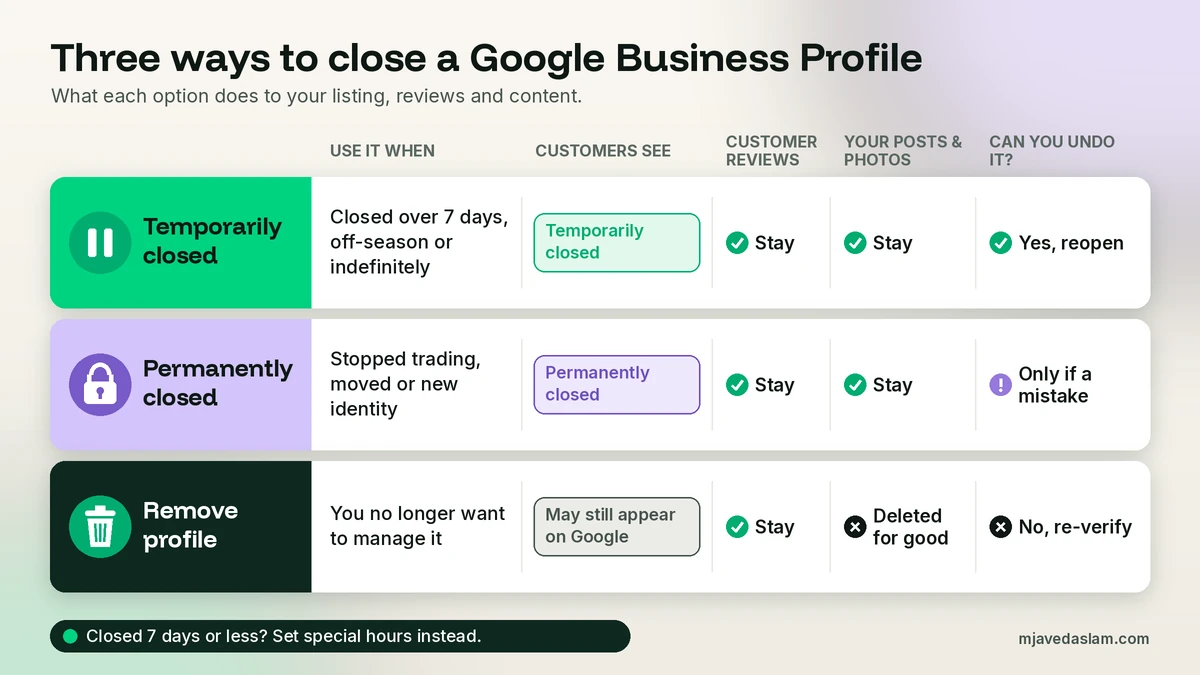
There’s a fourth, smaller option worth knowing. If you’re closed for 7 days or less, such as a public holiday or a short family break, Google says to set special hours rather than marking the business temporarily closed. My guide to holiday and special hours in Google Business Profile covers that.
Most owners who search for “delete Google Business Profile” actually want “Permanently closed”. Deleting doesn’t make the listing vanish, and it throws away your owner content.
Before you close anything: my 5-minute checklist
These aren’t Google’s steps. They’re what I do for clients.
- Check you’re the right person. Only the primary owner can remove profile content and managers, and Google says new owners and managers must wait 7 days before they can. If you’re not sure who owns the profile, sort that out first. My guide to claiming a Google Business Profile explains how ownership works.
- Save your numbers. Take screenshots or notes of your calls, direction requests and searches from Google Business Profile Insights. If you ever reopen, or sell the business, that history is useful evidence.
- Keep copies of your own photos. If you remove the profile, the photos and videos you uploaded are deleted along with your posts.
- Update your website first. Put the closure, or the new address, on your website, so what Google sees on your profile matches what customers see on your site.
- Decide what happens to access. If someone else is taking over the business, don’t close or remove anything. Transfer ownership of the Google Business Profile instead, and clean up old users with my guide to adding and removing managers.
How to close a Google Business Profile permanently
This is the right choice when the business has stopped trading at that location for good. These steps follow Google’s help page as of November 2026. Button names vary slightly between Google Search, the Maps app and desktop, but the path is the same.
- Sign in with the Google Account that manages the business, and go to your Business Profile (search for your business name on Google, or open it in Google Maps).
- Select Edit profile, then open Hours. In Google Maps, Google puts Hours under Edit profile and then Business information.
- In the “Business hours” section, next to “Hours”, select Edit and choose Permanently closed.
- Select Save.
Google says a permanently closed profile may still appear on Search and Maps for people who search for it, and it clearly shows that the business is closed. That’s useful. Old customers who look you up see a straight answer instead of driving to an empty unit.
Closing several locations at once
If you manage a chain, or you’re shutting several branches, use Business Profile Manager. Select the locations, click Actions, and choose Mark as permanently closed (or Mark as temporarily closed), then confirm in the dialog. Do this for each branch that is actually closing, not the whole list by habit.
How to mark a business temporarily closed
Use this for a renovation, a long illness, a seasonal business in its off-season, or any closure longer than a week where you fully expect to reopen. The path is the same as above: Edit profile, Hours, Edit next to Hours, then Temporarily closed, and Save.
Two details from Google’s help page are worth knowing:
- It can affect rankings while you’re closed. Google says that for broad searches, temporarily closed businesses can rank after open businesses, depending on the category, the type of search and how many similar businesses are also closed. Searches for your business name still find you.
- Others can report closures too. If Google receives an update that one of your locations is temporarily closed, you may get an email about it. Read those emails rather than ignoring them.
Never use “Permanently closed” as a stronger “Temporarily closed”. If you’re coming back, say so.
How to delete (remove) a Google Business Profile
Removing a profile is for when you no longer want to manage it, for example after the business has closed and you want it out of your account. Google calls this “removing profile content and managers”. Here are the steps from Google’s help page:
- Go to your Business Profile while signed in to the Google Account that manages it.
- Select More, then Business Profile settings.
- Select Remove Business Profile, then Remove profile content and managers.
- If the business has closed, turn on Mark your business as permanently closed.
- Select Continue, then Remove, then Done.
Read Google’s warnings before you press Remove, because this one is permanent:
- It affects every owner and manager on the profile, not just you.
- Posts, photos, videos and review replies added by owners and managers are permanently removed and can’t be recovered.
- Reviews and other content from customers stay.
- Removing the profile doesn’t guarantee the business disappears from Search and Maps. To manage it again later, you’d have to verify it again.
If you tick “Mark your business as permanently closed” while removing, Google says the business won’t disappear from Maps right away. It slowly drops out of search results and is then removed completely. For several profiles at once, Business Profile Manager has an Actions, Remove businesses option. If that throws an error, Google says to remove each profile one by one.
Just want yourself off the profile?
If the business is still trading and you’re simply leaving (an employee, an agency, or a former partner), don’t remove the profile. That would wipe everyone’s work. Remove yourself as a user, or, if you’re the primary owner, transfer primary ownership to the person staying on first.
Getting a listing taken off Google Maps
Removing a profile from your account and removing a business from Maps are different things. Google’s page on requesting removal of a Business Profile from Search and Maps says a business can be removed if it never existed or isn’t eligible to be on Google. In Google Maps, select the business, choose Suggest an edit, then Place is closed or not here, pick the option that fits and submit. A real business that has closed should be marked permanently closed instead. For fake or spam listings run by someone else, see my guide on how to report a fake Google Business Profile.
What happens to your reviews when you close or delete a profile
This is the part owners worry about most, so here’s what Google actually says.
- Temporarily closed: nothing is removed. The profile, reviews and your replies stay as they are, and the status just tells people you’re closed for now.
- Permanently closed: the profile can still be found by people who search for it, shown as closed. Changing the status doesn’t delete the profile or its content, which is why you can reopen it if it was a mistake.
- Removed: customer reviews remain, but your replies to them are permanently deleted, along with your posts, photos and videos.
- Moved or renamed: reviews don’t follow you to a new profile automatically. Google’s reopen guidance says that if you want your reviews moved to the new profile, you need to contact Google for help. Ask, but don’t assume the answer will be yes.
You can’t use closing or deleting to get rid of bad reviews. Customer reviews stay with the business on Google. If a review breaks Google’s policies, report that review instead of closing the profile.
How to reopen a Google Business Profile
If you closed temporarily, or the business was marked permanently closed by mistake, Google lets you reopen the same profile. The steps from Google’s mark your business as reopened page:
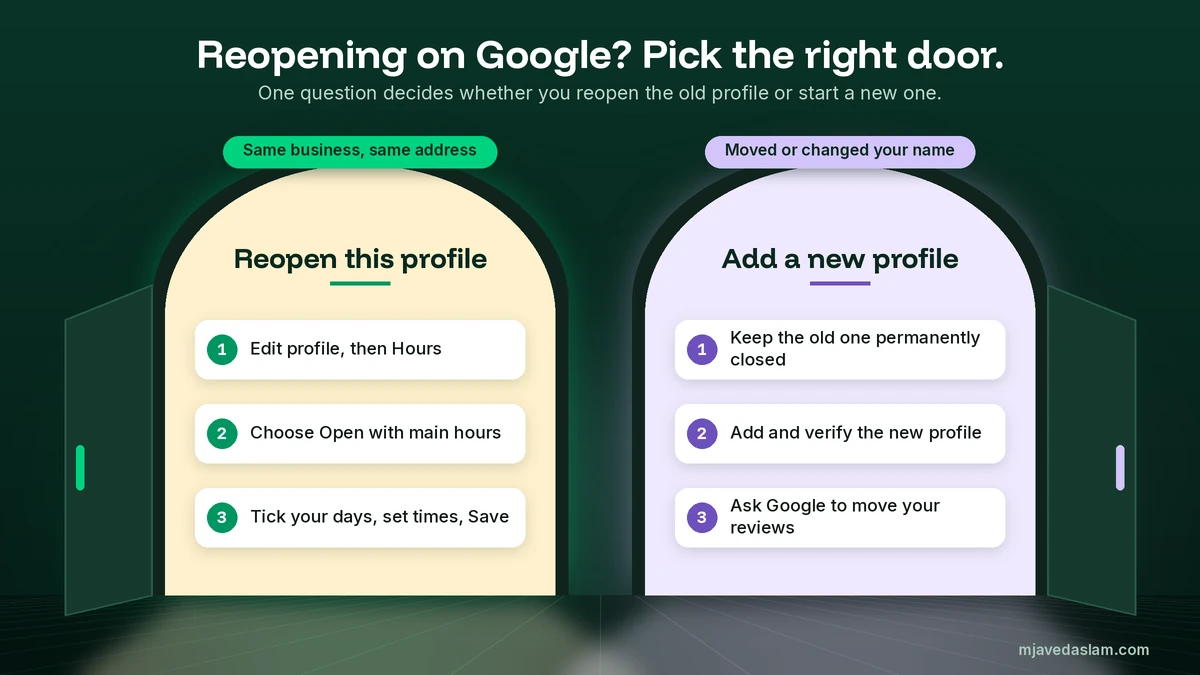
- Go to your Business Profile and select Edit profile, then Hours.
- In the “Business hours” section, next to “Hours”, select Edit, then Open with main hours. If you don’t want hours to show, choose Open with no main hours and save.
- Tick each day of the week you’re open.
- Set the opening and closing times with the dropdowns.
- Select Save.
For several locations, go to Business Profile Manager, select them, click Actions, then Open, and confirm with Mark as open. Once you reopen, Google stops labelling the profile as temporarily or permanently closed.
After saving, I check the listing in a private window later to confirm the label has gone. If it keeps getting marked closed while you’re open, someone may be suggesting that edit. Reopen it and contact Google Business Profile support with proof.
When you should not reopen
Google is clear about one exception: if your business was marked permanently closed as part of a location change or a name change, don’t reopen it. Add a new business instead, verify the new profile, and contact Google if you want your reviews moved. Reopening the old listing would put a closed address or an old identity back on Maps.
Moved your business? Close the old profile the right way
Moving is the most common reason I see a permanently closed label, and it’s where owners get tangled. Google’s overview of Business Profile policies says that if your business has relocated, you must mark the existing profile as permanently closed and create a new Business Profile at the new location. Google also rejects location edits for businesses whose physical place is part of the customer experience, such as restaurants, hotels and entertainment venues. The same page says that if a different business now operates at the location, or your business has changed significantly, the old business should be marked permanently closed, not renamed.
So, in short:
- Same business, address was just entered wrong: don’t close anything. Fix the address or the pin. My guide to fixing a wrong Google Maps pin covers that.
- Closed the shop front but still serve customers at their homes: you may not need to close at all. Read my guide to the service area business setup in Google Business Profile first.
- Genuinely moved to a new address: close the old profile permanently, create and verify the new one, then ask Google about moving reviews. Changing a business address on Google Business Profile has its own process, and an old profile left open next to a new one can turn into a duplicate. My guide to fixing a duplicate Google Business Profile deals with that.
- New name, new identity: check whether it’s a rebrand Google allows or a new business. My Google Business Profile name guidelines explain where that line is.
Mistakes I see when owners close a profile
- Deleting instead of closing. The listing often stays on Maps anyway, now with nobody managing it and without your replies to reviews.
- Using “Permanently closed” for a refit. Use “Temporarily closed” for anything you plan to come back from.
- Renaming the old profile for a new business at the same address. Google’s policy is to close the old business, not rename it.
- Removing the profile while selling the business. The buyer then has to claim and verify from scratch. Transfer ownership instead.
- Leaving the profile on “Open” after closing. Customers turn up at a locked door and leave angry reviews. A closed label is kinder and more honest.
Frequently asked questions
How do I close my Google Business Profile permanently?
Go to your Business Profile, select Edit profile, then Hours. In the Business hours section, next to Hours, select Edit, choose Permanently closed and select Save. Google says the profile may still appear on Search and Maps for people who search for your business, but it clearly shows that the business is closed. If you manage several locations, use Actions in Business Profile Manager.
Is deleting a Google Business Profile the same as marking it closed?
No. Marking a business permanently closed changes what customers see. Removing a profile (Remove profile content and managers) takes it out of your account and permanently deletes the posts, photos, videos and review replies added by owners and managers. Google says removal doesn’t guarantee the business disappears from Search and Maps, and only the primary owner can do it.
What happens to my Google reviews if I close my business?
Marking your business temporarily or permanently closed doesn’t delete your reviews. If you remove the profile, Google says customer reviews and other user content remain, but your replies to reviews are permanently removed. If you move or rename the business and create a new profile, reviews don’t transfer automatically. Google says to contact it for help if you want them moved.
How do I reopen a Google Business Profile that is marked closed?
Select Edit profile, then Hours. Next to Hours, select Edit and choose Open with main hours (or Open with no main hours), tick the days you’re open, set your times and save. In Business Profile Manager, select the locations and use Actions, then Open, then Mark as open. Don’t reopen a profile that was closed because of a move or name change. Add and verify a new profile instead.
Should I mark my business temporarily closed or set special hours?
Google says to use Temporarily closed if you’re closed for more than 7 days, closed for the off-season or closed indefinitely. If you’re closed for 7 days or less, set special hours instead. Google also says temporarily closed businesses can rank after open businesses for broad searches, so switch back to open as soon as you reopen.
My business moved. Should I close the old Google Business Profile?
Usually, yes. Google’s policy overview says that if your business has relocated, you must mark the existing profile as permanently closed and create a new Business Profile at the new location, and it rejects location edits for places like restaurants, hotels and entertainment venues. Verify the new profile and contact Google if you want your reviews moved. If only the address was entered wrong, fix it instead of closing.
Next step
Before you touch the Hours setting, decide which of the three situations you’re in: closed for now, closed for good, or done managing the profile. If you’re moving, rebranding or selling, the order of steps matters more than the button. If you’d like me to check your profile and handle the closure, move or handover for you, see my Google Business Profile management service.