Here’s the short answer. No, you don’t need a website for Google Business Profile. You can create, verify and run your profile without one, and it’s free. Google only asks for a phone number that reaches your business, or a website that represents it. But Google no longer builds a free website for you. It shut down its business.site websites in 2024. So if you want a website, you have to make your own. In my experience, most local businesses should, because a website does several jobs your profile can’t.
I’m Javed Aslam, a local SEO consultant in Pakistan. I set up and fix Google Business Profiles for small businesses, and this question comes up in almost every first call. Some owners think they can’t get on Google Maps without a website. Others had a free Google website that suddenly stopped working. This guide covers what Google’s own help pages say today, what happened to the free sites, what you lose without a website, and the cheapest way to fix it. If you want help with the whole profile, see my Google Business Profile service page.
What Google says about websites and Business Profiles
I checked Google’s help pages on 20 November 2026. None of them says a website is required. Here’s what they do say.
- The profile is free. Google’s add or claim page says: “You can add or claim your business at no charge.” The steps ask for your business details and a verification option. There’s no website step.
- A phone number or a website. Google’s guidelines for representing your business say: “Provide a phone number that connects to your individual business location, or provide a website that represents your individual business location.” Note the word “or.”
- The Website field is optional. The Edit your Business Profile page says: “You can share your business’s website with your customers on your Business Profile.” It asks you to enter the full URL with “http://” or “https://” and to make sure Googlebot isn’t blocked on your site.
- Google Ads says the same. Google’s Business Profile benefits page calls the profile “an easy way to maintain an online presence even if you don’t have a website.”
So the rule is simple. A website is optional. A real way to reach your business is not. If you have neither a working local phone number nor a website, fix that first.
What happened to Google’s free Business Profile websites
For years, Google let you build a basic website from your Business Profile, with a business.site address. Many small shops used it as their only website. Google turned these sites off in 2024. The help page that announced it has since been removed (its old address returns a 404 error today), so I’m quoting the archived copy of Google’s notice:
As of March 5, 2024, websites made with Google Business Profiles are no longer available and customers that visit your site will be redirected to your Business Profile instead.
| Date | What happened |
|---|---|
| March 5, 2024 | Websites made with Google Business Profiles were turned off. Visitors were redirected to the Business Profile. |
| March 5, 2024 onward | Google said ads linked to these websites “may be disapproved and stop running.” |
| Until June 10, 2024 | The redirect to the profile kept working, including for custom domains forwarded to the old site. |
| After June 10, 2024 | Visitors got a “Page not found” error. |
| Today | Domains ending in business.site and negocio.site have been removed from the Website field. Google’s Edit profile help now only has a Website field for a URL, with no site builder. |
Two things in that notice matter most. First, Google said: “Other than that, your Business Profiles aren’t affected.” Your reviews, photos and hours stayed. Only the website went away. Second, Google pointed people to other site builders: Wix, Squarespace, GoDaddy, Google Sites, Shopify, Durable, Weebly, Strikingly and WordPress. It also said: “If you’d like to continue to have a website for your business, you can create a new website with other tools. Then, update your Business Profile with the new website address.”
If your profile once had a business.site link and the Website field is empty now, that’s why. It isn’t a penalty. You just need a new site and a new link.
What your profile can do without a website
Quite a lot. A verified profile can show on Google Search and Maps, collect and answer reviews, show photos, hours, services and your phone number, and get you calls and direction requests. You can also publish Business Profile posts, and in select regions you can turn on chat with customers and add social media links. Google’s social media links page says that feature is “currently available for select regions,” so check your own Edit profile screen.
You can even run Google Ads without a website. Google’s Ads help says small businesses “without a traditional website can use their Business Profile as their ad landing page in Performance Max and Smart campaigns.” Google calls this a Business Profile (optimized for your ad). But read the fine print. Google says “Only Performance Max campaigns associated with a Business Profile are eligible,” and that this page “isn’t a replacement for your business’s website.” I cover campaign setup in my guide to Performance Max for local businesses.
What you miss without a website
This is where I push most clients to build a simple site. Here’s what a website gives you that a profile alone can’t, based on Google’s own pages.
1. Faster verification in some cases
Google’s verification page says: “In some cases, Google verifies a profile instantly. This can happen when: You verify your website with Google Search Console.” Without a website, that path isn’t open to you. You’ll use the normal options, like postcard, phone, email or video verification, which Google says can take up to 5 business days to review.
2. Booking and ordering links that work
Some categories can add links for bookings, reservations or orders. Google’s business links policy says these links must lead to “a dedicated landing page for your business” and “cannot be” social media sites, messaging links, app store links or link shorteners. So a Facebook page or a WhatsApp link won’t work as a booking link. You need your own page or a booking provider. More on that in my post on the Google Business Profile booking link.
3. More information for Google to read
Google’s page on how it sources Business Profile info lists “crawled web content (e.g., information from a business’ official website)” as one source. A profile has limited room. A website can explain each service, the areas you cover, your prices and your experience. In my view, that extra detail helps Google and customers understand what you really do.
4. A stronger case for prominence
Google’s local ranking page says local results are mainly based on relevance, distance and popularity. In its section on prominence, it says this is “based on info like how many websites link to your business and how many reviews you have.” Without a website, other sites have nothing of yours to link to except your profile. With one, local directories, partners and news sites can link to you. That’s the idea behind citation building.
5. Data you can track
Google’s performance page counts “Website clicks,” the number of times people clicked the website link on your profile. No website, no clicks to count. With a website, you can also add UTM tags to your profile link and see in Google Analytics what those visitors do next.
6. Something you own
This one is my opinion, not a Google rule. Your profile lives on Google’s platform. Google can change features, as it did with the free websites, and profiles sometimes get suspended or edited by others. A website on your own domain is the one place online you fully control. When something goes wrong with a profile, the business with a website still has a home.
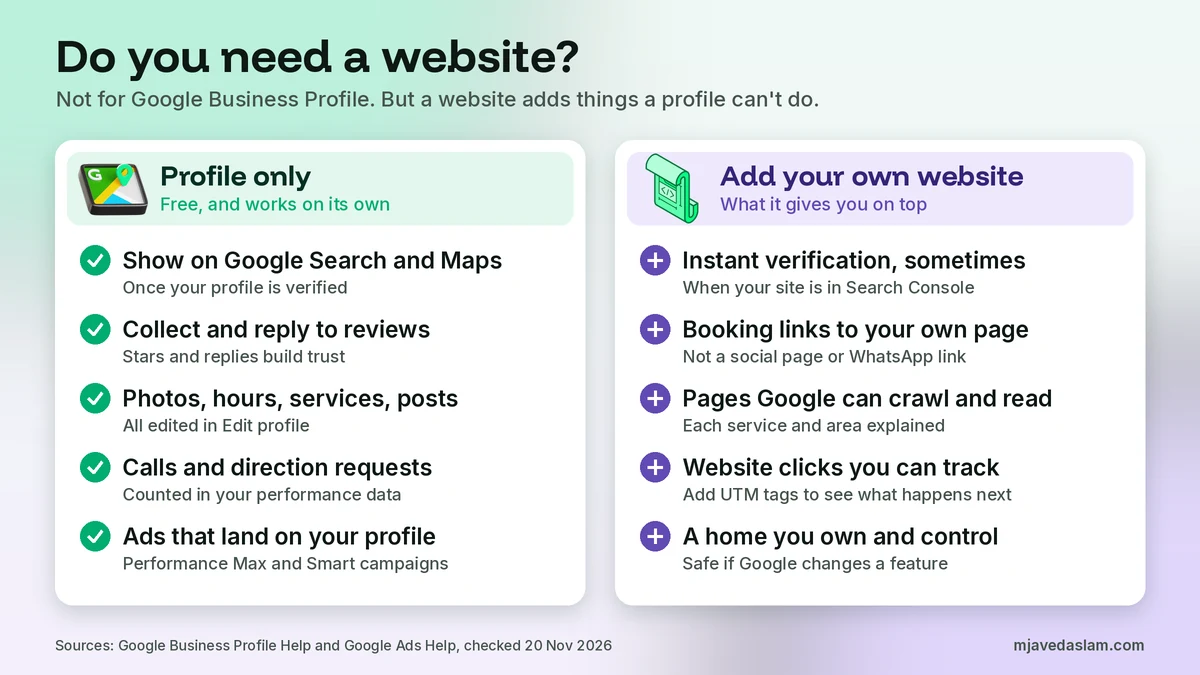
Website or no website: a quick comparison
| What you want | Profile only | Profile + your own website |
|---|---|---|
| Show on Google Search and Maps | Yes, once verified | Yes, once verified |
| Reviews, photos, hours, calls, directions | Yes | Yes |
| Instant verification through Search Console | No | Possible, in some cases |
| Booking or ordering links | Only through a booking provider | Yes, to your own dedicated page |
| Website clicks in performance data | No | Yes |
| Detailed service and area pages Google can crawl | No | Yes |
| Google Ads | Performance Max and Smart campaigns can use your profile as the landing page | Any campaign can send clicks to your own pages |
| Control if Google changes a feature | No | Yes, for your own site |
Can I use Facebook or Instagram as my website?
Many owners ask me this, especially here in Pakistan. Google’s guidelines say: “Do not provide phone numbers or URLs that redirect or ‘refer’ users to landing pages or phone numbers other than those of the actual business, including pages created on social media sites.”
My reading: Google doesn’t ban a business’s own Facebook page outright in that line, but it clearly treats social pages with caution, and booking and ordering links can’t be social sites at all. So I don’t put a Facebook page in the Website field. I add Facebook and Instagram in the Social profiles section, where that’s available, and keep the Website field for a real site. If you have no site yet, it’s fine to leave the field empty for now.
Who can skip a website for now
Here’s how I decide with clients. This is my judgment, not a Google rule.
- You can wait if you’re a small walk-in shop, like a tea stall, barber or corner store, where people find you on Maps and just call or visit. Get the profile right first: name, category, hours, photos and reviews.
- You should build one soon if you’re a service-area business like a plumber, electrician or AC repair company. You have no storefront to show, so a site that lists your services and areas does a lot of trust-building.
- You need one if you take bookings or orders online, sell services with longer decisions (clinics, lawyers, schools, contractors), or plan to run Google Search ads.
Whatever you choose, remember the profile itself is free. If someone tells you that you must pay them for a website before Google will list you, that’s not true. See my post on whether Google Business Profile is free and my warning about Google Business Profile scam calls.
How to get a simple website for your Business Profile
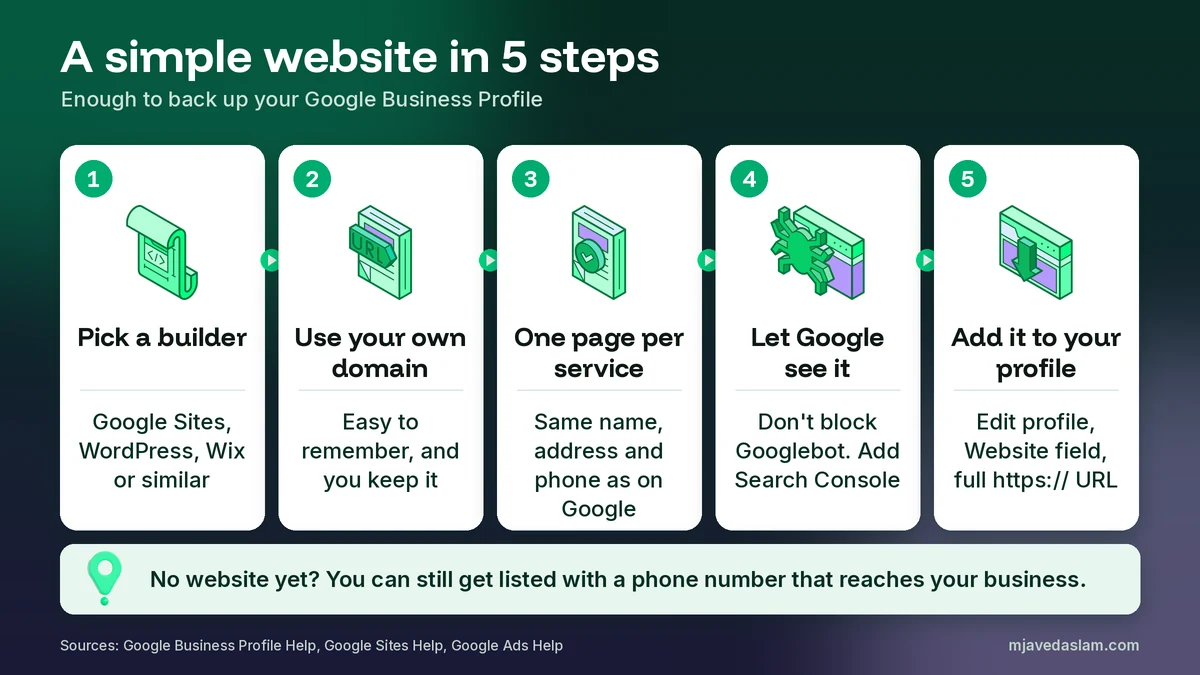
You don’t need a big site. One good page is a real start. Here’s the path I use, in plain steps.
- Pick a builder. Google’s Ads help page on websites lists Wix, Squarespace, GoDaddy, Google Sites, Shopify and WordPress. For a very small budget, Google Sites is simple: open Google Sites, pick a template, edit it, and click Publish. I build client sites on WordPress because it grows with the business.
- Use your own domain. A name like yourbusiness.com is easier to remember and you keep it if you change builders. Google Sites can connect a custom domain. Google says you can connect up to five custom domains to one site and that changes may take up to 48 hours to show.
- Write one clear page per main service. Say what you do, where you do it, your hours, and how to contact you. Use the exact same business name, address and phone number as your profile.
- Let Google see it. Don’t block Googlebot, add the site to Google Search Console, and, if you use WordPress, add LocalBusiness schema. Google’s LocalBusiness structured data guide says this lets you tell Google about things like business hours.
- Add it to your profile. Go to your Business Profile, select Edit profile, find the Website field with your contact details, enter the full URL starting with https://, and select Save.
One more thing from Google’s link policy: Google’s crawlers check business links and expect a page that returns “200 OK.” If your site is down, blocks bots, or shows an error, Google may remove the link. A fast, working site matters. If your WordPress site is slow, my guide to fixing Core Web Vitals will help, and my list of website copy mistakes covers the words on the page.
How to add or change the website on your profile
Sign in to the Google Account that manages your profile. On Google Search, go to your Business Profile and select Edit profile. In the Google Maps app, tap Business, then Edit profile. Find the Website field, enter the full URL including “https://”, and save. Google’s edits page says edits usually take up to 10 minutes to review, but sometimes up to 30 days. It also says unverified profiles can still edit a few basics, and the website is one of them.
If your edit isn’t accepted, check that the page loads in a private browser window, that the domain matches your business, and that the URL has no typos. My guide on Business Profile edits not approved goes deeper.
If you still have an old business.site link somewhere
Your profile is fine, but the old address may still be printed or posted in other places. It now leads to an error. Check these:
- Business cards, flyers, shop boards and vehicle stickers.
- Your Facebook, Instagram and WhatsApp Business profiles.
- Online directories and local listings.
- Old Google Ads, which Google said may be disapproved if they point to the old site.
You can’t redirect a business.site address, because the domain was never yours. Replace the link wherever you can. Going forward, use a domain you own, so this can’t happen to you again.
Do you need a website for Google Business Profile in Pakistan?
Many small businesses here run on Facebook, Instagram and WhatsApp, and plenty of them did fine on Google Maps without a website. That’s still possible, and Google’s rules are the same here. But I see three problems again and again. First, owners put a Facebook link in the Website field, which goes against the spirit of Google’s guideline above. Second, WhatsApp chat on the profile and social links are only in select regions, so they may not show for you. Third, in my experience, when a customer in Lahore or Karachi compares two plumbers, the one with a clear website showing real jobs, prices and areas often wins the call. A one-page site in English, with Urdu where your customers expect it, is a small cost for that trust.
My checklist
- Your profile has a working local phone number, or a website, or both.
- The Website field has no old business.site or negocio.site link.
- The website, if you have one, uses your own domain and loads over https://.
- Name, address and phone match exactly on the profile and the site.
- Googlebot isn’t blocked and the site is in Search Console.
- Facebook and Instagram go in Social profiles, not the Website field.
- Booking and ordering links go to a dedicated page or a booking provider, not a social page or WhatsApp.
For the bigger picture of how profiles rank, read my guide on how to rank in the Google Map Pack, and if you’re starting from zero, begin with claiming your Google Business Profile.
Frequently asked questions
Do I need a website for Google Business Profile?
No. You can add, claim and verify a Business Profile without a website, and Google says you can add or claim your business at no charge. Google’s guidelines ask for a phone number that connects to your location or a website that represents it, so a working local phone number is enough. A website is optional, but it helps.
Does Google still make free websites from Business Profiles?
No. Google turned off websites made with Google Business Profiles on March 5, 2024. Old business.site and negocio.site addresses redirected to the profile until June 10, 2024, and then showed a “Page not found” error. Those domains were also removed from the Website field. Your profile itself, including reviews, was not affected.
Can I verify my Google Business Profile without a website?
Yes. Verification options such as postcard, phone or SMS, email or video recording depend on your business type and region, and none of them needs a website. A website can help in one way: Google says it may verify a profile instantly when you’ve verified your website in Google Search Console.
Can I use my Facebook page as my website on Google Business Profile?
Google’s guidelines say not to use URLs that redirect or refer users to pages other than those of the actual business, including pages created on social media sites. Booking and ordering links also can’t be social media sites. I recommend leaving the Website field for a site you own and adding Facebook in the Social profiles section, where that’s available.
Will a website help my Google Maps ranking?
Google doesn’t promise that. It says local results are mainly based on relevance, distance and popularity, and that prominence uses info like how many websites link to your business and how many reviews you have. Google also uses crawled info from a business’s official website. So a good website can support your profile, but it’s not a switch for a higher ranking.
What is the cheapest way to get a website for my Business Profile?
Use a site builder. Google’s own help pages list Wix, Squarespace, GoDaddy, Google Sites, Shopify and WordPress. Google Sites lets you pick a template, edit it and click Publish, and you can connect your own domain later. One clear page with your services, area, phone and address is enough to start.
Next step
So, do you need a website for Google Business Profile? Not to get listed. But if you want more calls, working booking links and something you own, a simple website is worth it. If you’d like me to check your profile and tell you whether a website should be your next step, see my Google Business Profile service or my local SEO service, or get in touch with your business name and city.