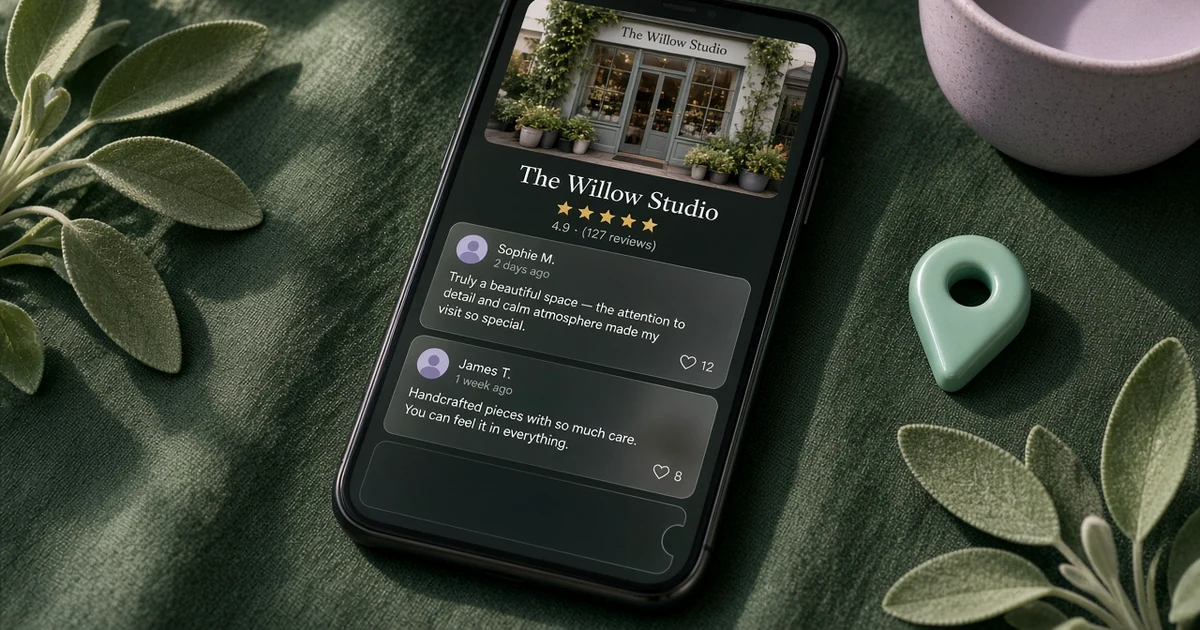
Here’s the short answer. When Google reviews are not showing on your Business Profile, the review is usually still being checked, it was removed for a policy issue, or you’re looking at the wrong profile. Google says a policy check can take a few days, and that reviews removed for spam or inappropriate content won’t be restored. Other official causes I see a lot: a recent profile merge, a future opening date, reviews unpublished after a restriction or a reinstatement, or a category that doesn’t allow reviews (including many schools for children aged 6 to 18). Don’t keep asking the same people to post again, and don’t offer a discount for a review. First confirm what customers see on a signed-out phone. Wait a few days if it’s a brand-new review. If genuine reviews are still missing, report it to Google with your Business Profile ID and the reviewer names.
I manage Google Business Profiles for local businesses in Pakistan and abroad. “A customer just reviewed us, but I can’t see it” and “half our reviews vanished overnight” are two of the messages I get most. They feel random, but they usually aren’t. In this guide I’ll walk through 11 reasons Google reviews are not showing up, how I diagnose the issue, and how to report missing reviews the way Google’s support form asks. If you want a clean way to ask once this is fixed, see my Google review QR code.
First, check you’re looking at the right profile
Before you assume Google deleted anything, do these four checks. They take five minutes.
- Open your profile from a browser or phone that isn’t signed in to the owner’s Google account. Owners sometimes see a different view than customers do.
- Check both Google Search and Google Maps. After a merge, reviews can take a few days to show in both places.
- Search your exact business name and city, and make sure you’re on the verified listing you manage, not a duplicate or an old address. If you have two listings, the reviews may be sitting on the other one. I explain how to clean that up in my guide to fixing a duplicate Google Business Profile.
- Ask the customer, politely, whether they can still see their own review. Google Product Experts on the official Business Profile community say that if they can, the review may only be temporarily filtered and can reappear after the automated check finishes.
If you manage the profile from your phone, my guide to the Google Business Profile app in Google Maps shows where reviews live on mobile.
Why Google reviews are not showing up
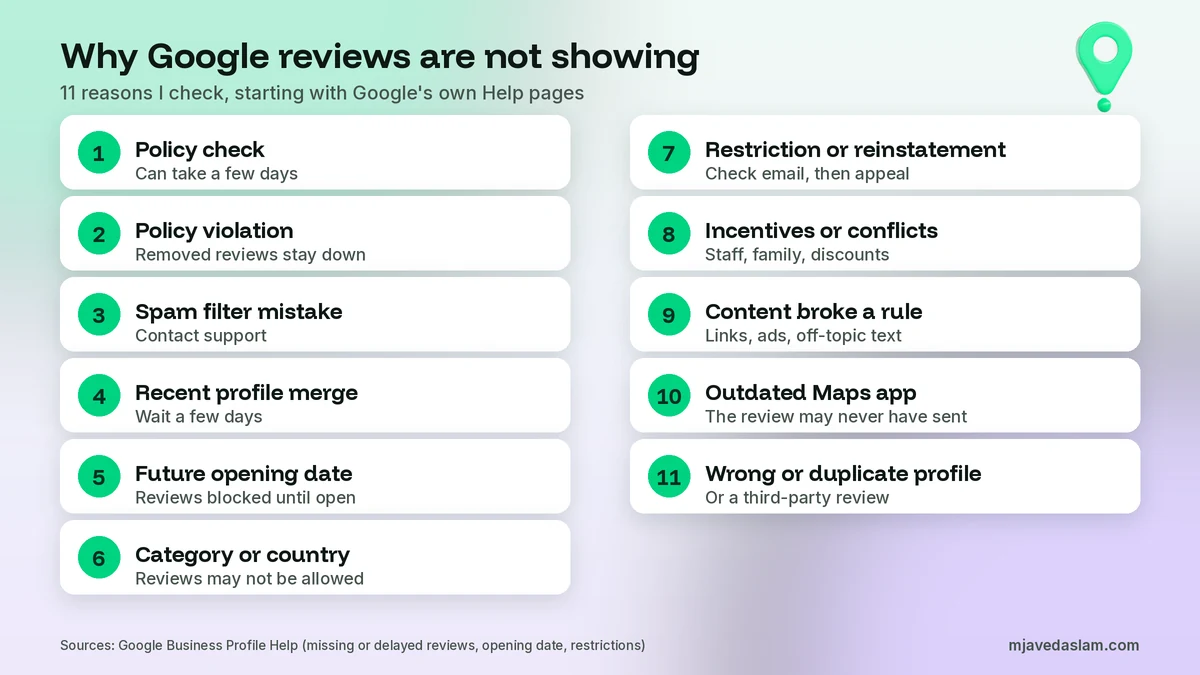
When Google reviews are not showing up, it’s almost always one of these 11 reasons. I’ll say clearly when a point is official Google Help, and when it’s guidance from Google Product Experts on the official community.
1. Google is still checking the review
This is the first place I look when a single new review is missing. Google’s help page on missing or delayed reviews says reviews are checked to make sure they comply with its policies, and that this process might take a few days.
There’s a second delay that’s easy to misread. Google’s page on how review scores are calculated says the score is the average of all ratings published on Google for that place, and that after someone leaves a new review it may take up to 2 weeks for the score to update. A review can already be live while the star average hasn’t moved. Don’t start a new review campaign just because the number at the top hasn’t changed.
2. The review was removed for a policy violation
Google says the usual reason reviews go missing is a policy violation such as spam or inappropriate content. It also says reviews removed for policy violations won’t be restored. That’s hard to hear, but it’s the official line. The rules live in Google’s prohibited and restricted content policy for Maps. They cover fake or misleading reviews, incentives, conflicts of interest, unusual review patterns, off-topic posts, and content such as harassment, hate speech, profanity used to offend, and personal information.
3. Automated spam detection removed a genuine review by mistake
Google’s systems are not perfect. On its page about reporting inappropriate reviews, Google says it uses automated spam detection to remove reviews identified as spam, and that the system may occasionally remove legitimate reviews by mistake. If that happens, Google tells you to contact support. Gather the reviewer’s name, the approximate date, and a screenshot if you have one, then use the support steps later in this guide.
4. You recently merged Business Profiles
If you just combined two listings, don’t assume the reviews were deleted. Google says that after a merge, it might take a few days for reviews from both profiles to display on Search and Maps. Check both from a signed-out phone. If they still haven’t landed after several days, include the merge in your support request. If you can already see two listings, start with my duplicate Google Business Profile guide rather than creating a third one.
5. A future opening date is blocking reviews
This one surprises people who are already serving customers. Google’s opening date help page says users cannot suggest edits or post content, such as reviews or photos, until your business is officially open. If the date is still in the future, or you set a future date by mistake, customers can see the profile and still be unable to leave a review. Set the real month and year you opened, save it once, and wait for the edit to go live. I cover the field in my guide to the Google Business Profile opening date.
6. Your category or country doesn’t allow reviews
Google’s manage customer reviews page says reviews are available only in certain countries or regions and for certain business categories, and that availability may change over time. That matters if you recently changed category, or if reviews were never turned on for your type of business in your market.
There’s also a hard rule for many schools. Google says reviews and ratings are removed and disabled for profiles whose primary category is an educational institution for students aged 6 to 18. Current reviews for those schools are deleted, and new ones aren’t allowed. Universities, day care centres and swim schools are excluded. If the category doesn’t represent your business, Google says you can change it, but a big category change can also trigger an edit review. My guide to the Google Business Profile primary category explains how I choose it.
7. Google unpublished reviews after a restriction or a reinstatement
If a lot of reviews disappeared at once, check your email and the public profile. Google’s page on Business Profile restrictions for policy violations says that if it determines a business owner violated its Fake Engagement policy, it may unpublish existing reviews for a set period, block new reviews for a set period, and display a warning that fake reviews were removed. Google says it notifies owners by email, and that you can appeal. A related official tip: reviews are sometimes removed after a profile is reinstated. If that happens, contact support. Don’t create a new profile to “start over.”
8. Incentives, staff, family, or a sudden review surge triggered a filter
This is the cluster I see most. Google does not allow reviews influenced by a payment, discount, free goods or services, or any other benefit, or reviews based on a conflict of interest. That can include current or former staff, a contract or consulting relationship, family, or a competitor. Google also removes unusual volumes or patterns of reviews that look like an effort to manipulate a rating. You may encourage genuine reviews, with no incentive and no attempt to influence the star rating or the wording. You may not discourage negative reviews or solicit only positive ones, pressure people to review while they are on the premises, or ask them to include specific wording, including a staff member’s name.
Google’s public Help pages don’t spell out every technical filter. Google Product Experts on the official Business Profile community also consistently flag reviews from the same IP address, reviews written on your shop Wi-Fi or an in-store “review station,” reviewers far outside your normal market, and the same review copied word for word onto another site. I treat those as practical risks, not as a published Google Help list. Ask after the visit, on the customer’s own phone, with no reward and no script.
9. The review itself broke a content rule
Sometimes the customer did nothing shady, but the text tripped a rule. Google’s policy treats promotional content in reviews as a problem, including email addresses, phone numbers, social links or website links. Off-topic reviews, unsubstantiated allegations, harassment and profanity used to offend can also come down. If a customer pasted your WhatsApp number or a booking link into the review, ask them to write about the visit itself and leave contact details out.
10. The customer couldn’t finish leaving the review
Not every “missing” review was ever submitted. Google says customers who use older phones or software might have trouble leaving reviews, and it recommends they update the Maps app. If someone says they reviewed you and you can’t find it, ask whether they finished the steps and whether Maps is up to date.
11. You’re looking at the wrong profile, or the reviews are from another site
A duplicate or an old address can hold the reviews you’re hunting for, while the listing you log into looks empty. And Google may show third-party reviews from other websites. You can’t choose those sources or turn them off. If a review comes from another site, Google says to contact that website directly. Businesses in the European Economic Area can also report third-party reviews on Google. If you see reviews that belong to a different business, contact support.
Google reviews not showing: a quick diagnosis
Use this table to match what you’re seeing with the next action.
| What you see | Likely cause | What I do |
|---|---|---|
| One new review hasn’t appeared yet | Policy check, or the review was never finished | Wait a few days. Ask if they submitted it and can still see it |
| The review is visible, but the star average hasn’t moved | Score updates can take up to 2 weeks | Leave it. Don’t start a new review push |
| Customers can’t find a “Write a review” button | Future opening date, category or country limits, or a restriction | Check the opening date, category and any email from Google |
| Many reviews vanished at once | Restriction, reinstatement, merge delay, or a filter after a surge | Check email, confirm the right listing, then contact support with names and dates |
| Reviews sit on a different listing | Duplicate or old address | Fix the duplicate. Don’t create a new profile |
| A school profile lost every review | Primary category is an educational institution for ages 6 to 18 | Confirm the category. Don’t expect those reviews back |
What to do in the first few days
When a brand-new review is missing, I wait. Google itself says the policy check might take a few days. Product Experts on the official community often suggest waiting about 3 to 7 days if the reviewer can still see their own review, because a temporary filter can clear on its own. I don’t treat that range as a Google Help guarantee, but rushing usually makes things messier. While you wait, don’t offer a discount to “replace” the missing review, don’t ask the same customers to post again today, and don’t sit people down at a tablet on your shop Wi-Fi. Take screenshots of the public profile, note the old review count and rating, and write down reviewer names and dates.
If the profile was recently suspended and then reinstated, wait a few days, then contact support if the reviews have not returned. Google’s own tip is to contact support in that situation. Don’t open a second profile for the same business.
How to report missing Google reviews to support
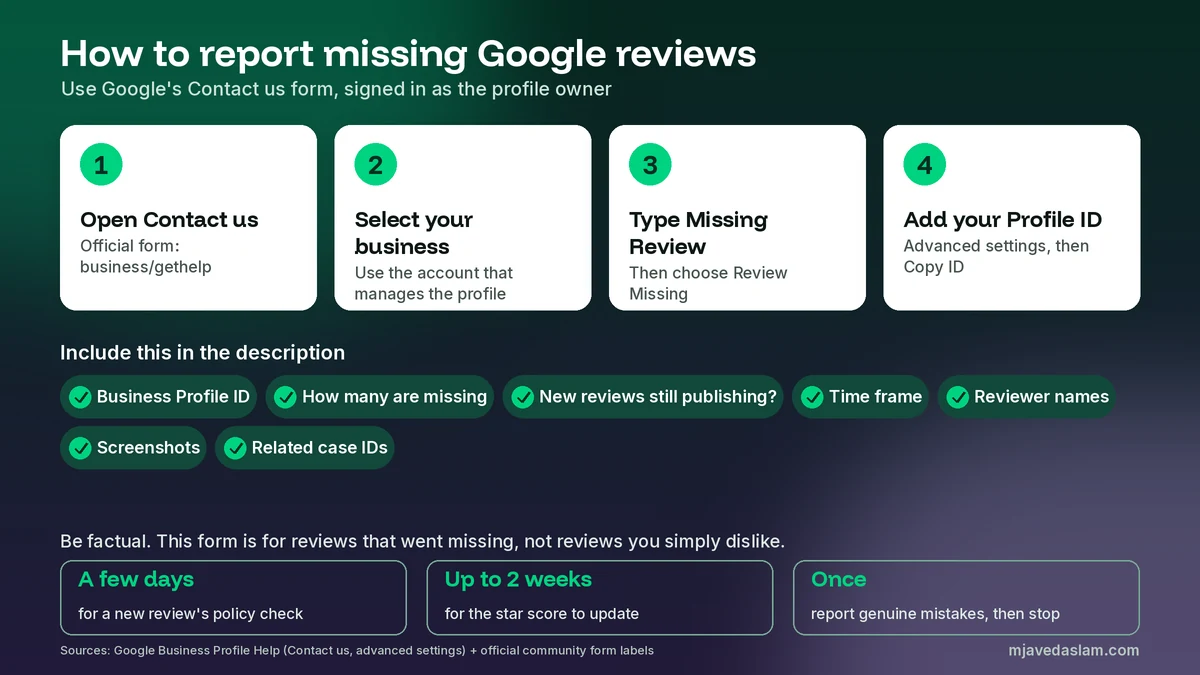
If genuine reviews are still missing after a short wait, use Google’s official Contact us form. There isn’t a public phone number I trust for this, and “Google support” numbers on random websites are often scams.
First, copy your Business Profile ID. Google’s advanced profile settings page says this ID is the unique identifier for your listing, and that you can share it with support. On your Business Profile, open More, then Business Profile settings, then Advanced settings, and copy the ID.
Then open the Contact us form, signed in as the profile owner, and:
- Select your business from the drop-down.
- Under “Tell us what we can help with,” type Missing Review.
- Under “Choose the best description of this issue,” choose Review Missing.
- In the description, include the details below.
Those form labels come from Google Product Experts on the official Business Profile community. In the description, include your Business Profile ID, how many reviews are missing, whether new reviews are still being published, the time frame, reviewer names and approximate dates, screenshots if you have them, and any related case IDs.
Be factual. This form is for reviews that were posted and then went missing, or that a customer submitted and the public never saw. If a live review breaks a policy, flag it through your profile or the Reviews Management Tool. Google says evaluation typically takes several days, and that you shouldn’t report a review just because you disagree with it. Policy-violating reviews won’t be restored. Report genuine mistakes once, with evidence, then go back to earning new, clean reviews.
How to ask for reviews without triggering filters
Ask in a way Google allows. Its tips to get more reviews repeat the rule: reviews must reflect a genuine experience, and incentives for posting, changing or removing a review are strictly prohibited. You can share a review request link or QR code. I show the official steps in my Google review QR code guide. Send it after the visit, not while someone is standing at the counter.
Ask every recent customer, not only the happy ones. Google does not allow you to solicit only positive reviews or to discourage negative ones. Don’t hand people a script, and don’t ask them to name a staff member. When reviews appear, reply to them. A calm, specific reply helps more than a copied “thank you.” I keep ready wording in my Google review response templates.
A note for businesses in Pakistan
Most of my clients are in Pakistan, and a few local habits cause missing reviews more often than people think. A WhatsApp broadcast that says “leave us 5 stars and get 10% off” is an incentive. Family and staff reviews in the first week after a shop opens are a conflict of interest. An iPad on the clinic or salon counter, on the shop Wi-Fi, is the “review station” pattern Product Experts warn about, and it also sits close to Google’s rule against pressuring people to review on the premises. If the shop is already serving customers but the opening date is still in the future, fix the date before you ask anyone to review. And be careful with “Google support” numbers on Facebook and WhatsApp. The real route is the Contact us form, signed in as the profile owner.
FAQ
Why are my Google reviews not showing up?
Usually because Google is still checking the review, it was removed for a policy issue, or you’re looking at the wrong profile. Official causes also include a recent merge, a future opening date, a category or country that doesn’t allow reviews, and reviews unpublished after a restriction or a reinstatement. A genuine review can also be caught by automated spam detection. If that happens, contact support.
How long does it take for a Google review to appear?
Google says the policy check might take a few days. Separately, the star rating at the top may take up to 2 weeks to update after a new review is published. If one new review is missing, wait a few days and ask the reviewer whether they can still see it before you file a support request.
Can I get a removed Google review restored?
Only sometimes. Google says reviews removed for policy violations won’t be restored. It also says automated spam detection may occasionally remove legitimate reviews by mistake, and that you should contact support if that happens. Report genuine cases once, with your Business Profile ID and the reviewer names. Don’t create a new profile.
How do I report missing Google reviews to support?
Open Google’s Contact us form, signed in as the profile owner. Select your business, type Missing Review, and choose Review Missing. Include your Business Profile ID, how many reviews are missing, whether new reviews are still being published, the time frame, reviewer names, screenshots and any related case IDs.
Do discounts or staff reviews cause Google reviews to disappear?
They can. Google prohibits reviews influenced by a payment, discount, free goods or services, or another benefit, and reviews based on a conflict of interest, including current or former staff, contractors, family and competitors. Unusual review surges can also be removed. Ask after the visit, with no reward and no script.
Why can’t customers leave a Google review yet?
The usual official reasons are a future opening date, a category or country where reviews aren’t available, or a restriction that blocks new reviews for a set period. Many school profiles for students aged 6 to 18 can’t collect reviews at all. Check the opening date, the primary category and any email from Google.
Next step
If reviews are still missing, or you’d like someone to check the profile and the way you ask for reviews, I can audit it and handle the support request with you. See my Google Business Profile service page, or get in touch with your business name and city. Once you know why Google reviews are not showing, the fix is usually patience, cleaner ask habits, and one clear report to Google, not a second profile.