Here’s the short answer. Your Google Business Profile opening date is the month and year your business opened, or will open, at its address. To add or change it, go to your Business Profile, select Edit profile, select Edit next to Opening date, enter at least the year and month, and select Save. If you haven’t opened yet, you can enter a date up to one year in the future. Once the date is set and the business is verified, Google says your profile shows up 90 days before opening day. After you open, the profile carries a “Recently opened” tag for 90 days. If you closed for a while and are coming back, the opening date usually isn’t the setting you need. You reopen through Hours instead.
The opening date is one of the quietest fields on a profile. In my local SEO work I see two problems again and again. A new shop goes live on Maps months before it opens and looks open to everyone. Or a business that has served its city for twenty years shows no opening date at all, so it gives up an easy trust signal. In this guide I’ll explain what the field does, when to set it, how to edit it, how to use the 90 days before launch, what it means for your anniversary, and how a reopen date really works on Google. If your profile doesn’t exist yet, start with my guide on how to claim your Google Business Profile.
What the opening date on Google Business Profile actually does
Google uses this one field for two different jobs. Its Add a business opening date help page covers the first one. If your business hasn’t opened yet, you can create a profile, set a future opening date, and use it to tell your community when and where you will open. The same page has a tip for the second job: businesses that are already open can add the date they opened.
Google’s Edit your Business Profile page explains why the past date matters. Google says it uses various sources to work out how long a business has been running. On certain places in Google Search, the opening date might be used to let customers know how many years a business has been in operation. If you think Google has it wrong, you can set the correct opening date yourself.
So before you open, the field controls when your profile appears and how it behaves. After you open, it can feed the years-in-business information some searchers see. Google says might and certain places, so treat that as a possible bonus, not a promised badge.
When to set or change your opening date
Here’s how I decide what to do for the situations clients bring to me most often. The rule I follow is simple: the opening date is the day this business first opened to customers at this address. Closures, rebrands and holidays are handled with other settings.
| Your situation | What to do with the opening date | Why |
|---|---|---|
| Not open yet (lease signed, fit-out under way) | Set the planned future date, up to one year ahead | Google shows the verified profile 90 days before that date and blocks reviews and edits from users until you open |
| Open for years, field is empty | Add the real month and year you opened | Google says the date might be used to show how many years you’ve been in operation |
| Google shows the wrong year | Correct it under Edit profile | Google’s help page says merchants who believe there’s an error can set the correct date |
| Opening was delayed | Update it to the new date as soon as you know | Customers and Google should see one consistent date |
| Closed for a few weeks or a season, now back | Leave it alone. Reopen through Hours | A temporary closure doesn’t change when you first opened |
| Moved to a new address | Follow the move process first, then set the date you opened at the new address | Google’s bulk upload guide describes the date as when you opened “at its current location” |
That last row needs care. Google’s Mark your business as reopened page says that if a business was marked permanently closed as part of a location or name change, you shouldn’t reopen it. You add a new business and verify it instead, and you can contact Google if you want your reviews moved to the new profile. For the duplicate side of a move, see my guide to fixing a duplicate Google Business Profile.
How to add or edit your Google Business Profile opening date
Sign in with the Google Account that manages the profile. Google’s edit help page notes that you must be signed in to the linked account to edit business info, and some businesses need to verify before they can change anything. Then follow Google’s steps:
- Go to your Business Profile. Searching for your business name, or for my business, on Google Search while signed in usually brings it up.
- Select Edit profile.
- Next to Opening date, select Edit.
- Enter the required fields. Only the year and month are required. The day is optional.
- Select Save.
Google says it reviews changes before they go live on your profile, so give an edit a little time before you check it. If you mostly manage from your phone, the same Edit profile menu is in the Google Maps app under Business. I explain that route in my guide to the Google Business Profile app on Google Maps.
Month only or the full date?
Google only needs the year and month. If you know the exact day, I add it, because it’s more precise and it costs nothing. If you’re planning a launch and the exact day depends on a contractor or a licence, I enter the month first and add the day once it’s certain.
Many locations at once
If you manage a chain, Google’s bulk upload spreadsheet guide has an optional opening date column. Each location can have its own date. You can enter a date up to one year ahead, but it won’t show on Google until 90 days before it. Use the format YYYY-MM-DD or YYYY-MM. For the wider workflow of running branches from one account, see my multi-location Google Business Profile guide.
Setting a future opening date for a new business
This is where the field earns its keep. Done well, a new business can be found on Google weeks before the doors open, without anyone thinking it’s already trading.
What Google says happens
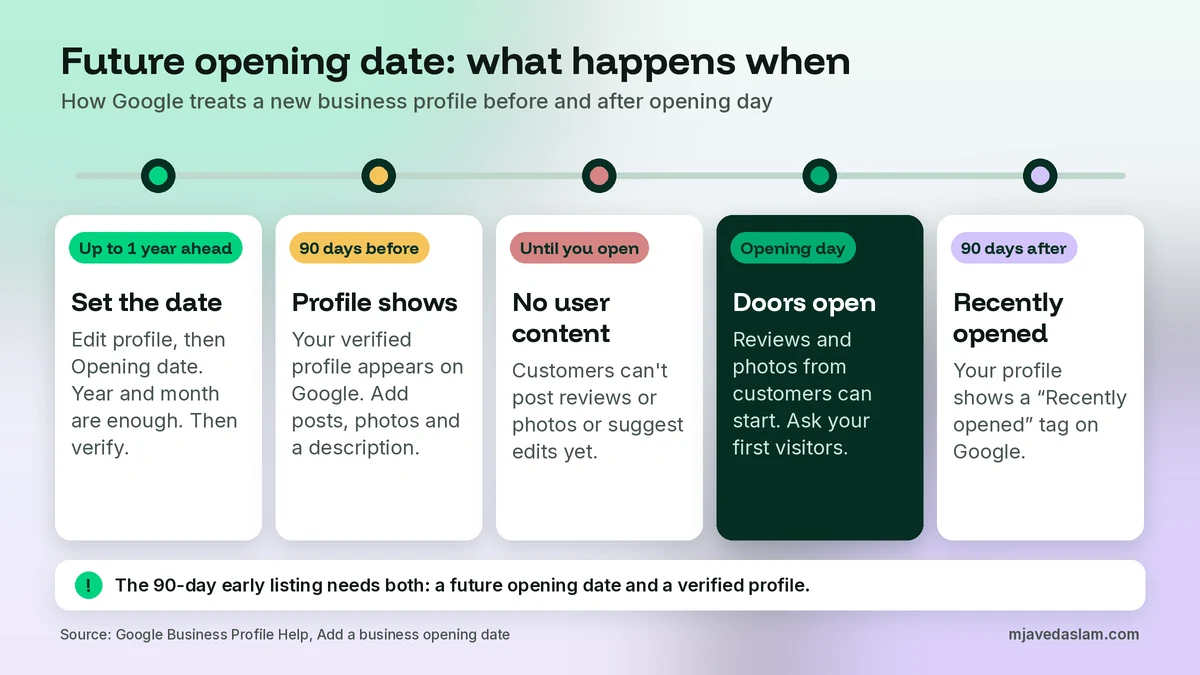
- You can enter a date up to one year in the future.
- After you enter the date and verify the business, your profile shows up on Google 90 days before the opening date.
- During those 90 days you can create posts, add photos and add a business description.
- Until you officially open, users can’t suggest edits to your business information or post content such as reviews or photos.
- Once you open, the profile shows a “Recently opened” tag on Google for 90 days.
My pre-launch order of work
Google gives the rules. The order below is my own, from setting up profiles for shops, clinics and offices that hadn’t opened yet.
- Search for an existing listing first. Look up the business name and the address on Google Maps. A builder, a landlord or an earlier tenant may already have created a place there. Claim or fix that one instead of making a second profile.
- Get the name and category right from day one. Use the name that will be on your sign, following the Google Business Profile name guidelines. You avoid re-verification trouble later.
- Enter the opening date, then verify. Google’s 90-day rule needs both. I set the date before I start verification, so a freshly verified profile isn’t treated as a business that’s open today.
- Verify with whatever method Google offers. Google picks the methods. If you get a card in the mail, read my postcard verification guide. If you’re offered a video, my video verification guide explains what to show. If you can’t yet show signage or equipment, it can be smarter to wait until you can.
- Write the description now. Google lists the merchant description as a pre-opening feature. Say what you do, who it’s for and where you are. My guide to the Google Business Profile description has a simple structure.
- Show the build, honestly. Google suggests photos that show progress from construction to opening day. Real photos of the shopfront, the sign going up and the finished interior work better than stock images. My Google Business Profile photo guidelines post covers what gets rejected.
- Post the countdown. Google suggests posts to announce the opening, keep people updated and share an opening day discount or coupon. One post when the profile goes live, one a week before and one on the day is a good minimum. See my Google Business Profile posts best practices for formats.
What doesn’t work before launch
You can’t collect reviews before you open, because Google blocks user content until the official opening. Please don’t run a “soft launch” and ask friends to review early. Wait, then ask real customers after their first visit. A printed review QR code at the counter on opening day helps here, and I explain how to make one in my guide to the Google review QR code.
If the opening is delayed
Building work and permits slip all the time. When they do, update the opening date the same day, then fix every place that repeats it: your latest post, your website, your social pages and any banner on the shop.
GBP anniversary: does the opening date show your years in business?
Many owners search for a “GBP anniversary” setting. As of this writing, Google’s help pages describe no separate anniversary feature or badge you can switch on. What they do say is what I quoted above. Google works out how long a business has been operating from various sources, and on certain places in Google Search the opening date might be used to show how many years you’ve been in operation.
In practice, that means three things:
- Make the date accurate. If you opened in March 2009, enter March 2009. That’s the only lever you control.
- Never backdate it. Google’s guidelines for representing your business start with “Reflect your business accurately”, and Google says it also uses other sources to judge how long you’ve been operating. An invented “since 1990” can clash with your registration papers and old website, and it misleads customers.
- Celebrate it yourself. On your anniversary, publish a Google post with a real photo, a thank-you to your customers and, if you like, a genuine offer. That’s content people can actually see, unlike a label Google may or may not show.
One more point. Your opening date is not a direct ranking switch. I’ve never seen a profile jump in the map pack because someone added a date. It helps with trust and accuracy. Rankings still come from relevance, distance and prominence, which I cover in my guide on how to rank in the Google map pack.
Google Business Profile reopen date: what to change when you come back
“Reopen date” isn’t a field on the profile. Reopening is handled with your status and hours, not the opening date. Here’s how Google’s own pages split it.
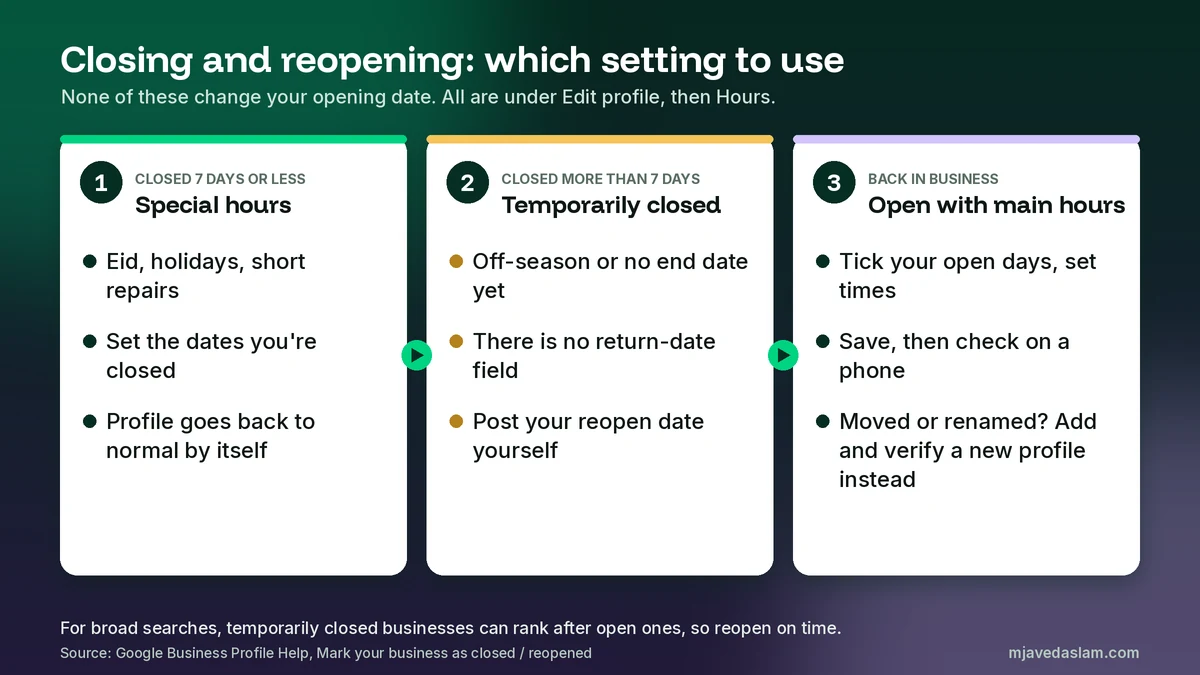
Short break: use Special hours
Google’s Mark your business as closed page says that if you’re closed for 7 days or less, you should set Special hours rather than marking the business closed. That covers Eid holidays, a family wedding or a short repair. Special hours have dates, so your profile goes back to normal by itself. I walk through it in my guide to Google Business Profile holiday hours.
Longer closure: mark it Temporarily closed
The same page says to use Temporarily closed if you’re closed for more than 7 days, closed for the off-season, or closed indefinitely. The steps are: go to your Business Profile, select Edit profile, then Hours. In the Business hours section, next to Hours, select Edit, then Temporarily closed, and Save.
Two warnings come from Google itself. First, for broad searches, temporarily closed businesses can rank after open businesses. How much depends on your category, the type of search and how many similar businesses are also closed. Second, Google’s steps for a temporary closure have no box for a return date. The status stays until someone changes it.
So how do customers learn your reopen date? I tell them directly. I publish a Google post with the date, add it to the website and the shop door, and put a reminder in the calendar of whoever manages the profile. The most common reopening problem I fix is a business that has been back for weeks while Google still says Temporarily closed.
Reopening: choose Open with main hours
When you’re back, Google’s reopen help page gives these steps:
- Go to your Business Profile.
- Select Edit profile, then Hours.
- In the Business hours section, next to Hours, select Edit, then Open with main hours. If you don’t want hours to show, Google offers Open with no main hours.
- Check the box next to each day you’re open.
- Set the hours with the dropdowns.
- Select Save.
For many locations, Google says to sign in to Business Profile Manager, select the locations, then use Actions, Open, and confirm Mark as open. Once you reopen, the profile is no longer marked temporarily or permanently closed on Maps and Search.
Leave the opening date as it was. Your business didn’t start again from zero, and a new date would tell Google and customers that you’re brand new. The one exception is the move or name change case I explained earlier, where Google wants a new profile. If you’re weighing a permanent closure, read my guide on how to close a Google Business Profile first, because permanently closed and temporarily closed do very different things.
Common Google Business Profile opening date mistakes I fix
- Verifying a pre-launch profile with no opening date. The profile can look like a live business before you’re ready for calls and visits.
- Entering a date too far out. Google only allows dates up to one year ahead, so wait until you’re within a year of opening.
- Changing the opening date to show a reopening. Use Hours and the Open with main hours option instead.
- Backdating for a bigger number. It risks a mismatch with other sources and misleads customers.
- Leaving Temporarily closed on after you reopen. Search your own business on a phone the day you reopen and check the status.
A note for businesses in Pakistan
Most of my clients are in Pakistan, and a few local habits are worth mentioning. New plazas and markets in cities like Multan or Lahore often open in stages, so a shop’s sign may go up weeks after the fit-out ends. That’s exactly when a future opening date helps: people can find you and follow your progress, but they can’t leave a “closed when I visited” review. If you’re offered video verification, wait until the sign is up and the shop looks like a working business. And plan Special hours early for Eid and other public holidays, so customers don’t make a wasted trip.
FAQ
How do I change the opening date on Google Business Profile?
Go to your Business Profile, select Edit profile, select Edit next to Opening date, enter at least the year and month, and select Save. Google reviews edits before they show, so allow some time for the change to appear.
How far in advance can I set a future opening date?
Google lets you enter a date up to one year in the future. After you set the date and verify the business, your profile shows up on Google 90 days before the opening date.
Can customers review my business before it opens?
No. Google says users can’t post reviews or photos, or suggest edits, on your profile until your business is officially open. You can add your own posts, photos and description during the 90 days before opening.
What is the Recently opened tag?
Once your business opens, Google shows a “Recently opened” tag on your profile for 90 days. It comes from the opening date you set, so a correct date matters.
Does the opening date show my years in business?
It might. Google says it uses various sources to work out how long a business has been operating, and on certain places in Google Search the opening date might be used to show how many years you’ve been in operation. There’s no switch to force it.
Should I change my opening date when I reopen after a closure?
No. Keep the date you first opened at that address. To come back after a temporary closure, go to Edit profile, then Hours, choose Open with main hours, set your days and times, and save. If you closed because of a move or name change, Google says to add and verify a new profile instead.
Next step
If you’re opening a new location, moving, or coming back after a long closure, I can set up the profile in the right order so it shows on Google at the right time and doesn’t trip over verification. Start with my Google Business Profile service page, or get in touch with your business name, city and planned opening or reopening date. Get the Google Business Profile opening date right once and it keeps working for you for years.