Here is how to report a fake Google Business Profile: open the listing in Google Maps while signed in, select Suggest an edit > Place is closed or not here, choose Doesn’t exist here or Offensive, harmful, or misleading, and submit. If the problem is a fraudulent or misleading business name, phone number or website, or you have a whole batch of spam listings, use Google’s Business Redressal Complaint Form instead and paste in each listing’s public Maps URL with your evidence. If the business is real but its name is stuffed with keywords, suggest an edit to its real-world name.
Fake listings are a real cost for honest local businesses. A “plumber” with no premises, a locksmith with ten near-identical profiles across the city, or a competitor called “Best Emergency Dentist Near Me” can push a genuine business out of the map results and take the calls that should have gone to you. This guide is about other people’s fake, spam and keyword-stuffed listings: how to tell real spam from a listing that’s just wrong, which of Google’s report paths to use, what evidence to gather and how to follow up without putting your own profile at risk. If the extra listing is an old or accidental copy of your own business, that’s a different fix, which I cover in my guide to fixing a duplicate Google Business Profile.
Fake, spammy or just wrong? Check before you report
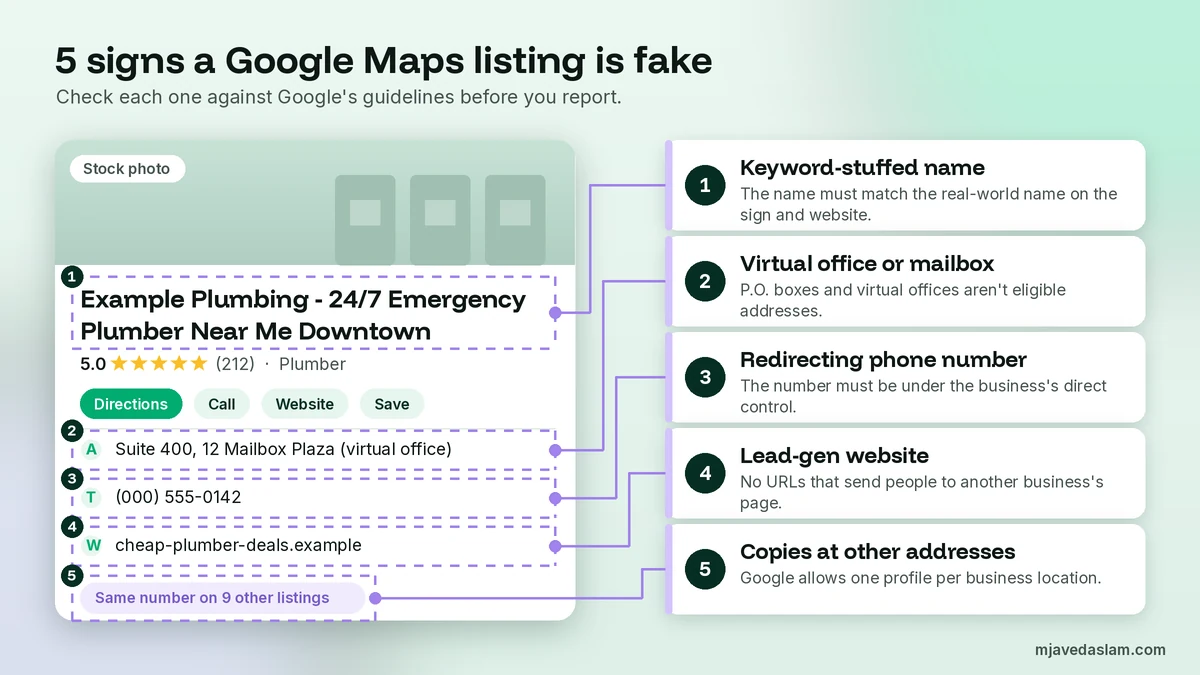
Google only removes or changes a listing when it breaks its guidelines for representing your business on Google. Disliking a competitor isn’t a reason, and reports without a clear rule behind them rarely go anywhere. These are the patterns I see most often, with the rule each one breaks:
- The business doesn’t exist at that address. Google says your profile must be for your actual, real-world location. P.O. boxes and remote mailboxes aren’t acceptable, a rented mailing address you don’t operate from (a virtual office) isn’t eligible, and a co-working desk only counts if it has clear signage and is staffed and receiving customers during business hours.
- The name is stuffed with keywords. The name should be the business’s real-world name, as used on its storefront, website and stationery. Google says unnecessary information in the name isn’t permitted and can lead to suspension. “Example Plumbing – 24 Hour Emergency Plumber Downtown” should just be “Example Plumbing”.
- The phone number or website isn’t really the business’s. Google says the phone number must be under the business’s direct control, and phone numbers or URLs must not redirect users to landing pages or numbers other than the actual business’s. Lead-generation listings that forward calls to whoever pays most break this rule.
- The same business has several listings. Google allows one profile per business location. Ten profiles for one locksmith, each at a made-up address in a different neighbourhood, is a classic spam network.
- Someone is pretending to be you. A listing using your business name or branding with a different phone number or website is impersonation, and it’s covered by the redressal form described below.
Some things look suspicious but aren’t spam. A real business with the wrong hours or an old phone number just needs a normal edit suggestion. A service-area business (a plumber or cleaner who travels to customers) is allowed to hide its address, so “no address shown” isn’t a reason to report. And a business with two genuine brands or departments at one address may be allowed separate profiles. If you’re unsure, compare the listing to the guidelines line by line before you report.
Which path to use when you report a fake Google Business Profile
Google has several report routes, and its Maps help on reporting a business says to make sure you use the correct form for your report. Using the wrong one is the most common reason I see reports ignored.
| What you found | Report path | Where |
|---|---|---|
| A real business with a wrong detail (hours, phone, a slightly wrong name) | Suggest an edit | Google Maps: Suggest an edit on the listing |
| A business that doesn’t exist at that address, or misleading info that makes you believe it doesn’t exist | Place is closed or not here > Doesn’t exist here, or Offensive, harmful, or misleading | Google Maps: Suggest an edit |
| Fraudulent or misleading names, phone numbers or website URLs, or a network of spam listings | Business Redressal Complaint Form | Google Business Profile Help (form link below) |
| A business paying for reviews or pressuring customers to leave them | Report business conduct | Google Maps app: Suggest an edit, at the bottom of the page |
| A single fake review on your own profile | Report the review | The review itself, not the listing |
| An old or accidental copy of your own business | Duplicate fix, not a spam report | Your own Business Profile |
Reviews are their own topic. If a business is buying reviews, report the business conduct. If you want reviews yourself, ask the policy-safe way, which I cover in my guide to the Google review QR code. Replying to and flagging individual fake reviews is covered in my Google review response templates guide.
Build your evidence file first
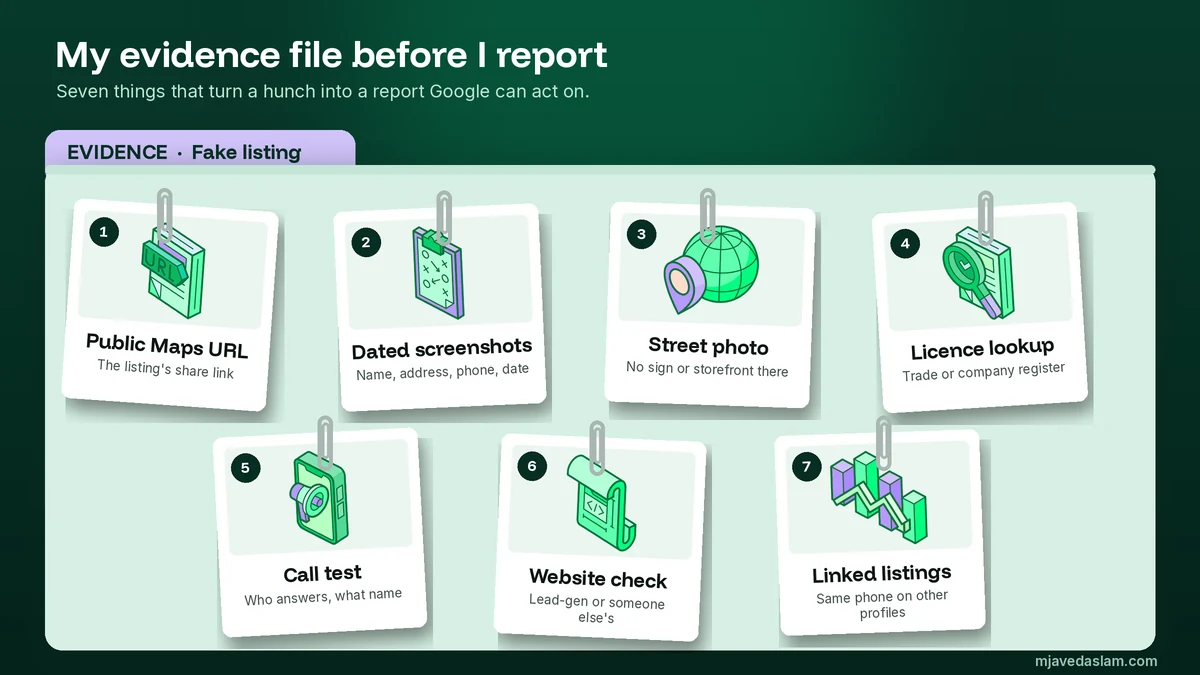
Before I report a fake Google Business Profile, I spend fifteen minutes building a small evidence file. It makes my report specific, and it means I’m ready if Google emails follow-up questions. Here’s what goes in it:
- The public Maps URL of every listing. Search the listing on Google Maps, open it and copy the full address from the browser bar. The redressal form only accepts URLs starting with https://www.google.com/maps.
- Dated screenshots. Capture the listing name, address, phone, website and reviews. Spam listings often change their name once they’re reported, so the screenshot is your proof of what was there.
- Proof of the address. Recent Street View images or your own photo from the public street showing no signage, a different business, an empty plot or a residential house. Take photos from public places only. Don’t go onto anyone’s property.
- A record lookup. Check whether the name appears in your local business or licensing register, and note the result. “Not registered” is strong evidence for a business that claims to be a licensed trade.
- A call test. Call the number and note who answers. If a call centre answers with a generic “plumbing services, how can I help?” and can’t name the business, or the same number appears on several listings, write that down.
- The website check. Note whether the site redirects to another brand or a lead-generation page, or is missing entirely.
- The pattern. If you find several listings with the same phone number, website or photos, list them all in a spreadsheet with one row per URL.
How to report a fake Google Business Profile in Google Maps
This is the right route when a listing doesn’t exist at its address or its info is so misleading you believe the business isn’t real. Google’s help on requesting removal of a Business Profile confirms you can request removal even if you don’t own the profile, and that a business can be removed if it never existed or isn’t eligible to be on Google.
- Sign in to your Google Account. Google says you must be signed in to request a removal.
- Go to Google Maps on a computer or open the Google Maps app.
- Select the business on the map, or search for it.
- Select Suggest an edit > Place is closed or not here.
- Choose the option that fits, for example Doesn’t exist here or Offensive, harmful, or misleading.
- Select Submit.
After you submit, Google might send you a status email with follow-up questions. That’s where your evidence file earns its keep: answer with specifics, not opinions. If the request is approved, the business is removed from Search and Maps.
To track what happened, open the Google Maps app and tap Contribute > View your profile, then scroll down to Edits. Google’s help on finding your Google Maps edits says each edit shows as Pending (Google is confirming it), Accepted or Not Accepted (Google couldn’t verify it). You can’t cancel or recall an edit, so wait for a decision before you try again.
How to report a keyword-stuffed business name
If the business is real but its name is padded with services and city names, you don’t need a removal. You need its name corrected to the real one:
- Find the business’s real name on its storefront sign, website, invoices or registration record, and screenshot it.
- Open the listing in Google Maps and select Suggest an edit.
- Choose the option to change the name or other details, and enter the real-world name only, with no extra comments in the name field.
- Add a photo of the storefront sign if you have one. Google says photos help it verify a suggestion, but they’re public under your name.
- Submit, then check the status under Edits.
Two things to expect. First, Google’s help on editing place information warns that edits trying to significantly change a business may be rejected, so suggest the real name exactly as it appears in the real world, not a version you prefer. Second, if the name edit isn’t accepted and the stuffed name looks deliberately misleading, that’s when the redressal form is worth using. I’ll go deeper on what is and isn’t allowed in a business name in a separate guide to Google Business Profile name guidelines. Here, all you need is the real name and proof of it.
How to use the Business Redressal Complaint Form
The Business Redressal Complaint Form is Google’s dedicated route for misleading info or fraudulent activity on Maps related to a business’s name, phone number or URL. Complaints are reviewed against Google’s guidelines for representing businesses. It’s the form I use for spam networks, lead-generation listings and impersonation.
What the form asks for:
- Your information: your own name (even if you’re reporting for a client you’re authorised to represent) and the name of the business or organisation being affected.
- The public URL of each listing, starting with https://www.google.com/maps. You can add more with “Add additional” or upload a spreadsheet. Google recommends 10 to 100 URLs at a time for faster processing, and its Maps help says you can report several businesses at once by uploading 10 or more profiles or a spreadsheet with all the URLs.
- The exact content you believe is malicious, quoted from the listing. If it’s a phone number or website, describe in detail how it could affect users or other businesses.
Here’s a description I’d write, with the specifics changed for the case:
“The listing named ‘Example Locksmith 24/7 Emergency Lockout Downtown’ does not operate at the address shown. Street View (May 2026) and my photo from the public street (attached) show a residential house with no signage. Calling the listed number reaches a call centre that could not name a business, and the same number appears on the 8 other listings in the attached spreadsheet, each at a different address. The business name is not in the city trade licence register. This misleads customers looking for a locksmith into calling an unverified lead-generation service.”
Be realistic about what happens next. Google says it can’t guarantee any action and that you won’t be updated on the status of your complaint. It also says incomplete or badly filled-out complaints won’t be processed, and that complaints not about name, phone or URL fraud can’t be reviewed through this form. So fill in every field, quote exactly, and don’t use it for a simple wrong detail. For that, the form tells you to correct the info through Suggest an edit instead.
What to do if someone made a fake profile of your business
Impersonation is different from a competitor’s spam. If a listing uses your name, logo or photos but sends callers to someone else’s number or website, act quickly:
- Make sure your real profile is claimed and verified. A verified, active profile is your strongest proof of who the real business is. If you haven’t done it yet, follow my guide on how to claim a Google Business Profile.
- Report the fake through the redressal form. Name your own business as the affected entity, quote the copied name and the wrong phone or URL, and attach proof that the real number and website are yours.
- Warn customers where you control the message. Put your real phone number and website clearly on your own profile, your site and your invoices.
- Check who has access to your own profile. Remove anyone you don’t recognise, and give staff or agencies their own access instead of sharing a password. Here’s how to add a manager to Google Business Profile.
Before you report, rule out the innocent explanation. If the “fake” turns out to be an old listing of your own business from a previous address, a former manager’s account or a past rebrand, it isn’t impersonation. It’s a duplicate of your own business, and fixing it through the duplicate process is safer than reporting it as spam.
Follow up without hurting your own profile
After you report a fake Google Business Profile, patience matters more than volume. Here’s the routine I follow:
- Give it time. Check the Edits status in the Maps app and look at the listing again after a couple of weeks. In my experience, network cases reported through the redressal form can take much longer, and the result may be a larger cleanup rather than a reply.
- Re-report only with something new. A second report with fresh evidence (a new photo, a newly found linked listing, a name change you screenshotted) is useful. The same report submitted every day isn’t.
- Escalate through the community if needed. For a well-documented case that hasn’t been acted on, the Google Business Profile Help Community is the usual next step. The Product Experts there are volunteers, not Google staff, but they can pass strong cases on. Bring your screenshots, the listing URLs and what you’ve already submitted.
And a few things I never do, because they backfire:
- Don’t copy the spammers. Adding keywords to your own business name to “keep up” breaks the same guidelines and can get your profile suspended. If that has already happened, the fix is an appeal, which I’ll cover in my guide to fixing a suspended Google Business Profile.
- Don’t report genuine competitors just because they rank above you, and don’t recruit friends to mass-report a listing.
- Don’t retaliate with fake reviews or threats. Fake engagement is against Google’s policies, and it hands the spammer a reason to report you.
- Don’t go onto private property to gather evidence. Photos from the public street are enough.
Does reporting a fake Google Business Profile help your own rankings?
Sometimes. When a cluster of fake listings near you is removed, there are fewer profiles competing for the same map-pack spots, and I’ve seen genuine businesses move up after a cleanup. But Google doesn’t promise action on any report, and removing a competitor doesn’t make your own profile more relevant. I treat spam reporting as a monthly check, not the strategy. The bigger wins are still a complete, accurate profile, steady genuine reviews, and watching what your own customers do. My guide on how to read Google Business Profile insights shows how to spot when calls or direction requests drop, which is often the first sign that spam has appeared near you.
FAQ: How to report a fake Google Business Profile
How do I report a fake business on Google Maps?
Sign in to your Google Account, open the listing in Google Maps, select Suggest an edit, then Place is closed or not here, and choose Doesn’t exist here or Offensive, harmful, or misleading before you submit. If the problem is a fraudulent business name, phone number or website, or a group of spam listings, use Google’s Business Redressal Complaint Form instead.
What is the Google Business Redressal Complaint Form?
It’s Google’s form for reporting misleading information or fraudulent activity on Google Maps related to a business’s name, phone number or URL. You enter your name, the business being affected, the public Maps URL of each listing and the exact content you believe is malicious. You can add several URLs or upload a spreadsheet, and Google recommends 10 to 100 URLs at a time.
How long does it take Google to remove a fake listing?
Google doesn’t publish a timeline. Edits you suggest on Maps show as Pending, Accepted or Not Accepted under Contribute, View your profile, Edits in the Maps app. Complaints sent through the redressal form get no status updates, and larger spam networks can take much longer to clean up than a single listing.
Can I report a competitor’s keyword-stuffed business name?
Yes. Google says a business name must reflect its real-world name, and extra keywords aren’t permitted. Select Suggest an edit on the listing, change the name to the one on its storefront, website or registration, and add a photo of the sign if you have one. If the stuffed name is part of fraudulent activity, report it through the redressal form.
Someone created a fake Google Business Profile for my business. What should I do?
Make sure your real profile is claimed and verified, then report the fake through the Business Redressal Complaint Form with your business as the affected entity, quoting the copied name and the wrong phone number or website. Show your real contact details clearly on your profile and website. If the extra listing is actually an old copy of your own business, treat it as a duplicate instead.
Will Google tell me if my report worked?
Not always. For Suggest an edit reports you can track the status in the Maps app, and Google may email you follow-up questions. For redressal form complaints, Google says it can’t guarantee action and won’t update you on the status, so check the listing yourself after a couple of weeks and only report again with new evidence.
Next step
Search your main service and city in Google Maps today and look through the top 10 results. For anything that looks fake, check it against the patterns above, build a short evidence file, and use the matching report path: Suggest an edit for wrong details and places that don’t exist, the redressal form for name, phone or URL fraud and spam networks. Keep your own profile clean while you do it. If you’d rather have me audit your map results, document the spam and keep your own profile in shape, see my Google Business Profile management service.