Here’s the short answer. Yes, a Google Business Profile for doctors is allowed, and the same rules cover dentists, lawyers, financial planners, and insurance and real estate agents. Google calls them individual practitioners. A practitioner can have their own profile if they are public-facing and can be contacted directly at the verified location during stated hours. If several practitioners work at one place, the practice gets its own profile too, and each practitioner’s profile uses only their name. A solo practitioner at a branded office should share one profile named “[brand]: [practitioner name]”. Support staff don’t get profiles.
I’m Javed Aslam, a local SEO consultant in Pakistan. I set up and fix Google Business Profiles for small businesses, and clinics and firms often ask me the same thing: “Should each doctor or lawyer have a listing, or only the practice?” This guide explains Google’s practitioner rules in plain English, the three main setups, how to name and fill in each profile, who should own it, and what to do when someone leaves. For the general naming rules for any business, see my guide to Google Business Profile name guidelines.
Google Business Profile for doctors and other practitioners: what Google says
Google covers this in a section of its guidelines for representing your business on Google. Here are the key lines, quoted from that page:
- Who counts: “An individual practitioner is a public-facing professional, typically with their own customer base. Doctors, dentists, lawyers, financial planners, and insurance or real estate agents are all individual practitioners.”
- Titles: “Business Profiles for practitioners may include title or degree certification (for example Dr., MD, JD, Esq., CFA).”
- When they get their own profile: a practitioner should create a dedicated profile if “they operate in a public-facing role” and “they can be contacted directly at the verified location during stated hours.”
- Who doesn’t: “Support staff should not create their own Business Profiles.” And “sales associates or lead generation agents for corporations aren’t individual practitioners and aren’t eligible for a Business Profile.”
- One profile per person: “A practitioner shouldn’t have multiple Business Profiles to cover all of their specializations.”
Google’s help page on duplicate profiles backs this up. It says several businesses at one address can each have a profile if they are distinct and eligible, and that this includes “individual practitioners at a shared location.” So a practitioner profile next to a practice profile isn’t a duplicate by itself. A second profile for the same practitioner is.
The usual eligibility rule still applies. Google’s eligibility guidelines say a business must make in-person contact with customers during its stated hours, and online-only businesses aren’t eligible. So a doctor who only offers video consultations, with no place where patients can see them, doesn’t fit the rules for a profile.
Practice profile or practitioner profile? The three setups
Google describes two specific situations, and the general rules cover the rest. Here’s how they compare:
| Your situation | What Google says to do | How to name it |
|---|---|---|
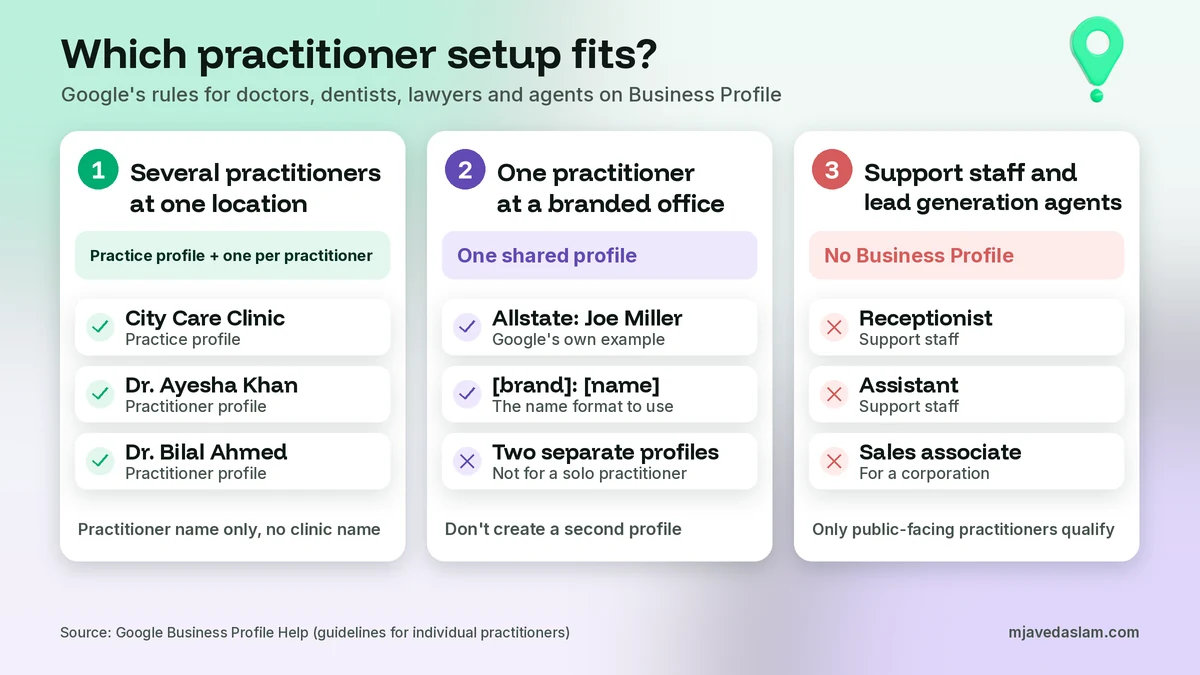
| Several public-facing practitioners at one location (a clinic with five doctors, a law firm with partners) | The organization creates a profile for the location. Each public-facing practitioner can have their own separate profile. | Practice: its real-world name. Practitioner: only their name, such as “Dr. Ayesha Khan” (example name). |
| One public-facing practitioner at a branded location (one agent at a franchise office) | It’s best to share one profile with the organization. | “[brand/company]: [practitioner name]”. Google’s example is “Allstate: Joe Miller”. |
| A practitioner with their own unbranded practice | Google doesn’t name this case separately. In my reading, the practice and the person are the same business, so one profile is enough. | The name the practice actually uses on its signage, stationery and website. |
| A department inside a hospital or university | Public-facing departments that operate as distinct entities can have their own profile, with a different name and category from the main business. | A distinct department name, like Google’s example “Massachusetts General Hospital Department of Dermatology”. |
| Support staff, receptionists, sales associates, lead generation agents | No profile. | Not applicable. |
The third row is my interpretation, not a Google quote. If a doctor runs a clinic under their own name, creating both “Dr. Ayesha Khan” and “Dr. Ayesha Khan Clinic” at the same address just splits one business into two listings, and that’s what Google’s duplicate rules warn against.
How to name a practitioner profile
Google’s name rule for every business is that “your name should reflect your business’s real-world name.” For practitioners, that real-world name is the person’s name. The guidelines allow a title or degree, so “Dr. Ayesha Khan” or “Ayesha Khan, MD” both fit. These are example names, not real listings.
What to leave out depends on the setup:
- Several practitioners at one location: leave out the organization’s name. Google says the practitioner’s profile title “shouldn’t include the name of the organization.” So “Dr. Ayesha Khan”, not “Dr. Ayesha Khan – City Care Clinic”.
- Solo practitioner at a branded office: one shared profile in the format “[brand/company]: [practitioner name]”.
- Always: no keywords, cities or taglines. Google’s name examples rule out service or product information, location information and marketing taglines. “Dr. Ayesha Khan Best Cardiologist Multan” would break that rule.
Google says unnecessary information in a business name “could result in the suspension of your Business Profile,” so it’s not worth the risk. Put specialties in the categories, services and description instead.
Categories, address, phone and hours for practitioners
A practitioner profile follows the same rules as any other profile, but a few details need extra care.
Categories
Google’s category help page says to pick a primary category that best describes the business and to be specific. The guidelines add: “Do not use categories that pertain to other businesses that are nearby or related, such as a business physically contained within your business or an entity that contains your business.” So a doctor’s profile should describe the doctor’s own work, not copy the hospital’s category. For more on this choice, see my guide to choosing a Google Business Profile primary category.
Address
Use the real address where the practitioner sees clients. The guidelines say suite numbers and floors may be included, with the suite number in Address Line 2. Google’s practitioner section doesn’t say what to do when one person works at two branches. It only rules out extra profiles for specializations, and its general rule is one profile per location of a business. To stay on the safe side, I’d keep one profile at the location where the practitioner can be contacted directly during stated hours most of the week.
Phone and website
Google asks for a phone number that connects to your individual business location and is “under the direct control of the business,” or a website that represents that location. For a practitioner, a direct line or extension and a dedicated page about them on the practice’s website both fit that rule well. Avoid pointing every profile at the same homepage if you can, since a personal page is more helpful to someone searching for that person.
Hours
This one needs thought. To have their own profile, a practitioner must be contactable at the verified location “during stated hours.” So list the hours when that person actually sees clients, not the clinic’s full opening hours. Google’s guidelines also say businesses that operate only by appointment shouldn’t provide hours. If a practitioner only works by appointment, you can leave hours out, and appointment links can help people book. My guide to adding a booking link to Google Business Profile explains that part.
Google Business Profile for doctors, dentists, lawyers and agents: what changes
The rules are the same for every practitioner, but each field has its common situations:
- Doctors and dentists: a clinic with several doctors gets a clinic profile plus one profile per public-facing doctor. A hospital may also have department profiles. Receptionists and assistants count as support staff here and shouldn’t have their own profiles. My guides on local SEO for dentists and local SEO for chiropractors cover the wider marketing side.
- Lawyers: a firm gets one profile for each office. Partners and associates who meet clients can have their own profiles, each with only their name. Paralegals and office staff don’t qualify.
- Insurance and real estate agents: an agent at a brokerage with other agents can have a personal profile. A single agent at a branded office should share one profile, like Google’s “Allstate: Joe Miller” example. Google’s eligibility guidelines also say lead generation agents or companies aren’t eligible.
- Financial planners and similar advisers: the same test applies. Are they public-facing, and can clients reach them at the verified location during stated hours?
Vets follow the same pattern, as I explain in my guide to local SEO for veterinarians.
Who should own and manage practitioner profiles
Google’s ownership rules say only business owners or authorized representatives may verify and manage a Business Profile. An authorized representative, like an agency or an office manager, must “always transfer Business Profile ownership to the business owner immediately upon request.”
A practitioner profile represents a person, so ownership can get messy when a clinic or firm sets it up. Google’s owners and managers page explains the two roles: owners have full control and can add or remove users, while managers can edit info, reply to reviews and post, but can’t add or remove users or remove the profile. A profile can have several owners but only one primary owner.
My advice is to agree on ownership in writing when the profile is created. One simple setup is to make the practitioner an owner and keep the practice as a manager or second owner. Then nobody gets locked out later. My guides on how to add a manager to Google Business Profile and transfer Google Business Profile ownership show the steps.
Duplicates, merging and the one-profile rule
Google says you can have only one Business Profile for each business, and duplicates won’t show on Google Search or Maps. For practitioners, that means:
- One profile per practitioner, not one per specialty, branch or service.
- A practice profile and a practitioner profile at the same address are allowed, because Google lists individual practitioners among the distinct businesses that can share an address.
- If the same practitioner has two profiles on Maps, request a merge by suggesting an edit on Google Maps. Google says merge requests are reviewed, the profiles must represent the same business, and when they merge “their reviews are combined, but replies to reviews may be lost.”
- Don’t try to merge a current practitioner’s profile into the practice profile. In my reading, they count as separate businesses under Google’s rules, so a merge request like that doesn’t match what merges are for.
For the full clean-up process, see my guide on how to fix a duplicate Google Business Profile. If the question is two different businesses sharing a building, my guide on two businesses at the same address on Google covers that.
When a practitioner leaves, retires or moves
This is the part that causes the most trouble. Google doesn’t have one help page for practitioners who leave, so here is how its general rules apply:
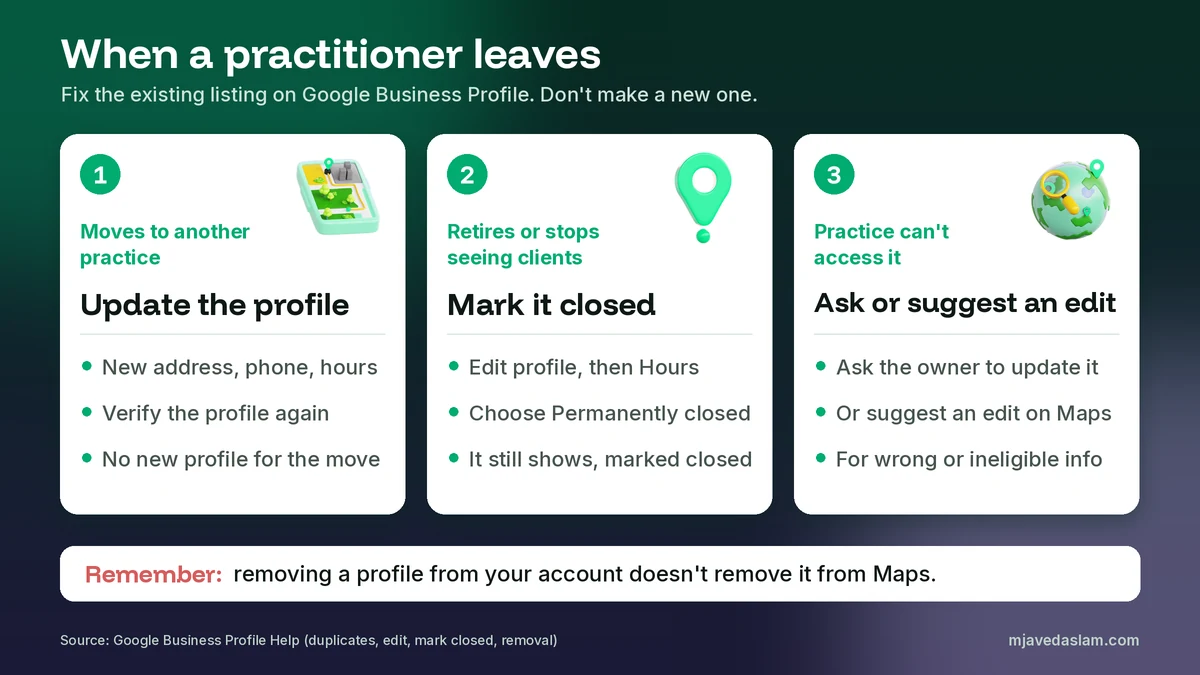
- They move to another practice. Google’s duplicate guide says “if your business relocates, do not create a new Business Profile for the new location. Instead, update the existing profile with the new address.” Its edit page adds that if you move to a new address after verification, “you must verify your business again.” Update the phone, website and hours at the same time.
- They retire or stop seeing clients. They’re no longer contactable at a location during stated hours, so the profile no longer fits the practitioner rule. The owner can mark the business as permanently closed under Edit profile, then Hours. Google says a permanently closed profile may still appear for people who search for it, clearly marked as closed.
- The practice can’t access the profile. If the person who owns it has left, ask them to update or close it. If the details are wrong, anyone can use Suggest an edit on Google Maps. Google’s removal page says a business can be removed if it never existed or isn’t eligible, through Suggest an edit, then Place is closed or not here.
One warning: removing a profile from your Google account isn’t the same as removing it from Maps. Google’s removal help page says that removing all ownership and content “doesn’t guarantee that the business won’t show up on Maps and Search.” For the full closing steps, see my guide on how to close a Google Business Profile.
Reviews on practitioner and practice profiles
Each profile collects its own reviews. So it helps to point happy clients to the right listing, whether that’s the practice or the person they saw.
Two review rules matter here. Google’s Maps content policy doesn’t allow content based on a conflict of interest, and it says this may include “current or former employment.” So staff shouldn’t review their own practitioners or practice. The same policy doesn’t allow offering incentives, such as payment, discounts or free services, in exchange for a review. Asking real clients for honest reviews is fine. My Google review QR code guide shows an easy way to send them to the right profile, and my Google review response templates help with replies.
For doctors and lawyers, I’d add one more habit: keep replies general and never confirm details about a patient’s or client’s case in public. Your professional and privacy rules still apply on Google.
Do practitioner listings help a practice rank?
Google’s local ranking help page says local results are mainly based on relevance, distance and popularity (it also calls the last one prominence), and “there’s no way to request or pay for a better local ranking on Google.” Google doesn’t say that practitioner profiles help or hurt the practice profile, so I won’t promise either.
What a practitioner profile can do is help people who search for a person by name find the right place, hours and phone number. For the practice profile itself, focus on what Google says it uses: complete and accurate info, the right category, reviews and helpful photos. My guide on how to rank in the Google Map Pack covers those steps. Don’t create profiles for support staff just to take up more space on the map. Google’s rules say they shouldn’t have them.
A note for clinics, law firms and agencies in Pakistan
The same rules apply in Pakistan. A clinic in Multan or Lahore with several visiting doctors can have a clinic profile plus a profile for each doctor who sees patients there at set times. A doctor who works at two hospitals should not create a second profile just to cover the other one. Lawyers who meet clients in chambers can have their own profile with only their name, and the chamber or firm can have its own. Verification options depend on your business type and region, so keep a registration, licence or utility bill in the right name ready. If you’re unsure what Google accepts, my guide to Google Business Profile video verification explains what to show.
FAQ
Can a doctor have their own Google Business Profile?
Yes. Google’s guidelines name doctors, dentists, lawyers, financial planners, and insurance or real estate agents as individual practitioners. A practitioner can have their own dedicated profile if they work in a public-facing role and can be contacted directly at the verified location during stated hours.
Can a clinic and its doctors each have a Business Profile?
Yes, when several public-facing practitioners work at one location. Google says the organization should create a profile for the location, separate from the practitioners’ profiles. Each practitioner’s profile should use only the practitioner’s name, not the clinic’s name.
How should I name a practitioner profile on Google?
Use the practitioner’s real name. Google allows a title or degree, such as Dr., MD, JD, Esq. or CFA. If several practitioners share the location, leave the organization’s name out. If the practitioner is the only public-facing one at a branded location, use one shared profile named [brand]: [practitioner name].
Can a doctor have separate profiles for each specialty?
No. Google says a practitioner shouldn’t have multiple Business Profiles to cover all of their specializations. Keep one profile and describe the specialties in the categories, services and description.
Can receptionists or assistants get their own profile?
No. Google says support staff should not create their own Business Profiles. Sales associates and lead generation agents for corporations aren’t individual practitioners either, so they aren’t eligible.
What happens to a practitioner’s profile when they leave the practice?
Google doesn’t have a separate help page for this, but its general rules apply. If the practitioner moves, update the existing profile with the new address instead of creating a new one, and expect to verify again. If they retire or stop seeing clients, the owner can mark the profile permanently closed. Anyone can suggest an edit on Google Maps if a listing is wrong.
Next step
Getting a Google Business Profile for doctors, lawyers or agents right saves a lot of trouble later, especially when someone leaves. If you run a clinic, law firm or agency and want each profile set up the right way, see my Google Business Profile service page, or get in touch with your setup and the city you serve, and I’ll suggest the structure that fits.