
Here’s the short answer. Local SEO for chiropractors is the work that puts your clinic in the Google map pack when someone nearby searches “chiropractor near me”, “back pain chiropractor” or “sciatica treatment” with your town name. It comes down to five jobs: the right Google Business Profile setup for the clinic and for each chiropractor, a clear website page for each main service and condition you treat, a steady flow of genuine reviews from every patient (not just the happy ones), review replies that never reveal patient information, and fast, easy booking.
I do local SEO and Google Business Profile work for small businesses. Chiropractors sit between a local service business and a medical practice, so this guide is the checklist I use for them. It follows the same pattern as my guides for dentists and locksmiths, with extra care on practitioner profiles, patient privacy and honest health claims. I also cover local SEO for veterinarians, including client confidentiality and accurate emergency hours.
Why local SEO for chiropractors is different
Three things make this niche its own case:
- Patients search by problem, not by profession. Many people type their pain first: “lower back pain”, “neck pain after car accident”, “headache from posture”. If your website only says “chiropractic care”, you miss those searches.
- Clinics and chiropractors can both have profiles. Google treats a chiropractor like a doctor or dentist: an individual practitioner who may have a profile of their own. Set this up wrong and you get duplicate or competing listings.
- It is healthcare. Reviews and replies touch patient privacy. In the US, a clinic that bills health insurance electronically is usually covered by HIPAA, and a careless review reply can become a privacy problem.
How Google ranks chiropractors in the map pack
Google’s local ranking tips say local results are mainly based on relevance, distance and prominence. The same page says you cannot request or pay for a better local ranking. For a chiropractic clinic that means:
- Relevance: how well your profile and website match the search. The right category, a full services list and pages for the conditions you treat all help.
- Distance: how far the clinic is from the person searching. You cannot change it honestly. Do not create profiles at addresses where you do not see patients.
- Prominence: how well known you are. Google names links to your business and the number of reviews and positive ratings as part of it.
Clinic profile vs chiropractor profiles: get this right first
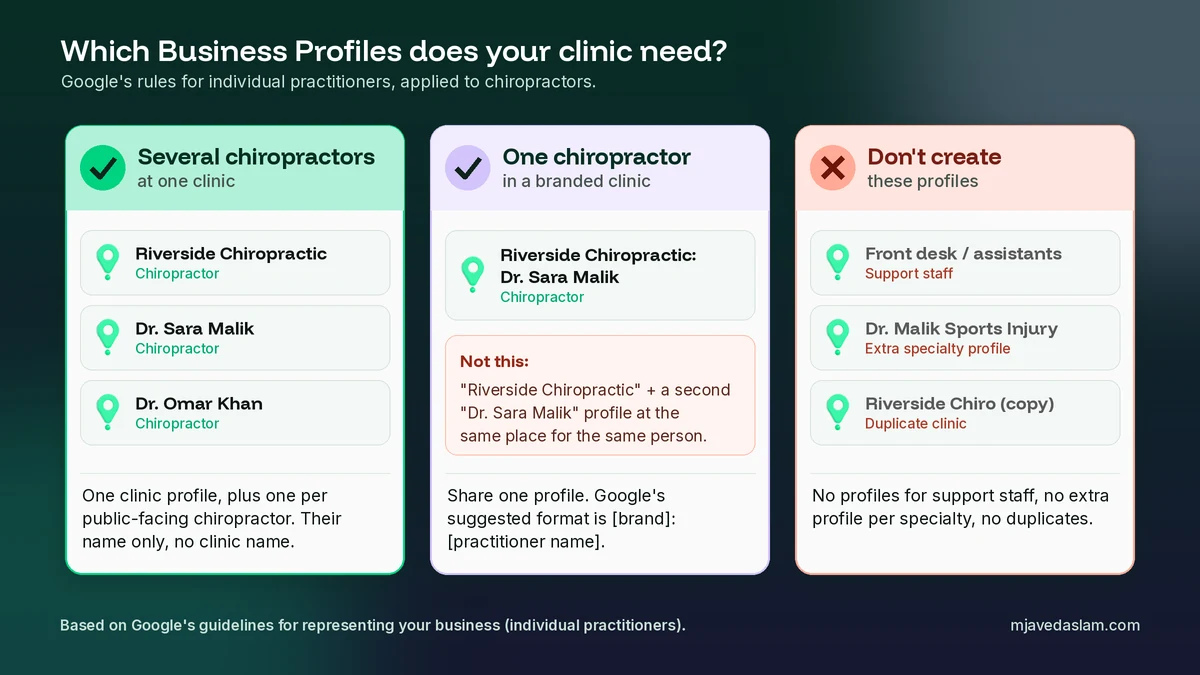
This is the part most chiropractic SEO guides skip. Google’s guidelines for representing your business have a section on individual practitioners. They name doctors and dentists as examples of public-facing professionals, and the same logic fits chiropractors. Practitioner profiles may include a title such as “Dr.”. Here is how the rules play out in a clinic:
Several chiropractors at one clinic
The clinic should have its own Business Profile. Each chiropractor who sees patients may also have a profile, but only if they work in a public-facing role and patients can contact them directly at that location during the stated hours. The name on a chiropractor’s profile should be only their name, for example “Dr. Sara Malik”, without the clinic name added.
A solo chiropractor in a branded clinic
If you are the only public-facing chiropractor at the location, Google says it’s best to share one profile with the organization. Its suggested name format is [brand]: [practitioner name], for example “Riverside Chiropractic: Dr. Sara Malik”. The key point is one profile, not two competing ones for the same place and person.
What not to create
- Profiles for support staff such as the front desk team or assistants. Google says support staff should not create their own profiles.
- Extra profiles for each specialty, such as one for sports injuries and one for pregnancy care. Google says a practitioner should not have multiple profiles to cover their specializations.
- A second clinic profile because the first one has old details. Fix or merge it instead. My guide on how to fix a duplicate Google Business Profile shows how.
When an associate joins or leaves, review these profiles straight away so that patients do not call a number for someone who no longer works there.
Set up the clinic’s Google Business Profile
Work through these fields in order. It is the same list I use in my Google Business Profile service, with the chiropractic points added.
Business name: only the real name
Your profile name must match the real-world name on your sign, website and stationery. Google’s guidelines say adding service or location words is not allowed and can lead to suspension. So “Riverside Chiropractic” is fine if that is your sign. “Riverside Chiropractic Back Pain and Sciatica Relief Downtown” is not. My Business Profile name guidelines post covers the edge cases.
Primary and secondary categories
Pick the most specific chiropractic category Google offers in your country. For most clinics that is simply Chiropractor. Google asks you to use as few categories as possible and to choose ones that complete the sentence “this business IS a”, not “this business HAS a”. Do not add categories only as keywords. If your clinic truly is also another kind of business, for example a physical therapy clinic with its own therapists, a second category can make sense. A massage table in one room does not make you a massage business. My guide to the primary category explains how to choose.
Address and hours
Use the exact address where you see patients, with permanent signage. Google does not allow a profile at a virtual office or a rented mailbox. If you treat patients at a second real location with its own hours, that location can have its own profile.
For hours, show the times when the clinic is open and the phone is answered. One detail surprises many clinics: Google’s guidelines list businesses that operate only by appointment among those that shouldn’t provide hours. If you have regular opening hours and also take bookings, set your normal hours.
Services, description and booking
- Services: add each real service as its own line, such as spinal adjustment, sports injury care, pregnancy chiropractic care, posture assessment or rehabilitation exercises. Only list what you offer.
- Description: plain English about who you help, the main problems you treat, your chiropractors and how a first visit works. The guidelines do not allow links, prices or sale offers in the description. My guide to the Business Profile description has examples.
- Booking: if you use online booking, add the link to your profile and test it on a phone. A patient in pain will not fight a slow booking form.
Photos patients trust
Show the outside of the building and the entrance, your reception, treatment rooms, your chiropractors and team, and the parking. Avoid stock photos. Never post a photo where a patient can be identified unless you have their written permission. My photo guidelines cover sizes and what Google rejects.
Build service and condition pages that stay honest
This is where chiropractors win the “pain + town” searches. I build four kinds of page:
- One page per main condition you treat. Lower back pain, neck pain, sciatica, headaches, sports injuries. Explain who usually comes in with it, how you assess it, what a treatment plan can include, and when you refer a patient to a medical doctor instead.
- One page per main service. Adjustments, pregnancy care, children’s care if you offer it, rehabilitation. Say who it is for and what happens in the room.
- A new patient page. What to bring, how long the first visit takes, insurance or payment basics, parking and how to book.
- A page for each chiropractor. Real name, photo, qualifications, licence details where your state or country issues them, languages spoken and what they focus on.
Write like a careful clinician, not a salesperson. Do not promise cures or fixed results, and do not claim to treat conditions you cannot support with evidence. Your licensing board or professional body may have its own advertising rules, so check them before you publish.
Then add LocalBusiness schema with your real name, address and phone, put a tap-to-call button and a booking button on every page, and use the same name, address and phone everywhere. If you add a short FAQ to condition pages, my guide to FAQ schema in WordPress shows how to mark it up.
Get reviews the right way (no review gating)
Reviews feed prominence, and new patients read them before they book. The routine is simple: ask every patient the same way, at the same point, for example after their second or third visit when they have had time to form a view.
What you must not do is “review gating”. That means sending a quick survey first and only asking the happy patients to post on Google. Google’s Maps content policy says merchants may not discourage or prohibit negative reviews, or selectively solicit positive reviews from customers. The same policy bans incentives such as payment, discounts or free services in exchange for a review, and says you should not pressure patients to leave a review while they are at the clinic or ask them to include specific content, such as a chiropractor’s name.
- Send every patient the same short link or show a Google review QR code at the front desk or in your follow-up message.
- Do not offer a free visit, a discount or a prize draw for reviews, and do not set staff review quotas.
- Do not write reviews for your own clinic, and do not let family or staff do it. Google treats reviews based on a conflict of interest as rating manipulation.
Reply to reviews without breaking patient privacy
Replying to reviews is good practice, but in healthcare the reply itself can be a privacy breach. In 2023 the US Department of Health and Human Services announced a settlement with Manasa Health Center, a New Jersey provider that had posted patient information in replies to negative online reviews. The provider paid $30,000 and agreed to a corrective action plan. The same rule applies to a chiropractic clinic that is covered by HIPAA. A reviewer sharing their own story does not give you permission to share yours.
My rules for chiropractic review replies are simple:
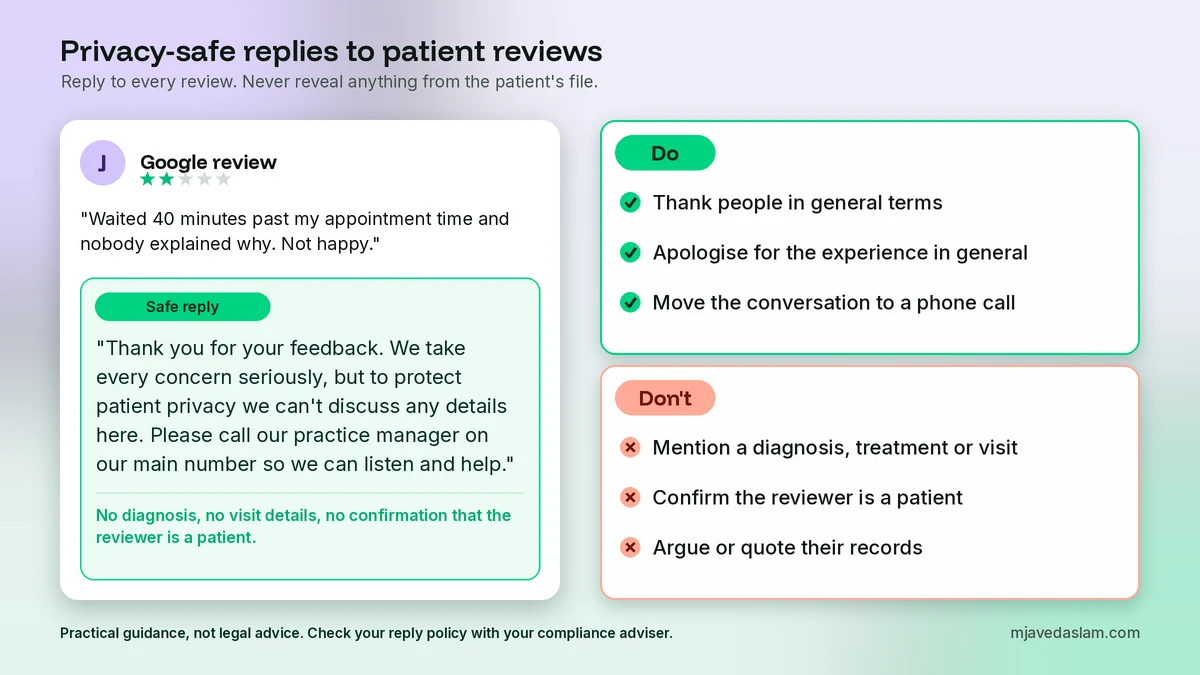
- Do not mention a diagnosis, treatment, visit date, injury, insurance or anything from the patient’s file.
- Do not confirm that the reviewer is a patient. Speak about your clinic’s general standards instead.
- Thank people for positive reviews in general terms. “Thank you for the kind words, we’re glad you felt welcome” is enough.
- For negative reviews, stay calm, apologise for the experience in general terms and invite the person to call the practice manager. Take the details offline.
- Write down a short reply policy and train everyone who can reply on Google. This is practical advice, not legal advice, so check the policy with your compliance adviser.
Here is a safe reply to a negative review: “Thank you for your feedback. We take every concern seriously, but to protect patient privacy we can’t discuss any details here. Please call our practice manager on our main number so we can listen and help.” My review response templates have more examples you can adapt.
Google Ads for chiropractors: one rule to know
Local SEO takes months. Paid search can bring in new patients sooner, but health advertising has limits. Google’s personalized advertising policy lists Health as a sensitive interest category. Advertisers whose ads fall into a sensitive category can’t use advertiser-curated audiences, such as remarketing lists and Customer Match. Target people searching for help in your area instead.
Keep your radius tight with Google Ads location targeting, send each ad group to the matching condition or service page, and track calls and bookings. My Google Ads service covers the full setup.
A 30-day local SEO plan for a chiropractic clinic
- Week 1: audit every profile for the clinic and each chiropractor. Fix the names, merge duplicates, remove profiles for support staff and set the Chiropractor category, address and honest hours.
- Week 2: add every real service, write a plain description, add the booking link and upload real photos of the clinic and team without identifiable patients.
- Week 3: publish or improve your top three condition pages, the new patient page and a page for each chiropractor. Add LocalBusiness schema, tap-to-call and booking buttons.
- Week 4: start asking every patient for a review the same way, write your privacy-safe reply policy, and reply to existing reviews using it.
After that, local SEO for chiropractors is mostly routine. Each month, check calls, website clicks and direction requests in your profile performance, add one new condition page, and keep the review routine going. For the wider strategy, including citations and local links, see my local SEO service.
FAQ: local SEO for chiropractors
What is local SEO for chiropractors?
It is the work that helps a chiropractic clinic appear in the Google map pack and local results when people nearby search for a chiropractor or for help with pain. It covers a well set up Google Business Profile for the clinic and its chiropractors, service and condition pages on your website, genuine reviews, privacy-safe review replies and easy booking. Google says local results are mainly based on relevance, distance and prominence.
What Google Business Profile category should a chiropractor use?
Use the most specific chiropractic category Google offers in your country, which for most clinics is Chiropractor. Google asks you to use as few categories as possible and to pick ones that complete the sentence “this business IS a”. Only add a second category if the clinic truly is also another kind of business.
Should each chiropractor have their own Google Business Profile?
If several chiropractors see patients at one clinic, the clinic should have its own profile and each public-facing chiropractor may have one too, named with only their own name. If you are the only chiropractor at a branded clinic, Google says it is best to share one profile in the format brand: practitioner name. Support staff should not have profiles.
Can a chiropractor only ask happy patients for Google reviews?
No. That is called review gating, and Google’s Maps content policy says merchants may not discourage negative reviews or selectively ask for positive ones. Ask every patient the same way, and do not offer discounts, free visits or other incentives for reviews.
How should a chiropractor reply to a negative review without breaking HIPAA?
Keep the reply general. Do not mention a diagnosis, treatment, visit or anything from the patient’s records, and do not confirm that the reviewer is a patient. Thank them for the feedback, say you take concerns seriously, and invite them to call the practice manager. In 2023 a US provider paid $30,000 to HHS after sharing patient information in review replies.
Can chiropractors use remarketing in Google Ads?
Usually not. Health is one of Google’s sensitive interest categories, and advertisers whose ads fall into it cannot use advertiser-curated audiences such as remarketing lists and Customer Match. Focus on search campaigns that target people looking for help in your area instead.
Next step
Start with the profiles this week: one clean clinic profile, the Chiropractor category, the right practitioner profiles and nothing for support staff. Then write your review reply policy before you answer the next review. If you want me to check your profiles, pages and reviews, see my Google Business Profile service or my wider local SEO work.