Here’s the short answer. There’s no public phone number for Google Business Profile support. To contact Google Business Profile support, sign in with the Google Account that manages your profile and open the Contact us form in the Business Profile Help Center. Describe your problem, check the articles Google suggests, then pick from the contact options it shows you. Those options can include email, chat or a phone call, depending on your issue. Some problems have their own official tool instead: suspensions go to the appeals tool, flagged reviews go to the Reviews Management Tool, and general questions can go to the Business Profile Help Community.
I’m Javed Aslam, and I help businesses in Pakistan and abroad set up and fix their Google Business Profiles. Search for a “Google customer care number” and you’ll find plenty of unofficial helpline pages. This guide covers how to contact Google Business Profile support the official way, which route fits which problem, what to prepare, and how to avoid people who pretend to be Google support.
Is there a Google Business Profile phone number you can call?
No. Google’s Business Profile help pages don’t list a phone number for owners to dial. Every support path in the Business Profile Help Center starts online, from a form or a tool. Google’s own GBP Best Practices Playbook 2026 lists four support options, in this order:
- The Business Profile Help Center. Google calls it the fastest way to solve most issues.
- An AI help guide. An interactive help experience that Google says is currently available only in selected countries.
- The Contact us form. You describe your issue, Google suggests articles first, and if they don’t help you get contact options.
- The Google Business Profile Help Community. A forum where Product Experts answer questions and can sometimes escalate complex cases to Google.
So does Google ever talk to you on the phone? It can, but only inside that flow. Google’s page on advanced profile settings says you can share your Business Profile ID “with Google support by phone, chat, email, or other channels.” In other words, phone and chat exist for some cases, but you reach them through the Contact us form, not a public number.
What about the Google Ads phone number?
That’s a different product. Google lists a Google Ads Expert line in the US (1-800-838-7971, Monday to Friday, 9am to 9pm ET) to help new advertisers set up their first campaign. It’s for Google Ads, not for Business Profile problems like verification, suspensions or reviews. If you run ads and also have a profile, keep the two support paths separate.
Watch out for fake “Google support” numbers
Search for a support number and you’ll find pages and ads that promise a “24/7 Google Business helpline”. Google’s page on protecting your Business Profile warns about calls, emails and texts from people who offer help with your profile in exchange for money, “including people or companies claiming to be Google support or Google employees.” It also says Google doesn’t charge for Business Profile, will never ask for a one-time password (OTP) or PIN, and will never try to convince you to pay to maintain your profile. If a “support agent” asks for money or a code, you’re not talking to Google. I cover the warning signs in detail in my guide to Google Business Profile scam calls.
How to contact Google Business Profile support with the Contact us form
The Contact us form is the main door for most problems. Here’s how to use it:
- Sign in with the right account. Use the Google Account that owns or manages the profile. If you sign in with a personal account that has no access, support can’t see your listing.
- Open the form. Go to support.google.com/business/gethelp, or select Contact us from a Business Profile help article. Google’s help pages for suspensions, reviews and appeals link to this same form.
- Describe the problem in plain words. One clear sentence works best, for example “My business name edit was rejected” or “My verified profile isn’t showing on Maps.”
- Read the suggested articles. Google shows help articles first. Sometimes they really do solve it, and you save a wait.
- Choose a contact option. If the articles don’t help, Google shows the options for your issue. The playbook says these are often email or a form submission. Chat or a call may appear for some issues.
- Submit once and keep the confirmation. Save any case number or email you get, and reply on that thread if support writes back.
Some problems need you to type a specific phrase. For example, Google’s page on requesting ownership says that for a service-area business with no shop or office, you should contact support and enter “Transfer ownership of listing” in the “Tell us what we can help with” field, then choose that issue.
Which support route fits your problem?
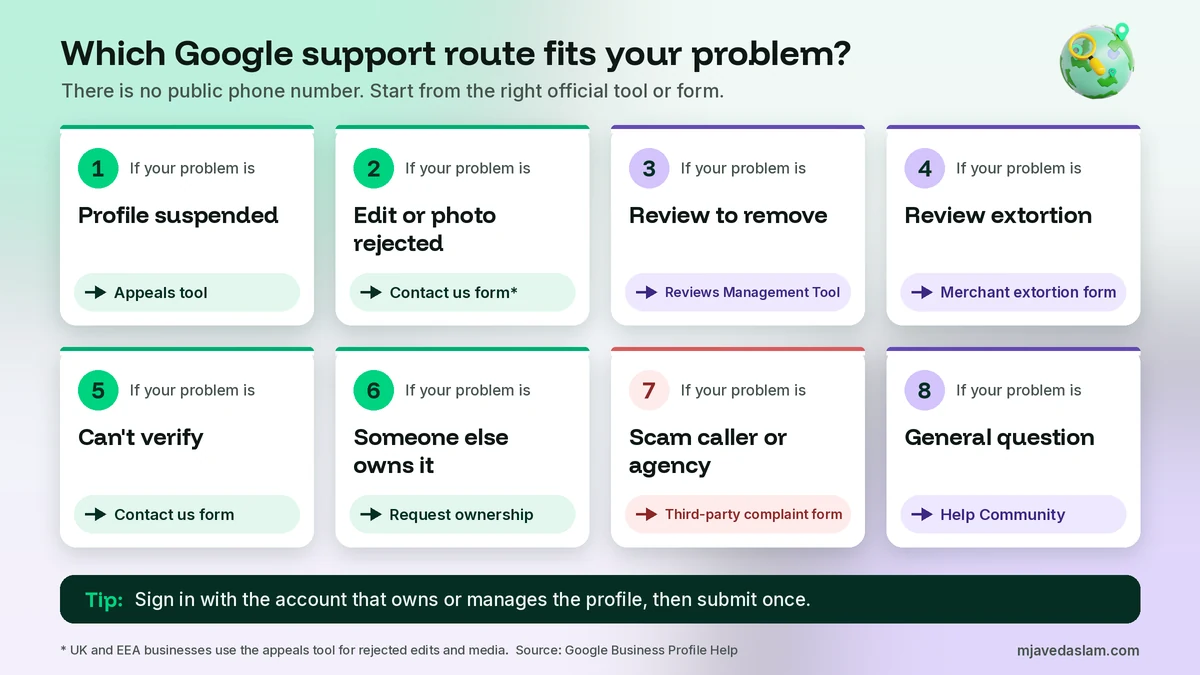
Picking the right route matters more than how many times you ask. The general form can’t reinstate a suspended profile, and the Help Community can’t remove a review. Here’s where Google sends each common problem:
| Your problem | Official route | What to know |
|---|---|---|
| Profile suspended or disabled | Business Profile appeals tool | One appeal per decision. Google emails the result. |
| Appeal denied | Additional review form | Only after a denied reinstatement request. Add new evidence. |
| Issues after reinstatement | Contact us | Google says to contact Business Profile Help. |
| Rejected edits or photos (outside UK/EEA) | Contact us | In the UK and EEA these go to the appeals tool. |
| Review you want removed | Reviews Management Tool | Flag first, then one-time appeal if it’s not removed. |
| Fake reviews plus a demand for money | Merchant extortion form | Send screenshots of the demands and review links. |
| Can’t verify the business | Contact us | Try every method offered first. Reviews take up to 5 business days. |
| Someone else owns your profile | Request ownership | Owner has 3 days to respond. |
| Scam caller or bad agency | Third-party complaint form | Include the caller’s company and contact info. |
| General how-to question | Help Community | Volunteers answer. Don’t post private data. |
Suspended or disabled profile: use the appeals tool
Google’s page on fixing suspended or disabled profiles says to first make sure your profile follows the guidelines, then open the appeals tool while signed in to the related account. You select the profile and the decision, and the tool shows the date, the reason, a link to the policy, whether you can appeal, and the status. You can attach files and explain why the profile should be reinstated.
- Evidence Google lists includes an official business registration, a business license, tax certificates, and utility bills such as electricity, phone, water or internet. The name and address on documents should match the profile.
- Appeals can only be submitted once, so attach everything before you submit.
- Google says not to create a new Business Profile for the same business.
- If the request is denied, Google may be able to do an additional review where you can add evidence you didn’t send the first time.
- If your whole account is restricted, you appeal the account first from your My accounts page, then the profile.
I’m publishing a full guide to fixing a suspension soon. In the meantime, if a duplicate listing caused the trouble, read how to fix a duplicate Google Business Profile.
Rejected edits, photos and other content
Google’s page on appealing content and profile restrictions splits this by region. For businesses in the UK or the European Economic Area, rejected edits (name, category, address, phone, website) and restricted media go through the appeals tool. For the rest of the world, including Pakistan, rejected edits and media restrictions go through Contact us. Google says appeal reviews can take up to 5 business days, and you shouldn’t submit several appeals for the same issue before you get a decision. A suspended profile must be reinstated before you can appeal content decisions. If your edits keep failing, my guide on Google Business Profile edits not approved explains the usual causes.
Reviews: flag, appeal, then contact support
Support isn’t the first step for a bad review. Google’s page on reporting inappropriate reviews says to flag the review, then track it in the Reviews Management Tool. If the status says “Report reviewed – no policy violation” and you disagree, you can submit a one-time appeal for up to 10 reviews. Google also says its spam system sometimes removes legitimate reviews by mistake, and that’s when you contact support for help. I explain the full process in how to remove a Google review and the missing-review side in Google reviews not showing.
If someone floods you with fake one-star reviews and then asks for money to stop, that’s extortion. Google has a separate report for review extortion scams. It asks for screenshots that show the demands, with date, time and sender details, plus links to the suspicious reviews.
Verification problems
Google’s page on verifying your business says Google picks the methods available to you, and after you complete the steps, reviews take up to 5 business days and, rarely, longer. For live video and postcard verification, it says to try the options available, and if you still can’t verify, contact support. Before you write in, go through my guides to video verification and postcard verification, because they cover what Google asks for in each method, and a fix on your side is often faster than a support ticket.
Ownership and access problems
If someone else, like an old agency or a former employee, owns your listing, start with Google’s request ownership process. The current owner gets an email and has 3 days to respond. If they don’t respond, you may get the option to claim the profile from your confirmation email. My guides on transferring ownership and adding a manager help you avoid this problem next time.
What to have ready before you contact support
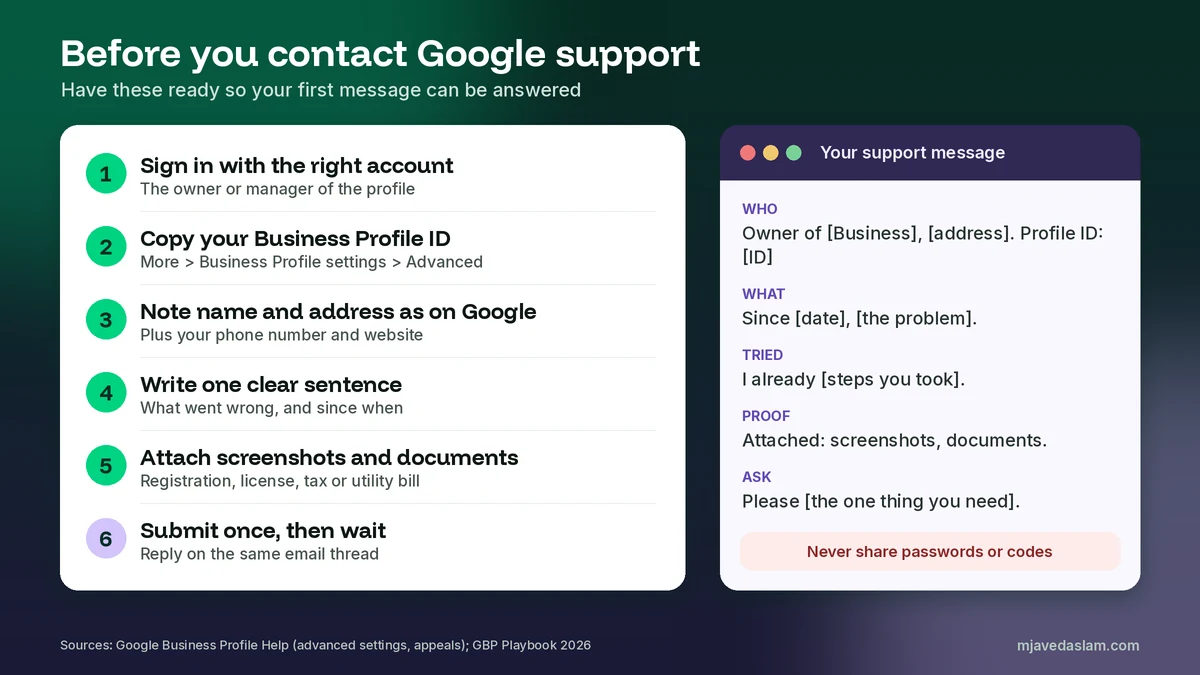
A clear first message saves days of back-and-forth. Collect these before you open the form:
- Your Business Profile ID. Google’s advanced settings page says to go to your Business Profile, then select More, Business Profile settings, Advanced settings. The ID is the unique identifier for your listing, and Google says you can share it with support.
- The account email. The Google Account that owns or manages the profile.
- Your business name and address exactly as Google shows them, plus your public phone number and website.
- One sentence about the problem, what you expected, and when it started.
- Screenshots of the error, the rejected edit, the status in the appeals or reviews tool, or the suspicious message.
- Documents if your case is about eligibility or the address. Google’s appeal pages list business registration, a license, tax certificates and utility bills. Check that the name and address match your profile.
A simple message you can adapt
Keep it short and factual. Here’s a structure I suggest:
- Who: “I’m the owner of [Business name], [full address]. Business Profile ID: [ID].”
- What: “Since [date], [the problem]. I expected [what should happen].”
- What I tried: “I’ve already [steps you took, e.g. re-submitted the edit once].”
- Proof: “Attached: [screenshots and documents].”
- Ask: “Please [review the edit / restore the reviews / help me verify].”
Don’t argue with competitors or vent about Google in the message. Support reads facts. And don’t paste passwords or verification codes into any form or chat. Google says it will never ask for your verification code.
Using the Google Business Profile Help Community
The Business Profile Help Community is a public forum. It’s good for questions like “Which category should I use?” or “What does this status mean?” Google’s Help Communities overview explains the badges you’ll see:
- Product Experts (Silver, Gold, Platinum and Diamond) are users who volunteer to help. They’re not Google employees.
- Google Employees, shown as Guides and Community Managers, work at Google.
- Google Community Specialists are Google partners who help maintain the communities.
Google’s playbook says Product Experts can sometimes escalate complex cases to Google. That makes the forum useful when the normal form goes nowhere. But it’s public. The Community page itself says not to share private or confidential personal or business information there, and Google says its representatives won’t ask for your password. Share your business name and the problem, not your account details.
Why you might not see chat or phone options
Owners often say, “Other people get chat, why don’t I?” Google’s playbook says that after the suggested articles you’ll be shown contact options, “often email/form submission.” Its AI help guide is only in selected countries. So it’s normal to see only email for some issues. Google doesn’t promise every channel for every problem. A few things can help:
- Sign in with the owner or manager account, not a personal one with no access.
- Pick the issue category that’s closest to your actual problem, and describe it in a clear sentence.
- If the problem has its own tool, like appeals or the Reviews Management Tool, use that tool. Google’s own help pages send those problems there.
- Try a different, plain description if the suggested articles don’t match your problem at all.
Don’t create a second profile to “start fresh” while you wait. Google’s suspension and appeals pages say not to create a new Business Profile for the same business. That usually makes things worse.
Contacting Google Business Profile support from Pakistan
There’s no separate Pakistan helpline or office number for Business Profile support. Owners in Pakistan use the same Help Center, Contact us form, appeals tool and Help Community as everyone else. Pakistan falls under the “rest of world” column in Google’s appeals chart, so rejected edits and media restrictions go through Contact us, not the appeals tool.
Be extra careful with WhatsApp messages and calls that offer “Google verification” or a “Google office” fix for a fee. Google says it doesn’t charge for Business Profile and won’t ask for codes. You can report such callers to Google through its third-party complaint form, and my scam calls guide has the Pakistan reporting steps.
Is it worth hiring help to deal with Google support?
Sometimes. An experienced consultant can’t jump the queue at Google, and nobody can guarantee a reinstatement or a removed review. What they can do is pick the right route, prepare evidence that matches your profile, and fix the issue that caused the problem in the first place. Google’s third-party policies say anyone who charges a management fee must tell you that Business Profile itself is provided at no extra cost. If an agency claims to be Google, or says it has a special line inside Google, walk away.
If you’re still at the start, read my guide to claiming your Google Business Profile. Doing setup right avoids many of the problems that send owners to support.
FAQ
Is there a Google Business Profile customer service phone number?
No. Google doesn’t publish a public phone number you can dial for Business Profile support. You start from the Contact us form in the Business Profile Help Center, and Google shows the contact options available for your issue. If a phone option appears there, use that one. Any “Google helpline” number on a random website or ad is not an official route.
Can I chat with Google Business Profile support?
Sometimes. Google’s own Business Profile ID help page says you can share your ID with support by phone, chat, email or other channels, but which options you see depends on your issue and account. Describe the problem in the Contact us form, read the suggested articles, then choose from the options Google offers.
How long does Google Business Profile support take to reply?
Google doesn’t publish one response time for support requests. For some processes it does give timelines: verification reviews and content appeals can take up to 5 business days, and an owner has 3 days to answer an ownership request. Don’t open new requests for the same issue while you wait.
Is the Google Business Profile Help Community run by Google?
It’s hosted by Google, but most answers come from Product Experts, who are volunteer users, not Google staff. Google employees in the forum carry their own badge as Guides or Community Managers. Google says some Product Experts can escalate complex cases, and it warns you not to post private or confidential information in the forum.
How do I contact Google about a suspended Business Profile?
Use the Business Profile appeals tool, not the general form. Sign in with the account linked to the profile, pick the profile and the decision, add evidence such as a business registration, license, tax certificate or utility bill, and submit. Appeals can only be submitted once, and Google emails you the decision. If it’s denied, you may be able to request an additional review.
Should I pay someone who says they can reach Google support for me?
Be careful. Google says it doesn’t charge for Business Profile and warns about people who offer help in exchange for money, including people claiming to be Google support or Google employees. A real agency can help you prepare a request, but it can’t buy you faster treatment, and it must tell you the profile itself is free.
Next step
If you’ve tried to contact Google Business Profile support and you’re still stuck, I can look at your profile, find the right route and help you prepare a clear request with the right evidence. See my Google Business Profile service page, or get in touch with your business name, city and the problem. And remember: real Google support never charges you for your profile and never asks for your code.