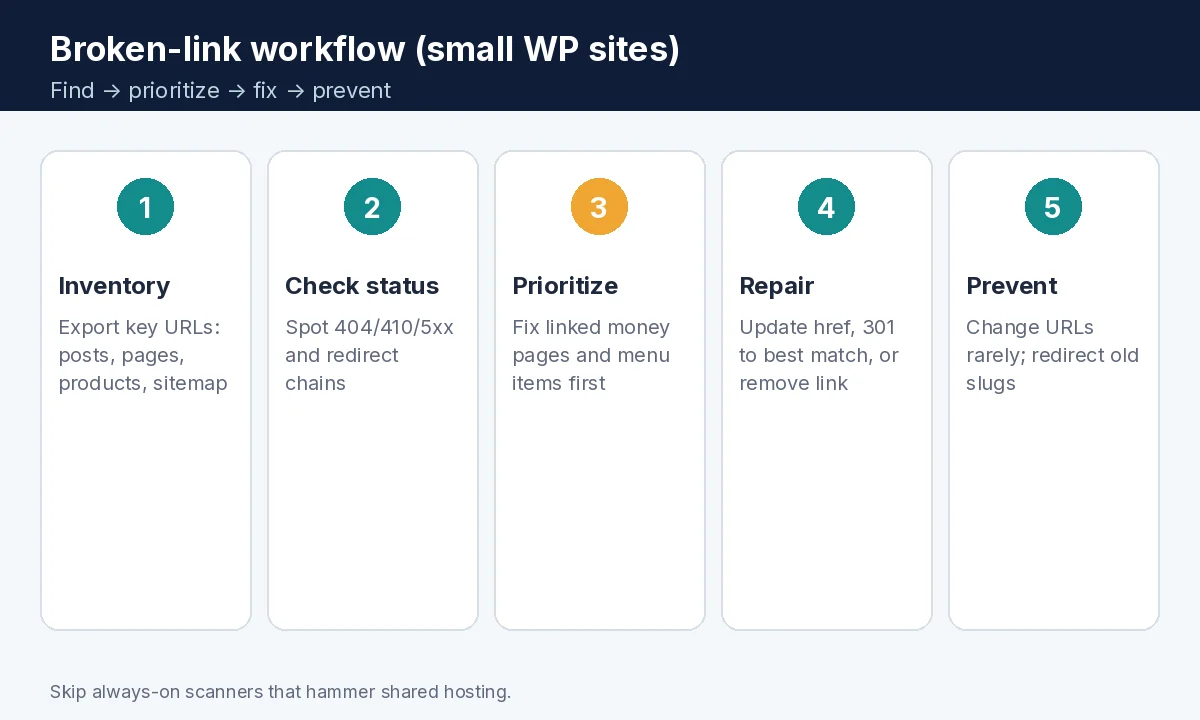
Fix broken links WordPress teams search for usually means this: fix broken links in WordPress without turning your site into a full-time crawl farm: inventory the URLs that matter, check status codes, repair or 301-redirect with matching intent, then prevent new rot when you change slugs. Broken links waste crawl budget and trust — but an always-on scanner on cheap shared hosting can hurt Core Web Vitals more than the 404s did.
This is the find-and-fix workflow for small WordPress sites. It is not the Core Web Vitals tune-up, not the Yoast sitemap include/exclude guide, and not an FAQ schema tutorial — those stay separate.
How to find and fix broken links in WordPress (quick answer)
- Pull a URL list from your Yoast (or similar) XML sitemap, menus, and top posts.
- Check for 404 / 410 / 5xx and long redirect chains (browser, curl, or a one-off audit tool).
- In Search Console, review the Page indexing report for not-found and redirect issues on important URLs.
- Fix by updating the href, adding a 301 redirect to the best same-intent page, or removing the dead link.
- Avoid “redirect everything to homepage” as a default — Google’s redirect docs want helpful, equivalent destinations.
- Skip heavy, always-running link checkers on small hosts; run periodic scans or manual passes instead.
- When you change a slug, add the redirect the same day.
Why broken links matter (without panic)
Google’s link best practices expect crawlable, working links so people and crawlers can reach your content. HTTP status documentation explains how 404/410 and server errors affect crawling. A few outbound blog citations going dead is normal; a broken main menu, service CTA, or internal hub link is urgent.
Broken links are not a Core Web Vitals metric by themselves — but fixing them is still UX and SEO hygiene. If your host is already slow, don’t stack a plugin that crawls thousands of URLs every hour — fix Core Web Vitals.
Find broken links without melting the server
- Export from the sitemap: open
/sitemap_index.xml(Yoast default) and collect post/page URLs you care about — Yoast XML sitemap settings. - Check menus and widgets: Appearance → Menus, footer widgets, and “important links” blocks. These 404s hurt every visitor.
- Spot-check money pages: manually click CTAs on Home, Services, Contact, and top landing pages on mobile.
- Search Console: Page indexing report — look for Not found (404), Redirect error, and server error reasons on URLs that should be live.
- One-off crawl (optional): a desktop crawler or a reputable broken-link plugin run on demand is fine. Prefer tools that throttle requests. WordPress.org lists options such as Broken Link Checker variants and redirect managers — evaluate performance impact before leaving any scanner enabled 24/7.
- Outbound links in old posts: batch a few high-traffic posts per month; you do not need to boil the ocean in one night.
Command-line quick check for a single URL (optional, for the technical owner): curl -sI -L -o /dev/null -w '%{http_code} %{url_effective}\n' 'https://example.com/old-page/' — look for final 200s and avoid long hop chains.
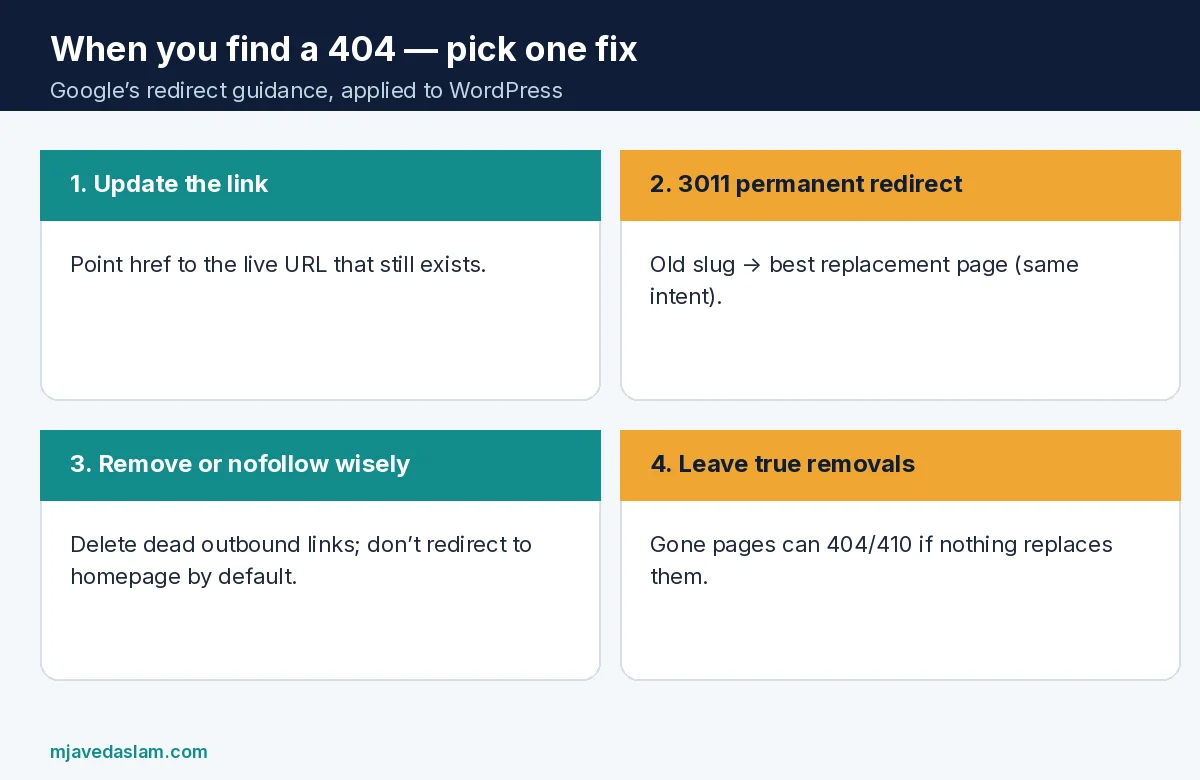
Fix patterns that stay safe
- Update the link text/URL in the block editor when the destination still exists under a new path.
- 301 redirect an old slug to the closest equivalent page (same service, same article topic). Use a redirect plugin (for example Redirection on WordPress.org) or server rules — follow Google’s redirects guidance: permanent moves for permanently moved content; keep redirects working as long as possible.
- Do not mass-redirect to the homepage unless the homepage truly is the best remaining equivalent. Soft-404 patterns confuse users and Search.
- Remove rotten outbound affiliate or citation links; replace with a better source or delete the sentence.
- True removals: if a page should stay gone, a clean 404/410 is acceptable — don’t invent a thin replacement just to avoid a 404.
- Fix chains: A → B → C should become A → C (or update links to C directly).
After migrations or domain changes, update the WordPress Address / Site Address carefully and map old paths — see WordPress documentation on changing the site URL. Permalink structure changes are a classic 404 factory; if you must change permalinks, plan redirects first — SEO services.
WordPress-specific gotchas
- Drafts, private pages, and noindexed leftovers still appear in internal editorial lists — don’t link them publicly.
- Media file URLs change when you regenerate thumbnails or move hosts; update post content or redirects for hotlinked PDFs/images you still need.
- Pagination, filtered shop URLs, and calendar archives can create soft-404 clutter — control what enters the sitemap.
- Multilingual plugins duplicate paths; fix links in each language version.
- Page builders sometimes store absolute URLs from staging — search the database/export for the staging domain after go-live (backup first).
Prevention beats monthly fire drills
- Change slugs rarely; when you do, redirect immediately.
- Prefer relative internal links where your stack supports them cleanly — or absolute production URLs, consistently.
- Before deleting a page, check in Search Console / analytics whether it earns clicks; redirect if it still has links.
- Keep a simple changelog of URL moves in your ops doc.
- Quarterly: click through the main menu and footer on a phone.
Internal linking should still be crawlable and descriptive — Google’s link best practices apply. Pair clean links with trustworthy pages — E-E-A-T checklist — and with FAQ markup only on real FAQs — FAQ schema.
If you use Google Ads landing pages on WordPress, broken thank-you or privacy links also break conversion hygiene — keep those URLs in your inventory — conversion tracking.
Example 90-minute cleanup: export sitemap URLs to a spreadsheet; mark status with a throttled checker; fix all menu/footer 404s first; 301 the top 20 trafficked old posts; schedule outbound-link cleanup for the ten most-visited articles; disable any always-on scanner afterward. Document redirects so the next developer doesn’t recreate the old slug.
Agency tip: never run a full-site broken-link crawl on a client’s production host at noon on a sale day. Use staging mirrors when possible, or off-peak windows with rate limits. Report before/after counts without inventing “X% ranking lift” promises — rankings move for many reasons.
When a redirect plugin and a security plugin both rewrite .htaccess, test critical URLs after every major update. Keep a backup of working redirect rules. On nginx hosts, redirects may live in server blocks instead of .htaccess — match the stack you actually run (WordPress docs cover Apache .htaccess patterns for permalinks).
Keep a living “known good” list of the twenty URLs that print money — service pages, booking, contact, top guides — and smoke-test them after every plugin update, theme change, or CDN cutover. That twenty-link ritual catches the failures customers feel before a full-site crawl ever runs.
FAQ: fix broken links in WordPress
How do I find broken links in WordPress without a plugin?
Use your XML sitemap and menus as the inventory, click-test money pages, check Search Console Page indexing for 404s, and optionally run a throttled external crawler. Spot-check with curl or browser dev tools.
Should I install Broken Link Checker permanently?
On small shared hosting, always-on scanners can slow the site. Prefer scheduled or manual audits, then disable aggressive crawling when finished.
Is a 301 redirect better than a 404?
If a good equivalent page exists, a permanent redirect helps users and Search. If the content is truly gone with no replacement, a clean 404/410 is fine — don’t soft-404 to the homepage by default.
Do broken outbound links hurt SEO?
They hurt user trust and can waste attention. Prioritize internal and navigational links first; clean high-traffic posts’ outbound citations over time.
What about redirect chains?
Collapse chains so old URLs reach the final destination in one hop when possible, and update internal links to point at the final URL.
Will fixing broken links improve Core Web Vitals?
Not directly — CWV measures loading/interactivity/stability. Fixing links improves UX and crawlability; avoid heavy scanners that worsen CWV.