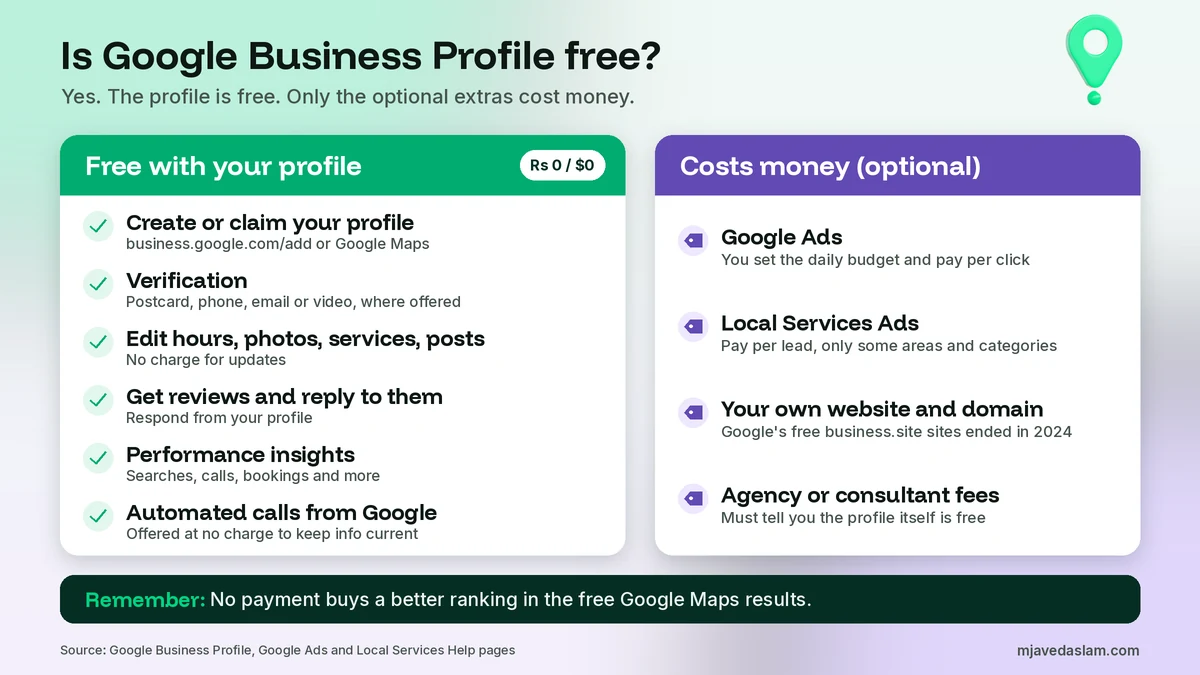
Here’s the short answer. Yes, Google Business Profile is free. Google says creating a Business Profile and listing your business on Google is free, and that you can add or claim your business at no charge. Verifying it, editing it, adding photos and posts, and replying to reviews are all free too. There’s no monthly fee and no “premium” version of the profile. What can cost money is optional: Google Ads, Local Services Ads, your own website, or paying someone to manage the profile for you. And no payment of any kind buys you a better position in the free Maps results.
I’m Javed Aslam, a local SEO consultant in Pakistan. I set up and fix Google Business Profiles for small businesses. A common question from business owners is: “Is Google Business Profile free, or will Google charge me later?” Some also get calls from people asking for money to “verify” or “protect” their listing. This guide explains exactly what’s free, what really costs money, and the paid traps to avoid. Every fact comes from Google’s own pages, linked as we go.
Is Google Business Profile free? What Google itself says
You don’t have to take my word for it. Google says it plainly in several places:
- On the official Google Business Profile page, Google’s FAQ answers “Is a Business Profile on Google free?” with: “Yes, creating a Business Profile and listing your business on Google is free.”
- Google’s Add or claim your Business Profile help page says: “You can add or claim your business at no charge.”
- Google’s Help protect your Google Business Profile page warns about people who offer help in exchange for money and says: “Google doesn’t charge for this service.” It adds that Google will never try to convince you to pay to maintain your profile, including getting it verified or reinstated.
- Google’s third-party policies say agencies that charge a management fee must tell customers that Business Profile is “a service provided at no extra cost.”
So the answer to “is Google Business Profile free or paid” is clear. The profile is free. If you’re asked to pay, you’re paying a third party for a service, or someone is trying to scam you.
One more thing that confuses people. Google My Business is just the old name. If you’re wondering “is Google My Business free”, the answer is the same. The product was renamed to Google Business Profile, and the name change didn’t add any fee.
What’s free on your Google Business Profile
Here’s what you can do without paying Google anything. I’ve listed only features Google describes on its own pages.
| What you can do | Cost | What Google says |
|---|---|---|
| Create a new profile or claim an existing one | Free | Add or claim your business “at no charge” at business.google.com/add or from Google Maps. |
| Verify the profile (postcard, phone, email or video, where offered) | Free | The options depend on your business type, region and other details. Google never asks you to pay to get verified. |
| Edit your info: hours, phone, website link, categories, description | Free | Edits are reviewed before they go live, but there’s no charge to make them. |
| Add photos, products, services and posts | Free | Google’s product page lists photos, offers, events and updates as ways to keep customers informed. |
| Get reviews and reply to them | Free | You can respond to reviews and highlight your ratings from the profile. |
| See performance insights | Free | Google shows what people searched to find you, plus calls, bookings and more. |
| Automated calls from Google to confirm your details | Free | Google says it offers this feature at no charge to help keep business info up to date. |
If you haven’t set up your profile yet, my step-by-step guide on how to claim your Google Business Profile walks you through it. For the two verification methods owners struggle with most, see postcard verification and video verification.
What actually costs money (and is optional)
This is where the confusion comes from. A few Google products and outside services sit close to your Business Profile. They can cost money. But none of them is required to have a working profile.
1. Google Ads
Google Ads is Google’s paid advertising product. It’s separate from your free profile. Google’s bid and budget help page explains that you set an average daily budget, and your maximum cost-per-click bid is the most you’re willing to pay for a click. It also says your monthly charges won’t go over 30.4 times your average daily budget. So you control the spend, and you can stop any time.
You’ll see ads on Google Maps too. Google’s Maps search help page says: “The square pins are ads.” That’s how you can tell paid placements from free results. If you’re thinking about ads, my guide on how much Google Ads cost for a small business gives realistic budget ranges.
2. Local Services Ads (only in some areas)
Local Services Ads are another paid product. Google’s Local Services Ads getting started page says you “pay only for leads related to your business and the services you offer.” They’re available only for certain service categories and areas, so many businesses can’t use them at all. I compare the two ad types in Local Services Ads vs Google Ads.
3. A website and domain
Your profile has a field for your website link, and adding one is free. But Google doesn’t host a website for you anymore. It used to offer basic one-page websites built from Business Profiles, and it turned those off in 2024. So if you want a website, you pay for your own domain and hosting, or use a free site builder. A website isn’t required for a profile, but it helps customers and gives you more pages that can rank.
4. Agency or consultant fees
Paying an agency or a freelancer like me to manage your profile is a service fee, not a Google fee. That’s allowed. But Google’s third-party policies set clear rules. If an agency charges a management fee, it must tell you in writing, before it starts, that Business Profile is a service provided at no extra cost. It must also show the fee on your invoices. And you must keep ownership or co-ownership of your profile at all times.
5. Your time
This is the real cost. A profile that’s set up once and then ignored rarely does well. Photos, posts, review replies, updated hours and correct categories all take time every month. That’s why some owners pay for help, and why others do it themselves for free.
Paying doesn’t buy you a better Maps ranking
This is the most important point in this article. Google’s local ranking help page says: “There’s no way to request or pay for a better local ranking on Google.” It says local results are mainly based on relevance, distance and prominence.
So when someone promises “first position on Google Maps” for a fee, be careful. They can’t buy that from Google. Google’s third-party policies list “Guarantees top placement on Google” as an example of a false or misleading claim. A good consultant can improve the things Google looks at, like complete information, accurate categories, reviews and a strong website. But nobody can guarantee a spot.
If you want to improve your position the honest way, start with my guide on how to rank in the Google Map Pack.
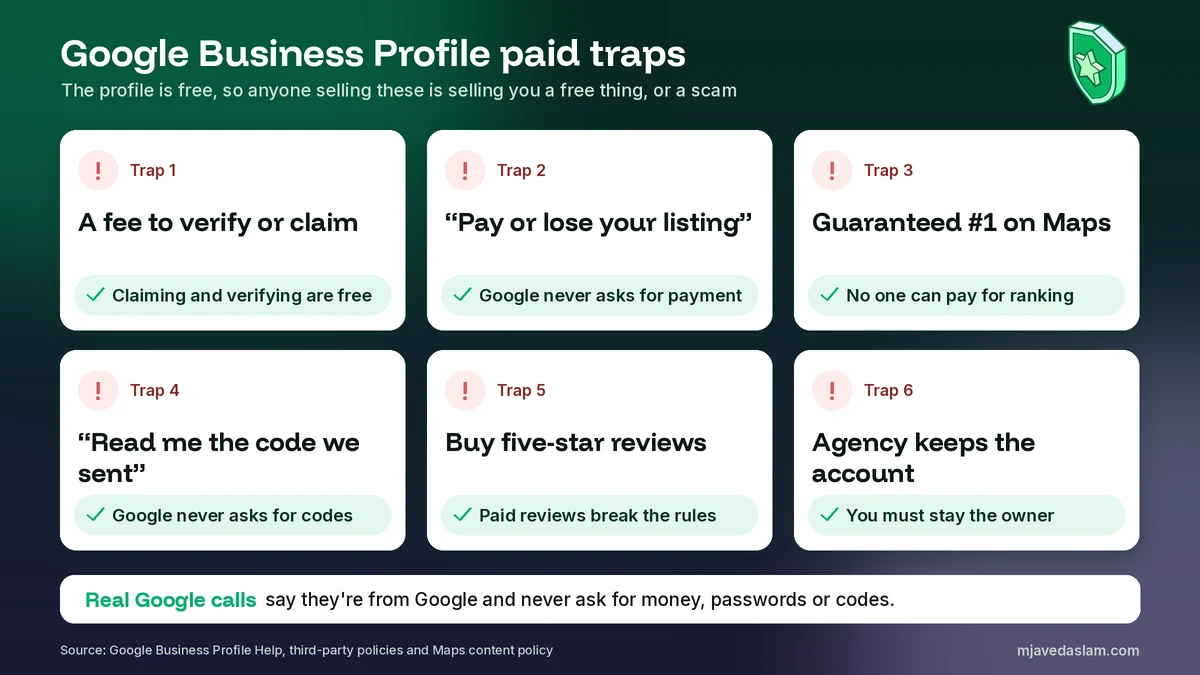
Common paid traps (and how to spot them)
Because the profile is free, scammers sell the free parts back to owners. These are the traps I see most, with what Google says about each.
Trap 1: “Pay a fee to verify or claim your listing”
Claiming and verifying are free. Google says it will never try to convince you to pay to maintain your profile, and that includes verification or reinstatement. If someone wants money for “official verification”, it’s not Google.
Trap 2: “Pay now or your business will be removed from Google”
Google’s automated calls help page says Google will never ask for payment, credit card information or account passwords. It also says: “If a caller asks for money to keep your business on Google, it is not a call from Google.” Google does make real automated calls to confirm details like your hours, but those calls say they’re from Google and never ask for money.
Trap 3: “Guaranteed number one on Google Maps”
As above, Google says there’s no way to pay for a better local ranking, and its third-party policies treat guaranteed top placement as a misleading claim. Treat any guarantee as a red flag.
Trap 4: “Just read me the code we sent you”
Google’s verification help page says: “Google will never ask for your verification code. Do not share the verification code with anyone, even with those who manage your Business Profile.” Google’s security page also says Google will never ask for a One Time Password (OTP) or PIN. Anyone who asks for that code can take over your profile.
Trap 5: “Buy 50 five-star reviews”
Paying for reviews breaks Google’s rules. Google’s Maps content policy prohibits offering incentives, “such as payment, discounts, free goods and/or services”, in exchange for reviews or for removing a negative review. Google’s tips to get more reviews say reviews must reflect a genuine experience. Asking real customers for reviews is free and safe.
Trap 6: “We’ll create it, but we keep the account”
Some agencies set up the profile under their own Google Account and never give you owner access. Google’s third-party policies say you must keep ownership or co-ownership at all times, and they list “Keeps a profile hostage in exchange for money” as untrustworthy behavior. If you hire help, give them manager access to your Google Business Profile, not your password. If someone already holds your profile, see how to transfer Google Business Profile ownership.
For the full picture on fake callers, including how to report them, read my guide to Google Business Profile scam calls. Google also has a fraudulent calls help page with a form to report a caller who pretends to be Google.
How to set up your Google Business Profile for free
You can do this yourself in under an hour, plus the time Google needs to review it. Here’s the free route:
- Search first. Look up your business name and city on Google Maps. If a profile already exists, claim it instead of creating a new one.
- Add or claim. Go to business.google.com/add, or select Claim this business on the existing Maps listing, as Google’s add or claim help page explains.
- Enter real details. Use your real business name, the right category, and an address or service area that meets Google’s guidelines.
- Verify. Pick one of the verification options Google shows you. These depend on your business type, region and other details.
- Complete the profile. Add hours, phone, website, photos and services. Google’s Edit your Business Profile page covers each field.
- Keep it active. Reply to reviews, post updates and keep your hours correct. All of this is free.
Stuck on a problem only Google can fix? Here’s how to contact Google Business Profile support through the official routes.
A note for businesses in Pakistan
Google Business Profile works the same way in Pakistan. There’s no fee in rupees, dollars or any other currency to list, claim or verify your business. The real risk isn’t a Google charge. It’s someone calling or messaging on WhatsApp, saying they’re from a “Google office”, and asking for a fee to verify the listing or keep it live. Google’s rules are the same here as everywhere: it won’t ask you to pay to keep or verify your profile, and it won’t ask for your code.
Local Services Ads also aren’t available in every country or category. So for most Pakistani businesses, the only Google product you’d pay for is Google Ads, and only if you choose to advertise.
When is it worth paying for help?
I’ll be honest, because this is my line of work. You don’t need to pay anyone to have a good Google Business Profile. Many owners do it well by themselves. Paying for help makes sense when:
- You don’t have time to post, add photos and reply to reviews every month.
- Your profile is suspended, stuck in verification, or has a duplicate you can’t fix.
- You’re in a competitive category and want a full local SEO plan, not just a listing.
- You run several locations and need them managed in one place.
If you do hire someone, ask three questions first. Will I stay the owner of my profile? What exactly do I get each month? And will you put in writing that the profile itself is free? A trustworthy consultant will say yes to all three without any fuss.
FAQ
Is Google Business Profile free or paid?
It’s free. Google says creating a Business Profile and listing your business on Google is free, and that you can add or claim your business at no charge. There’s no monthly fee and no paid tier for the profile itself. Things like Google Ads, Local Services Ads, a website or an agency’s help cost money, but they’re optional and separate from the profile.
Is Google My Business still free?
Yes. Google My Business is the old name for Google Business Profile. The product was renamed, but it’s still free to create, claim, verify and manage. If someone tells you the new version needs a paid plan, that isn’t true.
Does Google charge to verify a Business Profile?
No. Google says it will never try to convince you to pay to maintain your Business Profile, and that includes getting it verified or reinstated. Verification by postcard, phone, email or video is part of the free setup. Google also says it will never ask for your verification code, so never share it with a caller.
Can I pay Google to rank higher on Google Maps?
Not in the free results. Google says there’s no way to request or pay for a better local ranking. Local results are mainly based on relevance, distance and prominence. You can pay for ads, and on Google Maps the square pins are ads, but that’s advertising, not a better organic ranking.
Why would anyone pay for Google Business Profile management?
To save time or get expert help. An agency or consultant can set up the profile, choose categories, add photos and posts, handle reviews and fix problems. That’s a paid service, not a fee to Google. Google’s third-party policies say an agency that charges a management fee must tell you in writing that Business Profile itself is provided at no extra cost, and you must keep ownership of your profile.
Is a call asking me to pay for my Google listing a scam?
Almost certainly. Google says it will never ask for payment, credit card details or passwords, and if a caller asks for money to keep your business on Google, it isn’t Google. Hang up, don’t press any buttons, and don’t share any codes. You can report the caller through Google’s form on its fraudulent calls help page.
Next step
Your Google Business Profile is free, so make the most of it. If you’d like a second pair of eyes, I can review your profile, fix what’s holding it back and show you what to do each month. See my Google Business Profile service page, or get in touch with your business name and city.