Here’s the short answer. UTM parameters for Google Business Profile are short tags you add to the website URL on your profile — utm_source, utm_medium and utm_campaign, plus utm_content when you have more than one link — so Google Analytics 4 can show those clicks as their own campaign instead of mixing them with Direct or ordinary organic search. Build the tagged URL, paste it into the Website field under Edit profile, save, then confirm the live Website button still opens your page. In GA4, open Reports → Acquisition → Traffic acquisition and look at Session source, Session source/medium or Session campaign.
Google’s own URL builders help says you should always include utm_source, utm_medium and utm_campaign. That is the whole point of this guide: a clean recipe for the profile website button, a way to tag booking links and posts without mixing them up, and an honest look at why GA4 session counts will not match the website-click number in Google Business Profile insights.
I write this for owners who already have a verified profile and a GA4 tag on the site. If the profile is not claimed yet, start with how to claim Google Business Profile. If you want help running the listing itself, see my Google Business Profile service.
Why website clicks in Insights are not enough
Google’s Business Profile performance page defines website clicks as the number of times people clicked the website link on your profile. That is a tap count. It does not tell you which landing page they reached, whether they filled in a form, or how that traffic behaved next to your other channels.
That gap is why UTMs exist. Insights stays useful for views, calls, directions and search terms — I walk through those metrics in the insights guide linked above. UTMs answer the on-site question: who arrived from the profile, which door they used, and what they did after the click.
What each UTM parameter means
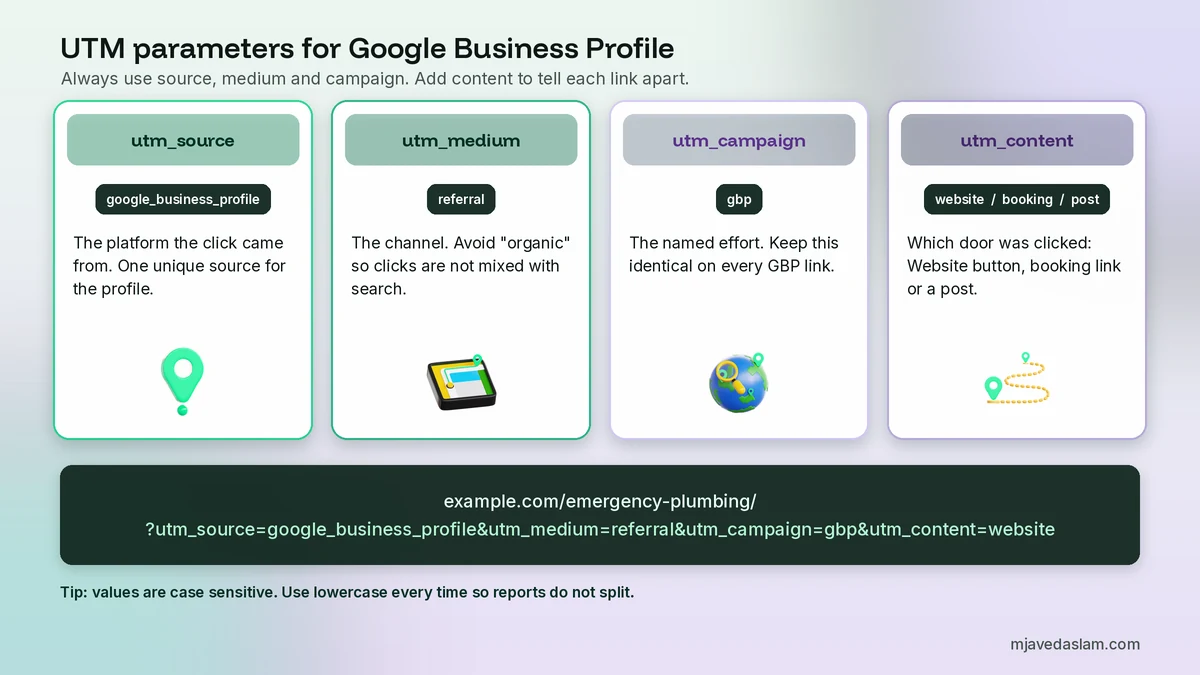
Google lists these parameters in the same URL-builders article. For a local profile you only need four of them:
- utm_source — the platform the click came from. I use google_business_profile.
- utm_medium — the channel or mechanism. I use referral.
- utm_campaign — the named effort. I use gbp.
- utm_content — which link or creative was clicked. I use website on the main Website field, and different values for booking links or posts.
Optional parameters such as utm_term and utm_id are for paid keywords or campaign IDs. You do not need them on a free profile link.
Google also notes that parameter values are case sensitive: google and Google become two rows. Use lowercase and keep the spelling identical every time you tag a link.
My recommended URL recipe
Paste your real page first, then add the query string after a question mark. If the page URL already has a question mark, join the UTM pairs with an ampersand instead. You can type this by hand or use Google’s Campaign URL Builder.
Example for a plumbing service page:
https://www.example.com/emergency-plumbing/?utm_source=google_business_profile&utm_medium=referral&utm_campaign=gbp&utm_content=website
That string is my convention, not a format Google requires. Be consistent. Change only the path (and utm_content, when the door is different) so reports stay tidy.
Why I do not use utm_medium=organic
A common starter tag is utm_source=google and utm_medium=organic. You can still filter that traffic by Session campaign, but it will not sit in its own channel. Google’s default channel group defines Organic Search as traffic whose source is on the search-site list, or whose medium exactly matches organic. So any link you tag with utm_medium=organic lands in Organic Search alongside ordinary unpaid search visits.
I prefer utm_medium=referral because the same help page puts medium values of referral, app or link in the Referral channel. Session source then reads google_business_profile, so you can separate profile clicks from other referrers. If you would rather invent a unique medium such as gbp, that traffic usually appears as Unassigned until you add a custom or primary channel group. Either approach is fine if you stick to it.
Google’s UTM best practices also say to use one unique source per platform, one unique medium per channel, and lowercase names so reports do not fragment.
How to add UTM parameters for Google Business Profile
You add the tagged URL in the same Website field you already use, not in a hidden tracking screen.
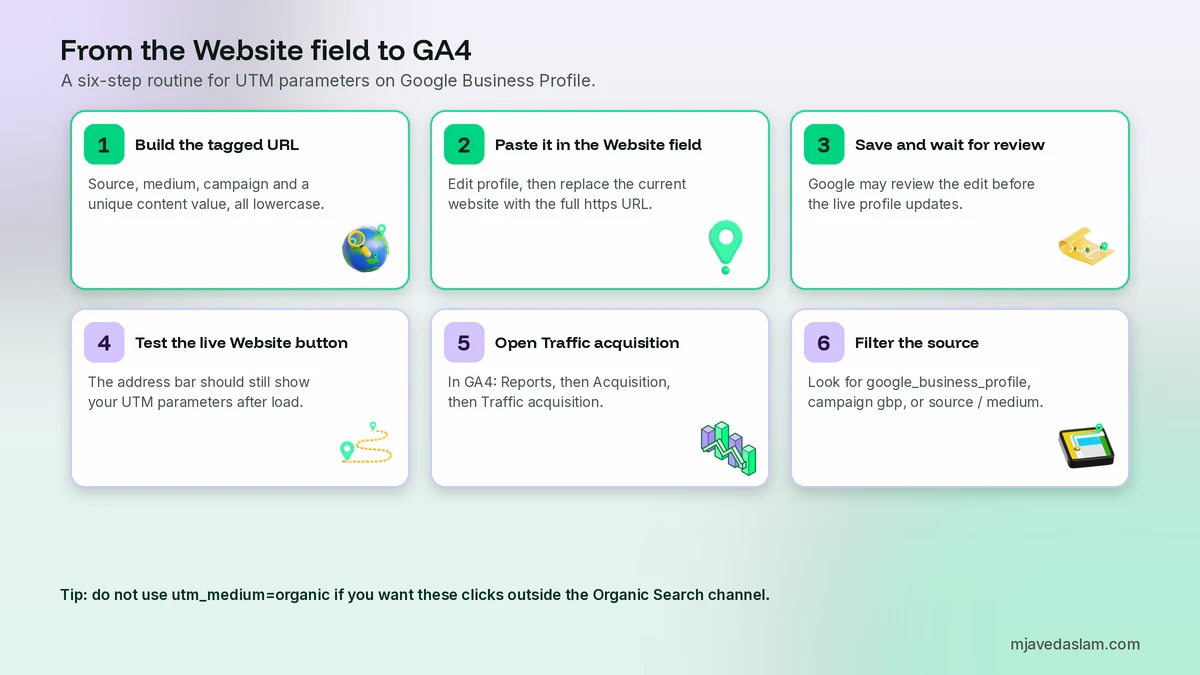
- Build and copy the full URL, including https://.
- Open your Business Profile on Google Search or Maps, signed in to the account that manages it.
- Select Edit profile. Google’s edit help is the official path; the Website field sits with your other contact details.
- Replace the current website with the tagged URL and save.
- Google may review the change before it appears on the live profile. Check back and click the public Website button from a phone. The address bar should still show your UTM parameters after the page loads.
A few practical limits:
- Google’s bulk-upload template documents a 256-character limit for the website field, so keep the tagged URL reasonably short.
- Paste a URL on your own domain. Do not run the click through a link shortener or a different tracking domain. Google’s business links policies disallow link shorteners on action links such as booking or ordering; I use the same rule for the Website field.
- Send people to a useful landing page — a service or location page with your phone number, area and a form near the top — not only a generic homepage. If you are a trades business that visits customers, make sure that page matches how you describe the business in your service-area profile setup. Tighten the profile copy as well; a clear Business Profile description still has to win the click before Analytics can measure it.
Tag booking links and posts separately
The Website field is only one door. If you also add appointment, order or other action links, give them a different utm_content value, for example utm_content=booking. Keep source, medium and campaign the same so the traffic still rolls up as one GBP campaign.
The same idea applies to buttons in Google Business Profile posts. A spring-hours post can use utm_content=spring-hours-post. Then Traffic acquisition will show which link actually sent the session, not just that “gbp” sent some traffic.
Do not add UTM parameters to links inside your own website. If a visitor arrives from the profile and then clicks a tagged internal link, that new tag can overwrite the original campaign data for later hits in the session. Reserve UTMs for links that start off-site.
Where to see Google Business Profile clicks in GA4
Once the GA4 tag (or the Google Tag Manager container that fires it) is collecting on the landing page, open:
Reports → Acquisition → Traffic acquisition
Google’s URL-builder article says you can view Session source/medium, Session medium, Session source and Session campaign there. Set a date range that starts after you saved the new URL. Then:
- Filter or search for google_business_profile, or
- Change the primary dimension to Session campaign and find gbp, or
- Use Session source/medium google_business_profile / referral if you followed my recipe.
Add a landing-page dimension or open an exploration if you want to see which page they landed on and whether they triggered a form or call event. UTMs do not create those events for you; they only label the session so you can slice the events you already collect.
Why GA4 numbers will not match Insights website clicks
Expect a gap. Insights counts clicks on the profile’s website link. GA4 counts users and sessions that loaded your tag. Common reasons they diverge:
- The visitor taps the button and leaves before the page (and the tag) finishes loading.
- A browser, ad blocker or consent banner blocks Analytics.
- Someone clicks more than once; Insights and GA4 do not count that the same way.
- Date ranges, time zones or processing delays do not line up.
- The live button still points at the old, untagged URL, or a redirect strips the query string.
Use Insights for the official tap count. Use GA4 to judge landing-page quality and conversions. If Insights shows a pile of website clicks and GA4 shows almost none after you tagged the URL, test the live button and the tag, not the UTM spelling first.
An official GBP link in Analytics is not a substitute
Google also lets you connect a Business Profile to Google Analytics. That product link shares profile performance data — interactions, website clicks, calls, directions and similar metrics — into Analytics. It is useful context. It does not replace UTM tags on the destination URL, because those tags are what mark the actual website session and let you follow the visit into events and landing pages.
If you use both, you get the profile metrics and the on-site journey. If you can only do one thing today, add the UTMs.
Common mistakes I see
- Using utm_medium=organic and then thinking Organic Search “grew” when it was really profile clicks.
- Mixing Google, google and GBP until one campaign becomes three rows.
- Leaving the Website field on the homepage when a service page would convert better.
- Tagging Google Ads the same way as the profile, so paid and free clicks share a source and campaign.
- Looking at User acquisition (first-visit source) when you meant Traffic acquisition (session source).
- Adding UTMs to in-site menus or footer links.
- Never clicking the public Website button after saving.
Worked example: a local plumber
Imagine a plumber whose profile website already points at the homepage. Insights shows healthy website clicks, but the contact form rarely fires. They change the Website field to:
https://www.example.com/emergency-plumbing/?utm_source=google_business_profile&utm_medium=referral&utm_campaign=gbp&utm_content=website
and tag the booking link with utm_content=booking.
A week later, Traffic acquisition shows a clear google_business_profile / referral row. Most sessions land on the emergency page; a smaller set comes from the booking button. Form events finally have a source they can trust. If the session count is far below Insights website clicks, they test the live button and the tag. The profile work is not finished — photos, reviews and the description still win the click — but at least the website half of the journey is measurable. For the local visibility work around that profile, I also use the same discipline on local SEO landing pages: one clear offer, visible contact details, no mystery about the service area.
Checklist before you save
- Is the GA4 tag firing on the destination page?
- Does the URL start with https:// and use a question mark or ampersand correctly?
- Are source, medium and campaign all present and lowercase?
- Is utm_content unique for this link?
- Will the page still keep the query string after any redirect?
- Did I click the public Website button after Google finished reviewing the edit?
Skip the save until those checks pass. A typo in the Website field is a quiet problem: the button still works, and Insights still counts taps, but GA4 never receives a campaign you can trust.
Frequently asked questions
What UTM parameters should I use on my Google Business Profile website link?
Always include utm_source, utm_medium and utm_campaign. My consistent recipe is utm_source=google_business_profile, utm_medium=referral, utm_campaign=gbp and utm_content=website. Use lowercase and the same spelling every time. That convention is mine, not a format Google requires.
Where do I add the UTM URL in Google Business Profile?
Open your Business Profile, select Edit profile, and paste the full tagged URL — including https:// and the query string — into the Website field with your other contact details. Save, wait if Google reviews the edit, then click the public Website button to confirm the parameters still appear in the address bar.
Will UTM parameters mix my GBP traffic with organic Google search in GA4?
They can, if you set utm_medium to organic. Google’s default channel group treats any traffic whose medium exactly matches organic as Organic Search. I use utm_medium=referral so the clicks land in Referral, then I filter Session source for google_business_profile. You can still separate traffic by Session campaign even if you keep a different medium.
Why don’t my GA4 sessions match Google Business Profile website clicks?
Insights counts taps on the website link. GA4 counts sessions that loaded your Analytics tag. People who bounce before the page loads, ad blockers, consent banners, extra taps, time-zone differences, an untagged button, or a redirect that drops the query string all create a gap. Use Insights for the tap count and GA4 for on-site behaviour.
Can I use different UTM tags for booking links and Google Business Profile posts?
Yes. Keep utm_source, utm_medium and utm_campaign the same so the traffic still rolls up as one GBP campaign, and change utm_content for each door — for example website, booking, or the name of a post. That is the purpose of utm_content in Google’s URL-builder help.
Do I need Google Tag Manager to track GBP UTMs in GA4?
No. UTM parameters are read from the landing-page URL by the Google tag itself, whether you installed it directly or through Google Tag Manager. You do need the tag firing on the destination page. Without it, the tagged clicks never appear in Traffic acquisition.
Next step
Add UTM parameters for Google Business Profile to the Website field this morning, then click the public button once the edit is live. Give Traffic acquisition a few days of data, then compare landing pages and form events — not just the session count — against the website-click total in Business Profile insights. If you want a second pair of eyes on the profile, the landing page and the tracking, see my Google Business Profile service and the broader local SEO work that makes those clicks worth measuring.