Here’s the short answer. A Google Business Profile virtual office listing is not allowed. Google’s guidelines say that if your business rents a mailing address but doesn’t operate out of it, that location isn’t eligible for a Business Profile. PO boxes and remote mailboxes aren’t acceptable either. A co-working office is allowed only if it has clear signage, receives customers during business hours, and is staffed by your own team during those hours. If you don’t have a real office that customers visit, the safe option is a service-area profile with your address hidden.
I’m Javed Aslam, a local SEO consultant in Pakistan. I set up and fix Google Business Profiles for small businesses. A common question from people who work from home or rent a desk is: “Can I just rent a business address and put that on Google?” This guide explains what Google allows for virtual offices, co-working spaces and PO boxes, what can go wrong, and the setups that work. If you’re asking about two real businesses sharing one building, that’s a different question, and I cover it in my guide on two businesses at the same address on Google.
Google Business Profile virtual office rules: what Google says
Google covers addresses in its guidelines for representing your business on Google and its business eligibility and ownership guidelines. Here are the lines that matter, quoted from those pages:
- Virtual offices: “If your business rents a physical mailing address but doesn’t operate out of that location, also known as a virtual office, that location isn’t eligible for a Business Profile.”
- Co-working spaces: “Businesses can’t list an office at a co-working space unless that office maintains clear signage, receives customers at the location during business hours, and is staffed during business hours by your business staff.”
- PO boxes: “P.O. boxes or mailboxes located at remote locations aren’t acceptable.”
- Real location: “Create your Business Profile for your actual, real-world location.”
- Signage: “Businesses showing their address on Google should maintain permanent fixed signage of their business name at the address.”
- Service-area businesses: they “can’t list a ‘virtual’ office unless that office is staffed during business hours.”
- Eligibility: “To qualify for a Business Profile, a business must make in-person contact with customers during its stated hours.” Online-only businesses are listed as not eligible.
Put together, the rule is simple. Renting is fine. What matters is whether your business really operates there, with your people, your sign and your customers. An address that only receives mail fails that test.
Virtual office, co-working, PO box or home: what’s allowed
Here’s how the common address options line up with Google’s rules. Where Google doesn’t name a case directly, the last column says what the rule points to.
| Address type | Allowed on Google? | Why |
|---|---|---|
| Virtual office (rented address, mail handling, no one works there) | No | Google names this exactly: a rented mailing address where you don’t operate isn’t eligible. |
| Virtual office plan where you book a meeting room now and then | Not as your address | Google’s test is staff and customers there during business hours. An occasional booked room doesn’t meet it. |
| Hot desk or shared desk at a co-working space | Usually no | Google requires clear signage, customers received and your own staff there during business hours. |
| Private office at a co-working space with your sign, staff and visitors | Yes | This meets all three co-working conditions in Google’s guidelines. |
| PO box, or a mailbox at a shipping or mail store | No | P.O. boxes and mailboxes at remote locations aren’t acceptable. |
| Your home, where customers visit you | Yes, as a storefront | You need permanent signage and stated hours when you serve customers there. |
| Your home, where you go to customers | Yes, address hidden | Set up a service-area profile and hide the address, as Google’s plumber example shows. |
| Online-only business (no in-person contact) | No | Google lists online-only businesses as not eligible. |
So the real question is what kind of business you run. Many people asking about virtual offices are service businesses working from home. They don’t need a rented address. They need a service-area profile.
A quick test before you list any address
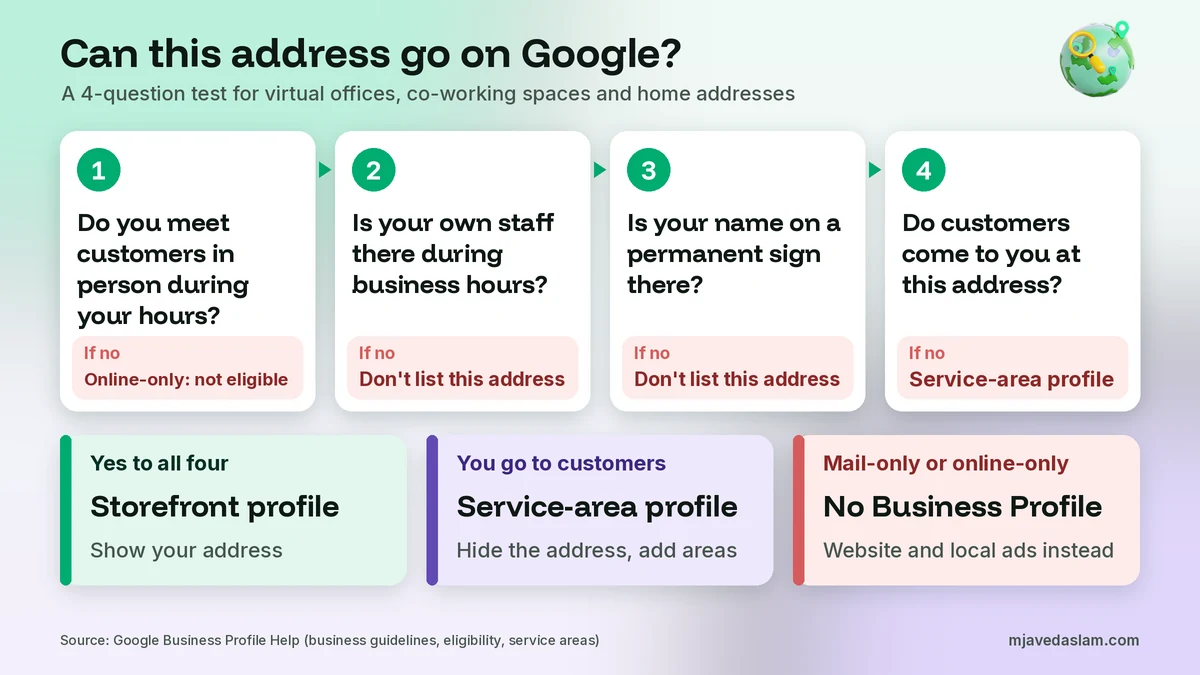
Ask yourself these four questions about the address you want to use. They come straight from Google’s eligibility and address rules.
- Do you meet customers in person during your stated hours? If not, and you’re online-only, Google says you aren’t eligible for a profile.
- Is your own staff at this address during business hours? Not a receptionist who works for the building, but your team. If not, a co-working or virtual address fails the test.
- Is there permanent signage with your business name at the address? Google wants permanent fixed signage for any business that shows its address.
- Do customers come to you at this address, or do you go to them? If they come to you, it’s a storefront. If you go to them, it’s a service-area business and the address should be hidden.
Yes to the first three and customers come to you? List the address. You meet customers only at their places? Use a service-area profile. No to the first question? A Business Profile isn’t the right tool for you.
Co-working spaces: how to meet Google’s three conditions
Co-working offices are the grey area, because some are allowed and some aren’t. Here’s how I’d read Google’s three conditions in practice:
- Clear signage. Your business name should be shown at your office, not only on a list of 50 companies at the front desk. Google’s video verification asks you to show your business name clearly printed on a permanent fixture, like a signboard, wall or window.
- Customers received. Clients should be able to walk in and meet you there during the hours on your profile.
- Your own staff. Someone from your business should be there during the stated hours. Set your profile hours to match the times you’re really there.
For the address itself, Google says to put your physical address in Address Line 1 and your suite or office number in Address Line 2. Don’t make up a suite number to look bigger. If the pin lands in the wrong spot in a large building, see how to fix a wrong Google Maps pin.
PO boxes and mailbox stores
A PO box can never be your Business Profile address. Google’s eligibility page lists “any business whose address is listed as a P.O. box or mailbox in a remote location” as ineligible. The same logic applies to a private mailbox at a shipping store that gives you a street-style address with a “suite” number. It’s still a mailbox, and you don’t operate there.
Some people think a mailbox is fine because the verification postcard can reach it. But a postcard proves mail arrives, not that you serve customers there. Google’s verification help page says verification methods are decided by Google and can’t be changed, and you may need more than one method. If you’re asked for a video, a mailbox can’t show what Google wants to see. You can read more in my guides on postcard verification and video verification.
The risks of a Google Business Profile virtual office listing
If someone offers you a virtual office “for Google Maps,” here’s what can go wrong, based on Google’s own pages:
- Failed verification. Google’s video verification page says storefront videos must show street signs or nearby businesses, your business name on a permanent fixture, and proof of management like opening a cash register or a storage room only an employee can access. A virtual office has none of these for your business. Live video calls are also only available within the business hours of your location.
- Suspension. Google’s suspended profiles page says it may suspend or disable profiles that don’t follow its guidelines. An address that isn’t eligible is a guideline problem from day one.
- A weak appeal. To appeal, Google suggests evidence like a business registration, license, tax certificate or utility bills, with a name and address that match the profile. A mail-service contract doesn’t prove you operate there, and appeals can only be submitted once.
- Account problems. Google says a restricted account’s profiles are suspended, and it can’t create or claim others.
- Unhappy customers. A visitor who finds no one there may leave a bad review.
Anyone can also report a listing they think breaks the rules. I explain how that works in my guide on how to report a fake Google Business Profile.
Safe alternatives to a virtual office
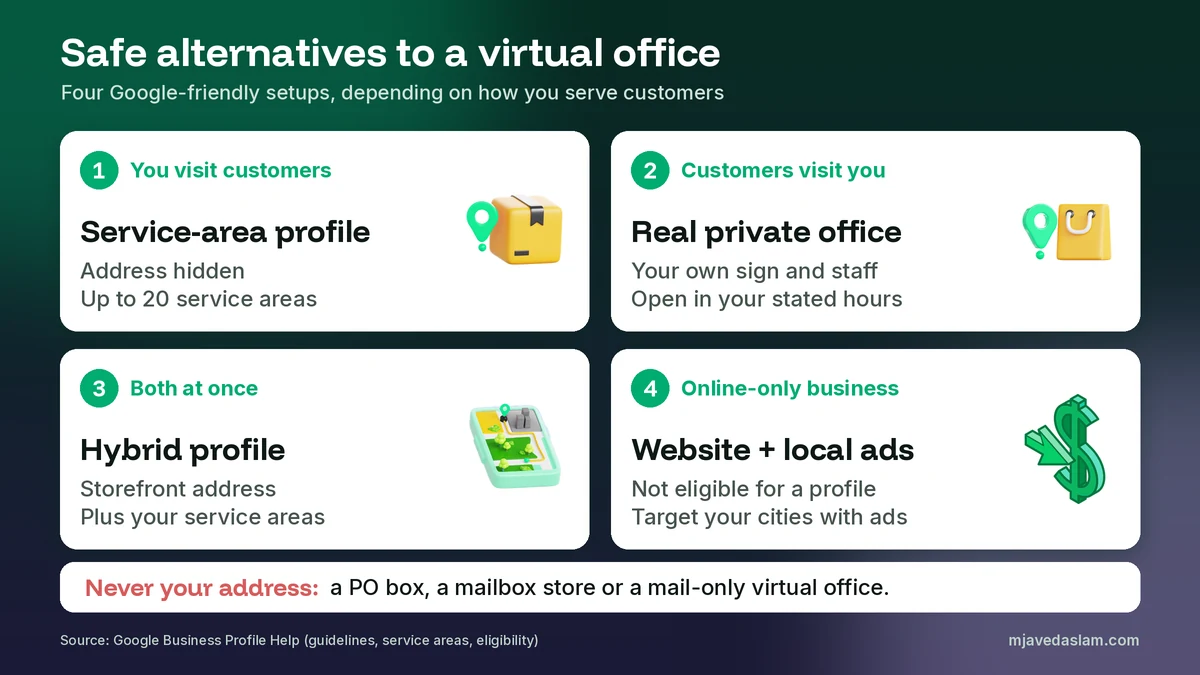
The good news is that most businesses don’t need a virtual office to be on Google. One of these setups will usually fit.
1. A service-area profile from your real base
If you go to your customers, like a cleaner, tutor, electrician or AC technician, this is the right setup. Google’s service area help page says that if you don’t serve customers at your business address, you should remove your address from your profile. You can then list up to 20 service areas by city, postal code or other area, and the overall area shouldn’t be more than about 2 hours of driving time from where your business is based. Service area edits may take up to 48 hours to show. My service-area business guide covers the full setup, so I won’t repeat it here.
Your home address is still entered behind the scenes. It just isn’t shown. For video verification, Google’s page even says that if you run a service-area business from home, you can record landmarks and signs in your neighbourhood to verify the address.
2. A real private office with your sign and staff
If you want customers to visit you, rent a space where you really work. A private co-working office is fine if your sign is up, your staff is there during your hours and clients can visit.
3. A hybrid profile
If customers visit your real location and you also travel to them, Google’s service area page says hybrid businesses can show their storefront address and add service areas. Without permanent on-site signage, though, it says you’re not eligible as a storefront and should be a service-area business.
4. No profile, with a strong website and ads (online-only businesses)
If you never meet customers in person, Google says you aren’t eligible. You can still build helpful pages on your website and run search ads aimed at the cities you serve. My guide on Google Ads location targeting shows how to reach people in a set area without a Business Profile.
Already using a virtual office address? Fix it now
If your profile already shows a virtual office, fix it before Google does. Here’s what I’d do:
- You visit customers: switch to a service-area profile. Google’s business address page says to go to your profile, select Edit profile, then Location, then edit Business location and turn off Show business address to customers. Then add your service areas.
- You’ve moved into a real office: update the address on the existing profile. Don’t create a new one. Google’s edit profile page says that if you move your business to a new address after it’s verified, you must verify your business again. If the edit gets stuck, see how to fix edits that are not approved.
- Your profile is suspended: fix the address problem first, then appeal once with documents that match your real name and address. Google’s appeal page says reviews can take up to 5 business days and not to submit multiple appeals for the same issue. Google also says not to create a new profile for the same business.
- Your profile has disappeared: my guide on why a Google Business Profile is not showing walks through every cause. If you need a human, here’s how to contact Google Business Profile support.
Can virtual offices help you rank in other cities?
This is often the real reason behind the question. Google’s local ranking help page says local results are mainly based on relevance, distance and popularity, and distance refers to how far each business is from the person searching. So a rented address in a bigger city looks like a shortcut.
It isn’t one Google allows. The guidelines say not to create more than one page for each location of your business, and a virtual office isn’t a location at all. Google does allow one profile for each real location of a service business that has separate service areas and separate staff at each location. If that’s you, my multi-location Google Business Profile guide explains the setup. If not, focus on relevance and popularity: the right category, a complete profile, reviews and helpful pages. My guide on how to rank in the Google Map Pack covers what you can control. Google’s ranking page also says there’s no way to request or pay for a better local ranking.
A note for businesses in Pakistan
Virtual office packages are sold in Lahore, Karachi and Islamabad too, and the same rules apply here. A freelancer who meets clients only online is likely online-only in Google’s eyes. A technician or tutor who visits customers should use a service-area profile with the home address hidden. If you rent an office, pick one where your board can go up, your staff can sit and clients can visit. Keep a registration, tax certificate or utility bill in the business name for that address, in case you ever need to appeal. And remember that the profile itself is free, as I explain in my guide on whether Google Business Profile is free, so be careful with anyone charging you for a “Maps address.”
FAQ
Can I use a virtual office address for Google Business Profile?
No, not if you only rent the address. Google’s guidelines say that if your business rents a physical mailing address but doesn’t operate out of that location, also known as a virtual office, that location isn’t eligible for a Business Profile. If you visit customers, set up a service-area profile from your real base and hide the address instead.
Can I use a coworking space address on Google Business Profile?
Only with conditions. Google says businesses can’t list an office at a co-working space unless that office maintains clear signage, receives customers at the location during business hours, and is staffed during business hours by your own staff. A hot desk or a mail-only plan usually doesn’t meet those conditions.
Can I use a PO box for Google Business Profile?
No. Google says P.O. boxes or mailboxes located at remote locations aren’t acceptable, and its eligibility page lists any business whose address is a P.O. box or mailbox in a remote location as ineligible. Address Line 2 is only for a mailbox or suite number at your real physical address.
Can I have a Google Business Profile without an office?
Yes, if you meet customers in person at their locations. Google calls this a service-area business. You hide your address and list up to 20 service areas. If your business is online-only and never meets customers in person, Google says it isn’t eligible for a Business Profile.
Can I use my home address on Google Business Profile?
You can use your home as your business base. If customers don’t come to your home, Google says to hide the address and show a service area. Its own example is a plumber who runs the business from a residential address and clears the address from the profile.
What happens if Google finds out my address is a virtual office?
Google says it may suspend or disable Business Profiles that don’t follow its guidelines. You may also fail verification, because video verification asks you to show permanent signage and areas only an employee can access. If your profile is suspended, appeal once with honest documents and don’t create a new profile.
Next step
A virtual office won’t give you a safe Google Business Profile, but the right setup will. If you’re not sure whether you should be a storefront, a service-area or a hybrid business, see my Google Business Profile service page, or get in touch with your business type and the city you serve, and I’ll tell you which setup fits.