Here’s the short answer. If your Google Business Profile is not showing up in search, first search your exact business name and city while signed out of Google. If it doesn’t appear even for your own name, something is blocking it: a suspension or disabled profile, a verification review or edit that’s still pending, a duplicate listing, or an address Google can’t accept. If it does appear for your name but not for searches like “dentist near me”, it isn’t missing. It just isn’t ranking yet. Google says local results are mainly based on relevance, distance and prominence, and rankings for new businesses can take up to a month to appear.
I’m Javed Aslam, a local SEO consultant in Pakistan. I help small businesses set up and fix their Google Business Profiles. “My profile is verified but nobody can find it” is one of the most common worries owners have. This guide walks through how to test the problem properly, the causes Google itself lists, how to fix each one, and when to stop editing and wait. Every fact here comes from Google’s own help pages, linked as we go.
First, test properly: is your Google Business Profile not showing, or just not ranking?
Most owners check their profile the wrong way. They search on their own phone, signed in to the Google Account that manages the profile. Google’s Find your business on Google page says you must sign in to the Google Account associated with the profile to find it as the owner. That’s great for managing it. But it tells you nothing about what a new customer sees.
Google Maps also personalizes results. Google’s Maps search help page says your results include places you’ve searched for before if your search history is on. So your own phone is the worst place to judge visibility. Run these four tests instead:
| Test | How to run it | What the result tells you |
|---|---|---|
| 1. Exact name + city | Signed out (private window), search “Your Business Name, City” on Google Search | If it’s missing here, the profile is blocked, pending, merged or not live. Go to causes 1 to 5. |
| 2. Same search on Maps | Open Google Maps signed out and search the name and city | If Search shows it but Maps doesn’t, check the address, pin and service area (cause 5). |
| 3. Category search | Search “[your service] near me” or “[service] in [area]” from near your location | If you show for your name but not here, it’s a ranking issue (cause 6), not a missing profile. |
| 4. Someone else’s phone | Ask a friend or customer nearby to search both ways | Confirms what real customers see, without your history. |
Also remember that Maps has filters. Google’s help page lists filters such as Price and Hours, and the Hours filter shows places that are currently open. If someone searches with “open now” at night and you’re closed, you won’t be in their list. That’s normal. And on Maps, the square pins are ads, so the top spots for a category search aren’t always organic results.
Cause 1: your profile is suspended or disabled
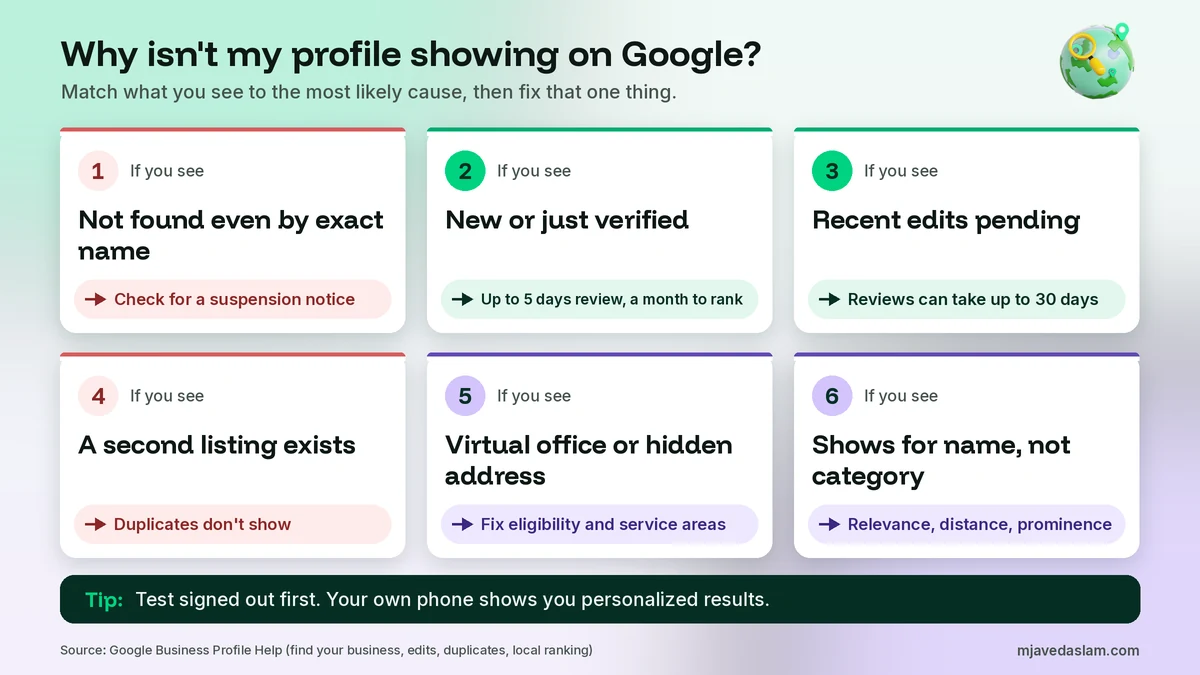
This is the first thing to rule out. Google’s help page says that if your profile violates its guidelines, “it becomes disabled or suspended and won’t show to other users on Google until you resolve the issue.” It also says you’ll get a notification in the Google Account you use to manage your profile.
So check three places: the notifications on your profile, the email inbox of the managing account, and any warning at the top of your Business Profile. If there’s a suspension, editing your profile won’t bring it back. You need to fix the problem and appeal.
- Read the reason and the linked policy. Google’s suspended and disabled profiles page says the appeals tool shows the date, the reason, a link to the violated policy and whether the decision can be appealed.
- Fix whatever broke the rule first. Common examples are extra words in the business name or an address the business doesn’t really serve customers from.
- Gather evidence. Google lists business registration, a business license, tax certificates and utility bills, and says the name and address on them should match the profile.
- Submit one appeal. Google notes that appeals can only be submitted once, and it emails you the decision.
- Don’t create a new profile for the same business. Google says this directly on its appeals page.
For the full appeal process, read my guide on how to contact Google Business Profile support, which covers the appeals tool and the other official routes.
Cause 2: verification or edits are still under review
A profile can look “done” to you while Google is still checking it. Google’s verification page says verification reviews take up to 5 business days, and on rare occasions longer. Until that review finishes, the profile may not be public in the way you expect.
Edits are reviewed too. Google’s page on what happens to your Business Profile edits says edits usually take up to 10 minutes to review, but sometimes up to 30 days. Each edit shows one of three statuses:
| Edit status | What it means | What to do |
|---|---|---|
| Accepted | Your updated info displays on your Business Profile. | Nothing. Give search results up to 3 days to catch up. |
| Pending | Your edit is still under review. | Wait. Don’t keep re-editing the same field. |
| Not approved | Google couldn’t confirm the change is accurate. | Check the guidelines, fix the edit, and appeal if it’s eligible. |
There’s a second delay after approval. Google’s Find your business page says that when you edit your business info, it updates search results, and “changes can take up to 3 days to appear.” So a name, category or address change won’t show everywhere the moment you press Save.
If an edit keeps getting rejected, my guide to a Google Business Profile edit that is not approved explains the common reasons and the appeal route. If you haven’t finished verifying yet, see my guide to video verification.
Cause 3: it’s a brand-new profile
New profiles need time. Google says plainly: “Rankings for new businesses can take up to a month to appear in search results.” That’s in the same help article that explains how to find your business.
In practice, a profile verified last week may show for your exact business name but not yet for category searches. That’s expected. During that first month, don’t change your name, category and address again and again. Each change goes back through review. Instead, spend the time completing the profile: hours, services, photos, a description and your website link.
Cause 4: a duplicate profile is taking your place
Google allows only one Business Profile per business. Its duplicate profiles page says: “If a profile is considered a duplicate, it won’t show on Google Search or Maps.” This is a very common reason for a verified profile that never appears.
Google lists three reasons a profile may be treated as a duplicate:
- Existing verified profile: a verified profile already exists for the same business on Google.
- Same address: multiple profiles have the same address.
- Different services: multiple profiles exist for the same business that offer different services.
How you fix it depends on the case. If an older profile exists and someone else owns it, request ownership. Google says the current owner has 3 days to respond. If you created a duplicate by mistake, you can remove it without affecting your verified listing. If two profiles for the same business exist on Maps, you can suggest a merge, and Google says the reviews are combined but replies may be lost. If you moved, update the existing profile’s address rather than creating a new one.
My step-by-step guide on how to fix a duplicate Google Business Profile covers each of these. If the other listing is fake or belongs to a spammer, see how to report a fake Google Business Profile.
Cause 5: an address, pin or service-area problem
Location problems can stop a profile from showing, or make it show in the wrong place. Google’s guidelines for representing your business are strict about which addresses are eligible:
- P.O. boxes or mailboxes at remote locations aren’t acceptable.
- A virtual office, meaning a rented mailing address your business doesn’t operate from, isn’t eligible for a Business Profile.
- An office at a co-working space only counts if it has clear signage, receives customers during business hours and is staffed by your team.
If you work from home or visit customers, you’re probably a service-area business. Google’s address help page says you should only hide your address if you’re a service-area business, and that if you hide it, your profile will only show your service area. If you don’t enter a service area, Google chooses a local area for you.
Google’s service area page adds a few rules worth checking:
- You can set up to 20 service areas, based on cities, postal codes or other areas.
- You can’t set a service area as a radius around your business.
- The overall area shouldn’t be more than about 2 hours of driving time from where your business is based.
- If approved, service area edits may take up to 48 hours to show.
Then check the pin. If your address has no street number, or Google can’t find it, Google lets you set the pin on the map yourself. A wrong pin can put you in the wrong neighbourhood, which hurts the distance factor. In many Pakistani cities, official addresses are vague. Google’s address page allows nearby cross-streets or landmarks where the official address isn’t accurate, but it asks you to avoid addresses like “Across from Central Park.”
For the details, see my guides to service-area business profiles and how to fix a wrong Google Maps pin.
Cause 6: it shows for your name but not for category searches
If test 1 worked and test 3 didn’t, your profile isn’t hidden. It’s competing. Google’s local ranking page says local results are mainly based on relevance, distance and prominence. Here’s what each one means in plain words:
| Factor | Google’s definition | What you can actually do |
|---|---|---|
| Relevance | How well a Business Profile matches what someone is searching for. | Choose the right primary category, add your services, write a clear description, keep hours accurate. |
| Distance | How far each business is from the person searching. If they don’t share a location, Google uses what it knows about their location. | Make sure your address, pin and service areas are correct. You can’t change where customers are. |
| Prominence | How well-known a business is, based partly on how many websites link to it and how many reviews it has. | Earn real reviews, reply to them, and get your business mentioned on trusted local sites. |
Distance explains a lot of frustration. If you’re on one side of the city, a customer on the other side may see closer businesses first. That’s not a penalty. It’s how local search is meant to work.
Two mistakes make this worse. The first is the wrong primary category. If you’re a dental clinic but your main category is something broad, you’ll miss the searches that matter. The second is a stuffed business name. Google’s guidelines say adding unnecessary information to your name isn’t permitted and could result in suspension. That turns a ranking problem into Cause 1.
To go deeper, read my guides on choosing your Google Business Profile primary category, the name guidelines, and how to rank in the Google Map Pack.
Cause 7: Google changed your details
Google doesn’t rely only on what you enter. Its page on how Google sources business info says profile information comes from publicly available web content, licensed third-party data, user contributions and owners. If those sources disagree with you, Google may update your profile.
Google’s Google updates page says info changed by Google shows in blue in the profile editor, with a notification at the top. When a user suggests an edit that needs your review, you have 4 days to accept or reject it. If you don’t respond, Google may publish the update if other public info, such as your website, supports it. A changed category, wrong hours or a moved pin can quietly reduce your visibility, so check for blue text whenever something looks off.
How to see which searches you actually show up for
Don’t guess. Your Business Profile has a Performance report. Google’s performance help page says it shows the search terms people used to find your business, plus views, calls, website clicks and direction requests on Search and Maps.
Two notes from Google matter here. The Searches metric is updated at the start of each month and can take up to 5 days to show up. And performance data includes views from both organic results and Google Ads. If your Searches list is mostly your own business name, customers who already know you can find you, but you’re not yet winning category searches. That points to Cause 6.
My guide to Google Business Profile insights explains each metric and how to read the trends.
A step-by-step fix plan for a Google Business Profile not showing
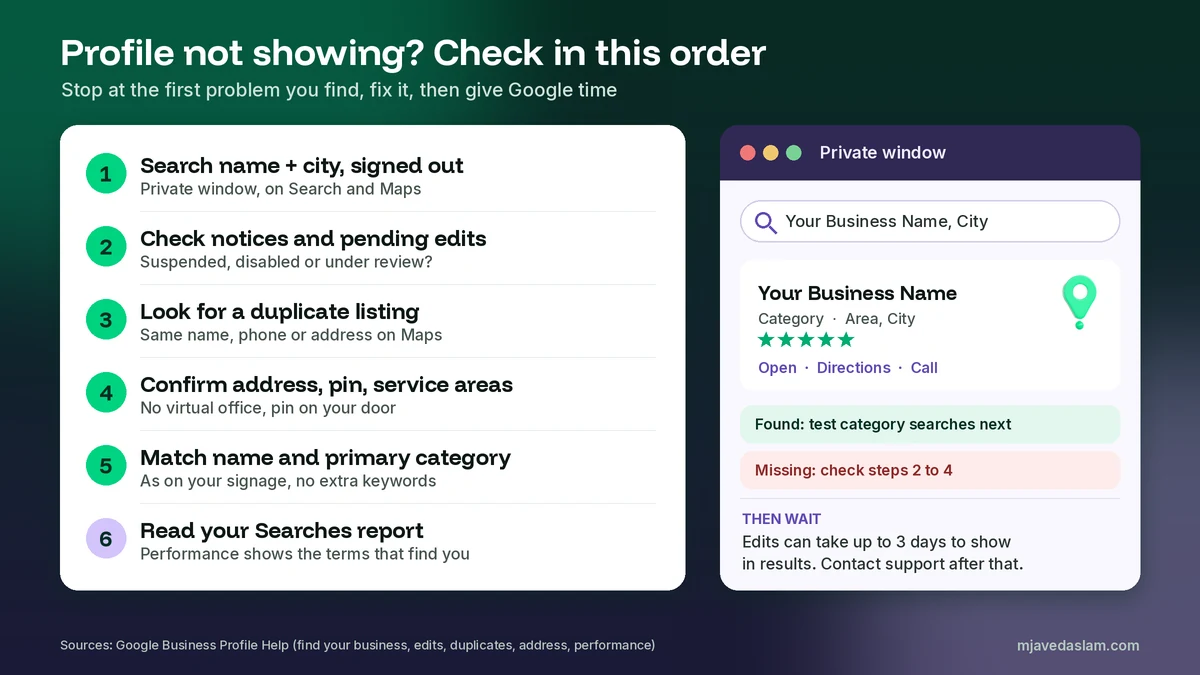
Work through these in order. Stop when you find the problem, fix it, and give Google time before you move on.
- Search signed out. Look up your exact name and city on Google Search and on Maps in a private window.
- Check for notices. Look at your profile and the managing account’s email for a suspension, disabled status or pending edits.
- Look for duplicates. Search your name, phone number and address on Maps. Note any second listing.
- Confirm the location. Is the address eligible? Is the pin on your door? Are service areas set correctly if you hid the address?
- Match the real world. Make the name exactly match your signage, and pick the most accurate primary category.
- Look for Google updates. Check the editor for blue text and review any suggested edits.
- Read the Searches report. See which terms already find you, and which don’t.
- Wait, then escalate. Allow the review times Google gives. If the profile still won’t show, contact support once.
What not to do while you wait
Some “fixes” make visibility worse. Avoid these:
- Don’t create a new profile. Google’s duplicate rules mean a second profile can stop both from showing, and its appeals page says not to create one.
- Don’t keep editing. Every change goes back into review, which can take up to 30 days.
- Don’t add keywords or a city to your name. It’s against the guidelines and can lead to suspension.
- Don’t use a virtual office or someone else’s address. It isn’t eligible.
- Don’t pay anyone for a “guaranteed” ranking. Google says there’s no way to request or pay for a better local ranking.
When to contact Google support
Contact Google when you’ve ruled out the common causes and the profile still doesn’t show for its exact name after the review times have passed. Use the Contact us form in the Business Profile Help Center. Describe the problem in one sentence, for example: “My verified profile doesn’t appear on Search or Maps for its exact name.” Add your Business Profile ID and screenshots.
If the profile was suspended, use the appeals tool instead of the general form. My guide on how to contact Google Business Profile support explains which route fits each problem and what to prepare. Real Google support never charges for your profile.
If your business is in Pakistan
The rules are the same worldwide. Pakistani businesses use the same help pages, appeals tool and Contact us form. Two things are worth extra care here. First, addresses. Many areas don’t have clear street numbers, so place your pin by hand on your actual door, and use cross-streets or landmarks only where Google allows them. Second, home-based businesses. If customers don’t visit you, hide the address and set service areas. Don’t list a relative’s shop or a rented mailbox to get a pin.
If you’re still at the start, read my guide to claiming your Google Business Profile. A clean setup avoids most of the problems in this article.
FAQ
Why is my Google Business Profile verified but not showing up?
Start by searching your exact business name and city while signed out. If the profile doesn’t appear even then, check for a suspension or disabled notice, pending edits, a verification review that hasn’t finished, or a duplicate listing. If it does appear for your name but not for searches like “plumber near me”, the profile isn’t missing. It just isn’t ranking yet, and Google says local results are mainly based on relevance, distance and prominence.
How long does it take for a new Google Business Profile to show up in search?
Google says verification reviews take up to 5 business days, and rankings for new businesses can take up to a month to appear in search results. After you edit your info, changes can take up to 3 days to appear in results. Edits themselves usually take about 10 minutes to review, but sometimes up to 30 days.
Why does my business show on Google Search but not on Google Maps?
Search your business name and city directly in Google Maps first. Maps results can be personalized, filters such as Hours can hide closed places, and the square pins you see are ads. If you still can’t find it, check your address and map pin. If you hid your address as a service-area business, Google says the profile will only show your service area, not a street address.
Can I see my Business Profile when customers can’t?
Yes, that can happen. When you’re signed in to the account that manages the profile, Google shows you your own profile and management tools, and your own search history can shape what you see. Check from a signed-out browser or another person’s phone. Also look in your Business Profile for any notice about a suspension, a disabled profile or edits that are still pending.
Will adding keywords to my business name help it show up?
No, and it can do real damage. Google’s guidelines say your name should match the real-world name on your signage, website and stationery. Adding unnecessary information such as services, locations or taglines isn’t permitted and could result in a suspension, which would stop the profile from showing at all.
Can I pay Google to make my profile show higher in Maps?
No. Google says there’s no way to request or pay for a better local ranking. You can run Google Ads, and ads on Maps show as square pins, but paid placement doesn’t change your organic position. Improve relevance with complete, accurate info, and build prominence with reviews and real mentions of your business online.
Next step
If your Google Business Profile is still not showing up in search, I can check it for you. I’ll test it the way customers search, find the cause and give you a clear fix plan. See my Google Business Profile service page, or get in touch with your business name, city and what you’ve tried so far.