Here’s the short answer. To ask for Google reviews, get your official review link from your Business Profile, ask customers in person right after a good experience, and send the link the same day by WhatsApp, SMS or email in two or three friendly sentences. Ask every customer, not only the happy ones. Never offer a discount or gift for a review, and never tell people what to write. Google’s Maps content policy allows businesses to “Solicit or encourage the posting of content that does represent a genuine experience, without offering incentives to do so or attempting to influence the rating or the contents of the review.”
I’m Javed Aslam, a digital marketer based in Multan. I manage Google Business Profiles for small businesses, and reviews are the part owners struggle with most. Not because customers refuse. Most happy customers simply forget, or nobody ever asked them properly. In this guide I’ll show you the system I set up for clients: where to get the link, when to ask, what to say, and the exact templates I use for counters, email, SMS and WhatsApp. Every rule here comes from Google’s own help pages, and I’ve marked where I’m giving my own experience. If you’d rather have it done for you, see my Google Business Profile service.
Why asking for Google reviews is worth the effort
Reviews show next to your profile on Google Maps and Search. Google’s tips to get more reviews page says “Reviews can help your business stand out and give potential customers helpful info.” They also play a part in where you show up. Google’s local ranking page lists prominence as one of three main factors and says “More reviews and positive ratings can help your business’s local ranking.”
That doesn’t mean reviews alone will put you at the top. Relevance and distance still matter, and so does a complete profile. I explain the full picture in my guide on how to rank in the Google Map Pack. But in my experience, a steady flow of recent, honest reviews is the one ranking signal a small business can improve every single week without spending money.
There’s a second reason that matters just as much. People read reviews before they call. A shop with 9 reviews, the last one from 2023, looks closed even when it’s busy. A shop with fresh reviews every week looks alive. Google itself says “A mix of positive and negative feedback often feels more trustworthy,” so you don’t need a perfect 5.0. You need real, recent reviews.
What Google allows, and what gets reviews removed
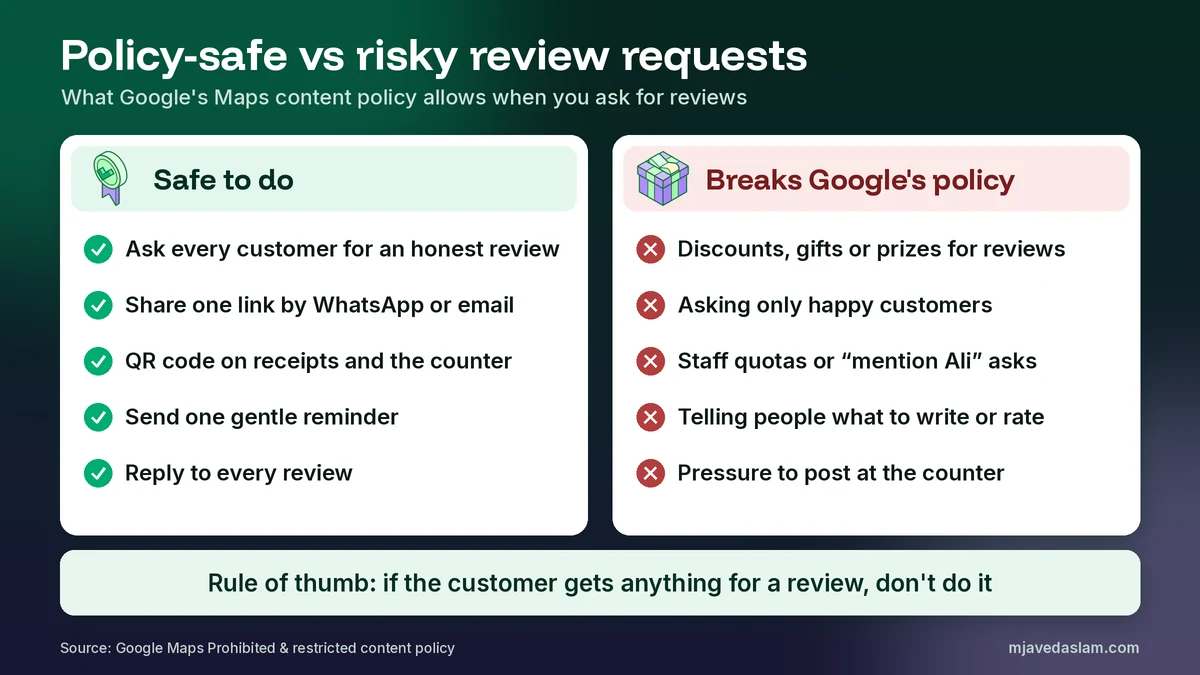
Before the templates, you need the rules. Breaking them is how businesses lose reviews they worked for. Google’s prohibited and restricted content policy for Maps covers this under “Fake Engagement” and “Rating Manipulation.” Here’s a plain-English summary:
| Allowed | Not allowed |
|---|---|
| Asking any customer for an honest review | Offering “payment, discounts, free goods and/or services” in exchange for a review |
| Sending your review link by email, SMS or WhatsApp | Asking for a review to be changed or removed in exchange for an incentive |
| A QR code on your counter, receipt or invoice | Asking only happy customers (“selectively solicit positive reviews”) |
| A reminder after a completed job | Discouraging or prohibiting negative reviews |
| Staff asking customers politely | Requiring or pressuring people to review “while on the premises” |
| Replying to every review, good or bad | Staff quotas, or asking for reviews that name a staff member or include specific content |
Two of those surprise most owners. The first is the counter rule. Google says merchants “should not require or pressure users to leave ratings or write reviews while on the premises.” You can ask at the counter. You shouldn’t stand over someone until they post. The second is staff targets. Google lists “Merchants requesting that staff solicit a certain number of reviews” and requests for reviews “that identifies a staff member” as examples of what’s not allowed. So “Please mention Ali in your review” is out, even though I see it in shops all the time.
The penalty is real. Google’s Business Profile restrictions page says that if it finds fake engagement, it can remove the reviews and also stop your profile from receiving new reviews for a set period, unpublish your existing reviews for a set period, or show a warning that “fake reviews were removed.” Google says it emails owners before applying a restriction, and you can appeal.
The US FTC rule, if you sell to American customers
If your business serves customers in the United States, there’s also a federal rule. The FTC’s Rule on the Use of Consumer Reviews and Testimonials (16 CFR Part 465), published in August 2024, makes it a violation for a business “to provide compensation or other incentives in exchange for, or conditioned expressly or by implication on, the writing or creation of consumer reviews expressing a particular sentiment, whether positive or negative.” It also covers fake reviews, insider reviews by employees and relatives without clear disclosure, and threats or intimidation to stop or remove a review. Google’s own policy is stricter on incentives, because it bans them for any review, not only reviews with a particular sentiment. So if you follow Google’s rules, you’re already on the safe side of this part of the FTC rule.
Step 1: Get your official Google review link
Before you ask for Google reviews, get the right link. Don’t send people to your Maps listing and hope they find the review button. Send them straight to the review box. Google’s review link and QR code page explains the steps:
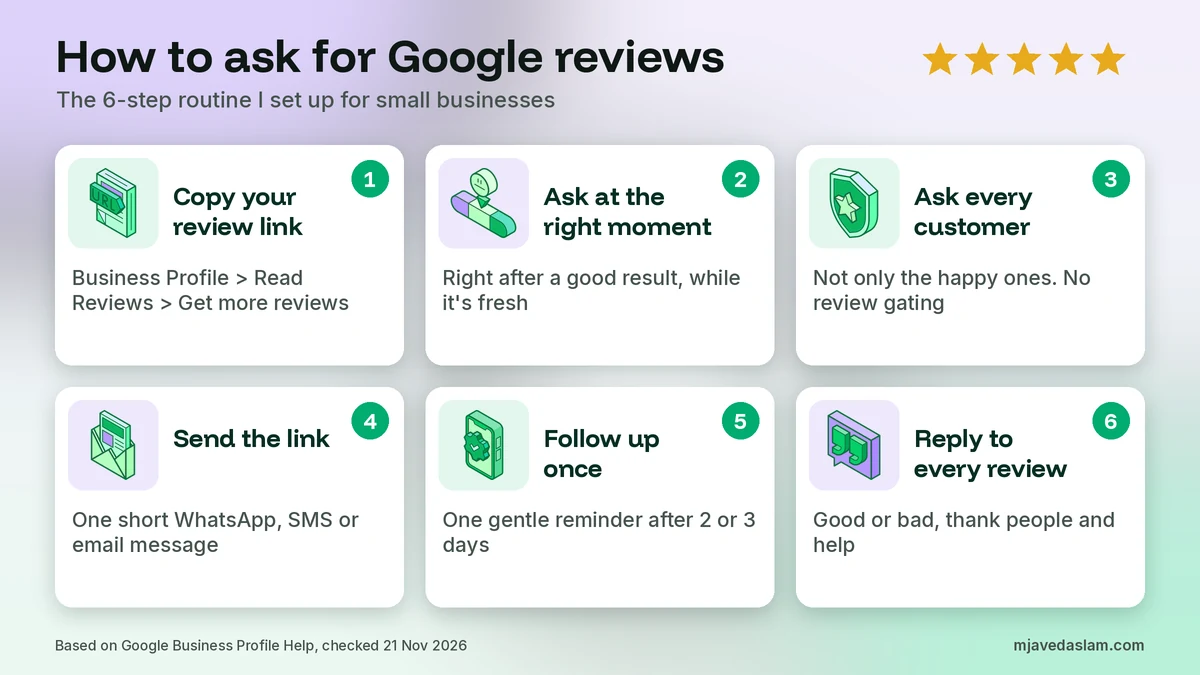
- On a computer, go to your Business Profile (search your business name on Google while signed in to the owner account).
- Select Read Reviews, then Get more reviews.
- Select Copy to copy the review link, or right-click the QR code and choose Save image as.
Google notes that review QR codes “can only be generated on a computer browser, not on mobile devices.” The link is what you’ll paste into WhatsApp, SMS and email. The QR code is for your counter, receipts and packaging. I cover printing and placing it in detail in my guide to the Google review QR code. Save the link somewhere you can paste it fast, like a pinned note on your business phone or a WhatsApp Business quick reply.
One tip from experience: test the link yourself on a phone that’s signed in to a different Google Account. It should open the review box for your business. If it opens the wrong listing, you may have a duplicate profile. My guide to fixing a duplicate Google Business Profile explains what to do.
Step 2: Ask at the right moment
When you ask for Google reviews matters more than how you word it. In my experience, the best moment is right after the customer gets the result they came for, while the feeling is fresh. Here’s what that looks like for different businesses:
| Business type | Best moment to ask | How |
|---|---|---|
| Shop or retail counter | When you hand over the bag or the receipt | Ask in person, point to the QR code |
| Restaurant or café | When the bill is paid and the table is happy | Ask in person, QR on the bill folder |
| Home service (plumber, AC, electrician) | After the job works and you’ve been paid | Ask on the spot, send the link by WhatsApp within an hour |
| Clinic, salon or studio | At checkout, never during treatment | QR at reception, link by SMS or WhatsApp later that day |
| Online or delivery business | A day or two after delivery, once they’ve used the product | Email or WhatsApp with the link |
| B2B or agency | After a milestone or a good result, not on invoice day | Personal email from the owner |
Avoid asking when something has just gone wrong, when the customer is in a rush, or before the work is finished. And don’t wait a month. In my experience, most reviews come in within the first day of asking, and the chance drops fast after that.
Step 3: Ask every customer, not only the happy ones
This is the rule that catches “smart” review tools. Some software sends a little survey first: happy customers get the Google link, unhappy ones get a private feedback form. That’s called review gating, and Google’s policy doesn’t allow merchants to “Discourage or prohibit negative reviews, or selectively solicit positive reviews from customers.”
So use a fair rule. Ask everyone who completed a job this week. Or everyone who paid at the counter today. Or every customer on your invoice list. You can still run a private feedback form for complaints. Just don’t use it to decide who gets the Google link.
Will this bring some negative reviews? Probably a few. That’s fine. Honest reviews look more trustworthy, and a calm reply to a complaint often wins more customers than another 5-star review. My Google review response templates show how to reply to both. If you receive a review that breaks Google’s policies, my guide on how to remove a Google review explains what you can report and what you can’t.
Step 4: Make the request short and easy
Every extra step loses people. Here’s what I put in every review request, and what I leave out:
- A thank-you that’s specific. “Thanks for choosing us for your AC repair today” beats “Dear valued customer.”
- Why it matters. One line, like “It helps other people in Multan find a reliable shop.”
- The direct link. One link only. No Facebook, no website, no app downloads in the same message.
- The word “honest.” It keeps you within the policy, and in my experience customers trust the request more.
- Your name. A message from “Javed, Rana Electronics” gets more replies than one from a brand name.
Leave out star ratings (“please leave us 5 stars”), suggested words, staff names to mention, and anything that sounds like a reward. Also remember that Google says “Customers must be signed into a Google Account to leave a review.” If an older customer says it didn’t work, that’s often why. Google adds that they can set up an account “with a non-Gmail email address.”
Policy-safe templates for asking for Google reviews
Here are the templates I give clients when they ask for Google reviews. Replace the parts in square brackets, keep them short, and send them yourself rather than through a bulk tool if you can. Personal messages get more reviews.
1. In person at the counter
“Thanks so much for coming in today. If you have a minute later, would you leave us an honest review on Google? This code takes you straight there. It really helps other people find us.”
Then hand them the receipt with the QR code and let them go. Don’t wait for them to post it in front of you.
2. In person after a home service job
“Everything’s working now. I’ll send you a WhatsApp message with a link. If you’re happy with the work, an honest Google review would help my business a lot.”
Then send template 4 or 5 within the hour, while they still remember your name.
3. Email template
Subject: Thank you from [Business name], quick favour?
Hi [First name],
Thank you for choosing [Business name] for [service/product]. We hope everything is working well.
Would you take a minute to share your honest experience on Google? Your review helps other people in [city] decide, and it helps us improve.
Leave a review here: [your review link]
Thank you,
[Your name]
[Business name] | [phone]
Google’s own help page suggests adding the review link “in thank you emails” and on receipts, so this is the most standard way to ask. If you also want to measure how many people click from your profile to your website, that’s a separate job. My guide to UTM tracking on Google Business Profile covers it.
4. SMS template
“Hi [First name], thanks for choosing [Business name] today. If you have a minute, we’d love your honest review on Google: [link] – [Your name]”
Keep SMS under about 160 characters where you can, so it goes as one message. Only text customers who gave you their number as part of doing business with you.
5. WhatsApp template (English)
“Assalam o Alaikum [Name], thank you for choosing [Business name] for your [service]. If you’re happy with our work, would you share an honest review on Google? It takes one minute: [link]. JazakAllah! – [Your name]”
6. WhatsApp template (Roman Urdu)
“Assalam o Alaikum [Name], [Business name] ko choose karne ka shukriya. Agar aap ko hamara kaam pasand aaya ho, to kya aap Google par apna honest review de sakte hain? Sirf ek minute lagega: [link]. JazakAllah! – [Your name]”
Most of my Pakistani clients’ customers reply on WhatsApp faster than on email or SMS. If you use WhatsApp Business, save template 5 or 6 as a quick reply so staff can send it in two taps.
7. One follow-up reminder
“Hi [Name], just a gentle reminder in case you missed my last message. If you have a minute, your honest Google review would mean a lot: [link]. No worries if not. Thank you again! – [Your name]”
Send one reminder two or three days later, and only to people who haven’t reviewed. That’s my rule from experience. Google says merchants shouldn’t “require or pressure” people to review, and a third or fourth message starts to feel like pressure.
8. Receipt, invoice or chat sign-off line
“Thank you for your business. Tell us how we did: [link or QR code]”
Google’s help page specifically mentions receipts and the “end of a chat interaction” as good places for the link. It’s low effort and it works quietly in the background.
What not to say: risky requests and safe fixes
Most problems I see when owners ask for Google reviews aren’t scams. They’re well-meaning owners using the wrong words. Here are real examples, and how I rewrite them:
| Risky request | Why it’s a problem | Safe version |
|---|---|---|
| “Leave us 5 stars and get 10% off your next visit” | Incentive in exchange for a review, and it suggests a rating | “We’d love your honest review: [link]” |
| “Happy with us? Review us on Google. Not happy? Tell us privately” | Selectively solicits positive reviews (review gating) | Send the Google link to everyone. Offer private help as a separate message |
| “Please mention Ahmed and our biryani in your review” | Asks for specific content and names a staff member | “Tell other people about your experience: [link]” |
| “Can you write it now before you leave? I’ll wait” | Pressure to review on the premises | “Here’s the code if you have a minute later” |
| “Each staff member needs 20 reviews this month” | Staff review quota | Track how many customers were asked, not how many reviews came in |
| “Enter our prize draw by leaving a review” | In my reading of Google’s policy, a prize is still an incentive | Run any giveaway separately, with no review required |
| Asking family and staff to post reviews | Conflict of interest under Google’s policy | Ask real customers only |
Incentives are the area I get asked about most. I’ll cover discounts, giveaways and the FTC rule in more depth in a separate guide. For now, the simple rule is: if a customer gets anything for leaving a review, don’t do it.
A simple weekly review routine for small businesses
The businesses that do best ask for Google reviews as a daily habit, not a one-off campaign. A burst of 50 reviews in a weekend and then nothing for six months looks odd, and Google’s policy mentions “unusual volumes or patterns of review contributions” as something it looks at. Here’s the routine I set up for clients. It takes about 15 minutes a day.
- Daily: ask every customer who completed a purchase or job in person, and send the link by WhatsApp, SMS or email the same day.
- Two or three days later: send one reminder to anyone who hasn’t reviewed.
- Daily: reply to every new review, good or bad. Google’s reviews page says replies show customers “that you value their feedback.”
- Weekly: count how many customers you asked and how many reviews came in. If the rate drops, look at timing and wording first.
- Monthly: read the reviews for patterns. If three people mention slow delivery, fix delivery. That’s the real value of honest feedback.
In my experience, a business that asks consistently can expect somewhere around one review for every five to ten people asked. It varies a lot by industry and customer type, so treat that as a rough guide, not a promise.
Special cases: when reviews don’t appear or aren’t allowed
Sometimes you do everything right and the review still doesn’t show. Google’s missing or delayed reviews page says reviews are checked against policy and “this process might take a few days.” It also says “Reviews removed for policy violations won’t be restored.” If customers tell you their review vanished, my guide to Google reviews not showing walks through the causes and fixes.
Some businesses can’t get reviews at all. Google’s manage reviews page says “Reviews are available only in certain countries or regions and for certain business categories.” One example that matters in Pakistan: Google says reviews and ratings are removed and disabled for profiles “primarily categorized as educational institutions for students aged 6 to 18.” Google says universities, day care centres and swim schools aren’t affected. So if you run a school and see no review option, that’s why. Don’t change your category just to get reviews. Your category must describe your business honestly, as I explain in my guide to the Google Business Profile primary category.
Finally, watch out for scams. Some owners get messages offering “guaranteed” 5-star reviews, or threats of fake 1-star reviews unless they pay. Never buy reviews. Google has a process to report review extortion, and my guide to Google Business Profile scam calls explains how to spot these.
Mistakes I see when businesses ask for Google reviews
- Never asking. The most common mistake by far. Happy customers rarely review on their own.
- Sending the Maps listing instead of the review link. Every extra tap loses people.
- Asking in bulk once a year. Steady reviews beat one big spike.
- Offering a discount “just this once.” It breaks Google’s policy and can cost you the reviews you already have.
- Filtering out unhappy customers. That’s review gating. Ask everyone.
- Ignoring the reviews you get. Reply to all of them, especially the negative ones.
- Letting a vendor post reviews for you. Paid or fake reviews can lead to restrictions on your profile.
Frequently asked questions
How do I ask a customer for a Google review?
Ask in person at the end of a good interaction, then send your official review link the same day by WhatsApp, SMS or email. Keep it short, ask for honest feedback, and don’t offer anything in return. Get the link from your Business Profile by selecting Read Reviews and then Get more reviews.
Is it allowed to ask customers for Google reviews?
Yes. Google’s Maps content policy says merchants may solicit or encourage reviews that represent a genuine experience, as long as they don’t offer incentives or try to influence the rating or the content of the review.
Can I offer a discount or gift for a Google review?
No. Google says offering incentives such as free or discounted goods or services in exchange for posting, changing or removing reviews is strictly prohibited. Google can remove those reviews and restrict your profile. In the US, the FTC rule also bans incentives conditioned on a positive or negative review.
Can I ask only my happy customers for reviews?
No. Google’s policy says merchants must not selectively solicit positive reviews or discourage negative ones. This is often called review gating. Ask every customer, or use a fair rule such as everyone who completed a job this week.
What should a Google review request message say?
Thank the customer, say their honest feedback helps other people, include your direct review link, and keep it to two or three sentences. Don’t suggest a star rating, ask them to mention a staff member or products, or tell them what to write.
How many times should I remind a customer to leave a review?
In my experience, one reminder two or three days after the first message is enough. More than that feels like pressure, and Google’s policy says merchants should not require or pressure people to leave reviews.
Can my staff ask customers for reviews?
Yes, staff can ask, but Google’s policy says merchants should not set staff targets for a certain number of reviews, or ask staff to request reviews that mention specific content, including a staff member’s name.
Why can’t my customers see the review option?
Customers must be signed in to a Google Account to leave a review. Google also says reviews are only available in certain countries, regions and business categories. For example, reviews are disabled for profiles primarily categorized as general schools for students aged 6 to 18.
Next step
Learning how to ask for Google reviews isn’t complicated. Get your link, ask every customer at the right moment, send one short honest message and one reminder, and reply to every review. Do that every week and your profile will look as busy as your business really is. If you’d like me to set up a review routine for your business, see my Google Business Profile service or my local SEO service, or get in touch with your business name and city.