Here’s the short answer. Discovered currently not indexed means Google has found the URL, but it has not crawled the page yet. In Search Console’s Page indexing report, the last crawl date for that URL is empty. Google’s help text says it typically wanted to crawl the URL, expected that this would overload the site, and rescheduled the crawl. The status is not a manual penalty. It also is not a promise that Google will index the page the next time it visits.
I’m Javed Aslam, a digital marketer. I work on WordPress sites and Google Search Console for small businesses, and this is the indexing status I see most often. New posts and service pages can sit here for days or weeks. In this guide I’ll explain what the status actually means, how it differs from crawled – currently not indexed, and the checks I run before I request indexing.
What discovered currently not indexed actually means
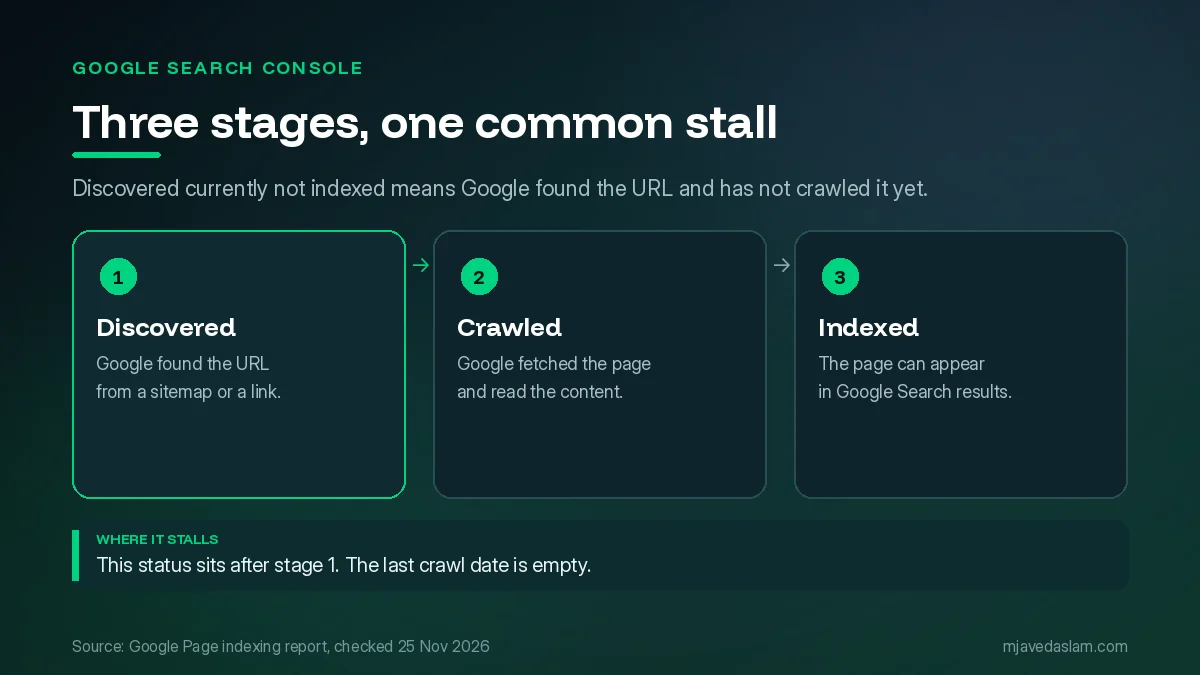
Google Search works in stages. First Google discovers a URL, usually from a link or a sitemap. Then it may crawl the page, which means it fetches the content. Then it may index the page so it can appear in search results. Google does not guarantee that every discovered URL will be crawled or indexed.
Discovered currently not indexed sits between the first and second stage. Google knows the URL exists. It has not fetched the page yet. That is why the report does not show a last crawl date.
You can read the official wording in Google’s Page indexing report. Many blog posts treat this status as a quality problem. Quality can matter later. At this stage, Google has not even looked at the page.
How it differs from crawled – currently not indexed
These two labels sit next to each other in Search Console, and they need different fixes.
Crawled – currently not indexed means Google already fetched the page and chose not to add it to the index. Google says this is common and does not always need a fix. On a page you care about, the usual issues are thin or duplicate content, or a technical problem you can confirm with the URL Inspection tool.
Discovered currently not indexed means the crawl has not happened yet. Requesting indexing can help here, because you are asking Google to crawl a URL it has not fetched. Requesting it again and again on a crawled – currently not indexed page is less useful. Google already saw the page. The next step is to make the page worth indexing, not to ping the same URL every day.
If a lot of your URLs move from this queue into crawled – currently not indexed, treat that as a content quality signal. I use my E-E-A-T checklist for small sites when I review those pages.
Why pages sit in this status
The official reason is the one I start with. Google wanted to crawl the URL, but it expected the request would overload the site, so it postponed the crawl. A slow WordPress host or a burst of new URLs can contribute. If Core Web Vitals are weak, I fix that first. I wrote a separate walkthrough on how to fix Core Web Vitals in WordPress.
The page is new
Google says new pages often take at least a few days to be noticed. A week is not unusual, and a few weeks can happen on a site with little history.
Crawl demand is low
Discovery can come from your sitemap or from a single internal link. If the site is new, has few external links, or the URL is buried, Google may leave it in the queue. A sitemap helps Google find URLs, but it does not make a page important. If no strong, already indexed page links to it, the URL can wait.
Too many low-value URLs
Tag pages, date archives, faceted filters, parameter URLs, and thin pagination can all compete for attention. Google’s crawl budget documentation lists sites with a large share of URLs in this status as a reason to clean up that inventory. A small site that creates hundreds of thin tag and filter URLs can still look messy.
This is not the same as a block
If the URL is disallowed in robots.txt, marked noindex, returning a 404, or behind a login, Search Console usually shows a different reason. Do not guess. Inspect the URL.
Checks I run before I request indexing
I do not start with Request indexing. I start with a short checklist, so I do not spend the daily quota on a page that cannot be indexed.
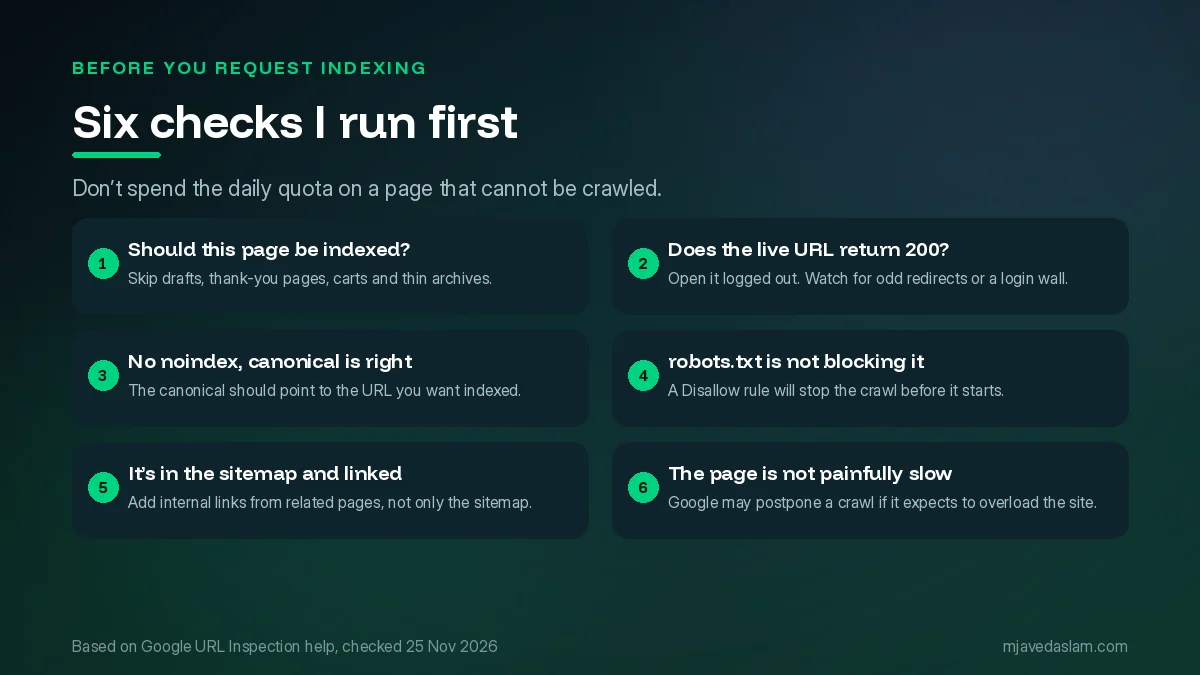
Confirm the page should be in Google
Drafts, thank-you pages, cart pages, internal search results, and thin date archives often should not be indexed. If that is the case, leave them out of the sitemap and keep them noindexed. The goal is not to index everything.
Open the live URL
Use an incognito window. The page should load for a logged-out visitor, return a 200 status, and not redirect to a login or an unexpected URL. If you recently changed a slug, add a 301 rather than leaving a dead link. I cover the cleanup process in how to fix broken links in WordPress.
Check noindex and the canonical
View the page source, or run a live test in the URL Inspection tool. Look for a noindex tag, then check the canonical. It should point to the URL you want indexed, usually the page itself. A mistaken canonical to another post can stop a new article from getting a fair crawl.
Confirm robots.txt is not blocking it
A Disallow rule can stop Google from crawling the page. That usually appears as “URL blocked by robots.txt,” but I still check after a plugin change or a manual robots edit. If you use Yoast, start with my guide to WordPress robots.txt settings in Yoast.
Confirm the URL is in the sitemap and linked
In Yoast, the post should be set to appear in search results, and it should show up in the post sitemap after you publish. Then add a few natural internal links from related, already published pages. A sitemap is a discovery hint, not a ranking vote. I explain the settings in Yoast SEO XML sitemap settings.
Check the page is not painfully slow
If Google already postponed the crawl because it expected to overload the site, a heavy page does not help. Compress images, avoid a stack of delayed scripts on first load, and watch the server response time.
How to request indexing without wasting the daily limit
Once the page is crawlable, use the URL Inspection tool.
Paste the full URL. Read the current index status. Then run a live test. The live test tells you whether Google can fetch the page now, including robots rules and the canonical it sees.
If the live test is clean, click Request indexing. Google’s documentation on how to ask Google to recrawl a page is clear on two points. Crawling can take a few days to a few weeks. And a request does not guarantee that the page will be indexed.
There is also a daily limit on how many URLs you can request. Use it on the homepage, key service pages, and your best new articles, not on tag archives or old parameter URLs.
After you request indexing, wait. Check the URL again in a few days. If Google crawled it and the status changes to “Crawled – currently not indexed,” stop requesting and improve the page. If it is still discovered currently not indexed, look at internal links, uniqueness, and site speed before you request it again.
What to do if the status comes back
This is the part owners find frustrating. You requested indexing, the page is live, and Search Console still says discovered currently not indexed. First, give it time. A clean request is not a same-day ticket.
Second, make the URL easier to want. Give the page a clear title and a unique job, and add two or three internal links from related posts that already get traffic.
Third, reduce waste. If Yoast is including thin tag pages, empty archives, or media attachments in the sitemap, turn those off. The cleaner the list of URLs, the more likely Google is to spend time on the pages you actually care about.
Fourth, be honest about quality. A short post that repeats another article on your site will struggle even after a crawl. If two posts target the same intent, improve one and merge or retarget the other.
Google’s guide to how Search works is plain about this. Indexing is not guaranteed, even when a page follows the rules.
A simple routine for the Page indexing report
I use a weekly pass. Open Search Console, go to Indexing, then Pages. Look at the discovered currently not indexed count, and inspect your most important pages one by one. The example list is a sample, not a complete inventory.
I ask three questions. Are the important URLs in this list, or only archives and filters? Has the count jumped after a batch of new posts? Did any important URL recently change slug, canonical, or robots settings?
If a deleted page is in the list, I leave the 404 in place, or I 301 it to a useful replacement when there is a clear successor. I do not redirect every typo to the homepage. If the leftover URLs are only tags and duplicates, I clean the sitemap and move on. Not every unindexed URL is a problem.
Frequently asked questions
What does discovered currently not indexed mean?
It means Google has found the URL but has not crawled it yet. The last crawl date in the report is empty. The page is not in the index at the moment.
Is this status a penalty or an error?
No. Discovered currently not indexed is a queue status, not a manual action. It often means Google postponed the crawl, commonly because it expected the request would overload the site.
How long does this status last?
It can clear in a few days, or sit for weeks. New and slow sites usually wait longer. There is no fixed deadline.
Should I request indexing for every URL with this status?
No. Request indexing for important pages that are live, indexable, and already in the sitemap. Skip thin archives, filters, and pages you do not want in Google.
What is the difference between this and crawled – currently not indexed?
Discovered currently not indexed means Google has not fetched the page yet. Crawled – currently not indexed means Google fetched it and did not put it in the index. The first is a crawl-queue issue. The second is usually a quality or selection issue.
Why is the last crawl date empty?
Because the crawl has not happened. Google has found the URL but has not fetched it yet.
My sitemap is submitted. Why are pages still in this status?
A sitemap helps Google discover URLs. It does not force a crawl or an index. The page still needs to be crawlable, useful, and worth the time compared with other URLs on your site.
Can a slow WordPress site cause this?
Yes. Google’s typical explanation is that it postponed the crawl to avoid overloading the site. Slow hosting, heavy pages, and a sudden batch of new URLs can all contribute.
Next step
If a page you care about is marked discovered currently not indexed, do the checks first. Make sure the URL is live, indexable, in the sitemap, and linked from a related page. Then request indexing for that URL, and give Google a few days.
If you want a second pair of eyes on a Search Console report that is full of unindexed URLs, get in touch.