
If you want to show up in AI Overviews, this month gave you a good reason to start. On October 15, 2026, Google announced a set of updates to AI Mode and AI Overviews built around sending people to websites. There are more links inside AI answers, and Google is testing a new section that puts the “official” places to get something done right at the top.
For a small business, that last part matters more than anything else in the announcement. When someone asks Google for your opening hours, your prices or how to book with you, the best answer is your own website. The question is whether Google can tell.
In this guide I’ll explain what changed, how Google picks the sources it shows in AI answers, and the steps I’d take on any small-business website this month. You won’t need tricks or special AI files, only the groundwork most small sites never got around to.
What Google changed in AI Mode and AI Overviews
Google’s October update covers five areas. Here’s the short version, based on Google’s own post:
- More inline links. Links built into the words of an AI response now appear more often and higher up, so key sources are clickable while people are still reading.
- An “official websites” section (in testing). When there are only one or two official places to complete a task or get exact information, Google will test showing those links in a dedicated section at the top of the response, with context about why each link is useful.
- Bigger news carousels. Carousels for timely articles are rolling out to more locations and languages, and they highlight a reader’s Preferred Sources.
- More clickable related links. The links at the end of some AI responses now get image thumbnails and a more prominent design.
- Clickable creator profiles. On video results in AI Mode, Google is testing creator and publisher names that link to their Search profiles.
The official websites section is still a test. Google hasn’t given a launch date, said which countries it will cover, or explained exactly how it decides what counts as “official.” I’d treat it as a strong hint about where things are going, not a guarantee.
Why the “official website” idea matters to small businesses
Google’s examples are about tasks where only one or two places on the web can really help. That fits local businesses well. Think about the searches your customers already make:
- “[your business name] opening hours”
- “book an appointment at [your business name]”
- “[your business name] price list” or “menu”
- “does [your business name] deliver to [area]?”
Each of these has one correct source: you. Today, many of these searches are answered by a directory listing, an old copy of your menu on someone else’s site, or a booking platform that takes a commission. If Google starts pulling the official link to the top of the answer, the businesses that are clearly the official source stand to get that visit. A business whose website is thin, outdated or inconsistent risks losing that spot to a third party.
So the useful question isn’t “how do I hack AI Overviews?” It’s “when Google looks for my official website, does it find it, and does it find the right page?”
How Google picks the sources it shows in AI answers
Here’s the reassuring part. Google’s own guide to optimizing for generative AI features says plainly that SEO best practices still apply, because these features are “rooted in our core Search ranking and quality systems.”
In plain English, the process has three steps:
- Your page has to be in Google’s index. If Google can’t crawl and index a page, an AI answer can’t use it.
- Google retrieves relevant pages. Google calls this grounding (retrieval-augmented generation). It uses its normal ranking systems to pull up-to-date pages from the index, then builds an answer that links to the pages supporting it.
- It widens the search with “query fan-out”. The AI runs several related searches at once to fill in the answer. A question like “best dentist for kids near me” might also trigger searches about weekend hours, emergency appointments or insurance.
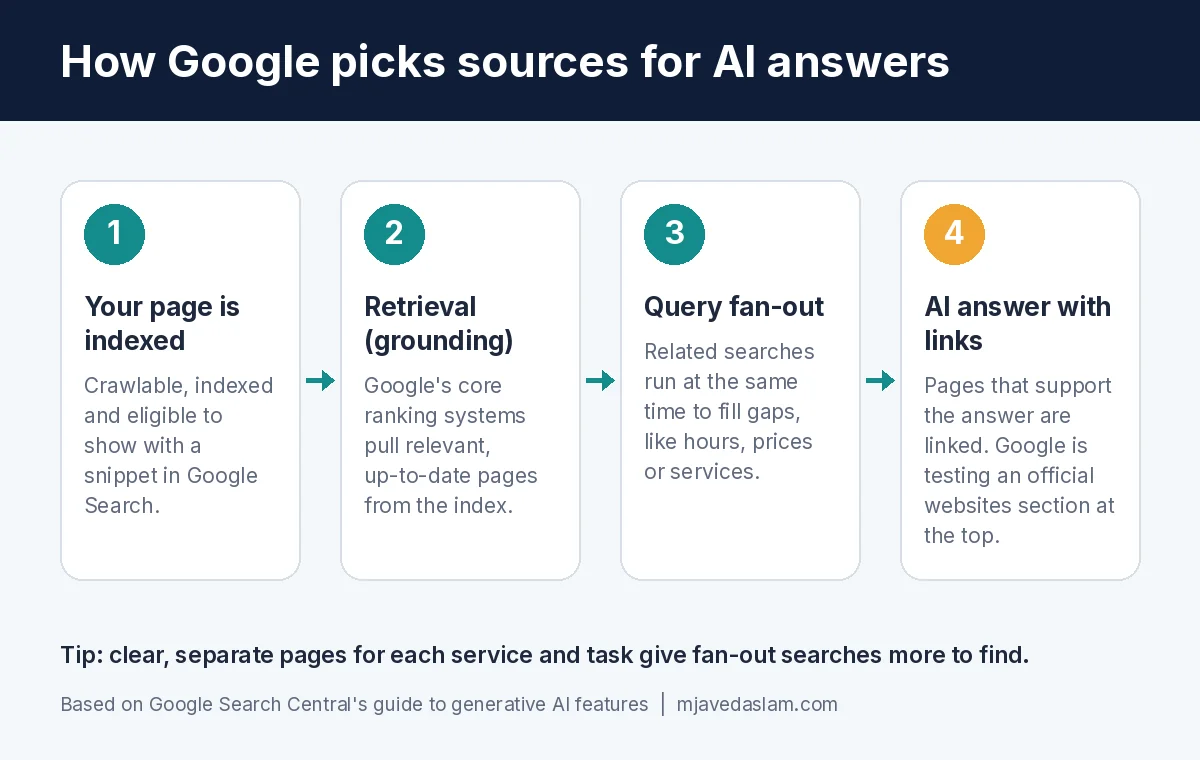
Query fan-out is why a well-organised site with clear pages for each service, location and common question has an edge. Every useful page is another chance to be picked up by one of those related searches.
Google also says something worth remembering whenever someone tries to sell you “AEO” or “GEO”: from Google Search’s point of view, optimizing for generative AI search is still SEO.
How to show up in AI Overviews: a 7-step plan for small businesses
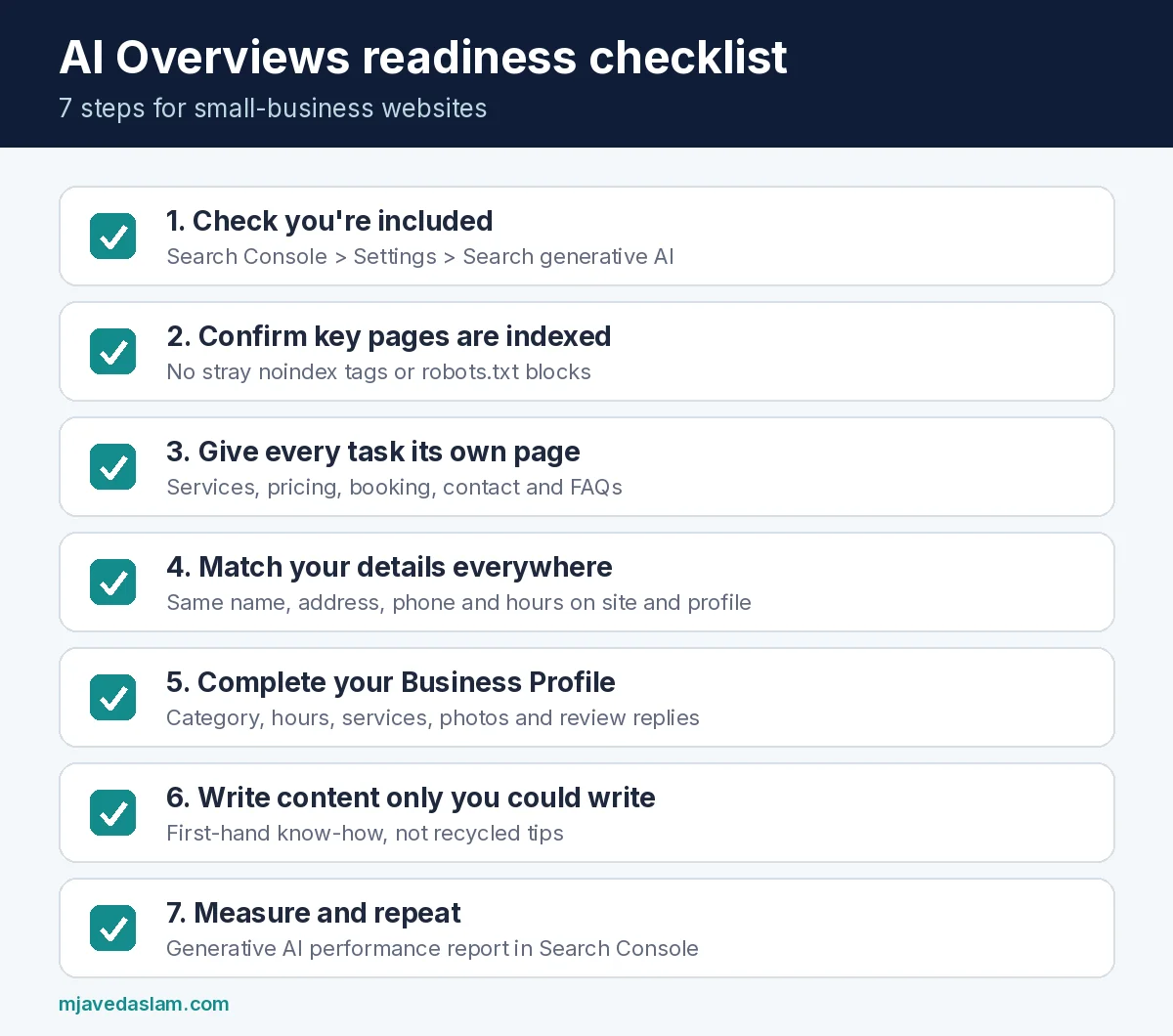
These are the steps I’d work through, roughly in this order. Most can be done in an afternoon or two.
1. Confirm your site is included in AI features
Search Console now has a Search generative AI control, rolled out to all websites worldwide as of August 31, 2026. You’ll find it under Settings > Search generative AI. Being included is the default, but check anyway, especially if a developer or agency set up your account. If your site is excluded, you won’t get any impressions or traffic from AI Overviews, AI Mode or AI features in Discover.
If you have more than one Search Console property (for example a domain property and a separate one for your blog), check which setting each one inherits.
2. Make sure your important pages are indexed and snippet-eligible
Google says a page has to be indexed and eligible to show with a snippet to appear in its generative AI features. Use the URL Inspection tool in Search Console on your homepage, main service pages, contact page and booking page. Look out for accidental “noindex” tags, pages blocked in robots.txt, and scripts or resources blocked from Google. This is the core of technical SEO, and it’s the part most small sites get wrong without realising it.
3. Give every important task its own clear page
If the official websites section rewards the right page for a task, you need that page to exist. Many small-business sites put everything on a single homepage. Instead, aim for:
- A dedicated page for each main service, explaining what it is, who it’s for, the price or price range, and how to get it
- A clear contact or booking page with your hours, address and phone number in plain text (not only inside an image)
- Location pages if you genuinely serve more than one area
- An FAQ that answers the questions customers actually ask you on the phone
4. Say who you are the same way everywhere
Google says its AI responses can include information about local businesses, and that keeping your Google Business Profile up to date helps your business show in both AI responses and regular results. Google’s local ranking help page also notes that businesses with complete, accurate information are more likely to appear in local results.
In practice, that means:
- Verify your Business Profile and fill in every relevant field: category, hours (including holiday hours), services, attributes and photos.
- Use the same business name, address and phone number on your website, your profile and the directories you’re listed in.
- Link your profile to your website, and your website to the social profiles you actually use.
- Reply to reviews. Google says review count and ratings feed into prominence, which is one of its three main local factors alongside relevance and distance.
If your listing has been sitting untouched for a while, my Google Business Profile service covers exactly this cleanup.
5. Write content only you could write
Google’s guide is clear that original, “non-commodity” content will likely matter more over time than any other suggestion. A generic “5 tips for choosing a plumber” post repeats what everyone else says. A page explaining how you price an emergency call-out, what’s included and what usually drives the cost up is something only you can publish.
Use your real experience, the questions you hear every week and the way you actually work. If writing isn’t your thing, this is where professional content writing pays for itself, as long as it’s built on your knowledge rather than recycled from other sites.
6. Add structured data, but don’t obsess over it
Google says structured data isn’t required for AI features and that there’s no special schema you need. It’s still worth having basic Organization or LocalBusiness markup on your site, because it helps with rich results and makes your details unambiguous. Think of it as tidying up, not a secret switch.
7. Measure what’s happening
Search Console’s Generative AI performance report shows how often links to your site appear in AI Overviews and AI Mode, broken down by page, country, device and date. It shows impressions, not clicks or queries, so use it to see which pages Google trusts enough to cite, and compare it with your normal Performance report for clicks. If the report doesn’t appear yet, your site may not have enough AI-feature impressions, or it may be excluded in the setting from step 1.
What you can safely ignore
There’s a lot of noise around AI search right now. Google’s guide calls out several popular “hacks” that Google Search doesn’t use or need:
- llms.txt and other AI-only files. Google Search ignores them. They won’t help or hurt you there.
- “Chunking” your content into tiny pieces. Google can understand a page that covers several points.
- Rewriting pages just for AI or stuffing in every long-tail variation of a keyword.
- Chasing fake mentions across forums and blogs. Google’s spam systems are designed to filter these out.
- Mass-producing pages for every possible question. Google says that doing this to manipulate AI responses breaks its scaled content abuse policy.
Where to start this week
If you only have an hour, do these three things:
- Open Search Console and confirm your site is included under Settings > Search generative AI.
- Check that your business name, hours, address and phone number match on your website and your Google Business Profile.
- Pick the one task customers most often search for (booking, pricing or hours) and make sure it has its own clear, up-to-date page.
AI search is changing quickly, but what Google rewards hasn’t: be findable, be clear and be the obvious official source for your own business. If you’d like a hand with the technical checks, your Google Business Profile or the content itself, take a look at my SEO & Technical SEO services or get in touch and tell me about your business.
Frequently asked questions
Can I pay Google to appear in AI Overviews?
No. Organic appearance in AI Overviews and AI Mode comes from Google’s regular ranking and quality systems, and Google says there’s no way to pay for a better local ranking either. Google Ads is a separate, paid channel.
Do I need an llms.txt file or special AI markup?
Not for Google Search. Google’s guide says Search doesn’t use llms.txt or any special AI markup. You can add one for other tools if you want, but it won’t change how you appear on Google.
How do I know if my business is showing in AI Overviews?
Use the Generative AI performance report in Google Search Console. It shows impressions from AI Overviews and AI Mode by page, country, device and date. It doesn’t show clicks or the exact searches yet.
Does my Google Business Profile affect AI answers?
Yes. Google says AI responses can include local business information, and that keeping your Business Profile accurate and up to date helps your business show in AI responses as well as in other Google Search results.
Should I exclude my site from AI features?
For most small businesses, no. If you’re excluded, you get no impressions or traffic from these features, and competitors’ content can still appear in your place. Exclusion is really for sites with a specific reason to keep their content out of AI answers.