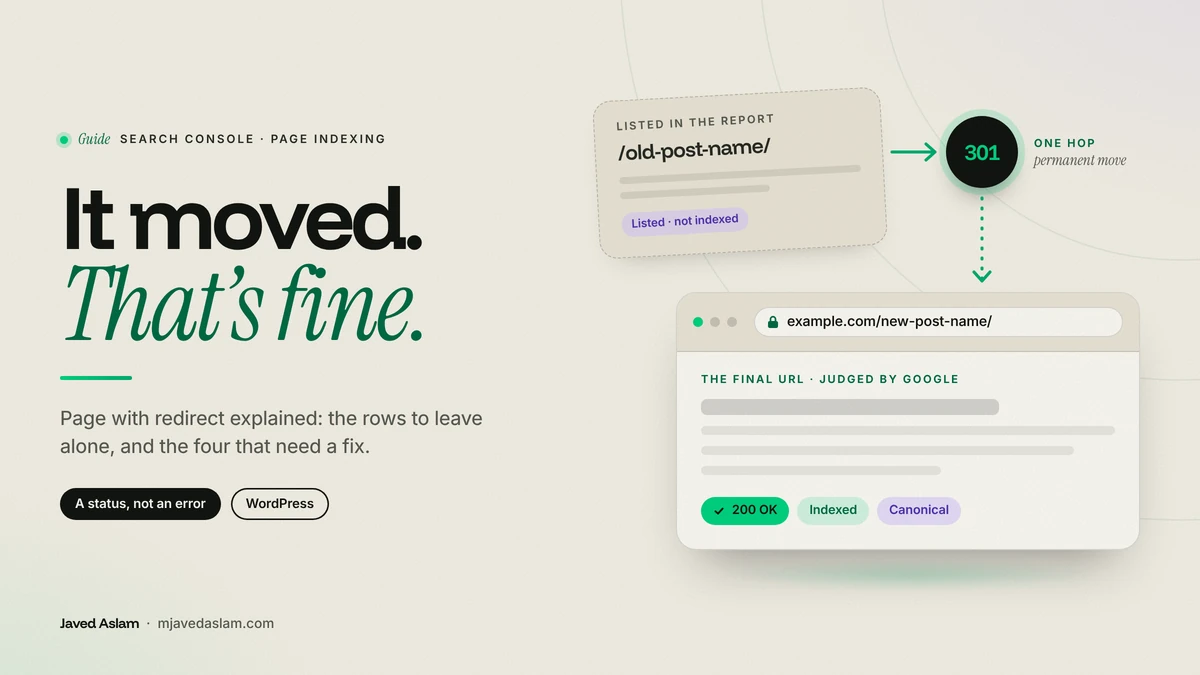
Here’s the short answer. Page with redirect in Google Search Console means the listed URL sends visitors and Googlebot to a different URL, so Google does not index the listed one. It is a status, not an error. If you set up the redirect on purpose, and the page it points to is live and indexed, there is nothing to fix. It only needs work when a page you want in Google is redirecting by mistake, or when your own sitemap and internal links keep sending Google to old addresses.
I’m Javed Aslam, a digital marketer. I clean up WordPress sites in Search Console, and “Page with redirect” is the row that worries owners most for the least reason. It looks like a pile of broken pages. Usually it is a list of redirects doing their job. Below I’ll show you how to read it, how to spot the four cases that do need a fix, and how to fix each one in WordPress.
What “page with redirect” actually means
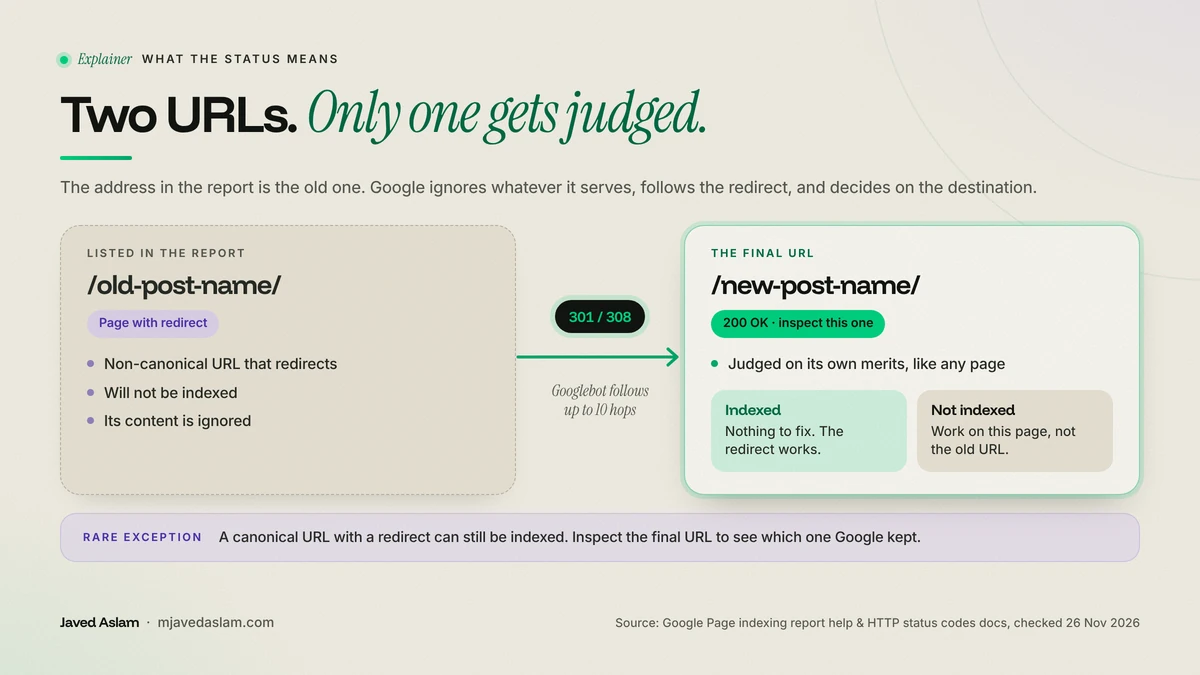
Google’s Page indexing report help describes it in three short points. The listed URL is a non-canonical URL that redirects to another page, so it will not be indexed. The target of the redirect might or might not be indexed, depending on what Google thinks about that target. And a canonical URL with a redirect can still be indexed, which is the rare exception.
So the report is really telling you about two URLs. The one on the list is the old address. The one that matters is where it ends up. Google treats the old address as finished and judges the destination on its own merits.
Google’s HTTP status code documentation adds the detail that explains why. When Googlebot meets a redirect, any content it receives from the redirecting URL is ignored, and the final target’s content is processed instead. A redirect does not have a page of its own to index.
Why WordPress sites collect these URLs
Almost every WordPress site has some “Page with redirect” rows, and most of them come from WordPress itself. These are the sources I find again and again:
- HTTP to HTTPS, and www to non-www. Once the site has an SSL certificate, every
http://address redirects tohttps://. The same happens with the www version you did not choose. - Trailing slashes. WordPress redirects a URL without the final slash to the version with it. On my own site,
https://mjavedaslam.com/blogreturns a 301 tohttps://mjavedaslam.com/blog/. - Changed slugs. When you edit the slug of a published post, WordPress remembers the old one. Its
wp_old_slug_redirect()function sends the old address to the new permalink with a 301. - Plain and short links. WordPress’s
redirect_canonical()function sends many alternate forms of a URL, such as?p=123links, to the proper pretty permalink. - Media attachment pages. If your SEO plugin redirects attachment pages to the image file, as Yoast SEO does when media pages are switched off, every old attachment URL becomes a redirect.
- Redirects you added yourself after deleting, merging or renaming posts, with a plugin or in your server settings.
Google keeps finding these old addresses through bookmarks, links from other sites and its own memory of your site. That is why the count rarely drops to zero, and it does not need to.
When you can safely ignore it
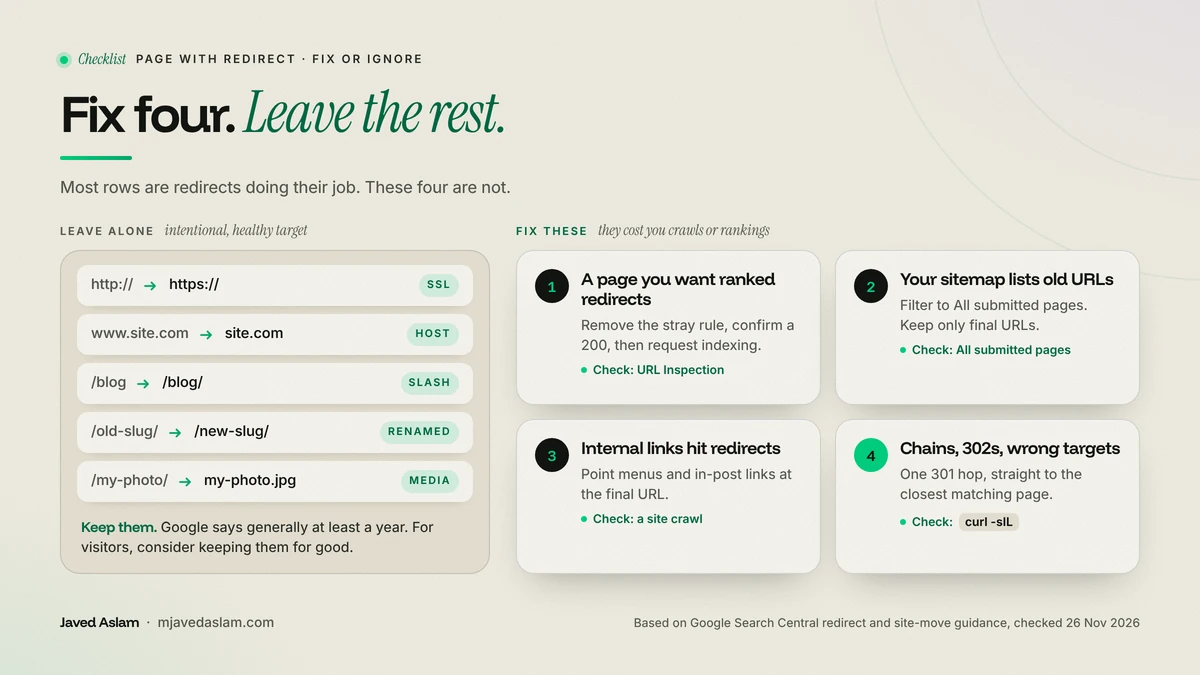
Click the Page with redirect row and look at the example URLs. Leave them alone when the redirect was intentional and the destination is healthy.
| Example on the list | Where it goes | What to do |
|---|---|---|
http://example.com/services/ | https://example.com/services/ | Nothing, if the HTTPS page is indexed |
https://www.example.com/about/ | https://example.com/about/ | Nothing, if you chose non-www on purpose |
https://example.com/blog | https://example.com/blog/ | Nothing. This is WordPress adding the slash |
/old-post-name/ | /new-post-name/ | Nothing, if the new slug is indexed |
/my-photo/ (attachment page) | /wp-content/uploads/…/my-photo.jpg | Nothing. The media page is meant to go |
Keep these redirects in place. Google’s guide to moving a site with URL changes says to keep redirects for as long as possible, generally at least one year, so Google can move signals to the new URLs. From the visitor’s side, it suggests keeping them indefinitely.
Four cases where it is a real problem
In these four situations, the redirect is either a mistake or a sign that you still point Google at retired addresses.
1. A page you want in Google is redirecting
Read the example URLs and ask: should this exact address rank? If a live service page, product or popular post appears here, something is redirecting it by mistake. Common causes are a redirect rule left over from an old site, a wildcard rule that catches more URLs than intended, or a redirect plugin that created a rule automatically when a post was moved or trashed and then restored. Remove or correct the rule, check that the URL now returns a 200, and then request indexing for it in the URL Inspection tool.
2. Your sitemap lists URLs that redirect
A sitemap should contain only the final URLs you want in search. At the top of the Page indexing report, change the filter from All known pages to All submitted pages. If “Page with redirect” still shows URLs, your sitemap is submitting addresses that bounce elsewhere.
With Yoast SEO, the sitemap is generated from your posts and pages, so this usually points to a custom sitemap, a second SEO plugin, or an old sitemap file still sitting in Search Console. My guide to Yoast SEO XML sitemap settings shows which sitemap you should submit and how to remove the stale ones.
3. Your internal links point at old URLs
Every internal link to a redirected address makes Googlebot request two URLs to reach one page. On a small site that is not a crisis, but it wastes crawls and blurs which URL you prefer. Update menus, buttons and in-content links to the final URL. The same crawl that finds broken links will find these, so the process in my post on how to fix broken links in WordPress works here too.
4. The redirect is long, temporary or pointing to the wrong place
Three patterns cause trouble. A chain: Googlebot can follow up to 10 hops, but Google advises redirecting straight to the final destination, ideally with no more than three hops if a chain can’t be avoided. A temporary redirect (302 or 307) used for a permanent move: Google’s redirects guide says a permanent redirect signals that the target should be canonical, and a temporary one does not. And a redirect to an unrelated page. When I remove a post, I send it to the closest match, or let it return a 404, instead of dumping every old URL on the homepage.
If the chain is broken or loops, Search Console usually moves the URL to a separate status called Redirect error, which does need fixing.
How I check a URL in five minutes
Before I change anything, I check a few example URLs:
- Look at the destination first. Open the listed URL in a private window. Is it the right page, and does it load?
- Count the hops. Run the command below, or use a browser extension that shows redirect paths. You want one hop with a
301or308, ending in a200. - Inspect the destination, not the old URL. Paste the final URL into URL Inspection and confirm it says it is on Google. If it is not, the destination is the page to work on.
- Check where Google found the old URL. Look at your sitemap, your menus and the posts that link to the old address.
curl -sIL https://example.com/old-page/ | grep -iE "^HTTP|^location"That command prints each response and its Location header. A clean result shows one 301 line, one location, and then 200.
One quirk catches many people out. Google says that when you inspect a redirecting URL, the indexed information applies to the URL you tested, ignoring the redirect. To see the indexed page it stands for, click Inspect in the indexing section of the result. The live test follows the redirect and tests the final URL without telling you, so it can look fine while the old URL is still listed.
How to fix it in WordPress
- Use one redirect tool. Yoast SEO Premium includes a Redirect Manager. The free Redirection plugin works too. Running two tools, or a plugin plus server rules, is how chains start.
- Point every old URL at the final URL. If A goes to B and B now goes to C, edit A so it goes straight to C.
- Choose 301 for permanent moves. Keep 302 for things that really are temporary, such as a short promotion.
- Clean the sitemap and resubmit it if the “All submitted pages” filter showed redirects.
- Update internal links, starting with your menus and your most visited posts.
A few things not to do. Don’t block redirected URLs in robots.txt to hide the row. Google advises against using robots.txt for canonicalization, and blocking the old URL stops Googlebot from seeing the redirect at all. My post on WordPress robots.txt settings in Yoast covers what that file should and should not do. Don’t use the URL removal tool either, because it hides every version of a URL from Search. And don’t delete redirects after a few weeks just because the report still lists them.
Should you click Validate fix?
Only if you fixed a real problem, such as a wanted page that was redirecting by mistake. Intentional redirects have nothing to validate. Expect the row itself to stay, because Google keeps rediscovering old addresses. Google’s help also notes that you can fix issues without validating, because the count updates whenever Google recrawls the affected pages. Validation typically takes up to about two weeks, and sometimes longer.
If you are also seeing URLs that Google found but never crawled, that is a different status with a different fix. I covered it in discovered currently not indexed: what it means and how to fix it.
FAQ
01Is page with redirect an error in Google Search Console?
No. It is an indexing status. It means the listed URL redirects to another URL, so Google indexes the destination instead. It only needs a fix if the listed URL is a page you want in search results.
02Does page with redirect hurt SEO?
Not by itself. Intentional 301 redirects are normal and help Google move signals to the new URL. It becomes a problem when your sitemap or internal links keep pointing to old URLs, when redirects chain, or when an important page redirects by mistake.
03How do I remove URLs from the page with redirect list?
You don’t need to. Google keeps finding old URLs through old links and bookmarks. Remove redirected URLs from your sitemap, update your internal links to the final URLs, and leave the redirects in place.
04Should I use a 301 or a 302 redirect?
Use a 301 or 308 when the move is permanent. Google treats a permanent redirect as a signal that the target should be the canonical URL. Use a 302 or 307 only when the move is genuinely temporary.
05What is the difference between page with redirect and redirect error?
Page with redirect means the redirect works and Google followed it. Redirect error means Google could not complete it, for example because of a loop, a chain that was too long, or a bad or empty URL in the chain. Redirect errors need fixing.
Next step
Open the Page indexing report, switch the filter to All submitted pages, and click Page with redirect. If the row is empty there, your sitemap is clean. Then check a handful of example URLs with the five-minute routine above. If every one lands on the right live page in one hop, close the report and spend your time on content instead.
If your report is full of redirects and you are not sure which ones matter, get in touch and I’ll take a look.

✳Written by
Javed Aslam
Digital marketer, copywriter and SEO specialist. I help small businesses get found, read and chosen. More about me.