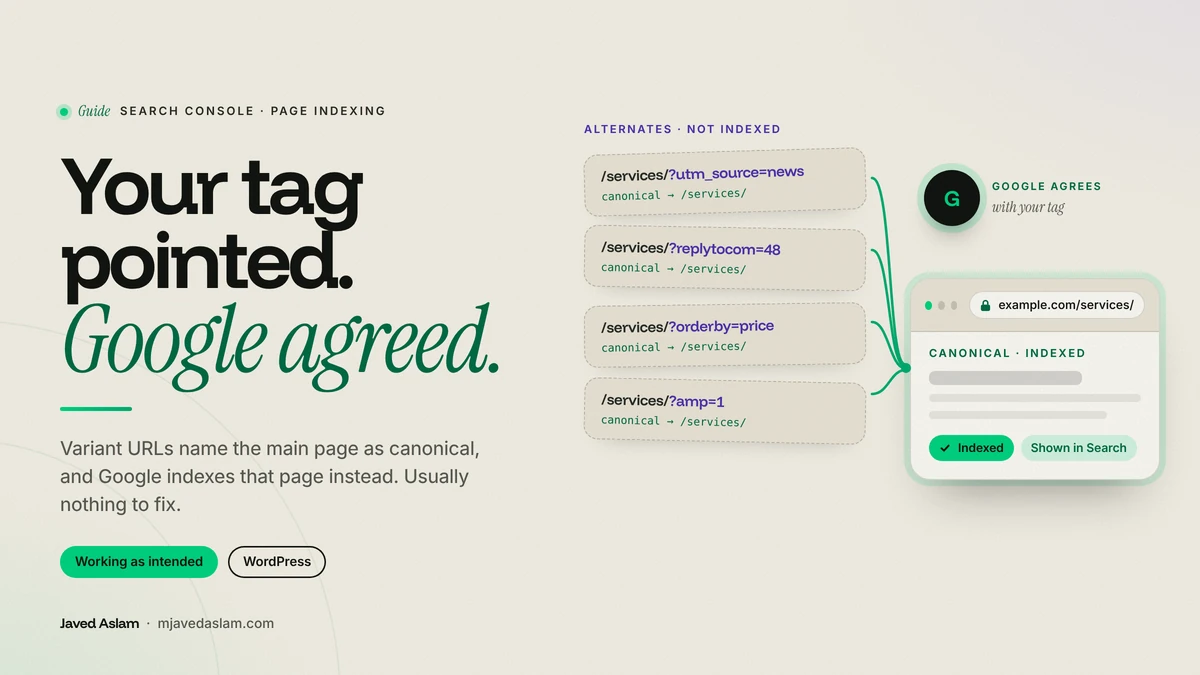
Here’s the short answer. Alternate page with proper canonical tag in Google Search Console means Google crawled a URL, found a rel="canonical" tag on it pointing to a different URL, agreed with that choice, and indexed the other URL instead. Your canonical tag did its job. Google’s own help page says there is nothing you need to do. The only time it needs attention is when a page you actually want in search results shows up in this list.
I’m Javed Aslam, a digital marketer, and I review the Page indexing report on WordPress sites most weeks. This row sits under “Why pages aren’t indexed”, which makes it look like a problem, and I regularly get messages from owners who have watched the count climb into the hundreds. In almost every case, the URLs are tracking links, comment reply links or sorted versions of a page. Below I’ll show you how to read the row, how to check it in about a minute, and the three patterns that are actually worth fixing.
What “alternate page with proper canonical tag” means
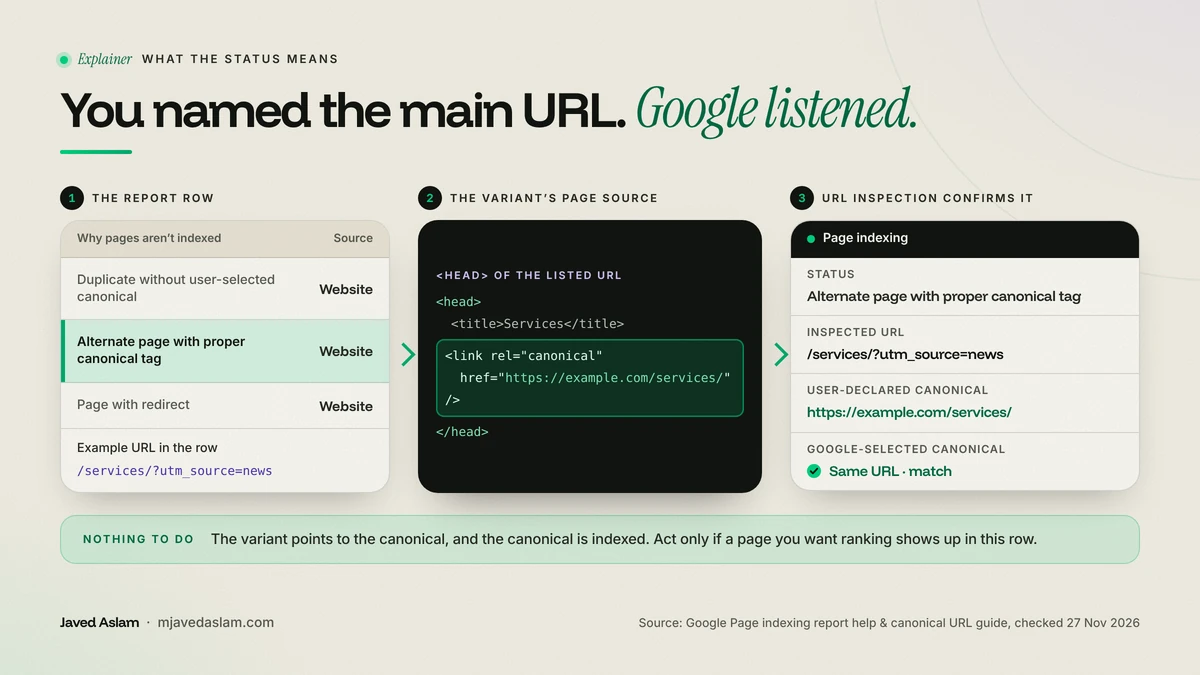
Google’s Page indexing report help describes the status like this: the page is marked as an alternate of another page, it correctly points to the canonical page, and that canonical page is indexed, “so there is nothing you need to do.” Google’s examples are an AMP page with a desktop canonical, or separate mobile and desktop versions of the same page.
In practice the row is much broader than AMP and mobile sites. The same help page says sites that use parameters to filter or sort a collection (for example sort=price) will see those URLs labeled “duplicate” or “alternate”. It also says that having a page marked duplicate or alternate is usually a good thing, because it means Google found the canonical page and indexed it.
Read the status name as three facts, all of them good:
- Alternate page: this URL is a version of another page, not a page in its own right.
- With proper canonical tag: the URL’s head contains a canonical link to the main version, and Google accepted it.
- Not indexed: Google indexed the main version instead. Searchers land on the clean URL, which is what you want.
One detail people miss: Google says alternate language pages are not detected by Search Console. So if you run translated pages with hreflang, they won’t show up here, and you shouldn’t expect them to.
How it differs from the other canonical statuses
There are three canonical-related rows in the report. The difference is what the URL told Google and whether Google agreed. I covered the first one in detail in my guide to duplicate without user-selected canonical.
| Status in Search Console | What the URL said | What Google did | Usually needs a fix? |
|---|---|---|---|
| Duplicate without user-selected canonical | Nothing. No canonical declared. | Picked a canonical itself | Only if Google picked the wrong URL |
| Duplicate, Google chose different canonical than user | Declared a canonical | Disagreed and indexed a different URL | Often worth checking |
| Alternate page with proper canonical tag | Pointed to another URL as canonical | Agreed and indexed that URL | Rarely. Only if a page you want ranking is listed |
So this row is the “instructions given and followed” case. That is the best result a non-canonical URL can get.
Why WordPress sites collect URLs in this row
WordPress and SEO plugins like Yoast SEO add a canonical tag to posts, pages and archives automatically. When someone visits the same page through a slightly different URL, the canonical still points to the clean address. Google crawls the variant, reads the tag and files it here. These are the sources I see most often:
- Tracking parameters. Links shared in newsletters, ads and social posts carry tags like
?utm_source=,?fbclid=or?gclid=. Every unique combination is a new URL to Google. - Comment reply links. WordPress builds its “Reply” links with a
?replytocom=parameter, one per comment, so a busy post can spawn dozens of variants. - Sorting and filter URLs. WooCommerce shop and category pages add parameters like
?orderby=price. Google’s help page names exactly this pattern. - AMP versions. If you run, or once ran, an AMP plugin, the
/amp/or?amp=1versions point back to the normal page. This is Google’s textbook example. - Pages you pointed elsewhere on purpose. If you set a custom canonical in Yoast because one page is a near-copy of another, the copy lands here once Google agrees.
Here’s a first-hand check from my own site, run on 27 November 2026. I loaded my post on discovered currently not indexed with ?utm_source=newsletter&utm_medium=email on the end, and again with ?amp=1. Both returned a 200, and both carried <link rel="canonical" href="https://mjavedaslam.com/discovered-currently-not-indexed/" />, printed by Yoast. If Google crawls either of those URLs, this row is exactly where they belong. A ?replytocom=12 version didn’t even load as its own page; it redirected straight to the post’s #comment-12 anchor, which is another clean way to keep these variants out of the index.
How to check the row in about a minute
You don’t need to go through every URL. Look for patterns, then confirm one URL per pattern.
- Open Indexing → Pages, scroll to “Why pages aren’t indexed”, and click Alternate page with proper canonical tag.
- Scan the example URLs and group them by shape:
?utm_,?replytocom=,?orderby=,/amp/,/page/2/, or plain URLs with no parameters at all. - For one URL in each group, click the Inspect icon and expand Page indexing.
- Compare User-declared canonical with Google-selected canonical. For this status they should be the same URL, and that URL should be the clean page you want ranking.
- Pay close attention to any group of plain, parameter-free URLs. Those are real pages, and they are the ones that can signal a problem.
Two limits from Google’s help pages are worth knowing. The example list is capped at 1,000 URLs and isn’t guaranteed to show every affected URL, so treat it as a sample. And the live test in URL Inspection doesn’t test duplicate or canonical conditions, so read the indexed result, not the live one.
Also, keep it in proportion. Google’s non-expert guide in the same help article says that if your site has fewer than 500 pages, you probably don’t need the Page indexing report at all; a few site: searches for your key pages tell you enough.
When it is a problem: three patterns to fix
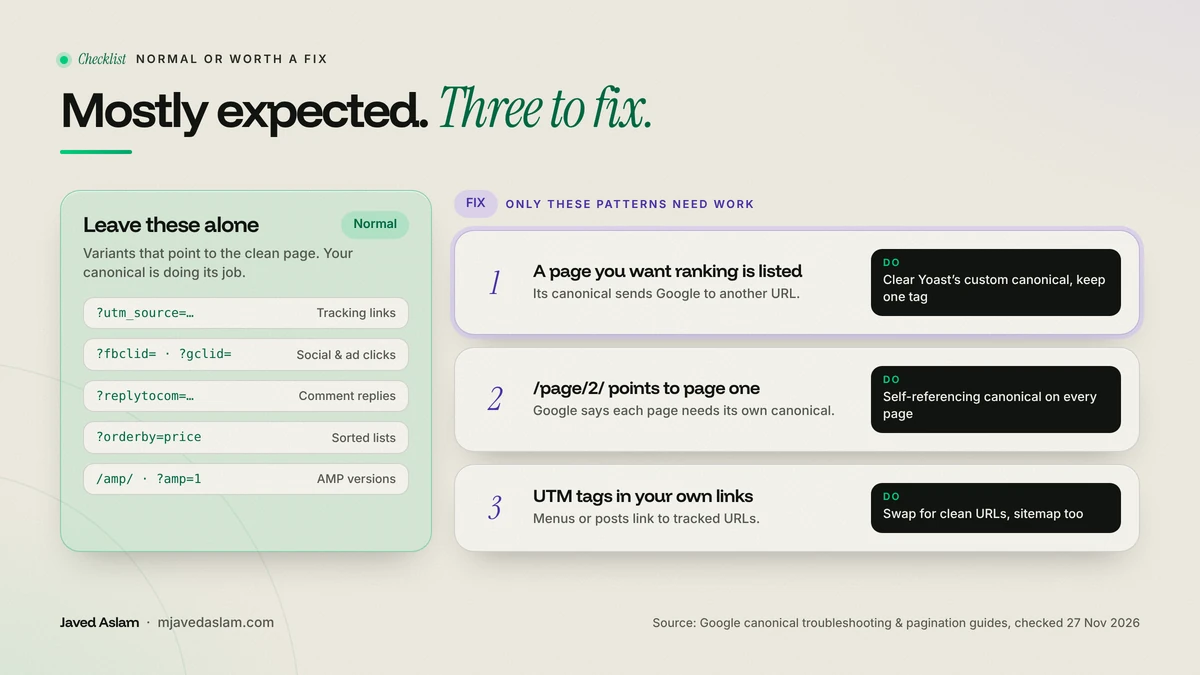
1. A page you want ranking is in the list
This is the one that matters. If a real post, service page or product appears here, its canonical tag is sending Google to a different URL, and Google agreed. Google’s canonical troubleshooting guide warns that some CMSs and plugins make incorrect use of canonical tags and point to undesired URLs, and suggests checking your HTML in the browser’s developer tools. Common WordPress causes I’ve found:
- A custom canonical left in the Yoast sidebar under Advanced → Canonical URL, often from a page that was copied or rewritten.
- A theme or second SEO plugin printing its own canonical, so the page carries two different ones.
- A canonical still pointing to a staging domain or an old URL after a migration.
- Translated pages canonicalized to the main language. Google’s guide says a canonical should point to a page in the same language, or the best substitute language if none exists.
The fix: open the page, clear the custom canonical field in Yoast (left empty, Yoast outputs a self-referencing canonical), update, then view the page source and confirm there is exactly one canonical link with the right absolute URL. Google’s guide to specifying a canonical URL recommends absolute URLs and picking one method, because mixing them is error-prone. Then request indexing for the page in URL Inspection.
2. Paginated pages point to page one
If /blog/page/2/, /page/3/ and so on are all in this row, some plugin or theme is canonicalizing them to the first page. Google’s pagination guidance says not to use the first page of a paginated sequence as the canonical, and to give each page its own canonical URL instead, so Google can reach the posts linked from deeper pages. On a default Yoast setup this is already right. I checked mine: /blog/page/2/ declares itself as canonical.
3. Tracking parameters in your own internal links
UTM tags belong on links from outside your site, never in your menus, buttons or post content. If the same ?utm_ URLs keep appearing in this row, search your site for internal links that carry them and replace them with the clean URL. Google’s canonical guide also says to link to the canonical URL when linking within your site, and to keep only canonical URLs in your sitemap. My guide to Yoast SEO XML sitemap settings shows what belongs in it. If you’re cleaning up links anyway, my post on how to fix broken links in WordPress covers how to find links across the site without overloading your server.
What not to do
When the count looks big, these are the quick fixes people reach for. Each one makes things worse:
- Don’t block parameter URLs in robots.txt to shrink the number. Google says robots.txt is not a canonicalization tool. A blocked URL can’t be crawled, so Google can no longer read the canonical tag that is doing the work.
- Don’t noindex the variants. Google recommends
rel="canonical"over noindex for choosing a canonical within one site, because noindex blocks the page from Search completely. - Don’t use the URL removal tool. Google says it hides all versions of a URL from Search, including the clean one you want.
- Don’t click Validate fix. There is nothing to validate. This row is a result, not an issue, and the count updates on its own each time Google recrawls the URLs.
For reference, this is what a correct canonical link looks like in the head of a parameter URL. Yoast writes it for you:
<link rel="canonical" href="https://example.com/services/" />Will a big count hurt my site?
Not on its own. These URLs aren’t indexed, so they don’t compete with your real pages, and the canonical consolidates signals to the main URL. A count that is much higher than your real page count can mean Google spends some crawl time on variants, but Google treats crawl budget as a concern mainly for very large or fast-changing sites. For a typical small business site, the useful move is the internal link cleanup above, not chasing the number to zero.
If your real pages are the ones sitting outside the index, look at the other rows instead. My guides to discovered currently not indexed and page with redirect in Search Console cover the statuses that more often hide genuine problems.
If a page you want indexed has no canonical pointing elsewhere and still isn’t in Google, check whether it sits under crawled currently not indexed instead.
FAQ
01Is alternate page with proper canonical tag an error?
No. Google’s Page indexing report help says the page correctly points to the canonical page, which is indexed, so there is nothing you need to do. It only needs attention if a page you want ranking appears in the list.
02Why are URLs with utm or fbclid parameters in this report?
Every tracking parameter creates a new URL. When Google crawls one, it finds a canonical tag pointing to the clean URL, accepts it, and lists the parameter version as an alternate. Keep tracking parameters out of your internal links so Google sees fewer of them.
03How do I fix alternate page with proper canonical tag in WordPress?
Usually you don’t. If a page you want indexed is listed, open it in WordPress, clear any custom canonical in the Yoast SEO sidebar under Advanced, make sure only one canonical tag is printed in the page source, and request indexing in URL Inspection.
04Should I block these URLs in robots.txt?
No. Google says robots.txt is not a canonicalization tool. If Google can’t crawl a variant, it can’t read the canonical tag that tells it which URL to index.
05Does a high number of alternate pages hurt rankings?
Not by itself, because these URLs are not indexed and their signals are consolidated to the canonical page. A count far above your real page count is a cue to remove tracking parameters from internal links, but small sites rarely need to do more.
Next step
Open the Page indexing report, click Alternate page with proper canonical tag, and sort the example URLs into groups. If every group is a parameter, comment reply or AMP version pointing to the right page, you’re done. If you spot a real page, or a run of paginated URLs, start with the matching fix above.
If you find a URL in the list and can’t tell why it’s there, get in touch and I’ll take a look.

✳Written by
Javed Aslam
Digital marketer, copywriter and SEO specialist. I help small businesses get found, read and chosen. More about me.