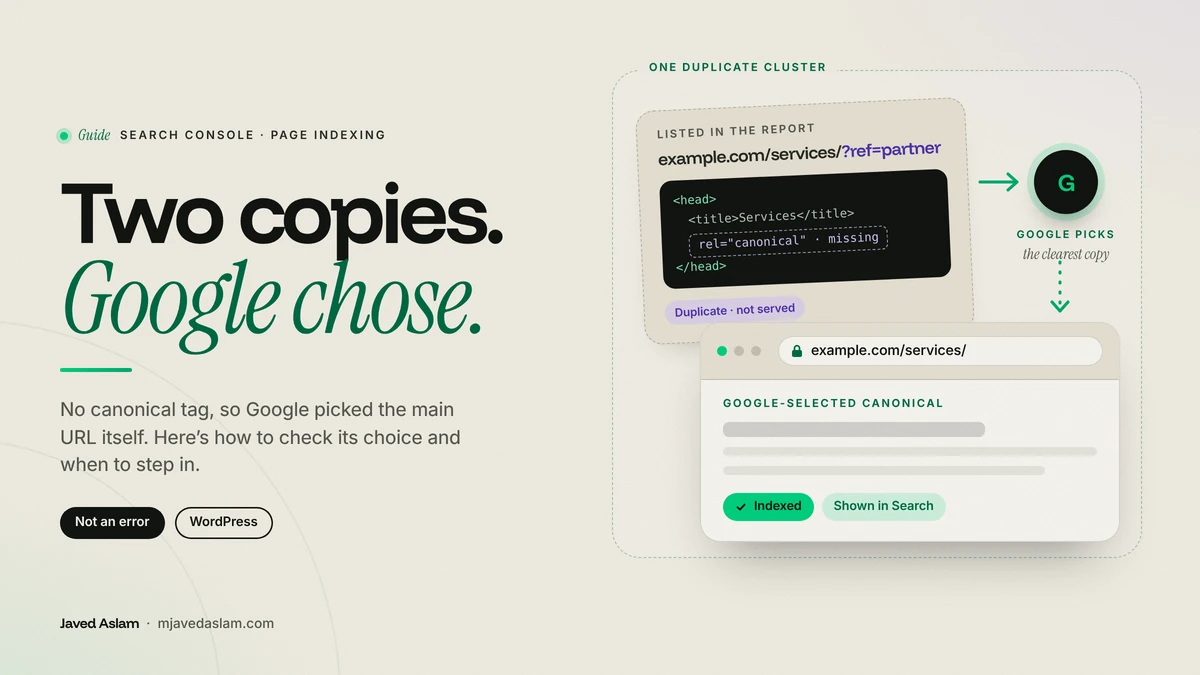
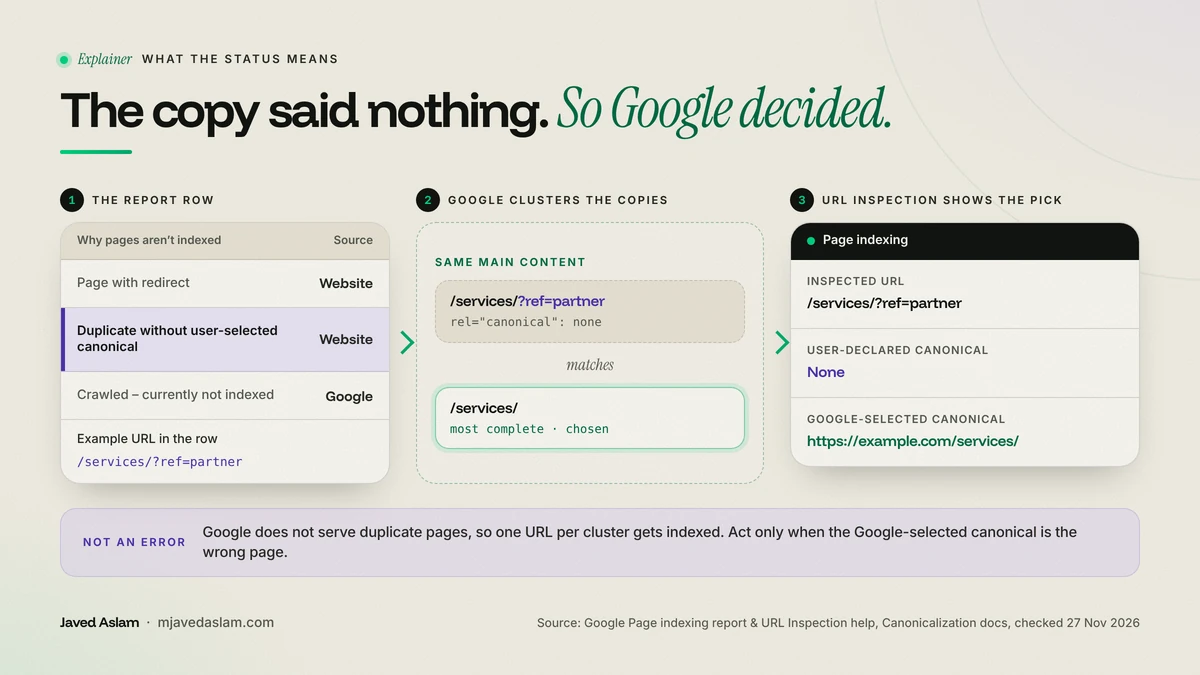
Here’s the short answer. Duplicate without user-selected canonical in Google Search Console means Google found a URL with the same content as another URL on your site, the listed URL did not say which version is the main one, so Google picked the other URL as the canonical and left this one out of search. It is not an error. Google says so itself: this status is working as intended. You only need to act when Google picked the wrong page, or when the listed URL is a page you actually want ranking.
I’m Javed Aslam, a digital marketer. I spend a lot of time in the Page indexing report on WordPress sites, and this row is the one owners most often read as “Google thinks I copied someone.” It doesn’t mean that. It is about duplicates inside your own site, usually created by WordPress, a plugin or a tracking link. Below I’ll show you how to read it, how to check Google’s choice in under a minute, and the three cases where a fix is worth your time.
What “duplicate without user-selected canonical” means
Google’s Page indexing report help defines it like this: the page is a duplicate of another page, although it doesn’t indicate a preferred canonical page. Google has chosen the other page as the canonical, so it will not serve this page in Search. Google adds that this is not an error, because it does not serve duplicate pages.
Break the name into its two halves and it explains itself:
- Duplicate: Google compared the content and grouped this URL with at least one other URL that shows the same thing.
- Without user-selected canonical: the listed URL gave Google no preference. There was no
rel="canonical"link pointing anywhere, so Google made the decision on its own.
Google’s canonicalization overview describes what happens next. Google clusters pages whose main content is the same or very similar, then marks the one it sees as the most complete and useful as canonical. The canonical gets crawled most often. The duplicates are crawled less, and a search result usually points to the canonical.
How it differs from the other duplicate statuses
The Page indexing report has three duplicate-style rows, and people mix them up. The difference is simply what your page told Google and whether Google agreed.
| Status in Search Console | What your page said | What Google did | Usually needs a fix? |
|---|---|---|---|
| Duplicate without user-selected canonical | Nothing. No canonical declared. | Picked a canonical itself | Only if Google picked the wrong URL |
| Duplicate, Google chose different canonical than user | “I am the canonical” (or pointed to another URL) | Disagreed and picked a different URL | Often worth checking |
| Alternate page with proper canonical tag | Pointed to the canonical correctly | Agreed and indexed the canonical | No |
So the row we’re dealing with is the “no instructions given” case. That is good news. It usually means the fix, when one is needed, is just giving Google the instruction it was missing.
Why WordPress sites get this status
WordPress itself adds a canonical tag only on single posts, pages and attachments. Its core rel_canonical() function simply stops on anything that is not a single item. Yoast SEO and similar plugins fill the gaps for archives, but they skip some URLs on purpose. These are the sources I see most often:
- URLs no SEO plugin can tag. RSS feeds such as
/feed/and/comments/feed/are XML, not HTML, so there is no<head>to put a canonical link in. The same goes for PDFs and other uploaded files that copy a page’s text. - Host variants that don’t redirect. If
http://andhttps://, orwwwand non-www, both load a page with a 200 instead of redirecting, Google sees two identical copies. Google’s own list of duplicate causes includes protocol variants. - Sorting, filter and tracking parameters on pages without a canonical. A shop filter like
?orderby=priceon an archive, or a?ref=link from a partner, creates a new URL with the same content. If that URL has no canonical, it lands here. - A staging or demo copy left open to crawlers. Google calls these accidental variants. If the copy carries no canonical, Google has to choose.
- Plugins or themes that remove the canonical. Some page builders and custom templates strip it. Yoast also does not print a canonical on any page set to noindex, which is normal, but worth knowing when you view the source.
Here’s a first-hand check from my own site. I loaded one of my posts with ?utm_source=newsletter and again with ?fbclid=abc on the end. Both returned 200, and both carried <link rel="canonical" href="https://mjavedaslam.com/page-with-redirect-search-console/" /> in the head, printed by Yoast. Because those URLs do declare a canonical, they should not end up in this row. That is the whole point: a URL lands in “Duplicate without user-selected canonical” only when its copy says nothing.
How to check Google’s choice in under a minute
Search Console shows you exactly what Google decided, one URL at a time.
- Open Indexing → Pages and click Duplicate without user-selected canonical in the “Why pages aren’t indexed” table.
- Hover over an example URL and click the Inspect icon.
- Expand Page indexing. Read two fields: User-declared canonical (it will usually say None) and Google-selected canonical.
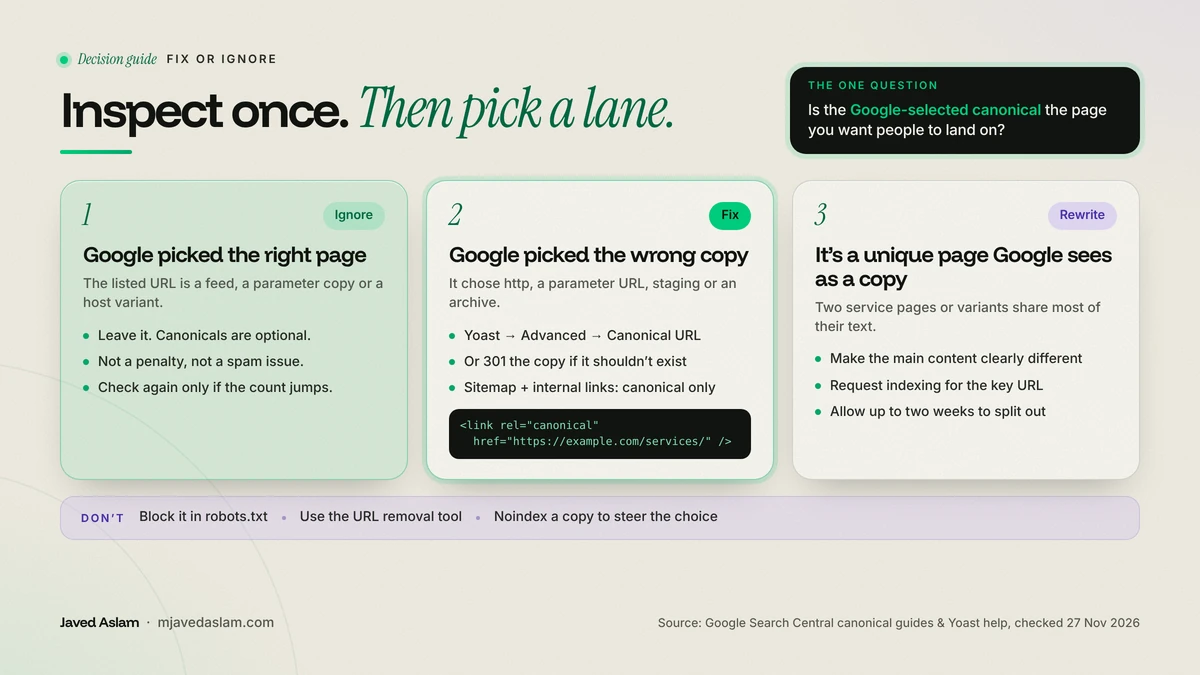
- Open both URLs side by side in your browser and ask one question: is the Google-selected canonical the page I want people to land on from Google?
- Repeat for five to ten examples. The pattern repeats fast, so you rarely need to check every row.
Two notes from Google’s help pages: The example list in the report is capped at 1,000 URLs and is not guaranteed to be complete, so treat it as a sample. And the canonical choice can only be seen in the indexed data. The live test in URL Inspection cannot predict which URL Google will pick.
Ignore it or fix it? The three cases
Every row you inspect falls into one of three cases. Only two of them need work.
1. Google picked the right page: ignore it
If the Google-selected canonical is the clean, live URL you care about, and the listed URL is a feed, a parameter version or a host variant, there is nothing to do. Google’s guide to specifying a canonical URL says plainly that none of the canonical methods are required, and that if you don’t specify one, Google will pick the version it sees as best. A count in this row is not a ranking penalty, and duplicate content inside your own site is not a spam policy violation.
2. Google picked the wrong copy: tell it which one you want
This is the case to fix. Typical examples: Google chose the http:// version, a version with a parameter, the staging copy, or a tag archive instead of the post itself. Give Google a clear, consistent signal:
- Add a canonical on the duplicate. In Yoast SEO, open the duplicate post or page, go to the Yoast sidebar → Advanced → Canonical URL, paste the full URL of the page you want (with https and the right www or non-www), and update.
- Redirect it if the duplicate has no reason to exist. A 301 is the strongest signal Google lists. Use it for old copies, the non-preferred host, or a staging site you forgot to lock.
- Make every other signal agree. Link internally to the canonical URL only, and keep only canonical URLs in your sitemap. My guide to Yoast SEO XML sitemap settings shows what belongs in it. Google warns against sending one URL in the sitemap and a different one in the canonical tag.
3. The page is unique, but Google thinks it’s a duplicate: make it different
Sometimes the listed URL is a real page you want ranking, such as a service page that shares most of its text with another service page, or two product variants with the same description. Google’s canonical troubleshooting page says the fix comes down to making the clustered pages sufficiently different. Rewrite the main content so each page answers its own question, then request indexing for the most important URL. Google notes it can hold pages in a duplicate cluster for up to two weeks after you change them, and pages split out faster when the difference is clear and significant.
What not to do
These are the quick fixes I see on forums. Google’s own guide advises against each of them:
- Don’t block the duplicate in robots.txt. Google says robots.txt is not a canonicalization tool. A blocked URL can still be indexed without its content, and Google can’t read it to compare the copies.
- Don’t use the URL removal tool. It hides all versions of the URL from Search, including the one you want.
- Don’t noindex one copy to steer the choice. Google recommends a
rel="canonical"link instead, because noindex blocks the page from Search completely. - Don’t use relative or fragment URLs as the canonical. Google recommends absolute URLs like
https://example.com/services/, not/services/, and does not support#sectionfragments as canonicals.
Here is what a correct canonical link looks like in the page head. Yoast writes it for you on normal posts and pages:
<link rel="canonical" href="https://example.com/services/" />After the fix: what to expect
Once the duplicates carry a canonical tag or a redirect, they leave this row. A redirected URL usually moves to the page with redirect status, which I explain in my guide to page with redirect. A URL that now points to its canonical generally stops being reported as “without user-selected canonical”, because it is no longer silent.
If you fixed every example, click Validate fix on the issue page. Google says validation typically takes up to about two weeks. You don’t have to validate, though. Search Console updates the count each time Google recrawls the URLs anyway.
And if the listed URLs are pages Google hasn’t crawled in a while, the bigger problem may be crawl attention, not duplication. My post on discovered currently not indexed covers how to get Google back to those pages.
FAQ
01Is duplicate without user-selected canonical bad for SEO?
Not by itself. Google says the status is working as intended, because it does not serve duplicate pages. It only matters when Google chose the wrong URL as canonical, or when a unique page you want ranking is being treated as a duplicate.
02How do I fix duplicate without user-selected canonical in WordPress?
Inspect the URL in Search Console and check the Google-selected canonical. If it is the wrong page, add a canonical URL to the duplicate in the Yoast SEO sidebar under Advanced, or 301 redirect the duplicate if it has no reason to exist. Then link internally and in your sitemap to the canonical URL only.
03Why does Google ignore my canonical tag?
A canonical tag is a strong hint, not a rule. Google can pick a different URL if other signals disagree, such as internal links, sitemap entries or redirects pointing elsewhere, or if the pages are not really duplicates. If your page declares a canonical and Google disagrees, it is reported as Duplicate, Google chose different canonical than user instead.
04Should I add a self-referencing canonical to every page?
Google recommends including a rel=”canonical” link on the canonical page itself. WordPress adds one to single posts and pages, and Yoast SEO adds it to most other indexable pages, so on a normal setup you don’t need to do anything extra.
05How long does it take for the status to update after a fix?
Google updates the report whenever it recrawls the URLs. If you click Validate fix, Google says validation typically takes up to about two weeks, and it can hold pages in a duplicate cluster for up to two weeks after you change their content.
Next step
Open the Page indexing report, click Duplicate without user-selected canonical, and inspect five example URLs. Write down the Google-selected canonical for each. If every one is the page you want, close the report and get back to writing. If even one is the wrong page, start with the case 2 fixes above.
If you’re not sure which case your URLs fall into, get in touch and I’ll take a look.

✳Written by
Javed Aslam
Digital marketer, copywriter and SEO specialist. I help small businesses get found, read and chosen. More about me.