Lead scoring gives each lead a number based on how well they fit your ideal customer and how strongly they’ve shown buying intent, so your team knows who to call first. For a small business, the best model is simple: a handful of fit signals, a handful of intent signals, points for each, and thresholds that trigger a clear action such as “call within the hour” or “add to the monthly newsletter”. You don’t need enterprise software or a data scientist. You need a short list of signals that genuinely predict a sale, and the discipline to review them.
This guide walks through building a points-based model step by step, with example scores (illustrative, not benchmarks), how to automate it in a CRM, and the mistakes that make scoring useless.
Why small businesses need lead scoring
Most small businesses don’t have a lead shortage so much as an attention shortage. The owner or a small team juggles calls, quotes and actual work. When twenty enquiries arrive in a week, they tend to get handled in the order they arrived, or by whoever shouts loudest. Meanwhile, the homeowner who asked for a full-system quote and checked your pricing page twice waits behind someone outside your service area who wanted a free tip.
Lead scoring fixes the order. It doesn’t replace judgement. It makes sure the most promising leads get the fastest, most personal follow-up, while lower-priority leads still get a useful automated nurture. Combined with fast response times, covered in my guide to speed to lead, it’s one of the simplest ways to win more jobs from the same lead volume.
Fit vs intent: the two halves of a score
Every good scoring model combines two kinds of signal:
- Fit: how closely the lead matches your ideal customer. For a home service business: in your service area, homeowner rather than renter, job type you do well, job size in your range. For a B2B service: industry, company size, role, budget.
- Intent: how ready they are to buy. Requested a quote, asked for a call, visited the pricing page, opened several emails, replied to a text, booked a consultation.
A lead with great fit but no intent needs nurturing. A lead with strong intent but poor fit, such as someone outside your area, may need a polite referral elsewhere. The leads you want to call right now have both.
Step 1: Look at your last 20 to 50 customers
Before assigning any points, look at who actually bought. Pull your last 20 to 50 won jobs and, if you can, a similar number of leads who didn’t buy. Ask:
- What did the customers have in common? Location, job type, property type, company size, referral source?
- What did they do before buying? Did they call? Fill in a quote form? Visit specific pages? Reply quickly?
- What did the non-buyers have in common? Outside the area? Only wanted price? Students or job seekers?
This is the most important step. A scoring model built on guesses scores the wrong things. A model built on your own customer data, even a small sample, is usually far more accurate.
Step 2: Choose five to eight signals
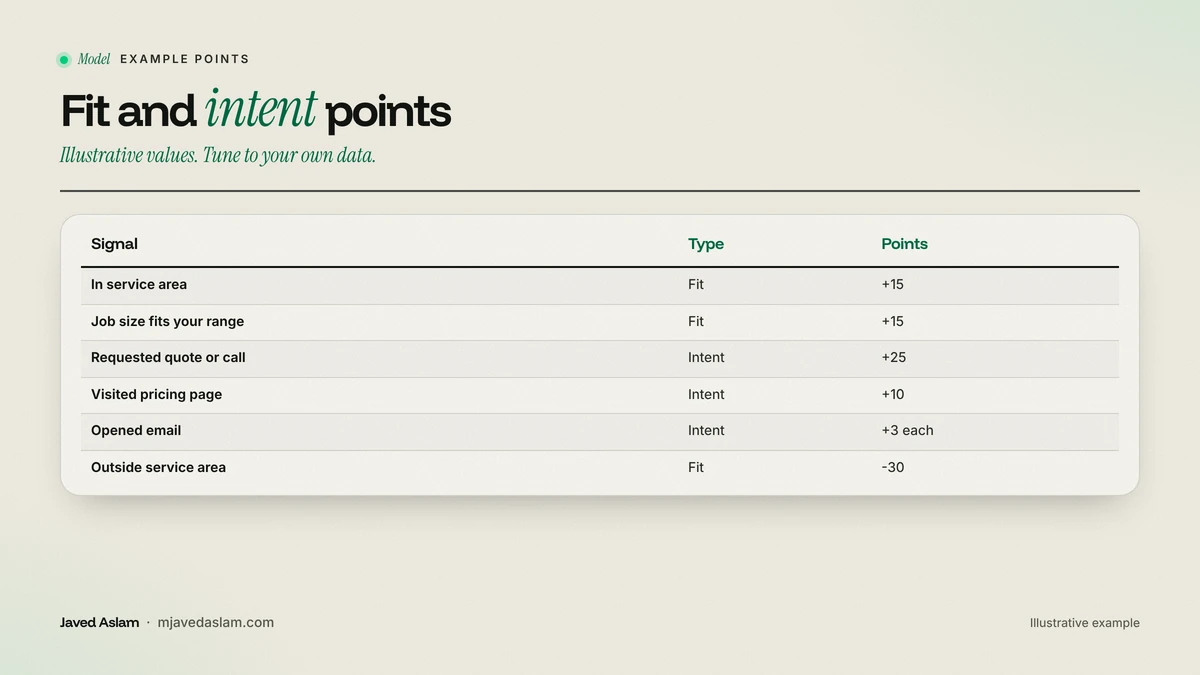
Keep it short. Too many signals make the model hard to understand and maintain. Pick the few that best separated buyers from non-buyers.
Example fit signals for a home service business (illustrative):
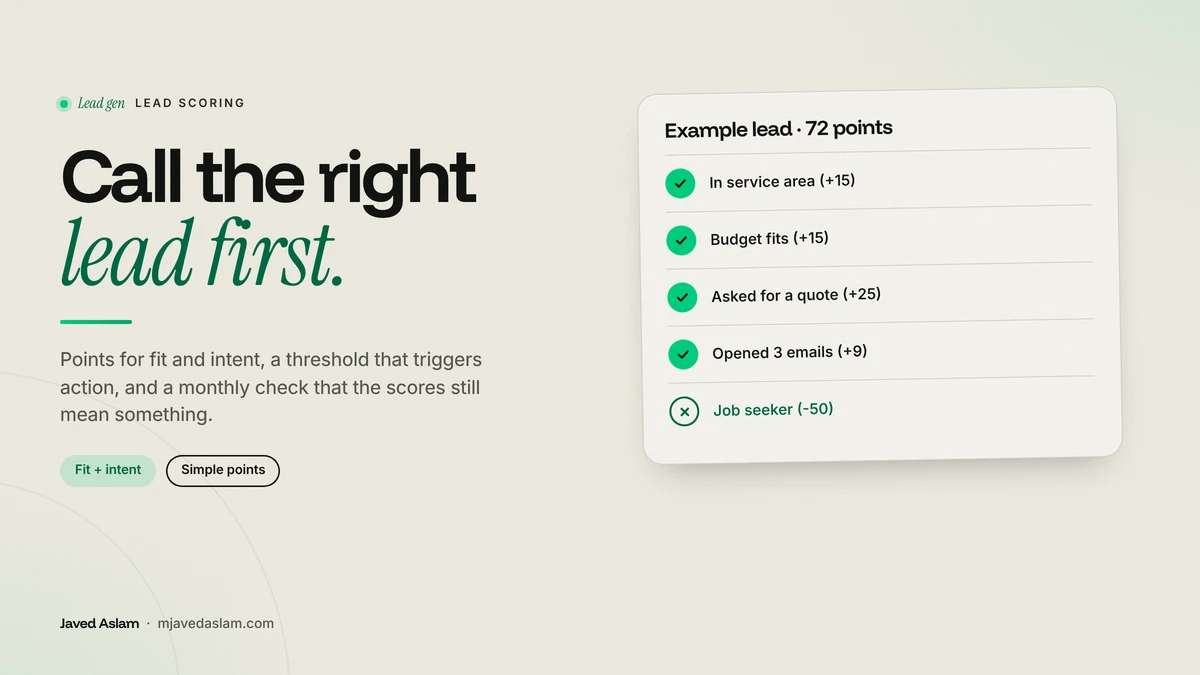
- In service area: +15
- Job type is a core service: +10
- Job size in your typical range: +15
- Outside service area: −30
Example intent signals:
- Requested a quote or a call: +25
- Booked an appointment: +30
- Visited the pricing or financing page: +10
- Replied to a text or email: +10
- Opened an email: +3 each (cap it, for example at +9)
Example negative signals:
- Job seeker or vendor pitch: −50
- Unsubscribed or asked not to be contacted: remove from sales follow-up entirely
- No activity for 90 days: −10 (score decay)
These numbers are made up to show the mechanics. Your values should reflect your data. A signal that appears in most of your won jobs and few of your lost ones deserves more points.
Step 3: Set thresholds that trigger action
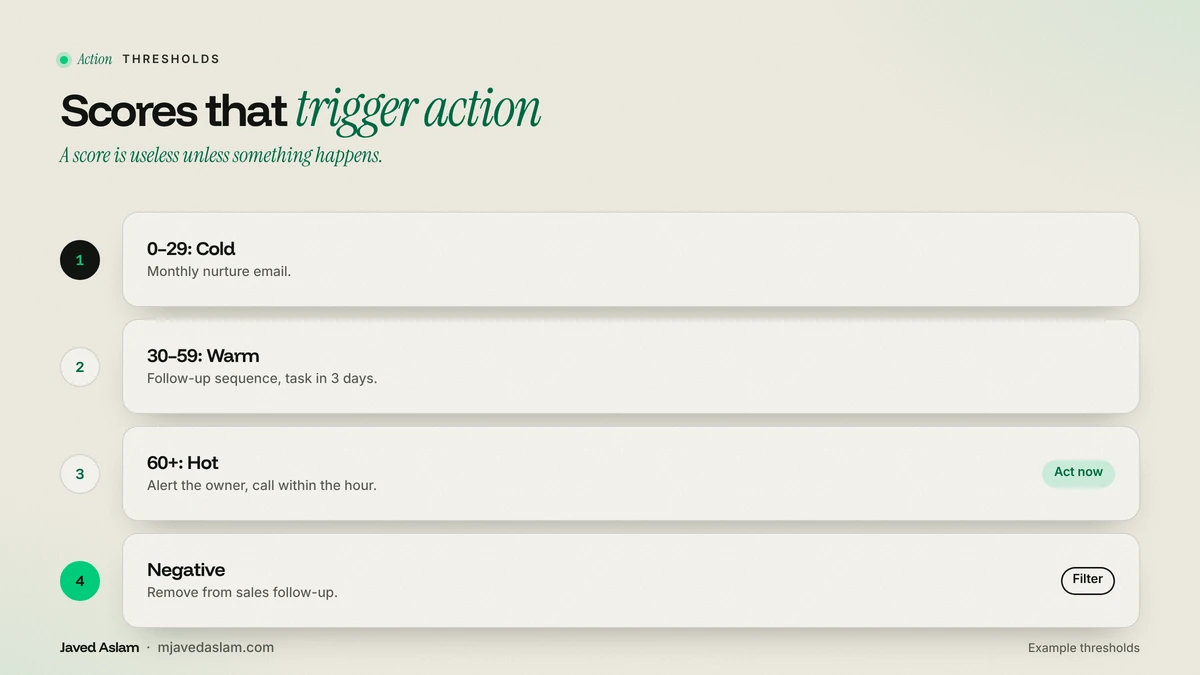
A score is only useful if something happens when it changes. Set three or four bands:
| Score | Label | Action |
|---|---|---|
| — | — | — |
| 60+ | Hot | Notify the owner or salesperson, call within the hour |
| 30–59 | Warm | Follow-up sequence, task to call within 3 days |
| 0–29 | Cold | Monthly nurture emails, no sales calls |
| Below 0 | Disqualified | Remove from sales follow-up, polite referral if relevant |
Again, these are example bands. Start somewhere sensible, then adjust after a month.
Step 4: Automate it in your CRM
Most CRMs can handle scoring in some form:
- HubSpot has a dedicated lead scoring tool on certain paid plans, with fit and engagement scores.
- GoHighLevel can track scores using a numeric custom field and workflows that add or subtract points when events happen, such as a form submission, a link click or a reply. My guide to GoHighLevel custom fields covers numeric fields, and trigger links let clicks add points.
- Other CRMs such as ActiveCampaign, Keap and Pipedrive offer scoring features or can be configured with fields and automation. Check your plan.
A typical automation setup:
- Create a numeric field called “Lead score”.
- Build workflows that adjust the score when events happen: +25 when a quote form is submitted, +10 when the pricing page link is clicked, and so on.
- Build a workflow that fires when the score crosses 60: tag “lead-hot”, notify the owner by text, create a call task due in one hour.
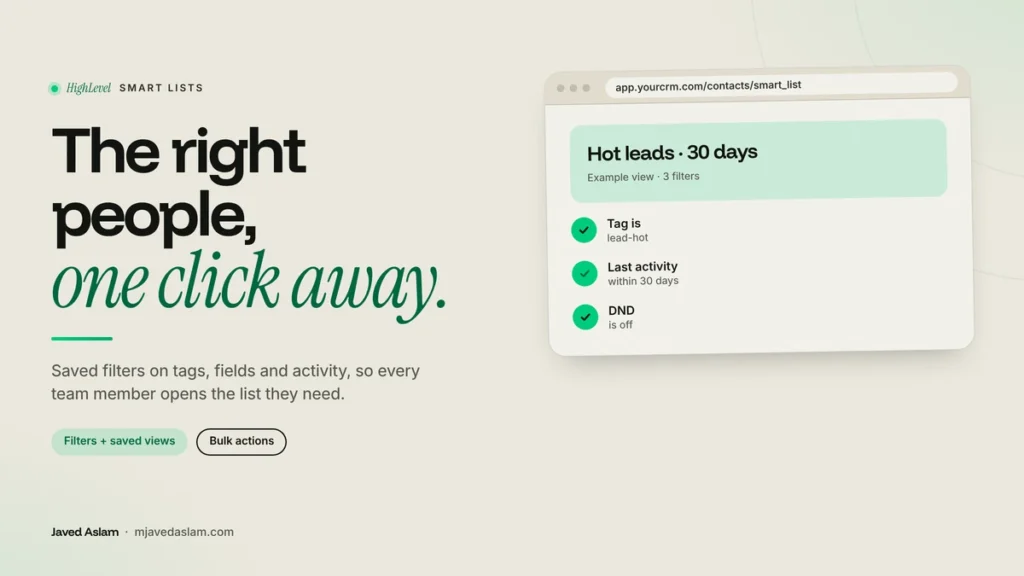
- Build a Smart List or saved view showing hot and warm leads, sorted by score, for the daily call list.
- Add a monthly decay: subtract points for inactivity so old interest doesn’t look current.
Step 5: Capture the fit data you need
Fit signals only work if you collect them. Add a few short questions to your forms: postcode or ZIP, service needed, property type or company size, and timeline. Don’t overload the form, because every extra field lowers completions. My guide to GoHighLevel forms and surveys covers conditional questions that keep forms short. For questions to ask on a first call, see my guide to lead qualification questions.
Step 6: Review monthly
Scoring models drift. A signal that predicted sales last year might not this year. Once a month:
- Look at leads that scored hot. What share became customers?
- Look at customers who scored cold or warm. What did the model miss?
- Adjust points for signals that over- or under-predict.
- Ask the person making calls whether hot leads feel genuinely hot.
If hot leads rarely convert, your intent signals are too generous. If many customers came from cold scores, you’re missing an important signal, often the referral source or a specific service type.
Simple alternative: a three-question score
If points feel like too much, start even simpler. When a lead arrives, answer three yes/no questions:
- Are they in our area and asking for something we do well? (fit)
- Have they asked for a quote, call or appointment? (intent)
- Is their timeline within the next 30 days? (urgency)
Three yeses: call now. Two: follow up today. One or none: nurture. This takes seconds, needs no software, and is far better than first-come, first-served.
Lead scoring for agencies and B2B services
For an agency or B2B service, fit signals usually include industry, company size, role of the contact (owner or decision maker), current tools and budget range. Intent signals include booking a discovery call, downloading a pricing guide, visiting case study pages and replying to outreach. The same principles apply: base it on your won clients, keep it short and attach an action to every threshold.
Common mistakes
- Scoring everything. Twenty signals with tiny point values create noise. Five to eight strong signals work better.
- Only scoring engagement. Email opens alone make newsletter fans look like buyers. Balance intent with fit.
- No decay. A lead who was active a year ago isn’t hot today.
- No action attached. If hot leads don’t trigger a fast call, scoring is just a number.
- Never reviewing. Models drift. Check monthly.
- Ignoring the salesperson’s view. If the person calling leads disagrees with the scores, investigate.
How scoring fits with nurture
Leads that score cold or warm aren’t lost. They need a useful, low-pressure nurture sequence: helpful emails, seasonal reminders and occasional offers. As they engage, their score rises and they move into the call list. This way, nobody falls through the cracks, and your team’s time goes where it counts. My guide to GoHighLevel automation shows how to build nurture sequences that respond to engagement.
A worked example (illustrative)
A made-up HVAC company receives a web enquiry from a homeowner inside its service area (+15) asking about a full system replacement, a core, high-value service (+10, +15 for job size). The homeowner also visited the financing page (+10). Score: 50, warm. The next morning, they reply to the automatic text asking for a quote visit (+10 reply, +25 quote request). Score: 85, hot. The owner gets a text alert and calls within the hour. Another enquiry the same day, from someone outside the area asking for advice on a window unit, scores −15 and gets a polite reply pointing them elsewhere.
Frequently asked questions
01What is lead scoring?
It’s a way of assigning points to leads based on how well they fit your ideal customer and how much buying intent they’ve shown, so your team can prioritise follow-up.
02How do I create a lead scoring model?
Look at your recent customers and non-buyers, pick five to eight signals that separate them, assign points, set thresholds that trigger actions, automate it in your CRM and review monthly.
03Do small businesses need lead scoring software?
Not necessarily. Many CRMs can track scores with a numeric field and automation, and a simple three-question check works without any software.
04What is the difference between fit and intent?
Fit describes how well the lead matches your ideal customer, such as location or company size. Intent describes how ready they are to buy, such as requesting a quote or booking a call.
05How often should I update my lead scoring model?
Review it monthly at first, then at least quarterly. Check whether hot leads convert and whether customers came from low scores.
06Can GoHighLevel do lead scoring?
Yes, using a numeric custom field and workflows that add or subtract points when contacts take actions, plus Smart Lists to show high scores.
Want lead scoring set up in your CRM?
I build scoring, follow-up and nurture automation in GoHighLevel for US service businesses and agencies. See my GoHighLevel services or email me.

✳Written by
Javed Aslam
Digital marketer, copywriter and SEO specialist. I help small businesses get found, read and chosen. More about me.