GoHighLevel for dentists is a way to make sure every new patient enquiry gets a fast reply, every recall reminder goes out on time, and happy patients are asked for a review while the visit is still fresh. It doesn’t replace your practice management software. It sits alongside it and handles the marketing and communication work that front desks rarely have time to do consistently.
This guide shows how a dental practice can use GoHighLevel: the new patient pipeline, reminders and recall, reactivating lapsed patients, reviews, and the HIPAA questions you need to settle before any patient data goes in. I build GoHighLevel systems for US service businesses, and the order below is the order I’d set things up.
What GoHighLevel does for a dental practice
Most dental practices already have practice management software for charts, scheduling and billing, such as Dentrix, Eaglesoft or Open Dental. GoHighLevel covers what those systems usually don’t do well:
- Lead capture: forms, chat, missed-call text back and calls from your Google listing land in one place.
- Fast follow-up: automatic texts and emails the moment someone enquires, plus tasks for the front desk to call.
- Marketing campaigns: recall, reactivation, whitening offers, Invisalign consultations and seasonal messages.
- Reviews: review requests after appointments and a dashboard of your Google reviews.
- Reporting: where new patients come from and which campaigns bring them in.
The practice management system stays the source of truth for clinical data and the official schedule. GoHighLevel handles the conversations around it.
Before anything else: settle HIPAA
Dental practices are covered entities under HIPAA, so any tool that stores or transmits protected health information (PHI) on your behalf needs a business associate agreement (BAA) and appropriate safeguards. This is the first conversation to have, not the last.
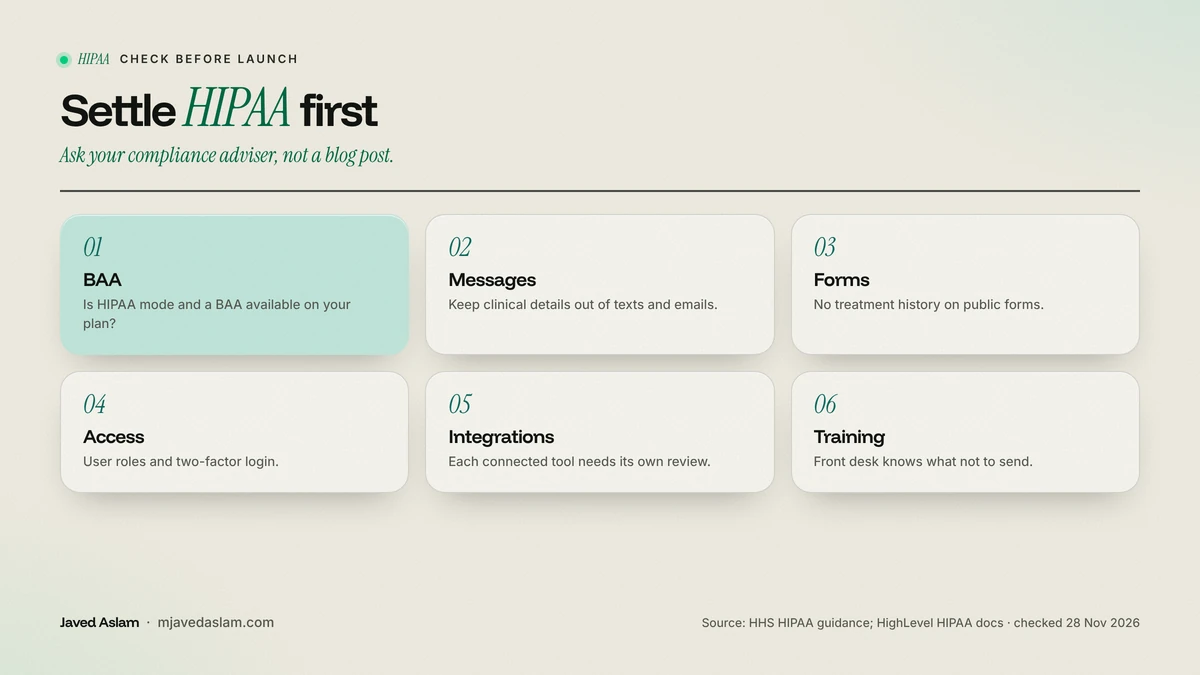
HighLevel offers a HIPAA compliance option for eligible accounts, which includes a BAA and additional controls. Check the current requirements, cost and what’s covered with HighLevel before launch, and confirm the setup with your compliance adviser. My guide to GoHighLevel and HIPAA covers the details and limits.
Even with a BAA in place, good practice is to keep clinical detail out of marketing messages:
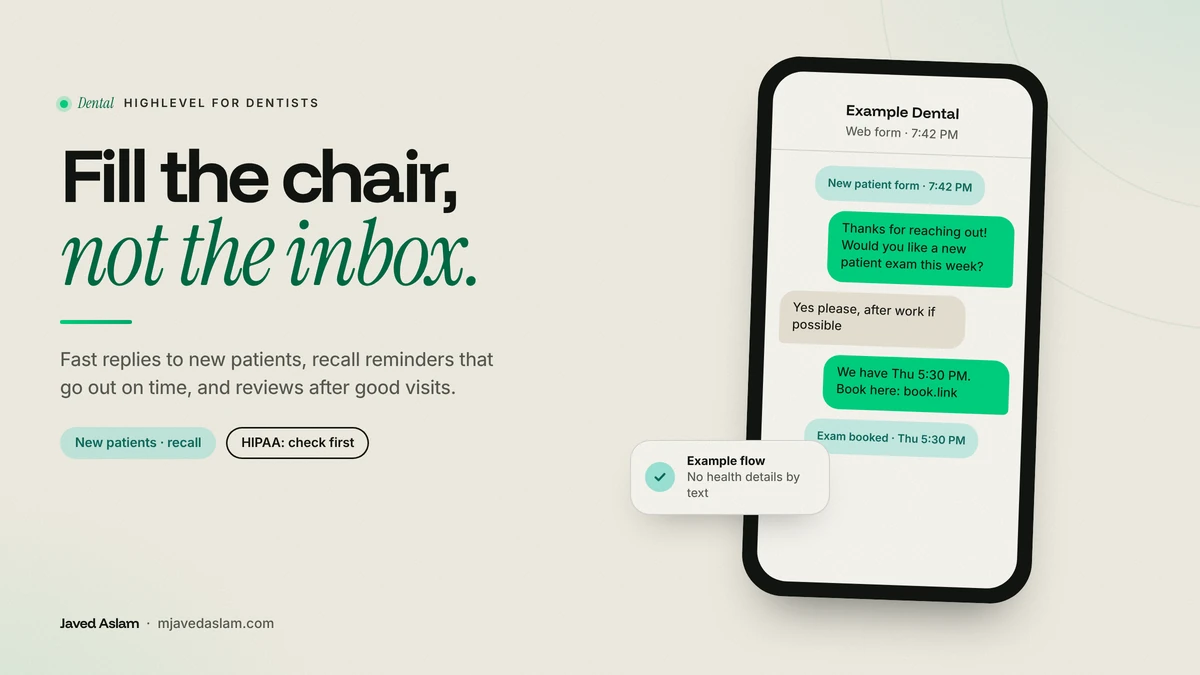
- Texts and emails should say “your appointment on Thursday at 3 PM”, not “your root canal follow-up”.
- Public web forms should collect contact details and a general reason for visiting, not medical history.
- Staff should only see what they need, using HighLevel’s user roles and permissions.
- Every integration that touches patient data needs its own review.
This isn’t legal advice. HHS publishes guidance for covered entities, and your compliance adviser should approve the final setup.
The new patient pipeline
A new patient is worth a lot to a practice over the years, yet many enquiries get one call back and then nothing. A pipeline makes sure each one is followed until they book or clearly decline.
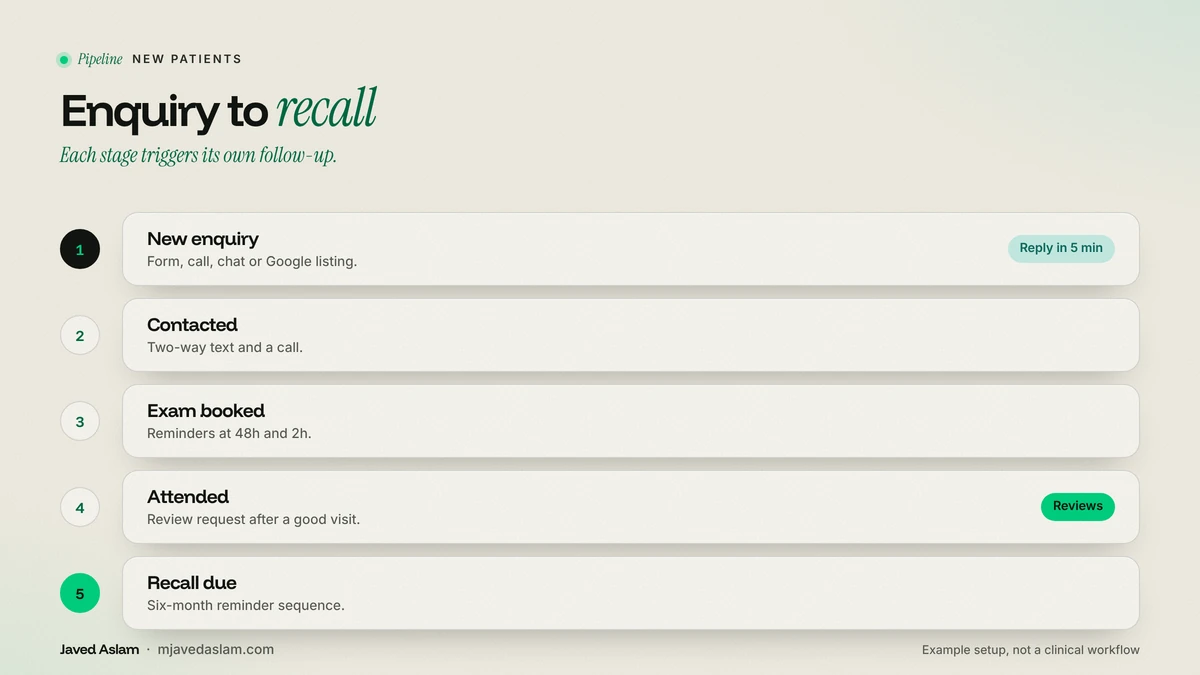
A simple pipeline for new patients:
- New enquiry: from a form, call, chat, Google Business Profile or ads. An automatic text goes out within a minute: “Thanks for contacting Example Dental. Would you like to book a new patient exam?”
- Contacted: the front desk has spoken with the person or exchanged texts.
- Exam booked: the appointment is in your practice management system. Reminders start.
- Attended: the patient came in. A review request and a thank-you message go out.
- Treatment accepted: optional, for practices that track treatment plan acceptance.
- Lost: with a reason, such as “went elsewhere”, “insurance not accepted” or “no response”.
The key automation is speed. A person searching for a dentist often contacts several practices. The one that replies first, by text, usually books the patient. My article on speed to lead explains the research behind this. If calls go unanswered at lunch or after hours, missed-call text back catches them.
Booking: HighLevel calendar or your practice software?
You have two options for online booking:
- Use your practice management system’s online booking (or a dental scheduling tool connected to it) and link to it from HighLevel messages. This keeps one schedule and avoids double booking.
- Use HighLevel’s calendar for consultation-type appointments, such as free Invisalign or implant consultations, where the slot doesn’t need to sync with the chair schedule in real time.
Most practices do a mix. Check what integrations exist for your specific practice management system before building anything, and avoid manual double entry wherever possible. My guide to GoHighLevel calendar booking covers calendar types and settings.
Reminders that reduce no-shows
No-shows cost chair time you can’t get back. A reminder sequence in HighLevel can include:
- A confirmation text when the appointment is booked.
- A reminder 48 hours before, asking the patient to reply C to confirm.
- A reminder two hours before with the address and parking note.
- A “sorry we missed you” text if they don’t arrive, with a rebooking link.
If your practice management system already sends reminders, don’t duplicate them. Patients who get two sets of reminders from two systems get confused and annoyed. Decide which system owns reminders and switch off the other.
Recall: the six-month reminder that pays for itself
Recall is where many practices lose revenue quietly. Patients mean to book their next cleaning, forget, and drift away. A recall sequence in HighLevel, triggered by a “recall due” date field, can send:
- A friendly text when the recall date arrives.
- An email a week later with a booking link.
- A task for the front desk to call if there’s still no booking after two weeks.
- A final message a month later, then the contact moves to a reactivation list.
To make this work, recall dates need to come from your practice management system, either through an integration or a regular export and import. Use a custom field for the recall date so workflows can use it.
Reactivating lapsed patients
Every practice has hundreds of patients who haven’t been in for 18 months or more. A reactivation campaign reminds them you exist. Keep it simple and friendly: “Hi Sarah, it’s been a while since your last visit to Example Dental. Would you like us to find you a time for a check-up?” Send by text only to patients who agreed to receive texts, and by email otherwise.
My guide to database reactivation campaigns covers list cleaning, consent and message timing in detail.
Reviews after good visits
Google reviews strongly influence which practice a new patient picks. HighLevel can send a review request automatically after an attended appointment. Two tips:
- Send it the same day, ideally within a few hours, when the experience is fresh.
- Ask every patient. Google’s policies don’t allow review gating, which means only asking people you expect to leave a good review. Read Google’s review incentives policy before setting this up.
Replying to reviews needs care in healthcare. Never confirm that someone is a patient or mention treatment details in a public reply, even if they did in their review.
Campaigns dental practices commonly run
| Campaign | Who it targets | Channel |
|---|---|---|
| — | — | — |
| New patient welcome | Booked first exam | Email + text |
| Recall | Patients due for hygiene | Text, then email, then call task |
| Reactivation | No visit in 18+ months | Text if consented, else email |
| Treatment follow-up | Unscheduled treatment plans | Call task + email (no clinical detail) |
| Cosmetic offers | Whitening, Invisalign interest | |
| Year-end benefits reminder | Patients with dental insurance | Email in Q4 |
The year-end benefits reminder is a common one in the US, because many dental plans reset in January. Keep the wording general: remind patients to check their remaining benefits, rather than stating what any individual has left.
Reporting: know where new patients come from
Tag every lead with its source: Google Business Profile, website, Google Ads, Facebook, referral, insurance directory. HighLevel’s dashboards can then show which sources bring booked exams, not just enquiries. If you run ads, track calls with dedicated numbers. My guide to GoHighLevel dashboards and reporting shows how to build a simple view the practice owner will actually look at.
What it costs
HighLevel’s plans start at $97/month (Starter), $297/month (Unlimited) and $497/month (Agency Pro), checked on 28 November 2026. Texts, calls and emails are billed by usage, and the HIPAA option has its own pricing and eligibility. A single practice usually starts on Starter or works with an agency that provides an account. See my GoHighLevel pricing guide for a full breakdown.
A 30-day rollout plan
- Week 1: HIPAA review and BAA, account setup, phone number and texting registration (A2P 10DLC).
- Week 2: forms, chat and missed-call text back; the new patient pipeline and instant reply.
- Week 3: reminders (if HighLevel owns them), review requests and staff training.
- Week 4: recall and reactivation campaigns, source tracking and a simple dashboard.
Train the front desk properly. The system only works if they move patients through the pipeline and reply to conversations in the HighLevel app.
Mistakes to avoid
- Skipping the HIPAA review. It’s the one step you can’t fix later.
- Duplicate reminders from two systems.
- Clinical detail in texts. Keep messages about times and logistics.
- No owner. Someone at the front desk must own the conversations inbox each day.
- Building too much at once. Start with speed to lead and reviews, then add recall.
Frequently asked questions
01Is GoHighLevel HIPAA compliant for dental practices?
HighLevel offers a HIPAA compliance option with a BAA for eligible accounts. Check the current requirements with HighLevel and confirm your setup with a compliance adviser before storing patient data.
02Can GoHighLevel replace dental practice management software?
No. Keep your practice management system for charts, scheduling and billing. Use GoHighLevel for enquiries, follow-up, campaigns and reviews.
03Does GoHighLevel integrate with Dentrix or Open Dental?
Options depend on your system and change over time. Some practices use third-party connectors, others use regular exports. Check what’s available for your exact software before you build workflows that depend on it.
04How can GoHighLevel help with dental recall?
Store the recall date in a custom field and trigger a sequence of texts, emails and call tasks when it arrives, stopping as soon as the patient books.
05Can I ask every patient for a Google review?
Yes, and you should ask everyone rather than only patients you expect to be happy. Never offer incentives for reviews, and keep public replies free of treatment details.
06How much does GoHighLevel cost for a dental office?
Plans start at $97 a month, plus usage for texts, calls and emails. The HIPAA option is priced separately.
Want a patient follow-up system set up properly?
I build GoHighLevel systems for US practices and service businesses, with HIPAA considerations handled from day one. See my GoHighLevel services or email me.

✳Written by
Javed Aslam
Digital marketer, copywriter and SEO specialist. I help small businesses get found, read and chosen. More about me.